pengenalan
Welcome to the user manual for your W&O X9 Pro Smartwatch. This guide provides essential information for setting up, operating, maintaining, and troubleshooting your device. The X9 Pro Smartwatch features a vibrant 2.02-inch Super AMOLED display, an aircraft-grade aluminum body, and comes with both silicone and fabric straps. It offers advanced health monitoring, comprehensive fitness tracking, Bluetooth calling, and convenient wireless charging.
Please read this manual thoroughly to ensure proper use and to fully utilize all the features of your new smartwatch.
Persediaan
1. Pengecasan Awal
Before first use, fully charge your smartwatch. The X9 Pro supports wireless charging.

Image: The X9 Pro Smartwatch being charged wirelessly on its charging pad. This illustrates the wireless charging capability.
Place the back of the smartwatch onto the wireless charging pad. Ensure the watch is correctly aligned for charging to begin. The screen will indicate charging status.
2. Pemasangan Apl
To unlock the full potential of your smartwatch, download and install the companion application. The recommended application is Wear Fit Pro, available on Google Play Store for Android devices and the App Store for iOS devices.
- Keperluan Sistem: Android 5.0+ atau iOS 10.0+
3. Berpasangan Peranti
After installing the app, follow these steps to pair your smartwatch with your smartphone:
- Pastikan Bluetooth didayakan pada telefon pintar anda.
- Open the Wear Fit Pro application.
- Navigasi ke bahagian 'Peranti' atau 'Tambah Peranti' dalam aplikasi.
- The app will search for available devices. Select 'X9 Pro' from the list.
- Sahkan permintaan berpasangan pada telefon pintar dan jam tangan pintar anda.
Mengendalikan Jam Pintar Anda
Navigasi Asas
- Skrin Sentuh: Leret ke kiri, kanan, atas atau bawah untuk menavigasi menu dan pemberitahuan. Ketik untuk memilih item.
- Butang Sisi: Typically used to return to the home screen, access the app menu, or power the device on/off.
- Butang Tindakan: Can be customized for quick access to specific functions or emergency features.
Ciri-ciri Komunikasi
The X9 Pro Smartwatch supports Bluetooth calls, allowing you to make and receive calls directly from your wrist when connected to your smartphone.
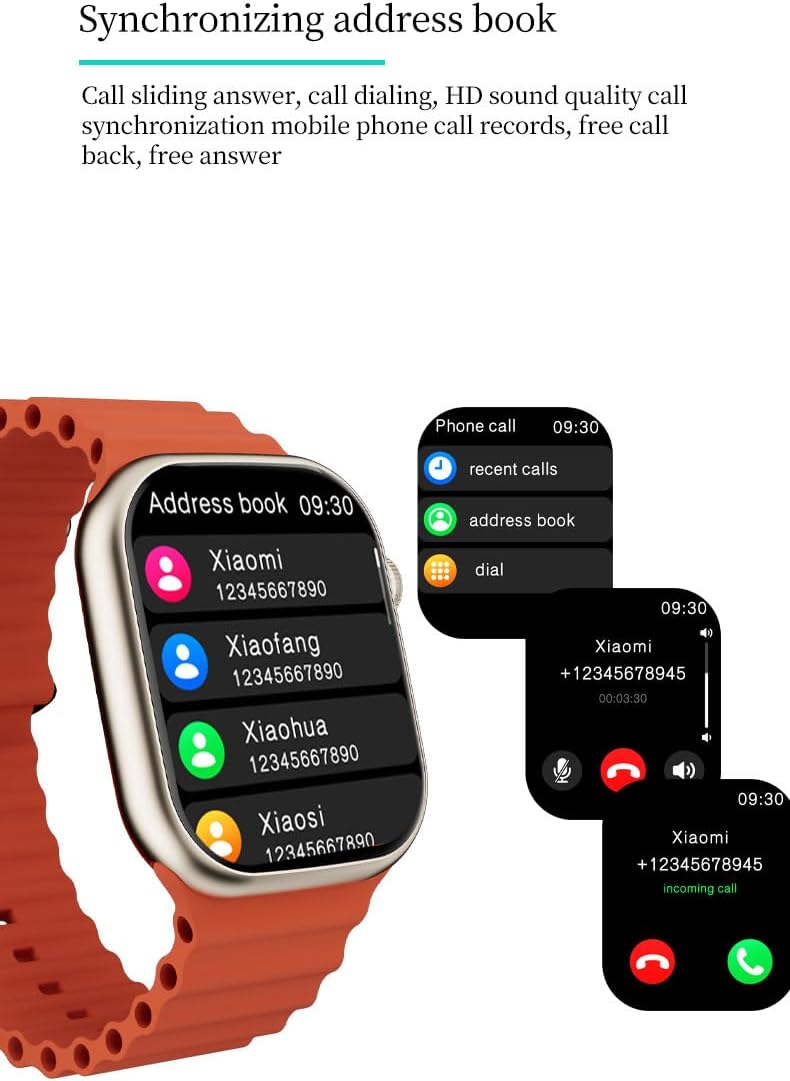
Image: The X9 Pro Smartwatch screen showing options for recent calls, address book, and dial pad, along with an incoming call notification. This demonstrates the Bluetooth call and address book synchronization features.
- Membuat Panggilan: Access the dial pad or synchronized address book from the watch.
- Menerima Panggilan: Answer or reject incoming calls directly from the watch screen.
- Pembantu Suara: Utilize the integrated voice assistant for hands-free control, playing music, checking weather, and more.

Image: The X9 Pro Smartwatch screen showing the weather forecast and the AI voice assistant interface, ready to receive commands. This highlights the AI intelligence and voice assistant functionality.
Penyesuaian
Personalize your smartwatch experience with various dial options.

Image: Several X9 Pro Smartwatches with different watch faces displayed, showcasing the dial switching and style customization options.
- Tukar Dail: Change your watch face through the settings menu on the watch or via the companion app.
Pemantauan Kesihatan
The X9 Pro Smartwatch is equipped with advanced sensors to monitor various health metrics.

Image: Three X9 Pro Smartwatches showing different health metrics: heart rate (bpm), blood pressure (mmHg), and blood oxygen saturation (%). This illustrates the health monitoring capabilities.
- Kadar Jantung: Penjejakan kadar denyutan jantung masa nyata.
- Oksigen Darah: Monitor blood oxygen saturation levels.
- Tekanan darah: Measure blood pressure (for reference only, not a medical device).
- ECG Test: Perform an electrocardiogram test (for reference only).
- Pemantauan Tidur: Track sleep patterns and quality.
- Analisis Tekanan: Analyze stress levels.
- Suhu badan: Measure body temperature.
- Female Cycle: Jejaki dan ramalkan kitaran haid.
Penjejakan Kecergasan
The smartwatch supports various sports modes and tracks your activity.
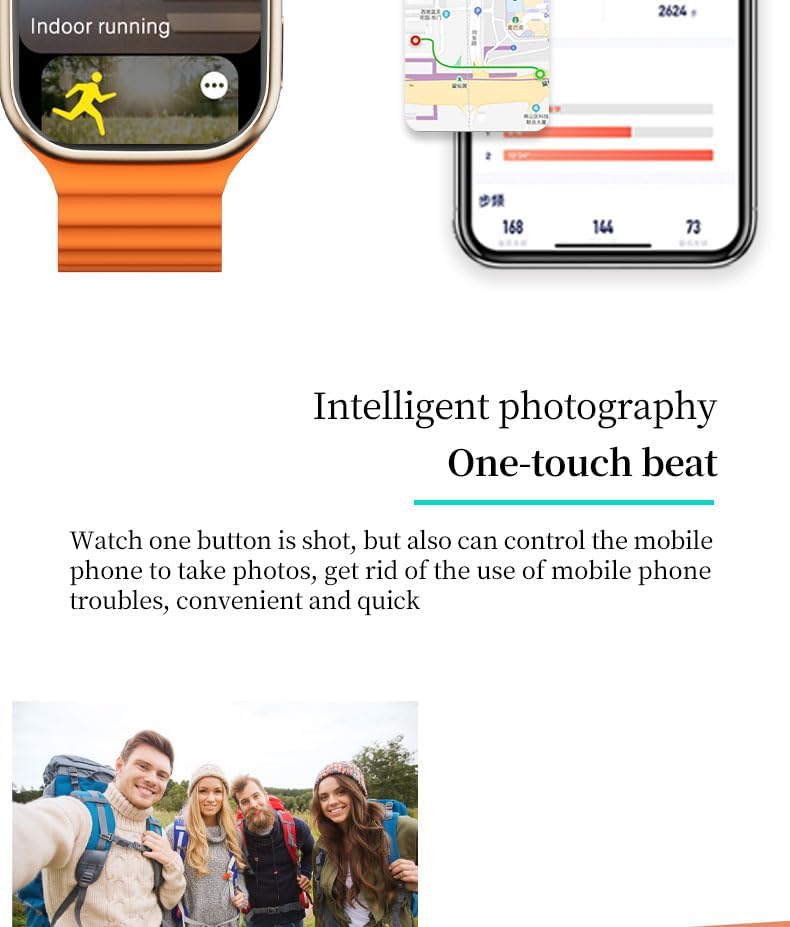
Image: The X9 Pro Smartwatch displaying 'Indoor running' mode, with a smartphone screen showing a GPS map and activity statistics. This highlights the fitness tracking and GPS capabilities.
- Mod pelbagai sukan: Select from various exercise modes for accurate tracking.
- Pedometer: Mengira langkah yang diambil sepanjang hari.
- Kalori: Anggaran kalori yang dibakar.
- Jarak: Tracks distance covered.
- Movement Patterns: Analyzes your activity trends.
- GPS terbina dalam: Provides accurate location and route tracking for outdoor activities.
Ciri-ciri Tambahan
- Main Balik Muzik: Control music on your connected smartphone.
- Kawalan Kamera Jauh: Gunakan jam tangan untuk mencetuskan kamera telefon anda dari jauh.
- Weather Reminders: Get weather updates directly on your watch.
- NFC: Near Field Communication technology for various functions (specific uses may vary by region and app).
- Ciri Kecemasan: Fall detection and crash detection can automatically alert emergency services. An alarm siren can be activated via the action button, audible up to 600 feet.
- Jam Penggera & Jam randik: Standard timekeeping functions.
- Latihan Pernafasan: Latihan pernafasan berpandu untuk relaksasi.
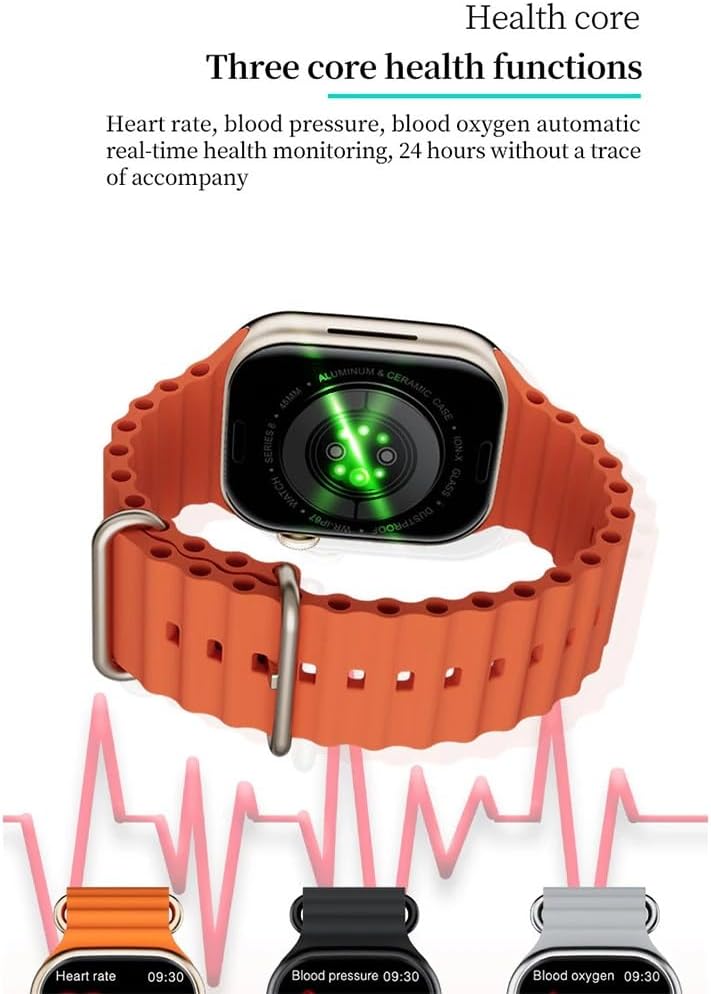
Image: A group of friends taking a photo, suggesting the use of the smartwatch for remote camera control. This illustrates the intelligent photography feature.
Penyelenggaraan
Membersihkan Jam Pintar Anda
To maintain the appearance and functionality of your X9 Pro Smartwatch:
- Lap skrin dan badan dengan kain lembut dan tidak berbulu.
- Untuk kotoran degil, sedikit dampen kain dengan air. Elakkan menggunakan bahan kimia yang keras atau bahan yang melelas.
- Bersihkan kenalan pengecas secara berkala untuk memastikan pengecasan yang cekap.
Tahan Air
The X9 Pro Smartwatch has an IP67 water and dust resistance rating. This means it is resistant to splashes and brief immersion in shallow water.
- Do NOT use the watch for swimming, diving, or high-speed water sports.
- Avoid exposing the watch to hot water, steam, or strong jets of water.
- If the watch gets wet, dry it thoroughly before charging or using any buttons.
Menyelesaikan masalah
If you encounter issues with your X9 Pro Smartwatch, try the following solutions:
Peranti Tidak Dihidupkan
- Ensure the watch is fully charged. Place it on the wireless charger for at least 30 minutes.
- Tekan dan tahan butang sisi selama beberapa saat untuk cuba menghidupkan kuasa.
Tidak Boleh Dipasangkan dengan Telefon Pintar
- Verify Bluetooth is enabled on your smartphone and the watch.
- Ensure the Wear Fit Pro app is updated to the latest version.
- Mulakan semula telefon pintar dan jam tangan pintar anda.
- Jika sebelum ini telah dipasangkan, cuba nyahpasangkan peranti daripada tetapan Bluetooth telefon anda dan kemudian pasangkan semula melalui aplikasi.
- Pastikan jam tangan berada dalam julat Bluetooth telefon anda.
Bacaan Kesihatan Tidak Tepat
- Pastikan jam tangan dipakai dengan kemas pada pergelangan tangan anda, tetapi tidak terlalu ketat.
- Bersihkan penderia di belakang jam tangan.
- Note that these readings are for reference and not intended for medical diagnosis.
Isu Pengecasan
- Ensure the wireless charging pad is connected to a working power source.
- Check that the watch is correctly positioned on the charging pad.
- Clean the charging area on both the watch and the pad.
Spesifikasi
| Ciri | Perincian |
|---|---|
| Nama Model | X9 Pro |
| Saiz Paparan | 2.02 inci |
| Jenis Paparan | Super AMOLED, HD TFT |
| Resolusi Paparan | 320 x 385 piksel |
| Kadar Segar Semula | 60 Hz |
| Chipset Utama | SF32LB551 |
| Versi Bluetooth | 5.2 |
| Sokongan NFC | ya |
| Kapasiti Bateri | 300 mAh |
| Penilaian Ketahanan Air | IP67 (Splash resistant, not for swimming/diving) |
| Keperluan Sistem | Android 5.0+ / iOS 10.0+ |
| Sistem Operasi | Tonton OS |
| GPS | GPS terbina dalam |
| Dimensi | 4.5 x 4 x 1.2 cm |
| Berat badan | 37 gram |
Waranti dan Sokongan
For warranty information and customer support, please refer to the documentation provided with your purchase or contact your retailer. Specific warranty terms and support channels may vary by region.


