
pengenalan
Thank you for choosing the Philco PAS26P Robotic Vacuum Cleaner. This device is designed to provide efficient and convenient cleaning for your home. Please read this manual thoroughly before operating the appliance to ensure safe and optimal performance. Keep this manual for future reference.
Arahan Keselamatan Penting
Apabila menggunakan perkakas elektrik, langkah berjaga-jaga asas hendaklah sentiasa dipatuhi, termasuk yang berikut:
- Baca semua arahan sebelum menggunakan perkakas.
- Do not operate the vacuum cleaner in wet conditions or on wet surfaces.
- Jangan biarkan kanak-kanak mengendalikan pembersih vakum. Awasi kanak-kanak dan haiwan peliharaan semasa perkakas sedang digunakan.
- Jangan mengutip objek, cecair atau bahan yang besar atau tajam yang boleh membakar/menghisap.
- Ensure the charging base is placed against a wall on a level surface, free from obstacles.
- Cabut plag perkakas dari salur keluar kuasa sebelum membersihkan atau melakukan penyelenggaraan.
- Use only the manufacturer's recommended attachments and accessories.
- Do not use the appliance if it is damaged or malfunctioning. Contact customer support.
- This appliance contains a lithium-ion battery. Dispose of batteries according to local regulations.
Kandungan Pakej
Pastikan semua komponen berada dalam keadaan baik dan lengkap:
- Philco PAS26P Robotic Vacuum Cleaner
- Pangkalan Pengecasan
- Penyesuai Kuasa
- Alat Kawalan Jauh
- Berus Sisi (2 pasang)
- Kain Mop
- Dustbin with HEPA Filter
- Water Tank (integrated with mop function)
- Manual Pengguna (dokumen ini)
Produk Selesaiview
Familiarize yourself with the main components of your robotic vacuum cleaner.
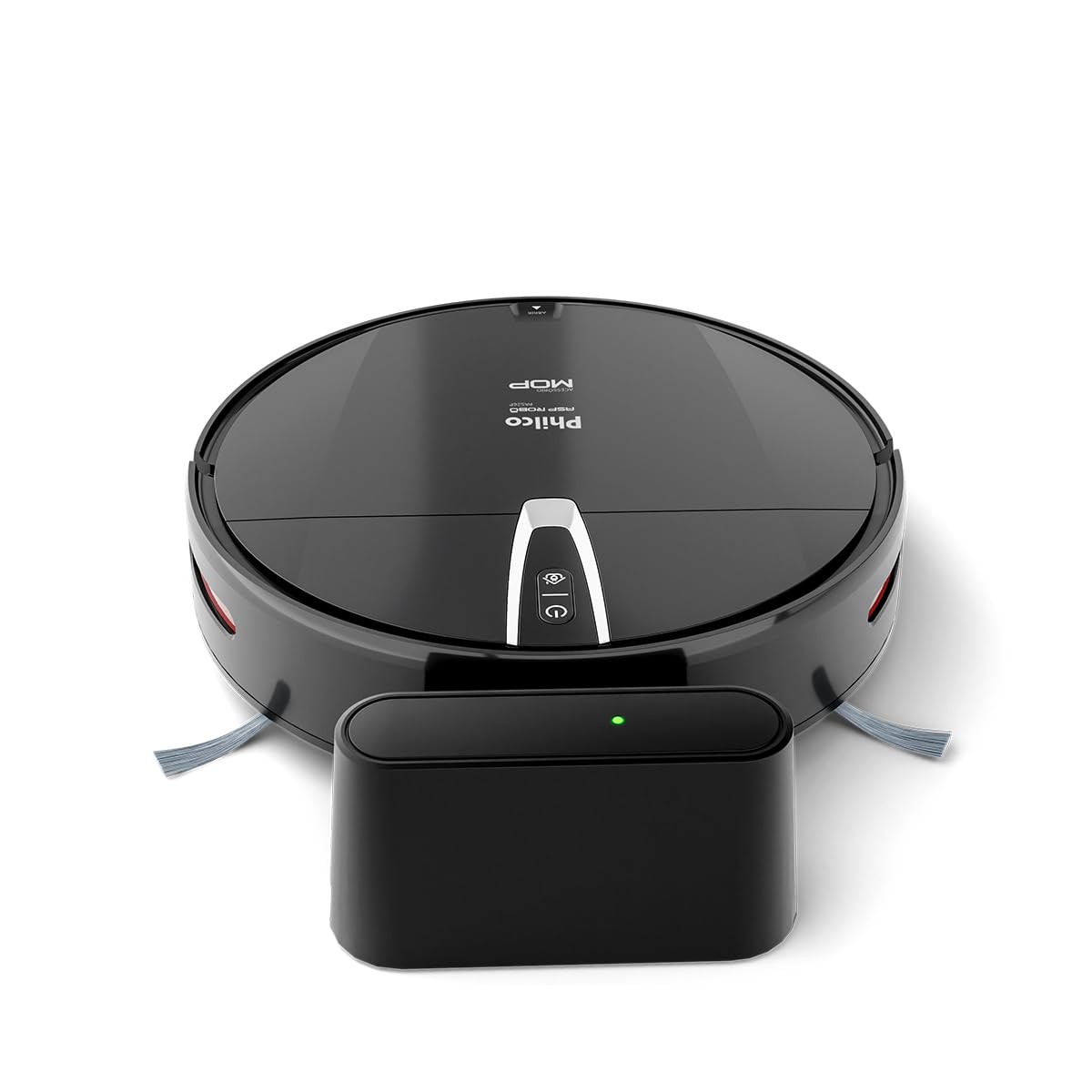
Rajah 1: Atas view of the Philco PAS26P Robotic Vacuum Cleaner with its charging base. The robot is black and round, featuring control buttons on its top surface and a side brush visible. The charging base is a compact black unit with an indicator light.

Rajah 2: The Philco PAS26P Robotic Vacuum Cleaner with its top cover lifted, revealing the dustbin compartment. The dustbin is easily accessible for emptying and filter maintenance.

Rajah 3: Bawah view of the Philco PAS26P Robotic Vacuum Cleaner, showing the two side brushes, main wheels, and the attached blue mop cloth for wet cleaning.
Persediaan
- Buka bungkusan Robot: Carefully remove the robotic vacuum cleaner and all accessories from the packaging.
- Pasang Berus Sisi: Attach the two side brushes to their respective posts on the bottom of the robot. Press firmly until they click into place.
- Place Charging Base: Position the charging base against a wall in an open area, ensuring there are no obstacles within 1 meter (3 feet) to the front and 0.5 meters (1.5 feet) to the sides. Plug the power adapter into the charging base and a wall outlet.
- Caj Permulaan: Place the robot onto the charging base. Ensure the charging contacts on the robot align with those on the base. The indicator light on the robot will show charging status. For first use, charge the robot for at least 4-6 hours until fully charged.
- Prepare for Mopping (Optional): If using the mop function, fill the water tank with clean water and attach the mop cloth. Insert the water tank assembly into the designated slot on the robot's underside.

Rajah 4: The Philco PAS26P Robotic Vacuum Cleaner docked on its charging base. The robot automatically returns to this base when its battery is low or after completing a cleaning cycle.
Arahan Operasi
Sebelum Pembersihan
- Clear the area of loose cables, small objects, and fragile items.
- For optimal mopping, ensure the water tank is filled and the mop cloth is attached.
- Open doors to rooms you wish to clean and close doors to areas you want the robot to avoid.
Memulakan Kitaran Pembersihan
You can start the robot using the power button on the robot or the remote control.
- Pada Robot: Press the power button once to start a cleaning cycle. The robot will begin cleaning in automatic mode.
- Menggunakan Alat Kawalan Jauh: Use the "Start/Pause" button on the remote control to begin or pause cleaning. The remote control also allows you to select different cleaning modes (e.g., Auto, Spot, Edge) and direct the robot manually.

Rajah 5: The Philco PAS26P Robotic Vacuum Cleaner actively cleaning a hard floor surface. Its compact design allows it to navigate under furniture and around obstacles.
Mod Pembersihan
- Mod Auto: The robot cleans automatically, adjusting its path based on obstacles and room layout.
- Pembersihan Tempat: The robot focuses on a specific area, cleaning in a spiral pattern. Useful for concentrated dirt.
- Pembersihan Tepi: Robot membersihkan sepanjang dinding dan tepi perabot.
Kembali ke Pangkalan Pengecasan
The robot will automatically return to its charging base when the battery is low or when a cleaning cycle is complete. You can also manually send it back using the "Home" button on the remote control.
Penyelenggaraan
Penyelenggaraan yang kerap memastikan prestasi optimum dan memanjangkan jangka hayat pembersih vakum robot anda.
Mengosongkan Tong Sampah
- Press the "Open" button on the top cover to access the dustbin.
- Remove the dustbin and empty its contents into a trash can.
- Clean the HEPA filter and primary filter with the provided cleaning brush or by tapping them gently to remove dust. Do not wash the HEPA filter with water.
- Reinsert the filters and dustbin into the robot.
Membersihkan Berus Sisi
- Periodically remove the side brushes by pulling them upwards.
- Remove any hair or debris tangled around the brushes.
- Reattach the brushes, ensuring they are securely in place.
Cleaning the Mop Cloth and Water Tank
- Remove the mop cloth from the water tank. Wash it by hand or machine and allow it to air dry completely before reattaching.
- Empty any remaining water from the water tank after each use to prevent mildew and odors.
Membersihkan Penderia dan Mengecas Kenalan
- Wipe the anti-fall sensors (located on the bottom of the robot) and obstacle sensors (on the front bumper) with a clean, dry cloth.
- Clean the charging contacts on both the robot and the charging base with a dry cloth to ensure a good connection.
Menyelesaikan masalah
Rujuk bahagian ini untuk isu biasa dan penyelesaiannya.
| Masalah | Kemungkinan Punca | Penyelesaian |
|---|---|---|
| Robot tidak dihidupkan. | Bateri lemah; Matikan kuasa. | Charge the robot; Ensure the main power switch (if present) is ON. |
| Robot tidak mengecas. | Charging contacts dirty; Power adapter not connected. | Clean charging contacts on robot and base; Ensure power adapter is securely plugged in. |
| Robot kerap tersangkut. | Obstacles (cables, rugs); Sensors dirty. | Clear obstacles from the cleaning path; Clean all sensors. |
| Prestasi pembersihan yang lemah. | Dustbin full; Filters clogged; Brushes tangled. | Empty dustbin; Clean/replace filters; Clean side brushes. |
| Mop function not effective. | Water tank empty; Mop cloth dry or dirty. | Refill water tank; Wet and clean mop cloth. |
| Robot does not return to base. | Tapak pengecasan tersumbat; Robot terlalu jauh dari tapak. | Ensure clear path to base; Manually place robot closer to base. |
Spesifikasi
| Nombor Model | PAS26P |
| Jenama | PHILCO |
| warna | Hitam |
| Dimensi Produk | 8 x 31.6 x 34.9 cm (Height x Diameter) |
| Berat Produk | 2.4 kg |
| Kapasiti tong sampah | 0.61 L |
| Kapasiti Tangki Air | 0.2 L |
| Ciri Khas | Anti-fall sensors, Automatic cleaning, Mop function, HEPA filter |
| Jenis Bateri | Litium-ion (1 termasuk) |
| Komponen yang Disertakan | Robotic Vacuum Cleaner, Charging Base, Remote Control |
| Syor Permukaan | Vinyl and similar hard floor surfaces |
Waranti dan Sokongan
For warranty information or technical support, please refer to the warranty card included in your product packaging or visit the official Philco webtapak. Simpan resit pembelian anda sebagai bukti pembelian.
Official Philco Store: Visit the Philco Store on Amazon