
1. Pengenalan
Terima kasih kerana membeliasing the BLOW 4625FHD DVB-T2 H.265 Digital Terrestrial TV Tuner. This device allows you to receive digital terrestrial television broadcasts (DVB-T2) with H.265 (HEVC) compression, offering high-definition video quality. This manual provides essential information for the safe and efficient setup, operation, and maintenance of your new tuner. Please read it thoroughly before use and retain it for future reference.
2. Maklumat Keselamatan
- Keselamatan Elektrik: Untuk mengelakkan renjatan elektrik, jangan buka penutupasing. Rujuk semua servis kepada kakitangan yang berkelayakan.
- Sumber Kuasa: Gunakan hanya penyesuai kuasa yang ditentukan. Pastikan voltage sepadan dengan keperluan peranti.
- Pengudaraan: Do not block ventilation openings. Ensure adequate airflow around the device to prevent overheating.
- Kelembapan: Keep the device away from water, rain, and excessive humidity.
- Pembersihan: Disconnect the power before cleaning. Use a soft, dry cloth. Do not use liquid cleaners or aerosols.
- penempatan: Letakkan peranti di atas permukaan yang stabil dan rata. Elakkan meletakkannya berhampiran sumber haba atau di bawah cahaya matahari langsung.
3. Kandungan Pakej
Selepas membuka bungkusan, sila sahkan bahawa semua komponen ada dan dalam keadaan baik:
- BLOW 4625FHD DVB-T2 Tuner Unit
- Alat Kawalan Jauh
- Power Adapter (integrated cable)
- Manual Pengguna (dokumen ini)

Image 3.1: Retail packaging of the BLOW 4625FHD DVB-T2 Tuner, showing the tuner unit and remote control.
4. Produk Lebihview
4.1. Panel hadapan
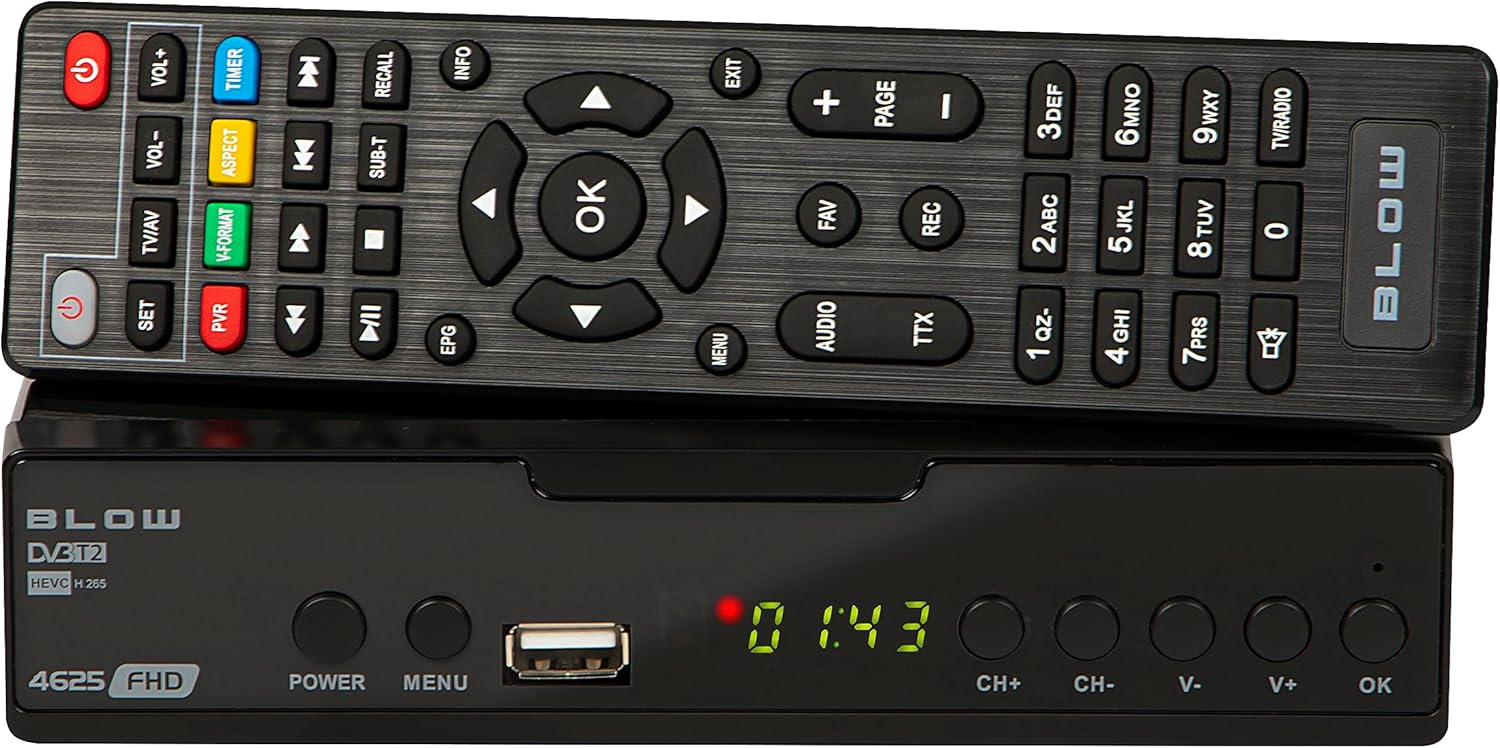
Imej 4.1: Depan view of the BLOW 4625FHD DVB-T2 Tuner with its remote control.
The front panel features a digital display, a USB port for media playback and PVR functions, and essential control buttons:
- paparan: Shows channel number, time, or menu information.
- KUASA: Turns the device on or off (standby).
- MENU: Mengakses menu utama.
- Port USB: Untuk menyambungkan peranti storan USB.
- CH+/CH-: Menukar saluran ke atas atau ke bawah.
- V+/V-: Melaraskan kelantangan ke atas atau ke bawah.
- OK: Mengesahkan pilihan dalam menu.
4.2. Panel belakang

Image 4.2: Rear panel of the BLOW 4625FHD DVB-T2 Tuner, showing various input and output ports.
The rear panel provides all necessary connection ports:
- RF DALAM: Menyambung ke antena terestrial anda.
- RF KELUAR: For looping the antenna signal to another device (e.g., another TV or tuner).
- COAXIAL: Output audio digital.
- HDMI: High-Definition Multimedia Interface output for connecting to modern TVs.
- SCART: Analog video and audio output for connecting to older TVs.
- AC DALAM: Input kuasa untuk peranti.
4.3. Alat Kawalan Jauh
The remote control provides full functionality for operating the tuner. Familiarize yourself with its buttons for easy navigation and control.
- KUASA: Menghidupkan/mematikan penala.
- VOL + / VOL-: Melaraskan kelantangan.
- CH+/CH-: Menukar saluran.
- OK: Mengesahkan pilihan.
- Butang Navigasi (Atas/Bawah/Kiri/Kanan): Menavigasi menu.
- MENU: Membuka menu utama.
- KELUAR: Keluar dari menu atau skrin semasa.
- EPG: Memaparkan Panduan Program Elektronik.
- PVR: Mengakses fungsi Perakam Video Peribadi.
- REKAM: Starts recording the current program.
- FAV: Mengakses senarai saluran kegemaran.
- TV/AV: Switches between TV and AV input modes on the tuner.
- V-FORMAT: Changes video output format.
- AUDIO: Selects audio track (if available).
- TTX: Fungsi Teleteks.
- Butang Nombor (0-9): Pemilihan saluran langsung.
5. Persediaan
5.1. Connecting the Tuner
- Sambungan Antena: Sambungkan kabel antena terestrial anda ke RF DALAM port on the rear panel of the tuner.
- Sambungan TV (HDMI): For best picture quality, connect an HDMI cable from the HDMI port on the tuner to an available HDMI input on your television.
- Sambungan TV (SCART): If your TV does not have an HDMI input, connect a SCART cable from the SCART port on the tuner to the SCART input on your television.
- Sambungan Kuasa: Sambungkan penyesuai kuasa ke AC DALAM port on the tuner, then plug the adapter into a wall outlet.
5.2. First Time Installation and Channel Scan
- Turn on your television and select the correct input source (HDMI or SCART) corresponding to where you connected the tuner.
- Tekan ke KUASA button on the tuner or remote control to turn on the device.
- The first time you power on the tuner, a "First Time Installation" wizard will appear. Follow the on-screen prompts.
- Select your preferred language, country, and other initial settings.
- Initiate the "Auto Scan" or "Channel Search" function. The tuner will automatically search for available DVB-T2 channels in your area. This process may take several minutes.
- Once the scan is complete, the tuner will save the channels and display the first available channel.
6. Beroperasi
6.1. TV Asas Viewing
- Menukar Saluran: Gunakan CH + / CH- buttons on the remote or front panel, or enter the channel number directly using the number buttons.
- Melaraskan Kelantangan: Gunakan VOL + / VOL- butang pada alat kawalan jauh.
- Redam: Tekan ke bisu button on the remote to mute/unmute audio.
- Information Bar: Tekan ke INFO button on the remote to display current program information.
6.2. Panduan Program Elektronik (EPG)
Tekan ke EPG button on the remote control to access the Electronic Program Guide. This displays program schedules for all available channels. Use the navigation buttons to browse through channels and programs. Press OK kepada view details or set a reminder/recording.
6.3. Main Semula Media (USB)
The BLOW 4625FHD supports media playback from a USB storage device. Insert a USB drive into the front USB port. Navigate to the "Multimedia" or "USB" section in the main menu to browse and play supported audio (MP3, WMA) and video files.
6.4. Personal Video Recorder (PVR)
To use the PVR function, connect a USB storage device (e.g., USB flash drive or external hard drive) to the USB port. The device must be formatted correctly (usually FAT32 or NTFS). You can record live TV programs by pressing the REC button on the remote. Scheduled recordings can be set via the EPG or the PVR menu.
- Rakaman Segera: Semasa menonton rancangan, tekan REC untuk memulakan rakaman. Tekan BERHENTI untuk menamatkan.
- Rakaman Berjadual: In the EPG, select a program and press OK, then choose the option to schedule a recording.
- Rakaman Main semula: Access recorded content through the PVR or Multimedia menu.
7. Penyelenggaraan
- Pembersihan: Ensure the device is unplugged before cleaning. Use a soft, dry, lint-free cloth to wipe the exterior. Do not use abrasive cleaners, waxes, or solvents.
- Pengudaraan: Regularly check that the ventilation slots are not obstructed by dust or debris.
- Kemas Kini Perisian: Periksa pengeluar secara berkala website for any available software updates. Follow the instructions provided with the update carefully.
8. Penyelesaian masalah
| Masalah | Kemungkinan Punca / Penyelesaian |
|---|---|
| Tiada gambar atau bunyi |
|
| Mesej "Tiada Isyarat" |
|
| Alat kawalan jauh tidak berfungsi |
|
| Picture freezes or pixelates |
|
9. Spesifikasi
| Model | BLOW 4625FHD (77-048) |
| Dimensi (L x W x H) | 9D x 9B x 2.5H cm |
| Berat badan | 428 Gram |
| Ketersambungan | HDMI, USB, SCART, Coaxial, RF IN/OUT |
| Resolusi Keluaran Video | 1080p |
| Piawaian yang Disokong | DVB-T2, H.265 (HEVC), H.264 |
| Julat Kekerapan | VHF: 170-230MHz, UHF: 470-860MHz |
| Format Audio | MP3, WMA |
| Mod Keluaran Audio | Stereo, Surround |
| Bekalan Kuasa | 12 Volt, 43 Milliampere (Operating) |
| Penggunaan Kuasa Siap Sedia | <0.5W |
| Penggunaan yang Disyorkan | Digital terrestrial TV viewing dan rakaman |
| Pengeluar | tiup |
10. Waranti
The BLOW 4625FHD DVB-T2 H.265 Digital Terrestrial TV Tuner comes with a Waranti pengilang 2 tahun from the date of purchase. This warranty covers defects in materials and workmanship under normal use. It does not cover damage caused by misuse, accident, unauthorized modification, or external causes. Please retain your proof of purchase for warranty claims.
11. Sokongan
If you encounter any issues that cannot be resolved using the troubleshooting guide, or if you require further assistance, please contact your retailer or the manufacturer's customer support. Refer to the product packaging or the manufacturer's official weblaman web untuk maklumat hubungan.