
1. Pengenalan
The CALEX Smart Home Indoor Ambiance Aroma Diffuser 590100500 is designed to enhance your indoor environment by improving air quality, diffusing pleasant aromas, and providing ambient lighting. This smart device integrates seamlessly into your smart home ecosystem, offering control through the Calex app, voice commands, and programmable features.
Ciri-ciri utama termasuk:
- Aroma diffusion with essential oils.
- Realistic flame effect for ambiance.
- Adjustable ambient lighting with 16 million color options.
- Smart control via Calex app (timers, programmable scenarios).
- Voice control compatibility with Google Assistant, Siri, and Amazon Alexa.
- 300ml water tank capacity with automatic shut-off.
2. Maklumat Keselamatan
Sila baca semua arahan keselamatan sebelum menggunakan peranti ini untuk mengelakkan kecederaan atau kerosakan.
- Always place the diffuser on a stable, flat surface away from direct sunlight, heat sources, and electronic devices.
- Do not exceed the maximum water fill line (300ml) to prevent overflow.
- Gunakan hanya air paip bersih atau air suling. Jangan gunakan air panas.
- Only use 100% pure, water-soluble essential oils. Other oils or corrosive liquids may damage the device.
- Jauhkan peranti daripada kanak-kanak dan haiwan peliharaan.
- Do not cover the mist outlet during operation.
- Unplug the device from the power outlet before cleaning or refilling.
- The device features an automatic shut-off function when the water tank is empty, and sends a notification to your phone.
- A built-in safety configuration will cause the diffuser to flash if the remaining water in the tank needs to cool down after a maximum of 72 hours of continuous operation.
- Jangan cuba membaiki atau mengubah suai peranti ini sendiri. Hubungi khidmat pelanggan untuk mendapatkan bantuan.
3. Kandungan Pakej
Sahkan bahawa semua item terdapat dalam pakej:
- CALEX Smart Home Indoor Ambiance Aroma Diffuser (Model 5901000500)
- Penyesuai Kuasa
- Manual Pengguna
4. Produk Lebihview
Familiarize yourself with the components of your aroma diffuser.
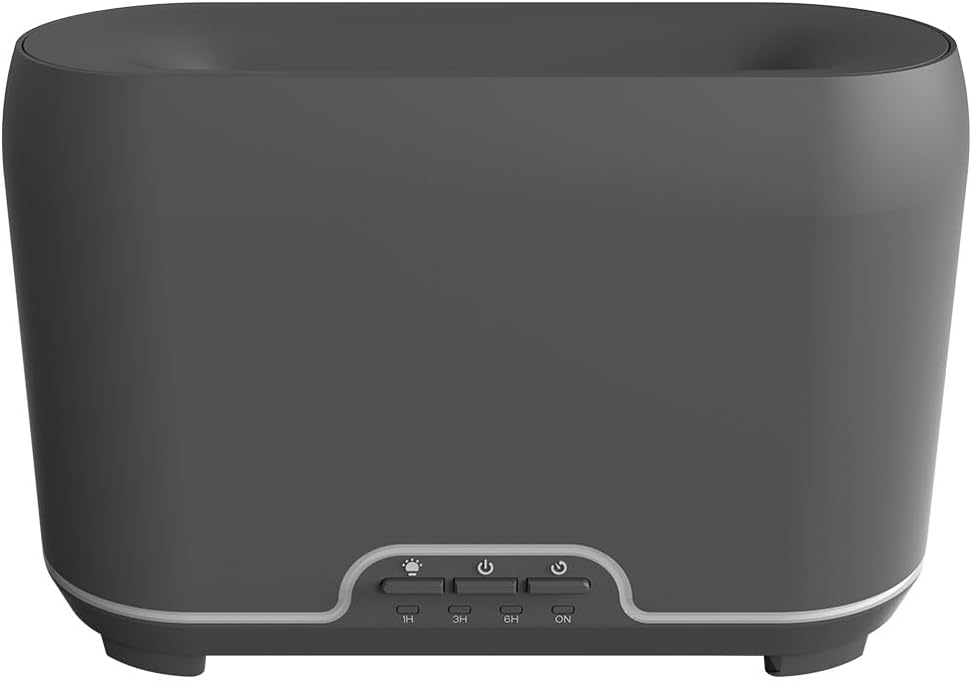
Imej: Depan view of the CALEX Smart Home Aroma Diffuser, showing the control panel with buttons for light, power, and timer settings (1H, 3H, 6H, ON).

Image: The CALEX Smart Home Aroma Diffuser operating on a wooden table, displaying its ambient flame effect and mist output.
The diffuser typically consists of a water tank, an ultrasonic plate, a mist outlet, and a control panel with buttons for power, light, and timer functions. The power input port is usually located at the back or bottom of the device.
5. Persediaan
Ikuti langkah ini untuk persediaan awal:
- penempatan: Letakkan peresap pada permukaan yang rata dan stabil.
- Tudung Buka: Tanggalkan penutup atas diffuser dengan lembut.
- Isi Tangki Air: Fill the water tank with clean water up to the 300ml maximum fill line. Do not overfill.
- Tambah Minyak Pati: Add a few drops of your preferred essential oil directly into the water tank.
- Tutup Tudung: Gantikan penutup atas dengan selamat.
- Sambungkan Kuasa: Plug the power adapter into the diffuser's power input port, then plug the adapter into a wall outlet.
- Download Calex App: Download the free Calex Smart app from your smartphone's app store (available for iOS and Android).
- Sambung ke WiFi: Follow the in-app instructions to connect your diffuser to your home WiFi network. Ensure your WiFi is 2.4GHz.
6. Arahan Operasi
The CALEX Smart Home Aroma Diffuser can be operated via the Calex app or its integrated control buttons.
6.1 Using the Calex Smart App
The Calex app provides full control over your diffuser's functions:
- Hidupkan/Mati Kuasa: Turn the diffuser on or off remotely.
- Kawalan Kabus: Adjust the mist output level.
- Kawalan Cahaya: Change the ambient light color from over 16 million options, adjust brightness, and select lighting modes.
- Kesan nyalaan: Activate or deactivate the flame effect.
- Pemasa: Set schedules for the diffuser to turn on or off automatically.
- Senario Boleh Aturcara: Create custom scenarios based on time, weather, or other smart home triggers.
- Pemberitahuan: Terima makluman apabila tangki air kosong.
6.2 Kawalan Suara
Integrate your diffuser with voice assistants for hands-free control:
- Pembantu Google: Link your Calex account in the Google Home app. Use commands like "Hey Google, turn on the diffuser."
- Siri: Create custom shortcuts in the Apple Home app or through the Calex app for Siri commands.
- Amazon Alexa: Enable the Calex skill in the Alexa app. Use commands like "Alexa, set diffuser light to blue."
6.3 Manual Control Buttons
The control panel on the diffuser allows for basic operation:
- Butang Kuasa: Press once to turn on/off the mist and flame effect.
- Butang Cahaya: Press to cycle through light colors or turn the light on/off.
- Timer Buttons (1H, 3H, 6H, ON): Select a desired operating duration. The diffuser will automatically shut off after the selected time. 'ON' typically means continuous operation until water runs out or manually turned off.
7. Penyelenggaraan
Pembersihan berkala memastikan prestasi optimum dan memanjangkan jangka hayat diffuser anda.
- Pembersihan Harian: Selepas setiap penggunaan, kosongkan baki air dari tangki. Lap bahagian dalam tangki dengan kain bersih dan lembut.
- Pembersihan Mingguan: For a more thorough clean, unplug the device. Add a small amount of white vinegar (about 10ml) to the water tank and let it sit for 10-15 minutes to dissolve mineral buildup. Gently wipe the ultrasonic plate with a cotton swab or soft brush. Rinse the tank thoroughly with clean water, avoiding the air outlet.
- Pembersihan Luaran: Lap bahagian luar peresap dengan lembut, damp kain. Jangan gunakan pembersih atau pelarut yang melelas.
- Ensure the device is completely dry before refilling or storing.
8. Penyelesaian masalah
Jika anda menghadapi masalah, rujuk kepada masalah dan penyelesaian biasa berikut:
| Masalah | Kemungkinan Punca | Penyelesaian |
|---|---|---|
| Tiada kabus atau kabus lemah | Paras air rendah Plat ultrasonik kotor Saluran keluar kabus disekat | Refill water to the appropriate level. Clean the ultrasonic plate as per maintenance instructions. Ensure the mist outlet is clear. |
| Peranti tidak dihidupkan | Tiada kuasa Tangki air kosong Kerosakan peranti | Periksa sambungan kuasa dan salur keluar dinding. Isi semula tangki air. Hubungi sokongan pelanggan jika masalah berterusan. |
| Isu sambungan apl | Kata laluan WiFi salah Penghala terlalu jauh 2.4GHz vs 5GHz WiFi | Sahkan kata laluan WiFi. Move diffuser closer to the router. Ensure your router is broadcasting a 2.4GHz network and connect to it. |
| Kesan nyalaan tidak berfungsi | Feature deactivated in app Kerosakan peranti | Check app settings to ensure flame effect is enabled. Hubungi sokongan pelanggan. |
9. Spesifikasi
| Ciri | Spesifikasi |
|---|---|
| Nombor Model | 5901000500 |
| Jenama | CALEX |
| Kapasiti | 300 mililiter |
| bahan | plastik |
| Automatikan | ya |
| Ketersambungan | Wi-Fi (2.4GHz) |
| Kaedah Kawalan | Calex Smart App, Voice Control (Google Assistant, Siri, Amazon Alexa), Manual Buttons |
| Pilihan Cahaya | 16 Juta Warna |
| Kawasan Penggunaan yang Disyorkan | Medium space |
| Kod Artikel Antarabangsa (EAN/UPC) | 08712879157090 |
10. Waranti dan Sokongan
Untuk maklumat jaminan atau sokongan teknikal, sila rujuk dokumentasi yang disediakan bersama pembelian anda atau hubungi peruncit/pengilang secara langsung. Simpan bukti pembelian anda untuk tuntutan jaminan.