
pengenalan
Thank you for choosing the ASHATA 6-Channel USB 3.7V Lithium Battery Charger Board. This device is designed to efficiently charge up to six 3.7V LiPo 1S or LiHv batteries simultaneously and independently. Its compact design and versatile power input make it an ideal solution for hobbyists and professionals requiring reliable battery charging.
Kandungan Pakej
- 1 x ASHATA 6-Channel USB Lithium Battery Charger Board
Maklumat Keselamatan
Sila baca dan fahami semua arahan keselamatan sebelum menggunakan produk ini. Kegagalan mematuhi arahan ini boleh mengakibatkan renjatan elektrik, kebakaran atau kecederaan serius.
- Use only with compatible 3.7V LiPo 1S or LiHv batteries. Do not attempt to charge other battery types.
- Ensure the charger is connected to a stable 5V USB power source (e.g., computer USB port, power bank, phone charger).
- Jangan biarkan pengecasan bateri tanpa pengawasan.
- Jauhkan pengecas daripada air, kelembapan dan suhu tinggi.
- Do not short-circuit the charging ports.
- If the charger or battery shows signs of damage, discontinue use immediately.
- Jauhkan daripada kanak-kanak.
Produk Selesaiview
The ASHATA 6-Channel USB Lithium Battery Charger Board features a compact design with multiple independent charging channels and user-friendly indicators.
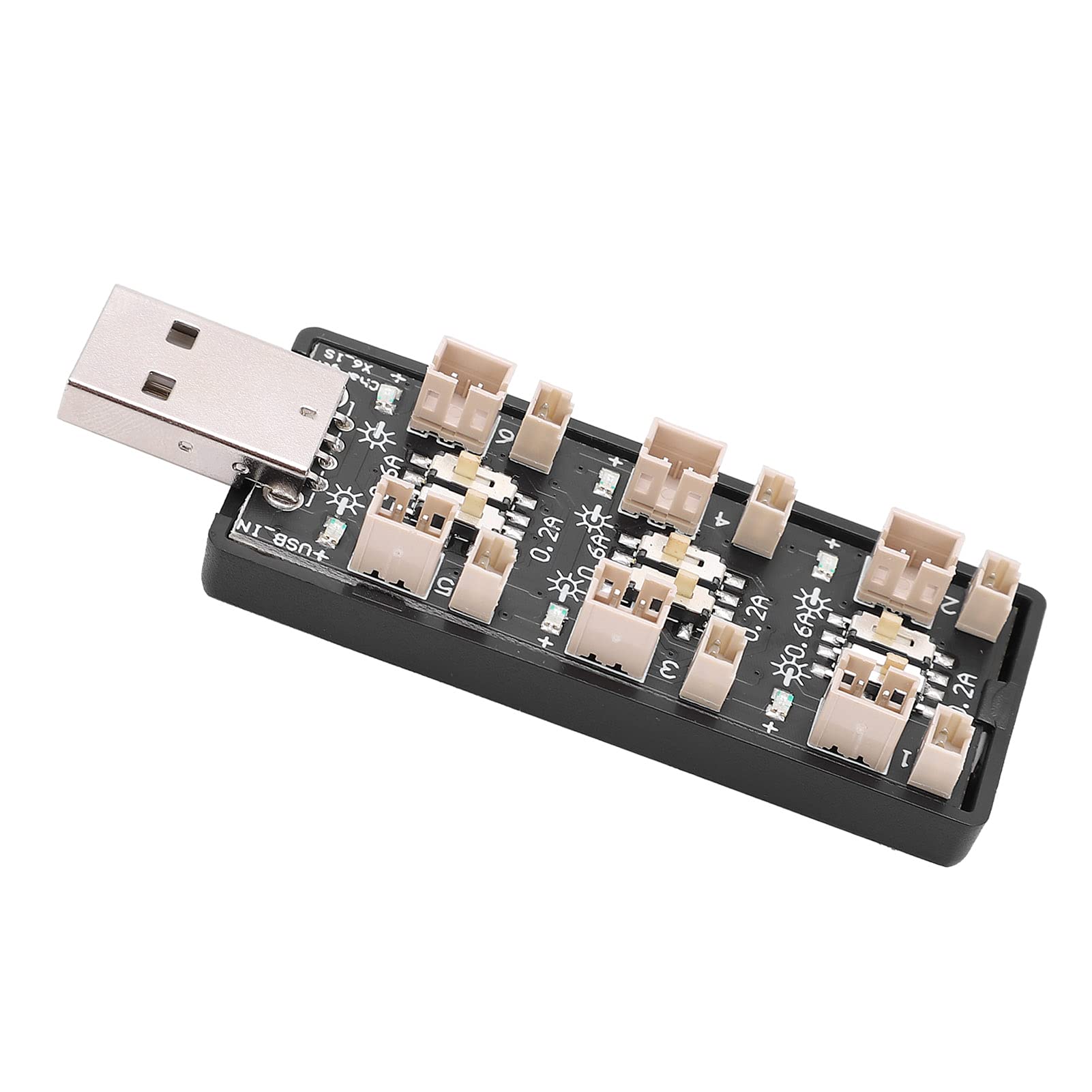
Rajah 1: Keseluruhannya view of the ASHATA 6-Channel USB Lithium Battery Charger Board, showing the integrated USB plug for power input and the six charging ports.
Komponen Utama:
- USB Input Plug: Standard USB-A connector for power input.
- Charging Ports (x6): Independent ports for connecting 3.7V LiPo 1S or LiHv batteries.
- Current Selection Switches (x6): Individual toggle switches for each channel to select charging current (0.2A or 0.6A).
- LED Indicators (x6): Each channel has an LED to indicate charging status.

Rajah 2: Satu jarak dekat view highlighting the individual charging ports and their corresponding current selection toggle switches (0.2A and 0.6A settings) and LED indicators.
Persediaan
- Sambungkan Sumber Kuasa: Insert the integrated USB plug of the charger board into a compatible 5V USB power source. This can be a computer USB port, a power bank, or a standard USB wall adapter (e.g., phone charger).
- Sediakan Bateri: Ensure your 3.7V LiPo 1S or LiHv batteries are in good condition and compatible with the charger's ports.

Rajah 3: Atas ke bawah view of the charger board, illustrating the layout of the six independent charging channels and the USB input.
Arahan Operasi
- Select Charging Current: For each battery you intend to charge, adjust the corresponding toggle switch to either 0.2A or 0.6A.
- 0.2A: Suitable for smaller capacity batteries or for a slower, more gentle charge.
- 0.6A: Suitable for larger capacity batteries or when a faster charge is desired. Ensure your battery can handle this current.
- Sambungkan Bateri: Carefully plug your 3.7V LiPo 1S or LiHv batteries into the charging ports. Ensure correct polarity.
- Status Pengecasan Pantau: The LED indicator for each channel will behave as follows:
- LED berkelip: Menunjukkan bahawa bateri sedang dicas.
- LED pepejal: Indicates that the battery is fully charged and the charging process has automatically stopped.
- Putuskan Sambungan Bateri: Once the LED turns solid, the battery is fully charged. Disconnect the battery from the charging port.
- Putuskan Kuasa: When all charging is complete, disconnect the USB charger board from its power source.

Rajah 4: Atas dan bawah views of the charger board, showing the compact form factor and the USB input.
Penyelenggaraan
- Pembersihan: Use a dry, soft cloth to clean the charger board. Do not use liquid cleaners or solvents.
- Storan: Simpan pengecas di tempat yang sejuk dan kering, jauh daripada cahaya matahari langsung dan suhu yang melampau apabila tidak digunakan.
- Pemeriksaan: Periodically inspect the charger for any signs of damage to the casing, ports, or USB plug.
Menyelesaikan masalah
| Masalah | Kemungkinan Punca | Penyelesaian |
|---|---|---|
| LED does not light up when battery is connected. |
|
|
| Battery charges slowly. |
|
|
| Charger or battery gets excessively hot. |
|
|
Spesifikasi
| Nombor Model | Rich0CsIrfVFiU |
| Input Voltage Julat | USB 5V ± 5% (0.5A ~ 2A) |
| Keluaran Voltage Julat | 2.5V ~ 4.20V |
| Julat Arus Keluaran | 600mA x 6CH (0.6A) / 200mA x 6CH (0.2A) |
| Bilangan Saluran | 6 saluran bebas |
| Jenis Bateri yang berkenaan | LiPo 1S; LiHv high voltage lithium battery (3.7V nominal) |
| Dimensi (L x W x H) | 8 x 3 x 2 cm |
| Pengeluar | ASHATA |
| Negara Asal | China |
Waranti dan Sokongan
For warranty information or technical support, please refer to the retailer's policy or contact ASHATA customer service through their official channels. Please have your model number (Rich0CsIrfVFiU) and purchase details ready when contacting support.