
1. Produk Lebihview
The UNI-T UT665 Industrial Endoscope is a non-destructive testing device designed for inspecting hard-to-reach areas. It features a high-definition probe, a 2.4-inch display, and IP67 waterproofing for reliable performance in various environments.

Image: The UNI-T UT665 Industrial Endoscope, showcasing its handheld unit and flexible camera probe.
2. Ciri-ciri Utama
- Real-time Clear Display: Equipped with a 2.4-inch TFT screen (480x234 resolution) for immediate viewing.
- Rotatable Images: Allows for image rotation to adjust vieworientasi ing.
- Flexible Camera Probe: Features a 1-meter coil length probe that can be bent and shaped for various inspection needs.
- Adjustable Image Saturation: 6 levels of image saturation adjustment for optimal visual clarity.
- Adjustable LED Brightness: 4 levels of LED light intensity for illuminating dark inspection areas.
- Probe Kalis Air IP67: The 9mm diameter probe is waterproof, suitable for wet environments.
- Jarak Fokus: Optimal focus range of 20mm to 100mm.
- Pembinaan Tahan Lama: Outer shell wrapped with soft rubber for shock-proof, waterproof, wear-resistant, and corrosion-resistant performance.
- Reka bentuk ergonomik: Handheld unit designed for comfortable and non-slip grip, lightweight and portable.
- Hayat Bateri yang Panjang: Provides 6-8 hours of operation on a single set of batteries.

Image: The UT665 endoscope designed for portable and comfortable use, highlighting its ergonomic grip.

Image: Detail of the UT665 endoscope, illustrating its robust and waterproof probe construction.
3. Arahan Persediaan
3.1 Kandungan Pakej
Pakej termasuk:
- UT665 Main Unit
- Flexible Camera Probe
- Lithium Metal Batteries (4x 1.5V R6)
- Manual Pengguna
3.2 Pemasangan Bateri
- Locate the battery compartment cover on the handle of the main unit.
- Open the cover and insert four 1.5V R6 (AA) batteries, ensuring correct polarity (+/-).
- Tutup penutup petak bateri dengan selamat.
3.3 Sambungan Probe
- Align the connector of the flexible camera probe with the port on the top of the main unit.
- Gently push the probe connector into the port.
- Tighten the threaded collar on the probe connector to secure it to the main unit. Ensure it is firmly attached to prevent disconnection during use.

Image: Visual guide for installing batteries and connecting the probe to the UT665 main unit.
Video: A demonstration of the battery installation and probe connection process for the UNI-T UT665 Endoscope.
4. Arahan Operasi
4.1 Menghidupkan/Mematikan
- Untuk menghidupkan peranti, tekan dan tahan butang kuasa butang (
 ) sehingga skrin menyala.
 - Untuk mematikan, tekan dan tahan kuasa butang sekali lagi sehingga skrin dimatikan.
4.2 Melaraskan Kecerahan LED
- Tekan ke Cahaya butang () to cycle through the 4 levels of LED brightness.
- Select the appropriate brightness for your inspection environment.
4.3 Adjusting Image Saturation
- Tekan ke Ketepuan butang () to adjust the image saturation through 6 available levels.
- This helps optimize color representation for clearer viewing.
4.4 Putaran Imej
- The device supports image rotation. Refer to the on-screen indicators or specific button functions for rotating the displayed image if needed.
4.5 Kegunaan Am
- Once powered on and the probe is connected, carefully insert the flexible probe into the area you wish to inspect.
- Observe the real-time image on the 2.4-inch display.
- Maneuver the probe as needed to get the desired view.

Image: The UT665 endoscope in use, demonstrating the clear imaging capabilities and adjustable settings.
5. Penyelenggaraan
- Pembersihan: After each use, gently wipe the probe and main unit with a soft, dry cloth. For stubborn dirt on the probe, use a slightly damp cloth and ensure it is completely dry before storage. Do not use abrasive cleaners or solvents.
- Storan: Store the endoscope in a cool, dry place away from direct sunlight and extreme temperatures. Disconnect the probe from the main unit and remove batteries if storing for extended periods.
- Penjagaan Bateri: Replace batteries when the low battery indicator appears. Always use fresh, high-quality batteries.
- Pengendalian Probe: Avoid sharp bends or excessive force on the flexible probe to prevent internal damage.
6. Penyelesaian masalah
| Masalah | Kemungkinan Punca | Penyelesaian |
|---|---|---|
| Peranti tidak dihidupkan | Bateri rendah atau mati; Pemasangan bateri yang salah | Replace batteries with new ones; Check battery polarity. |
| Tiada gambar di skrin | Probe not connected securely; Damaged probe cable | Ensure probe is firmly connected and collar is tightened; Contact support if probe is damaged. |
| Imej kabur atau tidak jelas | Lens is dirty; Object is outside focusing distance; Insufficient lighting | Clean the probe lens; Adjust the distance to the object (20mm-100mm); Increase LED brightness. |
| Lampu LED tidak berfungsi | LED brightness set to minimum; Faulty LEDs | Press the Light button to increase brightness; Contact support if LEDs remain non-functional. |
7. Spesifikasi
| Ciri | Perincian |
|---|---|
| Resolusi Paparan | 640x480 piksel |
| Diameter Kanta | 9mm (Max. 10mm) |
| Saiz LCD | 2.4 inci |
| Panjang Probe | 1m (3m pilihan) |
| Jenis Skrin | TFT |
| Panjang Fokus | >20mm (Optimal: 20mm-100mm) |
| Isyarat Video | Analog |
| Viewsudut | 60° |
| Kecerahan Imej | 6 tahap boleh laras |
| Pencahayaan | 4 LED lights, 4 levels adjustable |
| Penilaian Kalis Air | IP67 (probe only) |
| Flippable Image | ya |
| Penunjuk Kuasa Bateri | ya |
| Sumber Kuasa | 4x 1.5V R6 (AA) batteries |
| Warna Produk | Merah dan Kelabu |
| Berat Bersih Produk | 500g |
| Saiz Produk | 196mm x 74mm x 38mm |

Image: A detailed table outlining the technical specifications of the UT665 endoscope.
8. Aplikasi
The UNI-T UT665 Industrial Endoscope is suitable for various inspection tasks across multiple fields:
- Automotif: Inspecting engine components, exhaust systems, and other vehicle parts.
- Isi rumah: Checking pipes, drains, and hard-to-reach areas in homes.
- Jentera: Examining internal components of industrial machinery for wear or damage.
- HVAC: Inspecting ducts, vents, and air conditioning units.
- Paip: Visual inspection of pipes and drainage systems.
- Pembinaan: Checking structural integrity in confined spaces.

Imej: Cthamples of the UT665 endoscope being used in auto repair, mechanical inspections, conduit checks, and other difficult-to-access locations.
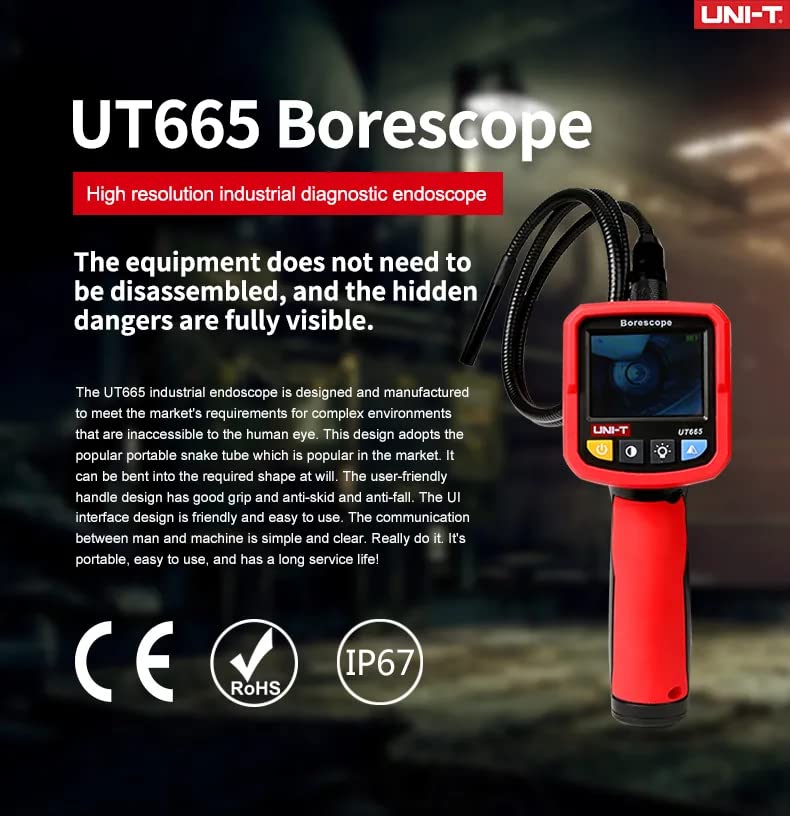
Image: The UT665 endoscope being used to inspect components within an automobile engine bay.
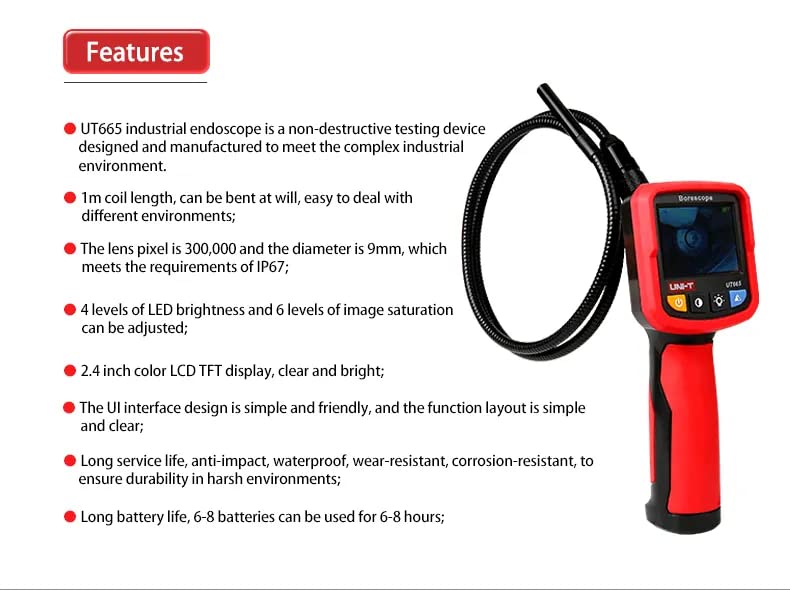
Image: The UT665 endoscope inspecting the interior of a pipe or conduit.
9. Waranti dan Sokongan
For warranty information and technical support, please refer to the documentation included with your product or contact the manufacturer directly. Keep your purchase receipt as proof of purchase.