
1. Pengenalan
Thank you for choosing the Diffuserlove Cloud Humidifier Rain Water Drip Diffuser. This device combines the functions of a humidifier, a rain sound generator, and a multi-color mood lamp to create a relaxing and comfortable environment. Please read this manual thoroughly before use to ensure proper operation and maintenance.
Maklumat Keselamatan Penting
- Do not use with essential oils. This device is designed for water-based humidification and rain effects only.
- Jauhkan daripada kanak-kanak dan haiwan peliharaan.
- Place the humidifier on a stable, flat surface away from direct sunlight or heat sources.
- Ensure the power cord is not damaged and is properly connected.
- Jangan rendam unit asas ke dalam air atau cecair lain.
- Cabut plag peranti sebelum membersihkan atau mengisi semula.
2. Kandungan Pakej
Sahkan bahawa semua item terdapat dalam pakej:
- Diffuserlove Cloud Rain Humidifier Unit
- Remote Control (requires two AAA batteries, not included)
- Type-C Power Cord (plug not included)

Image: The Diffuserlove Cloud Humidifier unit with its remote control.
3. Produk Lebihview
The Diffuserlove Cloud Humidifier features a unique mushroom-shaped design with integrated rain and mist functions, along with customizable lighting.

Image: The humidifier showing its approximate dimensions: 16cm (6.3 inches) wide and 25cm (9.95 inches) tall.
Komponen:
- Mushroom Top: Houses the light and rain drip mechanism.
- Tangki Air: Transparent section for water, capacity 300ml.
- Unit Asas: Contains controls, power input, and ultrasonic mist generator.
- Butang Kawalan: Located on the front of the base unit for light, power, and mist/rain functions.
- Kawalan Jauh: For convenient adjustment of settings.
4. Persediaan
- penempatan: Place the humidifier on a flat, stable surface. Ensure it is not near electronic devices sensitive to moisture.
- Remove Top: Gently lift the transparent water tank section from the base.
- Isi Tangki Air: Fill the water tank with clean tap water up to the MAX line. Do not overfill. Do not add essential oils.

Image: A hand pouring water into the humidifier's base reservoir.
- Pasang semula: Carefully place the transparent water tank back onto the base unit, ensuring it is securely seated.
- Sambungkan Kuasa: Insert the Type-C power cord into the port on the back of the base unit, then connect the other end to a suitable USB power adapter (not included).

Image: A hand connecting the Type-C power cable to the humidifier's power port.
5. Operasi
The humidifier can be operated using the touch buttons on the base unit or the included remote control.
5.1 Hidupkan/Mati Kuasa
- Butang Peranti: Tekan butang kuasa (U) on the base unit to turn the device on or off.
- Kawalan Jauh: Press the 'ON' or 'OFF' button on the remote control.
5.2 Rain & Mist Modes
The humidifier offers three combined rain and mist modes:
- Heavy Rain & Mist: Provides a strong rain sound and mist output.
- Light Rain & Mist: Offers a softer rain sound and mist output.
- Mist Only (No Rain): Produces mist without the rain sound effect.
Use the 'Rain' and 'Mist' buttons on the remote control to adjust these settings. The touch button on the device cycles through mist modes.

Image: Visual representation of the three rain and mist modes: Heavy, Light, and No Rain.
5.3 Fungsi Pencahayaan
The mushroom top features a 7-color LED mood light with various display options:
- Mod Warna Tetap: Select a specific color from the remote control (R, G, B, or other color buttons).
- Cycling Color Mode: The light transitions through all 7 colors automatically.
- Mod Cahaya Pernafasan: The selected or cycling color gently fades in and out.
- Pelarasan Kecerahan: Use the sun icon buttons on the remote to increase or decrease light brightness.
The light button on the device cycles through light modes. The remote offers more precise control.
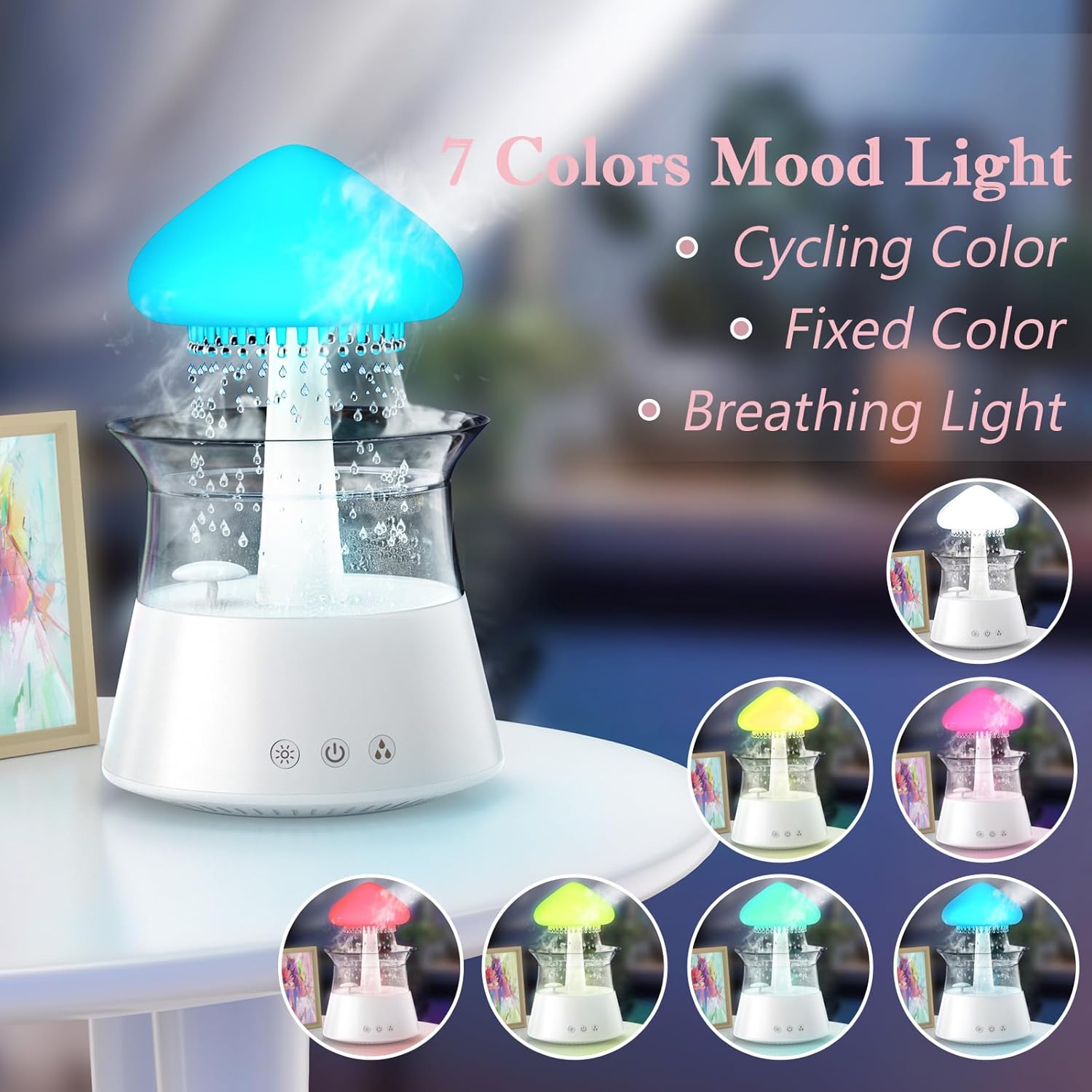
Image: The humidifier showcasing its 7-color mood light feature, including cycling, fixed, and breathing light modes.
5.4 Penetapan Pemasa
Set an automatic shut-off timer using the remote control:
- Press the '4H', '6H', or '8H' buttons on the remote to set the timer for 4, 6, or 8 hours respectively.
- The device will automatically turn off after the selected duration.

Image: A diagram illustrating the remote control with buttons for timer settings (4H, 6H, 8H), light colors, breathing light, rain volume, mist volume, and light brightness.
6. Penyelenggaraan
Regular cleaning ensures optimal performance and extends the lifespan of your humidifier.
6.1 Penyelenggaraan Harian
- Perubahan Air: Change the water in the tank daily to prevent bacterial growth.
- Lap ke bawah: Wipe the inside of the water tank and the mushroom top with a clean, damp kain.
6.2 Pembersihan Mingguan
- Cabut plag: Sentiasa cabut plag pelembap udara sebelum membersihkannya.
- Buka: Carefully remove the mushroom top and the transparent water tank.
- Tangki Air Bersih: Wash the water tank with mild soap and water. Rinse thoroughly to remove all soap residue.
- Unit Pangkalan Bersih: Use a soft brush or cotton swab to gently clean the ultrasonic mist generator and any small openings in the base unit. Do not use abrasive cleaners.
- Mengurangkan: If mineral deposits accumulate, fill the tank with a mixture of equal parts white vinegar and water. Let it sit for 30 minutes, then rinse thoroughly.
- kering: Benarkan semua bahagian kering sepenuhnya sebelum dipasang semula.

Image: Hands gently lifting the transparent water tank from the humidifier's base, indicating how to access for cleaning or refilling.
7. Penyelesaian masalah
If you encounter issues with your Diffuserlove Cloud Humidifier, refer to the following common problems and solutions:
| Masalah | Kemungkinan Punca | Penyelesaian |
|---|---|---|
| Tiada kabus atau keluaran kabus lemah | Paras air rendah Mineral buildup on mist generator Bolong udara terhalang | Isi semula tangki air Clean the mist generator as per maintenance instructions Ensure air vents are clear |
| No rain sound or weak rain sound | Paras air rendah Rain drip holes blocked Rain function not activated | Isi semula tangki air Clean rain drip holes (a small wire may be needed, not included) Activate rain function via remote or device button |
| Cahaya tidak berfungsi | Fungsi lampu padam Peranti tidak dikuasakan | Turn on light function via remote or device button Ensure device is plugged in and powered on |
| Alat kawalan jauh tidak bertindak balas | Bateri mati Obstruction between remote and device | Gantikan bateri AAA dalam jarak jauh Ensure clear line of sight to the device's sensor |
| Kebocoran air | Tangki air tidak diletakkan dengan betul Tangki air penuh Damage to unit | Re-seat the water tank correctly Jangan isi melepasi garisan MAX Contact customer support if unit is damaged |
8. Spesifikasi
Technical details for the Diffuserlove Cloud Humidifier (Model CH06):
- Nama Model: CH06
- Jenama: Diffuserlove
- Dimensi Produk: 6.3"D x 6.3"W x 9.95"H (160 x 160 x 251 mm)
- Kapasiti Air: 300ml
- Bekalan Kuasa: Type-C electric, 5V 2A
- Wattage: 10 watt
- Voltage: 2.3E+2 Volts (Note: This value seems unusually high for a 5V USB device. Please refer to the product label for accurate voltage requirements.)
- Mod Operasi: Manual (via device buttons) / Remote Control
- Ciri Khas: Auto Shut Off, Night Light, Rain Sounds, Remote Control
- Cahaya: 7 colors LED night light
- Kekerapan ultrasonik: 2.4MHz
- Rain Sounds: White noise 30-50dB
- Bahan: Plastik ABS+PP
- Berat Barang: 1.87 paun
- UPC: 663992505702

Image: The back of the product packaging displaying detailed product parameters and specifications.
9. Waranti dan Sokongan
The Diffuserlove Cloud Humidifier (Model CH06) comes with a Waranti 12 bulan dari tarikh pembelian. Waranti ini meliputi kecacatan pembuatan di bawah penggunaan biasa.
For warranty claims, technical support, or any questions regarding your product, please contact Diffuserlove customer service through the retailer where the product was purchased or refer to the contact information provided on the product packaging.