1. Pengenalan
This manual provides essential information for the installation, operation, and maintenance of your 12V battery, designed for use with the Gentron Pro2 7500W Gas Generator. This battery is crucial for the electric start function of your generator, ensuring reliable power when you need it most. Please read this manual thoroughly before attempting any installation or operation.
2. Maklumat Keselamatan
WARNING: Risk of fire, explosion, or burns.
- Jangan pintaskan terminal bateri.
- Do not disassemble, heat above 60°C (140°F), or incinerate.
- The storage temperature should not exceed 60°C (140°F).
- Always wear appropriate personal protective equipment (PPE), such as safety glasses and gloves, when handling batteries.
- Jauhkan daripada kanak-kanak.
- Pastikan pengudaraan yang betul semasa pengecasan dan operasi.
3. Produk Lebihview
The 12V battery is a rechargeable sealed lead-acid (SLA) battery, specifically designed to provide reliable starting power for your Gentron Pro2 7500W Gas Generator. It is a non-spillable battery, offering maintenance-free operation.
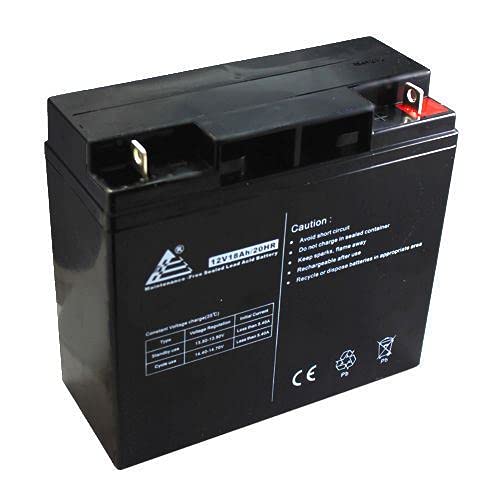
Figure 1: Generic 12V Battery for Gentron Pro2 7500W Gas Generator.
Untuk visual overview of a compatible battery, please refer to the video below:
Video 1: Casil 12V 18Ah AGM Rechargeable Deep Cycle Battery, demonstrating a compatible battery type and its features.
4. Persediaan dan Pemasangan
Before installation, ensure the generator is turned off and cooled down. Disconnect any power sources to the generator.
4.1. Pemeriksaan Pra-pemasangan
Visually inspect the new battery for any signs of damage. Confirm that the battery dimensions and terminal configuration match your generator's requirements. (Referencing visual content from user video frame 00:25, showing a new battery unboxed next to an old one, confirming size compatibility.)
4.2. Removing the Old Battery
- Locate the battery compartment on your Gentron Pro2 7500W Gas Generator. (Referencing visual content from user video frame 00:00, showing a Generac EXL8000 generator with its battery removed.)
- Using a wrench, disconnect the negative (-) terminal first, followed by the positive (+) terminal.
- Carefully remove the old battery from its bracket or tray.
4.3. Installing the New Battery
- Place the new 12V battery into the generator's battery compartment, ensuring it fits securely within the existing bracket. (Referencing visual content from user video frame 01:03, showing the new battery being compared to the old one, highlighting similar dimensions for a proper fit.)
- Connect the positive (+) terminal first, then the negative (-) terminal. Ensure connections are tight to prevent arcing and ensure good electrical contact.
- Secure the battery in place using any retaining straps or clamps provided with your generator.
For a detailed look at battery terminals and installation considerations, watch this video:
Video 2: 12V 18Ah Battery with Nut & Bolt Terminal, illustrating the terminal type and connection points.
5. Operating the Generator with the New Battery
Once the battery is securely installed, you can proceed with starting your Gentron Pro2 7500W Gas Generator using its electric start feature. Follow your generator's specific operating instructions for starting and shutdown procedures.
6. Penyelenggaraan
To ensure the longevity and optimal performance of your 12V battery, follow these maintenance guidelines:
- Pemeriksaan Berkala: Periodically check the battery for any physical damage, swelling, or corrosion on the terminals.
- Pembersihan Terminal: Keep battery terminals clean and free of corrosion. Use a wire brush and a mixture of baking soda and water if corrosion is present. Rinse with clean water and dry thoroughly.
- mengecas: For optimal battery life, maintain proper charge levels.
- Floating Use (Standby): Mengekalkan voltage between 13.6 - 13.8 V.
- Cycle Use (Regular Discharge/Recharge): Mengekalkan voltage between 14.6 - 14.8 V.
- Storan: When storing the battery for extended periods, ensure it is fully charged and stored in a cool, dry place. The storage temperature should not exceed 60°C (140°F).
7. Penyelesaian masalah
If your generator fails to start or experiences issues related to the battery, consider the following:
- No Power/Weak Crank: Check battery terminals for tightness and corrosion. Ensure the battery is fully charged. If the battery is old, it may need replacement.
- Bateri Tidak Dicas: Verify the generator's charging system is functioning correctly. Consult your generator's manual for charging system diagnostics.
- Bau atau Bengkak yang Luar Biasa: Immediately disconnect the battery and replace it. This indicates internal damage or overcharging.
If troubleshooting steps do not resolve the issue, consult a qualified technician or contact customer support.
8. Spesifikasi
| Ciri | Perincian |
|---|---|
| Product Model (Generic) | RIV-Sep33232 |
| Compatible Battery Models (Exampitu) | Mighty Max ML18-12XRP, Casil CA12180 |
| Voltage | 12 Volt |
| Kapasiti | 18 Amp Hour (Ah) |
| Jenis Bateri | Rechargeable Sealed Lead-Acid Battery (AGM) |
| Jenis Terminal | Nat & Bolt |
| Floating Use Voltage Peraturan | 13.6 - 13.8 V |
| Penggunaan Kitaran Voltage Peraturan | 14.6 - 14.8 V |
| Arus Awal | Kurang daripada 5.4A |
| Tidak Boleh Tumpah | ya |
| Pengeluar | BMotorParts |
| Negara Asal | Made in Vietnam (for compatible models) |
9. Waranti dan Sokongan
Untuk maklumat jaminan atau sokongan teknikal, sila rujuk dokumentasi yang disediakan bersama pembelian anda atau hubungi penjual secara langsung. Simpan bukti pembelian anda untuk sebarang tuntutan jaminan.


