
IPASON G-SLIM
IPASON G-SLIM Desktop PC User Manual
Model: G-SLIM | Brand: IPASON
1. Pengenalan
Terima kasih kerana membeliasing the IPASON G-SLIM Desktop PC. This compact and powerful system is designed for both business and personal use, offering stable performance and a space-saving design. This manual provides essential information for setting up, operating, maintaining, and troubleshooting your new computer.
2. Maklumat Keselamatan
Please read the following safety guidelines carefully before using your IPASON G-SLIM Desktop PC to ensure safe operation and prevent damage.
- Bekalan Kuasa: Gunakan hanya kabel kuasa yang disediakan dan sambungkan ke soket yang dibumikan. Jangan bebankan jalur kuasa secara berlebihan.
- Pengudaraan: Ensure proper airflow around the PC. Do not block ventilation openings. Maintain at least 10cm clearance on all sides.
- Persekitaran: Operate the PC in a dry, stable environment away from direct sunlight, heat sources, and excessive dust or moisture.
- Pengendalian: Avoid dropping or subjecting the PC to strong impacts.
- Servis: Jangan cuba membuka atau membaiki PC sendiri. Rujuk semua servis kepada kakitangan yang berkelayakan.

Figure 2.1: The IPASON G-SLIM Desktop PC undergoes rigorous testing to ensure reliability and stability, including 3C certification, drop tests, and temperature/noise control tests.
3. Kandungan Pakej
Sahkan bahawa semua item terdapat dalam pakej:
- IPASON G-SLIM Desktop PC
- Kabel Kuasa
- Manual Pengguna (dokumen ini)
- WPS Office License Key (if applicable)
4. Produk Lebihview
The IPASON G-SLIM is a compact tower PC designed for efficiency and performance. Its slim profile allows it to fit into various workspaces.

Rajah 4.1: Depan view of the IPASON G-SLIM Desktop PC, highlighting its sleek design and accessible front ports.
4.1 Panel Depan
- Butang Kuasa: To turn the PC on or off.
- Port USB: Convenient access for connecting USB devices.
- Bicu Audio: Untuk fon kepala dan mikrofon.
4.2 Panel Belakang
The rear panel contains various ports for connecting your monitor, network, and other peripherals.

Figure 4.2: Dimensions and various views of the IPASON G-SLIM Desktop PC, including the rear panel with its array of connectivity ports.
- Port Output Video: (e.g., HDMI, DisplayPort, VGA) for connecting monitors.
- Port USB: Additional USB 2.0 and USB 3.0 ports for peripherals.
- Port LAN: Untuk sambungan rangkaian berwayar.
- Port Audio: Line-in, line-out, and microphone jacks.
- Input Kuasa: Untuk menyambungkan kabel kuasa.
5. Persediaan
5.1 Menyambung Peranti
- Pantau: Connect your monitor to one of the video output ports on the rear panel (e.g., HDMI, DisplayPort).
- Papan Kekunci dan Tetikus: Sambungkan papan kekunci dan tetikus anda ke mana-mana port USB yang tersedia.
- Rangkaian: For a wired connection, connect an Ethernet cable from your router/modem to the LAN port on the rear panel.
- Audio: Sambungkan pembesar suara atau fon kepala ke bicu audio yang sesuai.
5.2 Sambungan Kuasa
- Insert the provided power cable into the power input port on the rear of the PC.
- Palamkan hujung kabel kuasa yang lain ke dalam salur keluar elektrik yang dibumikan.
5.3 But Awal
- Press the power button on the front panel of the PC.
- The system will boot up and guide you through the initial Windows 11 setup process. Follow the on-screen instructions to configure your language, region, network, and user account.
6. Operating System (Windows 11)
Your IPASON G-SLIM Desktop PC comes pre-installed with Windows 11, offering a modern and intuitive user experience.
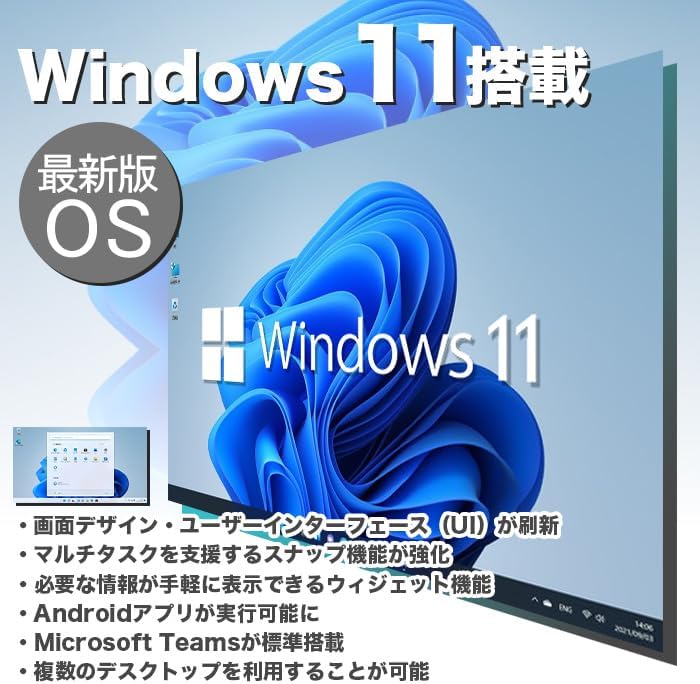
Figure 6.1: Windows 11 interface, showcasing its new design and features.
6.1 Key Features of Windows 11
- Redesigned User Interface (UI): A fresh, clean design with a centered Start menu and taskbar.
- Enhanced Multitasking: Snap Layouts and Snap Groups make organizing windows easier.
- Widget: A personalized feed for quick access to information.
- Android App Support: Run Android applications directly on your PC (requires Amazon Appstore).
- Penyepaduan Pasukan Microsoft: Built-in chat and video conferencing.
- Multiple Desktops: Organize your workspace with virtual desktops.
6.2 WPS Office
Your PC includes WPS Office, a Microsoft-certified office suite with high compatibility with Microsoft Office documents. You can use it for word processing, spreadsheets, and presentations.
7. Ciri Prestasi
The IPASON G-SLIM is equipped with components chosen for a balance of performance and cost-effectiveness, making it suitable for various tasks, including business applications and light gaming.
7.1 Processor (CPU)
Features a 12th Generation Intel Core i3 processor, offering improved performance over previous generations for everyday computing and multitasking.
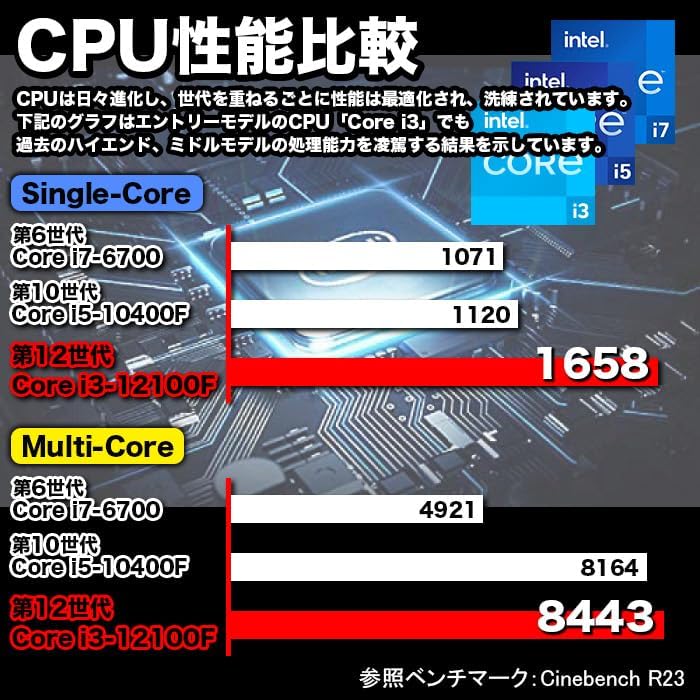
Figure 7.1: CPU Performance Comparison, demonstrating the significant performance improvements of the 12th Gen Intel Core i3.
7.2 Memori (RAM)
Equipped with 8GB of DDR4-3200 RAM, enabling smooth multitasking and efficient handling of multiple applications simultaneously.
7.3 Storage (SSD)
Utilizes a 256GB NVMe M.2 SSD, providing significantly faster data transfer speeds compared to traditional SATA SSDs (approximately 7 times faster), resulting in quicker boot times and application loading.

Figure 7.2: The IPASON G-SLIM Desktop PC is designed for stable high performance, suitable for various business scenarios.
8. Penyelenggaraan
8.1 Pembersihan
- Luaran: Gunakan yang lembut, damp cloth to wipe the exterior of the PC. Avoid abrasive cleaners or solvents.
- Pengudaraan: Periodically use compressed air to clear dust from the ventilation openings to ensure optimal cooling.
8.2 Kemas Kini Perisian
- Semak dan pasang kemas kini Windows secara berkala untuk memastikan kestabilan, keselamatan dan prestasi sistem.
- Keep your drivers updated for optimal hardware performance. You can usually find driver updates on the IPASON support website or through Windows Update.
9. Penyelesaian masalah
This section addresses common issues you might encounter with your IPASON G-SLIM Desktop PC.
| Masalah | Kemungkinan Punca | Penyelesaian |
|---|---|---|
| PC tidak dihidupkan. | Kabel kuasa tidak disambung dengan betul; Masalah saluran keluar kuasa. | Ensure power cable is securely connected to both PC and outlet. Try a different outlet. |
| Tiada paparan pada monitor. | Kabel monitor longgar; Sumber input pada monitor salah. | Check monitor cable connections. Select correct input source on your monitor. |
| Prestasi perlahan. | Too many programs running; System not updated. | Close unnecessary applications. Check for and install Windows updates. |
| Tiada sambungan internet. | Ethernet cable loose; Router/modem issue. | Check Ethernet cable connection. Restart your router/modem. |
Jika anda menghadapi masalah yang tidak disenaraikan di sini atau jika penyelesaian yang dicadangkan tidak menyelesaikan masalah, sila hubungi sokongan pelanggan.
10. Spesifikasi
Detailed technical specifications for the IPASON G-SLIM Desktop PC (Model: G-SLIM, ASIN: B0CDKLF6X6).
| Ciri | Spesifikasi |
|---|---|
| Jenama | IPASON |
| Nombor Model | G-SLIM |
| Faktor Bentuk | Small Form Factor Tower |
| Dimensi (W×D×H) | 100mm × 336mm × 350mm |
| Berat badan | 3 kg |
| Sistem Operasi | Windows 11 |
| Jenama CPU | Intel |
| Jenis CPU | Intel Core i12 Generasi ke-3 |
| Kelajuan CPU | 3.3 GHz |
| Soket Pemproses | LGA 1700 |
| Kapasiti RAM | 8 GB |
| Jenis Memori | DDR4-3200 SDRAM |
| Kapasiti Memori Maks | 16 GB |
| Kapasiti Storan | 256 GB |
| Jenis Storan | NVMe M.2 SSD |
| Pemecut Grafik | Intel UHD Graphics 620 (Bersepadu) |
| VRAM Capacity | 4 GB (Shared) |
| Port USB 2.0 | 3 |
| Port USB 3.0 | 5 |
| Bekalan Kuasa | 300W SFX |
| Pemacu Optik | Tidak termasuk |
| Port LAN berwayar | ya |
| Perisian Pra-pasang | Pejabat WPS |
11. Waranti dan Sokongan
IPASON is committed to providing high-quality products and reliable customer support.
11.1 Waranti Produk
Your IPASON G-SLIM Desktop PC comes with a Waranti 1 tahun against manufacturing defects. This warranty covers hardware malfunctions under normal use conditions. Please retain your proof of purchase for warranty claims.
11.2 Sokongan Pelanggan
For technical assistance, troubleshooting, or warranty inquiries, please contact the seller, Pasoul Store, through the Amazon platform. They are the authorized reseller and can provide direct support.
You can also visit the official IPASON brand store on Amazon for more information and product updates: IPASON Brand Store
Ask a question about this manual
Ask about setup, troubleshooting, compatibility, parts, safety, or missing instructions. Manuals+ will review the question and use this page’s manual context to help answer it.