
1. Pengenalan
Thank you for choosing the AWEI T36 Wireless Sport Earbuds. These in-ear earphones are designed to provide a high-quality audio experience with convenience and durability, especially for active lifestyles. Featuring Bluetooth 5.0 connectivity, touch controls, and an IPX4 water resistance rating, the T36 earbuds are suitable for various activities, including sports.
2. Kandungan Pakej
Sila semak pakej untuk item berikut:
- AWEI T36 Wireless Sport Earbuds (Left and Right)
- Kes Pengecasan
- Kabel Pengecas USB
- Manual Pengguna
3. Produk Lebihview
Familiarize yourself with the components of your AWEI T36 earbuds.
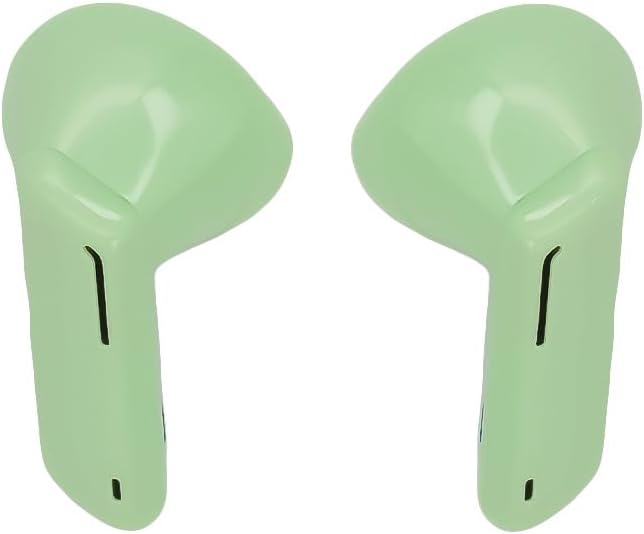
Image 1: AWEI T36 Wireless Sport Earbuds. This image displays the two green earbuds, highlighting their ergonomic design for in-ear fit.

Image 2: AWEI T36 Charging Case. This image shows the compact green charging case with the 'awei' brand logo on its lid.
4. Persediaan
4.1 Mengecas Fon telinga dan Sarung
- Caj Permulaan: Sebelum penggunaan pertama, cas sepenuhnya sarung pengecas dan fon telinga.
- Mengecas Kes: Connect the USB charging cable to the charging port on the case and to a power source. The case takes approximately 90 minutes to fully charge.
- Mengecas fon telinga: Place the earbuds into the charging case. Ensure they are correctly seated. The earbuds will charge automatically from the case. The earbuds take approximately 1.5 hours to fully charge.
4.2 Berpasangan dengan Peranti
- Berpasangan kali pertama:
- Buka bekas pengecasan dan keluarkan kedua-dua fon telinga. Mereka secara automatik akan memasuki mod berpasangan.
- Pada peranti anda (telefon pintar, tablet, dll.), dayakan Bluetooth.
- Cari untuk peranti Bluetooth yang tersedia dan pilih "AWEI T36" daripada senarai.
- Setelah disambungkan, anda akan mendengar bunyi pengesahan dan fon telinga akan sedia untuk digunakan.
- Penyambungan Semula Automatik: After the initial pairing, the earbuds will automatically connect to the last paired device when removed from the charging case, provided Bluetooth is enabled on the device and it is within range.
5. Arahan Operasi
5.1 Memakai Fon Telinga
Gently insert the earbuds into your ears, ensuring a comfortable and secure fit. Adjust them until the sound quality is optimal and they feel stable, especially during physical activity.
5.2 Kawalan Sentuhan
The AWEI T36 earbuds feature touch-sensitive controls on each earbud. The following actions can be performed:
- Main/Jeda: Ketik sekali pada salah satu fon telinga.
- Lagu Seterusnya: Ketik dua kali pada fon telinga kanan.
- Trek Sebelumnya: Ketik dua kali pada fon telinga kiri.
- Jawab/Tamatkan Panggilan: Ketik sekali pada sama ada fon telinga semasa panggilan masuk atau panggilan aktif.
- Tolak Panggilan: Tekan dan tahan salah satu fon telinga selama 2 saat semasa panggilan masuk.
- Aktifkan Pembantu Suara: Ketik tiga kali pada salah satu fon telinga.
6. Penyelenggaraan
6.1 Pembersihan
Bersihkan fon telinga dan bekas pengecas anda secara kerap untuk memastikan prestasi dan kebersihan yang optimum.
- Gunakan kain lembut, kering dan tidak berbulu untuk mengelap fon telinga dan bekas pengecas.
- Jangan gunakan pembersih, pelarut atau semburan aerosol yang kasar.
- Keluarkan sebarang tahi telinga atau serpihan dari jaring telinga dengan lembut menggunakan berus kecil yang lembut atau kapas.
6.2 Penyimpanan
Apabila tidak digunakan, simpan fon telinga di dalam bekas pengecasannya untuk melindunginya daripada habuk, kerosakan dan memastikan ia sentiasa dicas.
7. Penyelesaian masalah
If you encounter any issues, please refer to the following common solutions:
- Fon telinga tidak berpasangan: Ensure both earbuds are removed from the case and are in pairing mode. Turn off and on Bluetooth on your device, then try pairing again.
- Hanya satu fon telinga berfungsi: Place both earbuds back into the charging case, close the lid, wait a few seconds, then remove them again. This often re-syncs them.
- Tiada bunyi: Periksa tahap kelantangan pada peranti anda dan pastikan fon telinga disambungkan dengan betul.
- Isu pengecasan: Ensure the charging cable is securely connected to both the case and the power source. Check if the charging contacts on the earbuds and inside the case are clean.
- Kualiti bunyi yang lemah: Ensure the earbuds are properly seated in your ears. Try cleaning the earbud mesh.
8. Spesifikasi
| Jenama | AWEI |
| Model | T36 |
| Jenis Fon Kepala | Dalam Telinga |
| Versi Bluetooth | 5.0 |
| Kapasiti Bateri Earbud | 45 mAh (setiap satu) |
| Kapasiti Bateri Kes Pengecasan | 320 mAh |
| Waktu Main Muzik | Sehingga 5 jam |
| Masa Berbual | Sehingga 8 jam |
| Masa Mengecas | Approx. 1.5 hours (earbuds/case) |
| Masa Tunggu Sedia | Sehingga 210 jam |
| Penilaian Ketahanan Air | IPX4 |
| Jenis Kawalan | Kawalan Sentuh |
| warna | hijau |
9. Maklumat Waranti
Specific warranty details may vary by region and retailer. Please refer to the warranty card included with your product or contact your point of purchase for detailed warranty terms and conditions.
10. Sokongan
For further assistance or inquiries, please contact AWEI customer support. You may also find additional resources and support via the official AWEI channels.
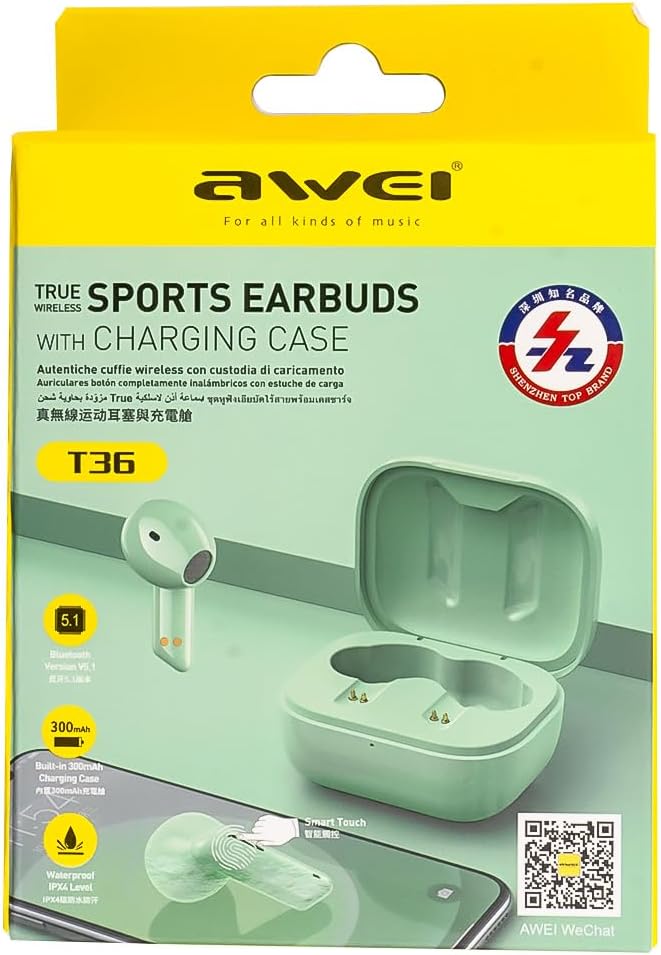
Image 3: AWEI T36 Product Packaging. This image shows the product box, which includes a QR code for WeChat support.
Scan the QR code on the product packaging or visit http://weixin.qq.com/r/7XQ0O7vEfoUBh6pYnyHJ for WeChat support.