
NXGKET 2AYV7YG-813
NXGKET Rechargeable Walkie-Talkie User Manual
Model: 2AYV7YG-813
pengenalan
Thank you for choosing the NXGKET Rechargeable Walkie-Talkie. This manual provides detailed instructions for the safe and effective use of your new device. Designed for both children and adults, these walkie-talkies offer reliable communication with a long range, making them ideal for outdoor activities, camping, and general recreational use. Please read this manual thoroughly before operating the device and keep it for future reference.
Maklumat Keselamatan
Untuk memastikan operasi yang selamat dan mengelakkan kerosakan, sila patuhi langkah berjaga-jaga berikut:
- Do not disassemble or modify the walkie-talkie. Unauthorized modifications can void the warranty and pose safety risks.
- Keep the device away from water and moisture. It is water-resistant but not waterproof.
- Avoid exposing the walkie-talkie to extreme temperatures, direct sunlight, or open flames.
- Use only the provided USB Type-C charging cable and a compatible power adapter (not included) for charging.
- Supervise children during use to ensure proper handling and safety.
- Do not operate the walkie-talkie near medical devices or in areas where radio communication is restricted (e.g., hospitals, aircraft).
- Buang bateri dan komponen elektronik secara bertanggungjawab mengikut peraturan tempatan.
Kandungan Pakej
Selepas membuka bungkusan, sila sahkan bahawa semua item ada dan dalam keadaan baik:
- 2 x NXGKET Rechargeable Walkie-Talkies (Blue)
- 2 x Built-in 1200mAh Lithium Polymer Batteries
- 1 x USB Type-C Charging Cable (for dual charging)
- 1 x Manual Pengguna (dokumen ini)

Image: The NXGKET Walkie-Talkie package showing two blue walkie-talkies, a charging cable, and the product box, illustrating the typical contents.
Produk Selesaiview
Familiarize yourself with the various components and controls of your walkie-talkie:

Image: A detailed diagram labeling the key components of the NXGKET Walkie-Talkie, including the antenna, PTT button, LCD display, lamp button, menu/lock button, sound speaker, power/scan button, up/down buttons, call/ring button, Type-C charging port, and removable belt clip.
- Antena: Untuk menghantar dan menerima isyarat.
- Butang PTT (Push-to-Talk): Tekan dan tahan untuk menghantar suara anda.
- Butang Naik: Navigates menus upwards or increases values.
- Lamp Butang: Mengaktifkan lampu suluh LED terbina dalam.
- Butang Menu/Kunci: Enters menu settings or locks/unlocks the keypad.
- Pembesar Suara: Output audio yang diterima.
- Butang Kuasa/Imbas: Turns the device on/off (long press) or initiates channel scanning (short press).
- Butang Bawah: Navigates menus downwards or decreases values.
- Call/Ring Button: Sends a call tone to other walkie-talkies on the same channel.
- Port Pengecasan Jenis-C: For connecting the USB Type-C charging cable.
- Remove Belt Clip: Point for attaching or detaching the belt clip.
- Paparan LCD: Menunjukkan saluran, kelantangan, status bateri dan penunjuk lain.
Persediaan
1. Pengecasan Awal
Your walkie-talkie comes with a built-in 1200mAh lithium polymer battery. For optimal performance, fully charge the device before first use.
- Connect the provided USB Type-C charging cable to the charging port on the side of the walkie-talkie.
- Sambungkan hujung kabel USB yang satu lagi ke sumber kuasa USB yang serasi (cth., penyesuai dinding, port USB komputer, bank kuasa).
- The battery indicator on the LCD display will show charging status. A full charge typically takes approximately 2 hours.
- Once fully charged, the battery can provide up to 24 hours of work time and up to 3 days of standby time.

Image: An illustration demonstrating the 1200mAh lithium polymer battery and its charging time (2 hours for full charge) and work time (24 hours), alongside a diagram of the high-volume speaker.
2. Hidupkan/Mati Kuasa
- To turn on the walkie-talkie, press and hold the Butang Kuasa / Imbasan sehingga skrin LCD menyala.
- To turn off the walkie-talkie, press and hold the Butang Kuasa / Imbasan sehingga skrin LCD dimatikan.
Arahan Operasi
1. Setting Channels and Privacy Codes
For two or more walkie-talkies to communicate, they must be set to the same channel and privacy code (CTCSS/DCS).
- The NXGKET walkie-talkie has 16 main channels and 121 privacy codes (38 CTCSS codes and 83 DCS codes).
- Tekan ke Butang Menu/Kunci once to enter channel selection mode. Use the Up or Butang Bawah to select your desired channel (1-16). Press PTT untuk mengesahkan atau Menu again to move to privacy code setting.
- Tekan ke Butang Menu/Kunci twice to enter privacy code selection mode. Use the Up or Butang Bawah to select your desired privacy code (0-121). Code 0 means no privacy code.
- Tekan ke Butang PTT to confirm your selection and exit the menu.
- Ensure all walkie-talkies intended for communication are set to the identical channel and privacy code.
2. Menghantar dan Menerima
- To transmit your voice, press and hold the Butang PTT. Speak clearly into the microphone (located near the speaker). Release the Butang PTT when you finish speaking to allow the other party to respond.
- Apabila Butang PTT is not pressed, the walkie-talkie is in receive mode. You will hear incoming transmissions through the speaker.
3. Melaraskan Kelantangan
Gunakan Up dan Butang Bawah (when not in menu mode) to adjust the speaker volume. The volume level will be displayed on the LCD screen.
4. Nada Panggilan
Tekan ke Call/Ring Button once to send an audible call tone to other walkie-talkies on the same channel and privacy code, alerting them to an incoming transmission.
5. Fungsi VOX (Pertukaran Beroperasi Suara)
VOX allows hands-free operation. When activated, the walkie-talkie will automatically transmit when it detects your voice.
- Tekan ke Butang Menu/Kunci multiple times until "VOX" appears on the LCD display.
- Gunakan Up or Butang Bawah to select the VOX sensitivity level (e.g., 1-3, with 3 being most sensitive). Select "OFF" to disable VOX.
- Tekan ke Butang PTT untuk mengesahkan dan keluar.
6. Imbasan Saluran
The scan function allows you to automatically scan through channels to find active conversations.
- Tekan sebentar Butang Kuasa / Imbasan (when the device is on) to initiate channel scanning. The walkie-talkie will cycle through channels until it detects a signal.
- It will pause on an active channel. To stop scanning, press the Butang Kuasa / Imbasan lagi atau Butang PTT.
7. Lampu suluh LED
The built-in LED flashlight can be used for illumination in low-light conditions.
- Tekan ke Lamp Butang once to turn on the flashlight.
- Tekan ke Lamp Butang sekali lagi untuk mematikan lampu suluh.
8. Kunci Pad Kekunci
To prevent accidental button presses, you can lock the keypad.
- Tekan dan tahan butang Butang Menu/Kunci for a few seconds until a lock icon appears on the LCD display.
- Untuk membuka kunci, tekan dan tahan butang Butang Menu/Kunci again until the lock icon disappears.
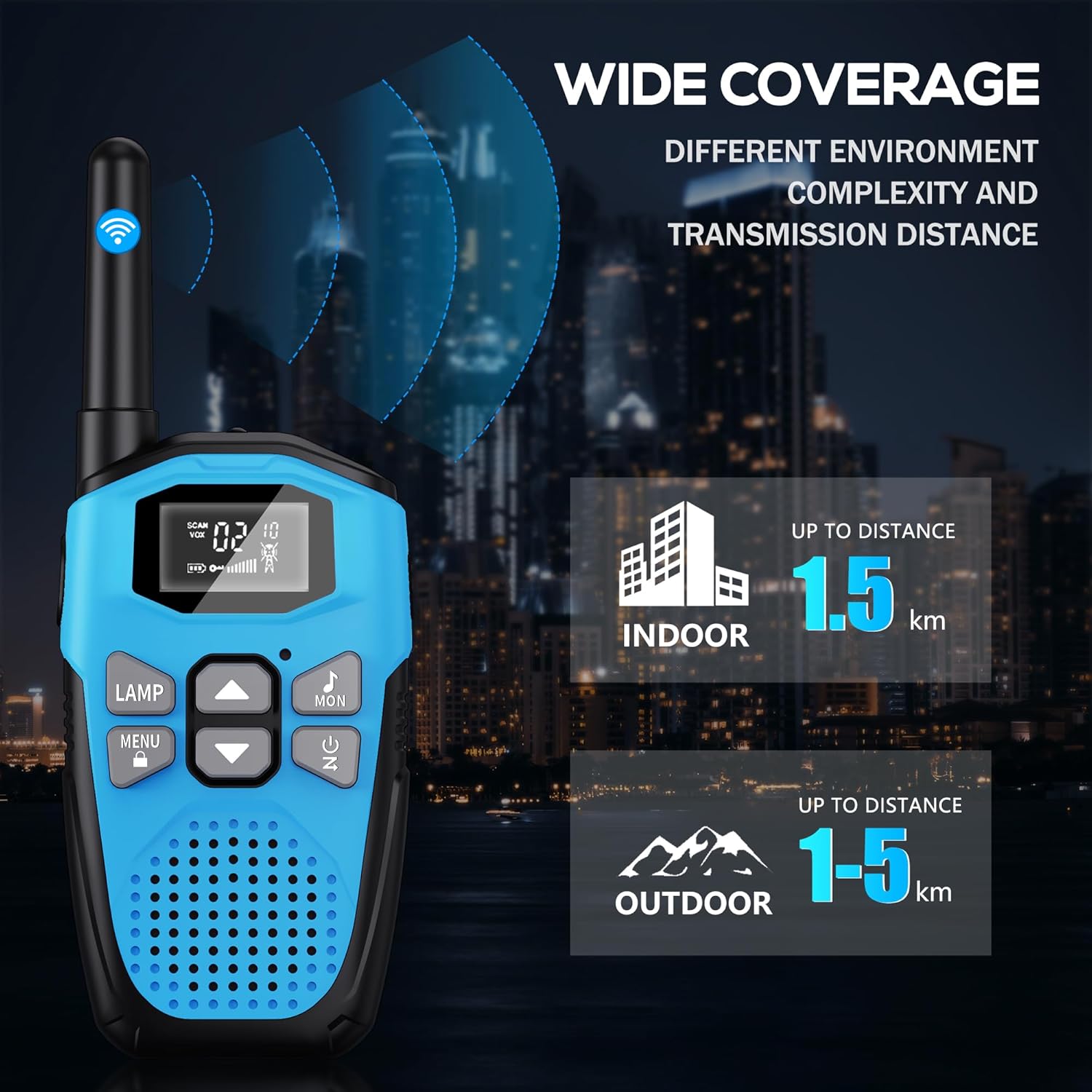
Image: An illustration showing the wide coverage capabilities of the walkie-talkie, indicating an indoor range of up to 1.5 km and an outdoor range of 1-5 km, depending on environmental complexity and transmission distance.
Penyelenggaraan
- Pembersihan: Lap walkie-talkie dengan kain lembut,amp kain. Jangan gunakan bahan kimia yang keras atau pembersih yang kasar.
- Storan: Simpan peranti di tempat yang sejuk dan kering jauh dari cahaya matahari langsung dan suhu yang melampau apabila tidak digunakan.
- Penjagaan Bateri: For long-term storage, it is recommended to charge the battery to about 50% every 3-6 months to maintain battery health.
- Perlindungan jatuh: The walkie-talkie features a hard shell and anti-drop design for environmental protection. However, avoid excessive drops or impacts to prevent damage.

Image: A visual representation highlighting the walkie-talkie's hard shell, anti-drop design, and key features such as VOX hands-free, keypad lock, clear sound, drop protection, noise reduction, and LED emergency light.
Menyelesaikan masalah
| Masalah | Kemungkinan Punca | Penyelesaian |
|---|---|---|
| Tiada kuasa | Bateri habis. | Charge the walkie-talkie fully. |
| Cannot communicate with other walkie-talkies | Different channels or privacy codes. | Ensure all walkie-talkies are on the same channel and privacy code. |
| Kualiti bunyi yang buruk atau statik | Di luar julat; bateri lemah; gangguan. | Move closer to the other unit; charge battery; move away from sources of interference. |
| Julat komunikasi pendek | Obstacles (buildings, terrain); environmental factors. | Move to an open area; range is reduced in urban/dense environments. |
| Pad kekunci tidak bertindak balas | Pad kekunci dikunci. | Tekan dan tahan butang Butang Menu/Kunci untuk membuka kunci. |
Spesifikasi
| Ciri | Perincian |
|---|---|
| Jenama | NXGKET |
| Nombor Model | 2AYV7YG-813 |
| warna | Biru |
| Jenis Bateri | Built-in 1200mAh Lithium Polymer (rechargeable) |
| Port Pengecasan | USB Jenis-C |
| Bilangan Saluran | 16 |
| Kod Privasi | 121 (38 CTCSS, 83 DCS) |
| Julat Kekerapan | 446 MHz (UHF) |
| Maximum Range (Open Area) | Up to 5 Kilometers (approx. 3.1 miles) |
| Maximum Range (Urban Area) | Up to 1.5 Kilometers (approx. 0.9 miles) |
| Voltage | 3.7 Volt |
| Tahap Ketahanan Air | Kalis air (bukan kalis air) |
| Ciri Khas | Rechargeable Battery, Volume Control, Long Range, Lightweight, Noise Reduction, VOX, LCD Display with Backlight, LED Flashlight, Keypad Lock, Low Battery Alert, Drop Protection. |
Waranti dan Sokongan
The NXGKET walkie-talkie has been tested to meet CE certification standards.
- Waranti: Produk ini disertakan dengan waranti 1 tahun dari tarikh pembelian.
- Sokongan Pelanggan: For any questions, issues, or warranty claims, please contact NXGKET customer service via email. Refer to your purchase documentation for specific contact details or visit the official NXGKET webtapak.
Ask a question about this manual
Ask about setup, troubleshooting, compatibility, parts, safety, or missing instructions. Manuals+ will review the question and use this page’s manual context to help answer it.