
1. Pengenalan
Thank you for choosing the AUSEK UltraHD 4K Action Camera. This manual provides essential information for setting up, operating, and maintaining your camera. Please read it thoroughly before use to ensure optimal performance and longevity of your device.

Image: The AUSEK UltraHD 4K Action Camera, shown with its transparent waterproof housing and a separate view of the camera itself, highlighting its compact design and 4K Ultra HD and Wi-Fi capabilities.
2. Ciri-ciri Utama
- 4K 60FPS Video & 24MP Photos: Capture high-resolution videos and still images.
- EIS Stabilization: Advanced Electronic Image Stabilization for smooth footage.
- Kanta Sudut Lebar 170°: Broad field of view for immersive captures.
- 30M kalis air: Durable waterproof case for underwater use up to 30 meters.
- Kesambungan Wi-Fi: Connect to your smartphone or tablet for remote control and sharing.
- Kawalan Jauh Wayarles 2.4G: Convenient control from a distance.
- Mod Penangkapan Serbaguna: Includes time-lapse, slow-motion, and burst photo modes.

Image: An illustration highlighting the key features of the AUSEK 4K Action Camera, including its 2-inch HD screen, 4K HD display, 30m diving depth, 1050mAh battery, remote controller, multi-language support, 170-degree wide angle, and built-in Wi-Fi.
3. Product Components and Parts Identification
3.1. Apa yang ada di dalam Kotak
Pakej standard termasuk item berikut:
- AUSEK 4K Action Camera
- Sarung Kalis Air
- Kawalan Jauh Kawalan Tanpa Wayar 2.4G
- Stand Basikal
- Multi-functional Mount Clip
- Pemasangan Helmet
- pembalut
- Kabel USB
- Pengecas AC
- Kain Lensa
- Quick Reference Guide (User Manual)

Image: A comprehensive display of all accessories included with the AUSEK 4K Action Camera, such as various mounts, straps, cables, and the waterproof case, alongside the camera itself and the user manual.
3.2. Camera Parts Identification
Biasakan diri anda dengan butang dan port kamera:

Image: A detailed diagram of the AUSEK 4K Action Camera, labeling its various components including the Power/Mode Button, Shutter/Select Button, Status Indicator Light, Microphone, Lens, Charging Status Light, Micro SD Slot, Micro USB Port, and Micro HD OUT Port.
- Power / Mode Button: Press to power on/off or switch between modes.
- Shutter / Select Button: Press to start/stop recording or take a photo. Also used to confirm selections in menus.
- Lampu Penunjuk Status: Indicates camera status (e.g., recording, charging).
- mikrofon: Mikrofon terbina dalam untuk rakaman audio.
- Kanta: The camera's optical lens.
- Lampu Status Pengecasan: Menunjukkan status pengecasan.
- Slot Micro SD: Masukkan kad Micro SD anda di sini.
- Port USB Mikro: Untuk pengecasan dan pemindahan data.
- Micro HD OUT Port: Untuk menyambung ke paparan luaran.
4. Persediaan
4.1. Mengecas Bateri
- Connect the camera to the AC charger using the provided USB cable.
- The Charging Status Light will indicate charging progress.
- Once fully charged, the light will change or turn off.
4.2. Memasukkan Kad SD Mikro
A Micro SD card (not included) is required to store photos and videos. Use a Class 10 or higher Micro SD card, up to 64GB capacity.
- Locate the Micro SD Slot on the side of the camera.
- Masukkan kad Micro SD dengan sesentuh emas menghadap ke belakang kamera sehingga ia terkunci pada tempatnya.
- Untuk mengalih keluar, tolak kad masuk perlahan-lahan sehingga ia keluar.
4.3. Menggunakan Sarung Kalis Air
The waterproof case allows the camera to be used underwater up to 30 meters and protects it from dust, dirt, and scratches.
- Ensure the camera is dry before placing it inside the waterproof case.
- Close the case securely, ensuring the latch is fully engaged and the rubber seal is clean and free of debris.
- Before first use underwater, perform a leak test with the case empty.
4.4. Attaching Mounts and Accessories
Various mounts are included to attach your camera to helmets, bicycles, and other surfaces.
- Refer to the specific mount's instructions for proper attachment.
- Ensure all connections are secure before engaging in activities.
5. Arahan Operasi
5.1. Hidupkan/Mati Kuasa
- Untuk Menghidupkan: Press and hold the Power / Mode Button for a few seconds.
- Untuk Mematikan: Press and hold the Power / Mode Button for a few seconds until the screen turns off.
5.2. Menukar Mod
Press the Power / Mode Button repeatedly to cycle through the different modes:
- Mod Rakaman Video: Indicated by a video camera icon.
- Mod Foto: Indicated by a camera icon.
- Mod Main Semula: Indicated by a play icon, for reviewmedia yang ditangkap.
- Mod Tetapan: Indicated by a gear icon, for adjusting camera settings.
5.3. Rakaman Video
- Tukar ke Mod Rakaman Video.
- Press the Shutter / Select Button to start recording. A red dot or recording indicator will appear on the screen.
- Press the Shutter / Select Button again to stop recording.
5.4. Mengambil Foto
- Tukar ke Mod Foto.
- Bingkai pukulan anda.
- Press the Shutter / Select Button to take a photo.
5.5. Penstabilan Imej Elektronik (EIS)
The camera features EIS technology to reduce blur and stabilize footage, especially during fast-action activities.

Image: A side-by-side comparison demonstrating the effect of Electronic Image Stabilization (EIS) on the AUSEK 4K Action Camera. The left side shows a clear, stable image with EIS ON, while the right side shows a blurred image with EIS OFF, both depicting a person riding a mountain bike.
EIS can be enabled or disabled in the camera's settings menu. For best results in high-vibration environments, ensure EIS is turned on.
5.6. Kesambungan Wi-Fi dan Penggunaan Apl
Connect your camera to a smartphone or tablet via Wi-Fi for remote control, live preview, and easy sharing.
- Download the compatible app (check user manual for app name) from your device's app store.
- On the camera, enable Wi-Fi from the settings menu. The camera's Wi-Fi name and password will be displayed.
- On your smartphone/tablet, go to Wi-Fi settings and connect to the camera's Wi-Fi network.
- Buka aplikasi untuk mengawal kamera, view hidup footage, and download files.

Image: An illustration showing the AUSEK 4K Action Camera's Wi-Fi sharing capability, allowing users to instantly review and share videos and photos on social media via a mobile phone. Examples of shared content include underwater footage, skateboarding, and skydiving.
5.7. Menggunakan Alat Kawalan Jauh Tanpa Wayar
The included 2.4G wireless remote control allows you to operate the camera from a distance of up to 10 meters.

Image: A depiction of the AUSEK 4K Action Camera being controlled by its 2.4GHz wireless wrist remote control, illustrating the convenience of starting photo taking or video recording even when the camera is mounted in hard-to-reach places.
- Butang Merah: Untuk mengambil gambar.
- Gray Button: For starting/stopping video recording.
Ensure the remote control battery is charged and it is paired with the camera (refer to the quick reference guide for pairing instructions if needed).
5.8. Mod Penangkapan Serbaguna
Explore various creative shooting options:
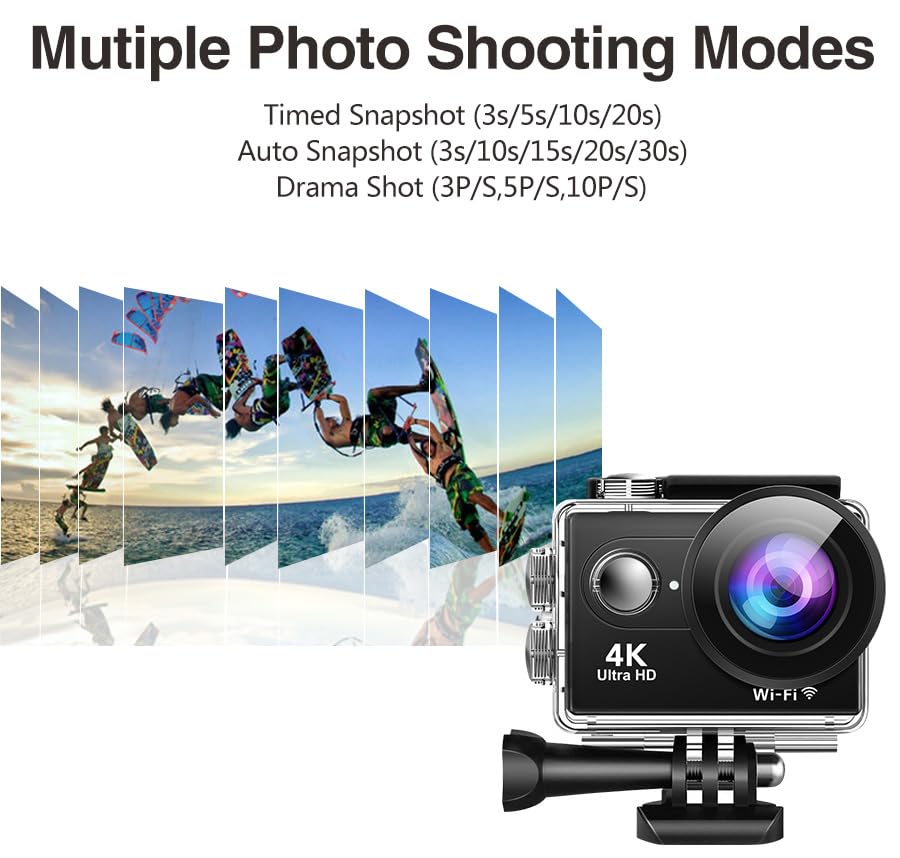
Imej: Persembahan ilustrasicasing the multiple photo shooting modes available on the AUSEK 4K Action Camera, including Timed Snapshot (3s/5s/10s/20s), Auto Snapshot (3s/10s/15s/20s/30s), and Drama Shot (3P/S, 5P/S, 10P/S), with a visual representation of burst photography.
- Video Selang Masa: Captures frames at set intervals to create a sped-up video.
- Slow-Motion Recording: Records at a higher frame rate for smooth slow-motion playback.
- Foto Letupan: Mengambil berbilang foto secara berturut-turut.
- Rakaman Gelung: Mengganti foo tertuatage when the memory card is full, ideal for dashcam use.
These modes can be selected and configured within the camera's settings menu.
6. Penyelenggaraan
6.1. Membersihkan Kamera dan Casing
- Use the provided lens cloth or a soft, lint-free cloth to clean the camera lens and screen.
- For the waterproof case, rinse with fresh water after saltwater use and allow it to air dry. Ensure the rubber seal is clean and free of sand or debris.
- Jangan gunakan bahan kimia atau pembersih kasar.
6.2. Penyimpanan
- Simpan kamera di tempat yang sejuk dan kering jauh dari cahaya matahari langsung dan suhu yang melampau.
- Remove the battery if storing for extended periods to prevent damage.
7. Penyelesaian masalah
| Masalah | Kemungkinan Punca | Penyelesaian |
|---|---|---|
| Kamera tidak dihidupkan. | Bateri lemah; Bateri tidak dipasang dengan betul. | Charge the battery; Reinsert battery correctly. |
| Tidak boleh merakam video/mengambil gambar. | Tiada kad Mikro SD; kad SD penuh; ralat kad SD. | Insert SD card; Delete files or use a new card; Format SD card (backup data first). |
| Footage is blurry/shaky. | EIS is off; Lens is dirty; Insufficient lighting. | Enable EIS in settings; Clean the lens; Ensure adequate lighting. |
| Isu sambungan Wi-Fi. | Incorrect password; Too far from camera; App not updated. | Re-enter password; Move closer to camera; Update app. |
| Audio is muffled in waterproof case. | Waterproof case inherently reduces audio clarity. | This is normal. For clear audio, use the camera without the waterproof case in dry environments. |
8. Spesifikasi
| Ciri | Perincian |
|---|---|
| Model | Rider Moto Vlogging Camera |
| Resolusi Video | 4K/60FPS, 2.7K/30FPS, 1080P/120FPS, 720P/120FPS |
| Resolusi Foto | 24 MP |
| Sudut Kanta | Sudut Lebar 170° |
| Penstabilan Imej | EIS (Electronic Image Stabilization) |
| Kedalaman Kalis Air | Sehingga 30m (dengan sarung kalis air) |
| Skrin Paparan | 2.0 Inci |
| Penyimpanan | Micro SD (up to 64GB, Class 10 or higher recommended) |
| Ketersambungan | Wi-Fi, Micro USB, Micro HD OUT |
| Alat Kawalan Jauh | Alat Jauh Wayarles 2.4G |
| Format Audio yang Disokong | AAC |
| Format Tangkapan Video | MP4, AVI |
| Teknologi Penderia Foto | CMOS |
9. Waranti dan Sokongan
9.1. Maklumat Waranti
This product comes with a 1-year warranty from the date of purchase. Please retain your purchase receipt as proof of warranty. The warranty covers manufacturing defects but does not cover damage caused by misuse, accidents, unauthorized repairs, or normal wear and tear.
9.2. Sokongan Pelanggan
For any questions, technical assistance, or warranty claims, please contact AUSEK customer support:
- Telefon Sokongan Pelanggan: 08048977694
- Pengeluar: AUSHA EXPORTS P LTD- 140, Sector 27, Gurugram-122009
You can also visit the official AUSEK webtapak untuk Soalan Lazim dan sumber tambahan.