
1. Produk Lebihview
The UNI-T UT372 is a non-contact digital laser tachometer designed for measuring the rotational speed (RPM) and count of objects. It utilizes a laser pointer and reflective tape to provide accurate and stable measurements without physical contact. This device is suitable for various industrial and scientific applications.
Ciri-ciri Utama:
- 5-digit LCD screen with RPM/count and time dual display.
- Measurement modes: MAX (Maximum), MIN (Minimum), AVG (Average), and Normal.
- Boleh laras sampling rate (0.5-255 seconds).
- Automatic power-off function (cancelable).
- Selectable laser pointer (on/off).
- Clock and time setting capabilities.
- Fungsi penyimpanan data.
- Low power consumption, allowing for approximately 40 hours of continuous operation.
- Equipped with a USB interface for data transfer (UT372 only).
- Certified with CE and UKCA standards.
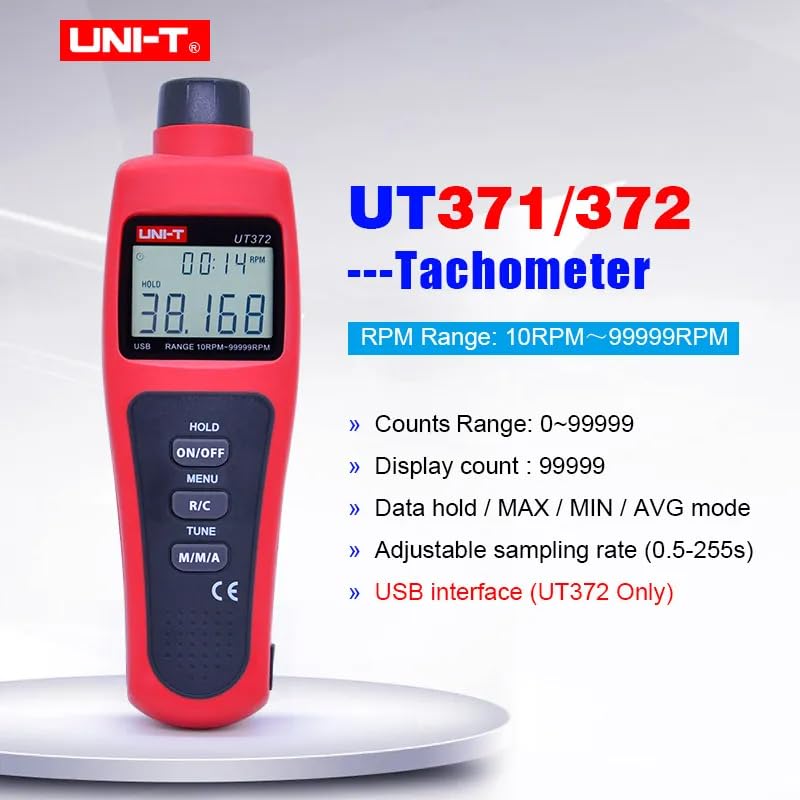
Image 1.1: The UNI-T UT372 tachometer displaying its main features and specifications.
2. Maklumat Keselamatan
Sila baca dan fahami semua arahan keselamatan sebelum mengendalikan peranti. Kegagalan untuk mengikut arahan ini boleh mengakibatkan kecederaan atau kerosakan pada peranti.
- Do not look directly into the laser beam. The laser is a Class 2 laser product.
- Jangan cuba mengubah suai atau membuka peranti. Pembaikan hendaklah hanya dilakukan oleh kakitangan yang berkelayakan.
- Pastikan petak bateri ditutup dengan selamat sebelum digunakan.
- Tanggalkan bateri jika peranti tidak akan digunakan untuk tempoh yang lama untuk mengelakkan kebocoran.
- Keep the device away from water, dust, and extreme temperatures.
3. Kandungan Pakej
Carefully unpack the box and check if all items are present and undamaged. If any item is missing or damaged, contact your supplier.
- UNI-T UT372 Digital Laser Tachometer
- Pita Reflektif
- USB Interface Cable (for UT372 only)
- PC Software CD (for UT372 only)
- Manual Pengguna Bahasa Inggeris
- Batteries (1.5V LR6 x 4)

Image 3.1: The UNI-T UT372 tachometer and its standard accessories as packaged.
4. Product Layout and Panel Introduction
Familiarize yourself with the components and controls of your UT372 tachometer.

Imej 4.1: Depan dan sisi view of the UT372 tachometer with labeled components.
- Tachometer Light Source: Emits the laser beam for measurement.
- Paparan LCD: Shows measurement readings, modes, and other indicators.
- HOLD / ON/OFF Button: Press to power on/off the device. Short press to activate/deactivate data hold.
- Butang MENU: Mengakses menu untuk pelarasan tetapan.
- R/C (RPM / Counts) Button: Toggles between RPM and Count measurement modes.
- TUNE Button: Used for adjusting settings within the menu.
- M/M/A (MAX/MIN/AVG) Button: Cycles through Maximum, Minimum, and Average measurement modes.
- USB Port (UT372 only): Untuk menyambung ke komputer bagi pemindahan data.
5. Persediaan dan Pemasangan Bateri
5.1 Pemasangan Bateri
- Cari penutup petak bateri di bahagian belakang peranti.
- Buka penutup dengan menggelongsor atau membuka skrunya.
- Insert four 1.5V LR6 (AA) batteries, ensuring correct polarity (+/-).
- Tutup penutup petak bateri dengan selamat.
5.2 Applying Reflective Tape
For accurate non-contact measurement, apply a piece of reflective tape to the rotating object whose speed or count you wish to measure. Ensure the tape is clean and securely attached.
6. Arahan Operasi
6.1 Hidupkan/Mati Kuasa
Tekan ke HOLD / ON/OFF button to turn the tachometer on or off.
6.2 RPM Measurement
- Ensure the device is in RPM measurement mode (indicated on the LCD). If not, press the R/C butang untuk beralih.
- Point the laser beam at the reflective tape on the rotating object.
- Maintain a measurement distance between 50mm and 200mm (2 to 8 inches) from the target.
- Bacaan RPM akan dipaparkan pada LCD.
- Nota: If no signal is detected within 7 seconds, the LCD will display "0.0000". If the RPM exceeds 99999, the LCD will display "OL" (Overload).

Image 6.1: Illustrates the correct distance and method for RPM measurement.
6.3 Counts Measurement
- Tekan ke R/C button to switch to Count measurement mode.
- Point the laser beam at the reflective tape on the object.
- The device will count the number of times the laser beam reflects off the tape.
6.4 Mode Selection (MAX/MIN/AVG)
Tekan ke M/M/A button repeatedly to cycle through the following display modes:
- MAKS: Memaparkan nilai maksimum yang diukur.
- MIN: Displays the minimum measured value.
- AVG: Displays the average measured value.
- Biasa: Displays the current real-time measurement.
6.5 Pegangan Data
During measurement, a short press of the HOLD / ON/OFF button will freeze the current reading on the display. Press it again to release the data hold and resume live measurement.
6.6 SampPelarasan Kadar ling
Sampling rate can be adjusted from 0.5 to 255 seconds. Refer to the detailed user manual for specific steps on how to access and change this setting via the MENU dan TUNE butang.
6.7 USB Interface (UT372 Only)
The UT372 model features a USB port for connecting to a computer. Use the provided USB cable and PC software CD to transfer measurement data for analysis and logging. Follow the instructions provided with the software for installation and operation.
7. Penyelenggaraan
- Pembersihan: Gunakan kain lembut dan kering untuk membersihkan peranti. Jangan gunakan pembersih atau pelarut yang melelas.
- Storan: Store the tachometer in a cool, dry place away from direct sunlight and extreme temperatures. Remove batteries if storing for extended periods.
- Pita Reflektif: Ensure the reflective tape is clean and free from damage for accurate readings. Replace as needed.
8. Penyelesaian masalah
- Peranti tidak dihidupkan: Periksa pemasangan bateri dan pastikan bateri tidak habis. Gantikan jika perlu.
- "0.0000" displayed during RPM measurement: Ensure the laser is correctly aimed at the reflective tape and the measurement distance is within 50-200mm. Check if the reflective tape is properly applied and clean.
- "OL" dipaparkan: The measured RPM exceeds the device's maximum range (99999 RPM).
- Bacaan tidak tepat: Verify the reflective tape is securely attached and clean. Ensure the target object is stable during measurement. Check for any obstructions in the laser path.
- Penunjuk bateri rendah: Replace batteries promptly when the low battery icon appears on the display.
9. Spesifikasi
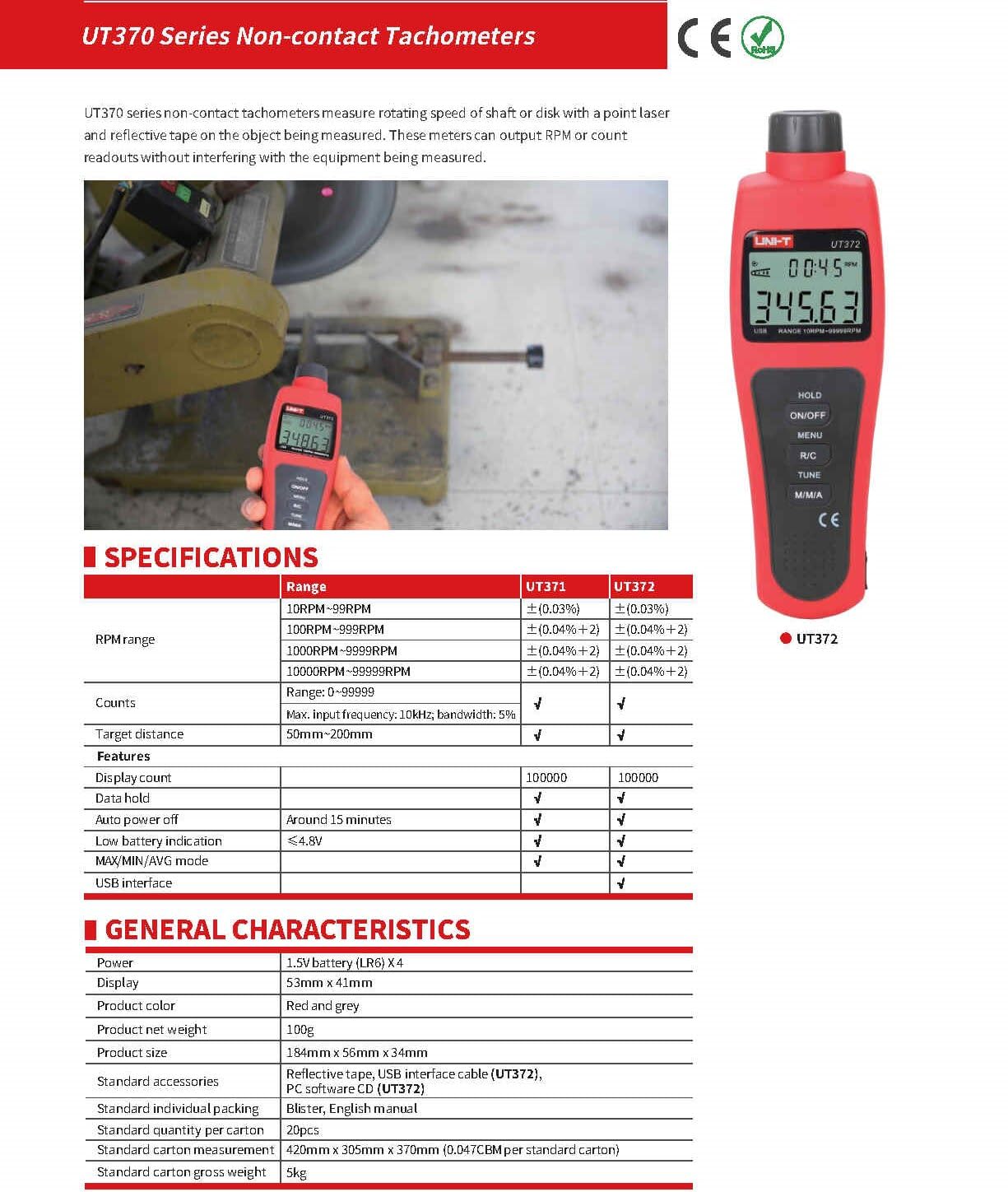
Image 9.1: Detailed specifications for the UT370 series tachometers.
| Parameter | UT372 Specification |
|---|---|
| Julat RPM | 10 RPM ~ 99999 RPM (Accuracy: ±(0.04%+2)) |
| Counts Range | 0 ~ 99999 |
| Kiraan Paparan | 99999 |
| Jarak Sasaran | 50mm ~ 200mm |
| Kekerapan Input Maks | 10kHz, bandwidth: 5% |
| kuasa | 1.5V Battery (LR6) x 4 |
| Paparan | LCD 53mm x 41mm |
| Warna Produk | Merah dan Kelabu |
| Berat Bersih Produk | 100g |
| Saiz Produk | 184mm x 56mm x 34mm |
| Auto Matikan | Around 15 minutes (cancelable) |
| Petunjuk Bateri Rendah | <4.8V |
| Antaramuka USB | ya |
| Suhu Operasi | 0°C hingga 50°C (32°F hingga 122°F) |
| Suhu Penyimpanan | -20°C hingga 60°C (-4°F hingga 140°F) |
| Kelembapan | <80% RH (tanpa pemeluwapan) |
10. Waranti dan Sokongan
UNI-T products are designed and manufactured to high quality standards. For warranty information, technical support, or service, please refer to the warranty card included with your product or contact your local UNI-T distributor or customer service center. Please have your product model number (UT372) and purchase date available when contacting support.