
1. Pengenalan
This manual provides detailed instructions for the installation, operation, and maintenance of your Tiandy TC-C32XN 2MP Fixed IP Dome Turret Camera. Please read this manual thoroughly before using the product to ensure correct usage and optimal performance. Keep this manual for future reference.
2. Maklumat Keselamatan
- Ensure the power supply matches the camera's requirements to prevent damage.
- Jangan dedahkan kamera kepada suhu, kelembapan atau persekitaran yang menghakis yang melampau.
- Avoid pointing the camera directly at strong light sources for extended periods, as this may damage the image sensor.
- Kendalikan kamera dengan berhati-hati. Jangan jatuhkan atau tertakluk kepada getaran yang kuat.
- All installation and service should be performed by qualified personnel.
- Putuskan sambungan kuasa sebelum membersihkan atau melakukan penyelenggaraan.
3. Kandungan Pakej
Sahkan bahawa semua item terdapat dalam pakej anda:
- Tiandy TC-C32XN 2MP Fixed IP Dome Turret Camera
- Penyesuai
- Skru Pemasangan dan Palam Dinding
- Panduan Mula Pantas (jika disertakan)
4. Produk Lebihview
The Tiandy TC-C32XN is a 2MP Fixed IP Dome Turret Camera designed for reliable surveillance. It features Smart IR for clear night vision up to 30 meters, a built-in microphone, and an SD card slot for local storage.

Rajah 4.1: Depan view of the Tiandy TC-C32XN camera, showing the lens and IR illuminators.
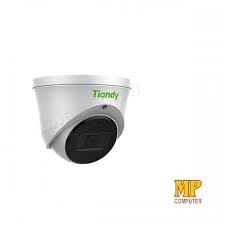
Rajah 4.2: Sisi view of the Tiandy TC-C32XN camera, highlighting its dome turret form factor.
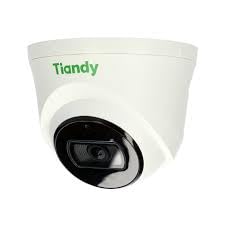
Rajah 4.3: Bersudut view of the Tiandy TC-C32XN camera, showcasing reka bentuknya yang padat.
5. Persediaan dan Pemasangan
5.1 Pemasangan
- Pilih Lokasi: Choose a suitable outdoor or indoor location (IP67 rated for outdoor use) that provides the desired viewing angle and is within reach of power and network connections. The camera is designed for protruding mounting.
- Lubang gerudi: Use the provided mounting template (if applicable) to mark and drill holes for the mounting screws.
- Selamatkan Kamera: Attach the camera base securely to the mounting surface using the provided screws and wall plugs.
5.2 Pendawaian
- Sambungan Kuasa: Connect the provided adapter to the camera's power input and then to a power outlet. The camera operates on corded electric power.
- Sambungan Rangkaian: Connect an Ethernet cable from your network router or PoE switch to the camera's Ethernet port. This camera supports Ethernet connectivity for data transmission.
5.3 Tatarajah Awal
- Hidupkan kuasa: Once wired, power on the camera.
- Penemuan Rangkaian: Use the Tiandy client software or a network scanner tool to discover the camera's IP address on your local network.
- Access Camera: Buka a web pelayar dan masukkan alamat IP kamera untuk mengaksesnya web interface. Log in using the default credentials (refer to the quick start guide for default username/password).
- Tukar Kata Laluan Lalai: For security, immediately change the default password upon first login.
- NVR Integration: If using with an NVR, add the camera to your NVR system following the NVR's instructions. This camera is compatible with all brand NVRs.
- Persediaan Apl Mudah Alih: Download the official Tiandy mobile application (available for Android and iOS) and follow the in-app instructions to add your camera for remote viewing dan kawalan.
6. Arahan Operasi
6.1 Langsung View dan Rakaman
Akses siaran langsung kamera view melalui web interface, NVR, or mobile app. Configure recording schedules and methods (continuous, motion-triggered) via the camera's settings.
6.2 Smart IR and Night Vision
The camera features Smart IR technology, which automatically adjusts the intensity of its infrared LEDs to prevent overexposure of objects close to the camera, ensuring clear images in low-light conditions up to 30 meters. It also supports 'Night Color' low light technology for enhanced visibility.
6.3 Pengesanan Gerakan dan Makluman
Configure motion detection zones and sensitivity in the camera settings. The camera supports 'Motion Only' alert types. When motion is detected, the camera can trigger recordings, send notifications to your mobile device, or activate other configured actions. It also supports advanced features like tripwire and perimeter intrusion detection.
6.4 Fungsi Audio
The built-in microphone allows for audio monitoring of the surveillance area. Audio settings can be adjusted in the camera's web interface or NVR.
6.5 Penyimpanan Kad SD
Insert a compatible SD card into the camera's SD card slot for local storage of recordings. Ensure the card is formatted correctly via the camera's settings. The camera supports SD flash memory type.
6.6 Butang Tetapkan Semula
A reset button is included for restoring the camera to its factory default settings. Consult the quick start guide for the exact location and procedure for your model.
7. Penyelenggaraan
- Pembersihan: Lap kanta dan badan kamera dengan lembut menggunakan kain lembut dan kering. Jangan gunakan bahan kimia yang keras atau pembersih yang kasar.
- Kemas kini Firmware: Regularly check the Tiandy official website for firmware updates. Keeping your camera's firmware up-to-date ensures optimal performance and security.
- Pemeriksaan Kabel: Periodically inspect all cables for signs of wear or damage, especially for outdoor installations.
8. Penyelesaian masalah
- Tiada Kuasa: Ensure the power adapter is securely connected and the power outlet is functional.
- Tiada Video: Check network cable connections. Verify the camera's IP address and network settings. Ensure the camera is properly added to your NVR or viewperisian ing.
- Kualiti Imej Lemah: Clean the camera lens. Adjust focus if applicable. Check lighting conditions and camera placement.
- Isu Sambungan Rangkaian: Verify router and network cable functionality. Restart the camera and network devices.
- Tidak Boleh Akses Web Antara muka: Ensure your computer is on the same network segment as the camera. Verify the camera's IP address. Try resetting the camera to factory defaults if necessary (this will erase all settings).
9. Spesifikasi
| Ciri | Spesifikasi |
|---|---|
| Model | TC-C32XN |
| Resolusi Pegun Berkesan | 2 MP (1920x1080) |
| Kadar Bingkai | 30 bingkai sesaat |
| Teknologi Penderia Foto | CMOS (1/2.8") |
| Julat Penglihatan Malam | 30 Metres (Smart IR) |
| Teknologi Cahaya Rendah | Warna Malam |
| Zum Optik | 3 x |
| Mikrofon Terbina dalam | ya |
| Slot Kad SD | Yes (Flash Memory Type: SD) |
| Jenis Makluman | Motion Only (supports tripwire and perimeter) |
| Teknologi Ketersambungan | Wireless (IR), Ethernet |
| Sumber Kuasa | Elektrik Bertali |
| Penilaian Perlindungan Antarabangsa | IP67 |
| Faktor Bentuk | Dome Turret |
| Jenis Pemasangan | Menonjol |
| Keserasian Sistem Pengendalian | Android, iOS |
| Dimensi Produk (L x W x H) | 50 x 50 x 70 Milimeter |
| Berat Barang | 20 Gram |
| Komponen yang Disertakan | Penyesuai |
| warna | putih |
10. Waranti dan Sokongan
For warranty information and technical support, please refer to the warranty card included with your product or visit the official Tiandy website. Contact the seller or manufacturer directly for assistance with product issues or inquiries.