
1. Persediaan dan Pemasangan
This section guides you through unboxing and assembling your Dyson V15 Detect Cordless Vacuum Cleaner, ensuring it is ready for first use.
1.1 Apa yang ada di dalam Kotak
Carefully unpack all components. The package should contain the following items:
- Dyson V15 Detect Total Clean Vacuum
- High Torque cleaner head
- Kepala pencuci Laser Slim Fluffy ™
- Alat gabungan
- Alat celah
- Hair Screw Tool
- Berus Kotoran Degil
- Mini Soft Dusting Brush
- Klip Tongkat
- Pengecas
- Stesen dok

Image: All components of the Dyson V15 Detect vacuum cleaner, including the main unit, various cleaner heads, tools, charger, and docking station, are displayed.
1.2 Pengecasan Awal
Before first use, fully charge the vacuum cleaner's battery. Connect the charger to the docking station or directly to the vacuum. A full charge typically takes approximately 4.5 hours. The LCD screen will indicate the charging status.
2. Arahan Operasi
Learn how to effectively use your Dyson V15 Detect for optimal cleaning performance across various surfaces and situations.
2.1 Mod Kuasa
The Dyson V15 Detect offers three power modes to suit different cleaning tasks:
- Mod Eko: For longer run time and lighter cleaning tasks.
- Mod Auto: Automatically adjusts suction power based on dust levels and floor type, providing a balance of power and run time.
- Mod Rangsangan: For intensive spot cleaning and stubborn dirt, offering maximum suction power.

Image: Visual representation of the three power modes: Eco, Auto, and Boost, with corresponding battery level indicators.
2.2 Illuminated Cleaner Head and Dust Sensing
The Laser Slim Fluffy™ cleaner head features an integrated laser that illuminates microscopic dust particles on hard floors, making invisible dust visible. The vacuum's Piezo sensor continuously measures dust particles, and the LCD screen displays real-time data on the size and quantity of dust collected, allowing the vacuum to automatically adjust suction power in Auto mode.

Image: The Laser Slim Fluffy cleaner head in action, showing a green laser beam highlighting dust particles on a dark floor surface.

Imej: A terperinci view of the Dyson V15 Detect's LCD screen, displaying a graph of dust particle sizes and counts, along with remaining run time.
2.3 Pembersihan Serbaguna
The V15 Detect is designed for comprehensive cleaning:
- Pembersihan Lantai: Use the High Torque cleaner head for carpets and the Laser Slim Fluffy™ cleaner head for hard floors.
- High-Up Cleaning: The lightweight design allows for easy cleaning of ceilings and high shelves.
- Mod pegang tangan: Detach the wand to transform the vacuum into a handheld unit for cleaning furniture, car interiors, and tight spaces.
- Pembuangan Bulu Binatang: The Hair Screw Tool is specifically designed to pick up long hair and pet hair without tangling.

Image: A woman demonstrates the versatility of the Dyson V15 Detect, cleaning floors, reaching high areas, and using it as a handheld vacuum for pet hair on a sofa.
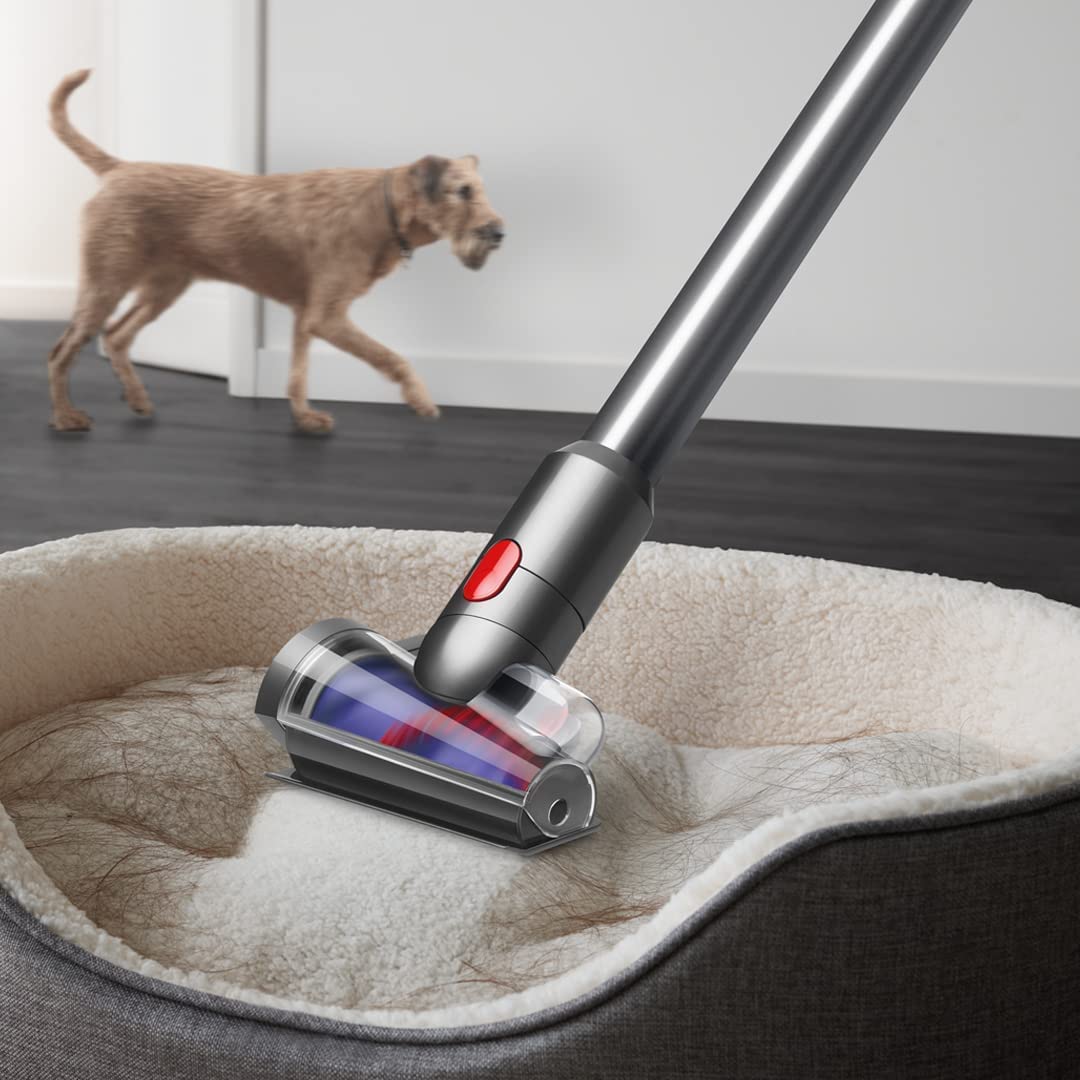
Image: The Hair Screw Tool attachment is shown effectively removing pet hair from a pet bed.
3. Penyelenggaraan
Regular maintenance ensures your Dyson V15 Detect continues to perform efficiently.
3.1 Bin Emptying
Empty the bin when the dirt reaches the MAX fill line. To empty, hold the vacuum over a waste bin and push the red lever to release the dirt. This is a no-touch process.

Image: A person demonstrates the no-touch bin emptying mechanism, releasing collected debris directly into a waste bin.
3.2 Penyelenggaraan Penapis
The vacuum features an advanced filtration system. Regularly check and clean the filter according to the instructions provided in the full manual to maintain suction power and air quality.

Imej: Satu dalaman view menggambarkan multi-stage advanced filtration system within the vacuum, designed to capture fine dust and allergens.
3.3 Cleaner Head Maintenance
The cleaner heads, especially the Laser Slim Fluffy™ head, can be washed. Ensure they are completely dry before reattaching. The High Torque cleaner head is engineered to de-tangle hair automatically during cleaning, reducing manual maintenance.

Image: A hand is shown rinsing the soft roller of the Fluffy Optic cleaner head under running water, indicating it is washable for easy maintenance.
4. Penyelesaian masalah
If you encounter issues with your Dyson V15 Detect, refer to these common troubleshooting tips.
- Tiada Kuasa/Tidak Mengecas: Ensure the charger is properly connected to a working power outlet and the vacuum. Check for any damage to the charger cable or battery.
- Sedutan Berkurangan: Check if the bin is full and needs emptying. Inspect cleaner heads and wand for blockages. Ensure the filter is clean and correctly installed.
- Kepala Pembersih Tidak Berputar: Check for obstructions in the cleaner head brush bar. Ensure the cleaner head is securely attached to the wand or main body.
- LCD Screen Errors: Refer to the full Dyson V15 Detect manual for specific error codes and their solutions.
5. Spesifikasi
| Ciri | Perincian |
|---|---|
| Jenama | Dyson |
| Nama Model | V15 Mengesan |
| Ciri Khas | Bagless, Cord-free, Handheld, LCD Screen, Motorized Tools |
| Jenis Penapis | Kartrij |
| Syor Permukaan | Semua tingkat |
| Sumber Kuasa | Dikuasakan Bateri |
| Voltage | 50V |
| Berat Barang | 2.74 Kilogram |
| Kapasiti Bin | 0.77 Liter |
| Masa Larian | Sehingga 60 minit |
| Tahap Kebisingan | 82 Desibel |
| Wattage | 240 Watt |
| Dimensi (L x W x H) | 26.5L x 25W x 107.5H Sentimeter |
| Kaedah Kawalan | Sentuh |
6. Maklumat Waranti
Your Dyson V15 Detect Cordless Vacuum Cleaner comes with a Waranti Pengilang 2 tahun. Waranti ini melindungi kecacatan pada bahan dan mutu kerja di bawah penggunaan biasa. Sila simpan bukti pembelian anda untuk tuntutan waranti.
7. Sokongan Pelanggan
For further assistance, technical support, or warranty inquiries, please contact Dyson customer service:
- Hubungan Pengilang: 1800-258-6688
- Hubungan Pengimport: Dyson Technology India Pvt. Ltd.
Anda juga boleh melawati pejabat rasmi Dyson website for more information and online support resources.