
1. Pengenalan
This manual provides comprehensive instructions for the revolt Solar Battery Module, featuring a 4.8 kWh LiFePO4 battery and a 5.5 kW off-grid solar inverter with a Wi-Fi module. This system is designed to store self-generated solar energy and provide a reliable power supply for household appliances, even during outages or at night. It supports multiple power sources including solar, grid, and generator.
2. Maklumat Keselamatan
- Pemasangan Profesional: Installation of this system involves high voltage electrical connections. It is strongly recommended that installation be performed by a qualified electrician to ensure safety and compliance with local regulations.
- Bahaya Elektrik: Do not attempt to open or service the inverter or battery module unless you are a qualified professional. Risk of electric shock.
- Pengudaraan: Ensure adequate ventilation around the units to prevent overheating.
- Keadaan Persekitaran: Operate the system within the specified temperature and humidity ranges. Avoid exposure to direct sunlight, rain, or excessive dust.
- Pengendalian Bateri: The LiFePO4 battery is maintenance-free, but proper handling during installation is crucial. Avoid short-circuiting battery terminals.
3. Kandungan Pakej
Sahkan bahawa semua komponen ada dan tidak rosak semasa membongkar:
- revolt SHI-5500 Hybrid Solar Inverter
- revolt LiFePO4 Battery Module (4.8 kWh)
- Wi-Fi Module (with antenna, cable, 2 screws)
- Kabel Rangkaian
- Connection Cable Kit (SC25-6 with eyelets)
- Manual Pengguna
4. Produk Lebihview
The revolt solar energy system combines a high-capacity LiFePO4 battery with a powerful hybrid inverter to provide efficient and reliable power management.
4.1. Komponen Utama
- LiFePO4 Battery Module: A 100 Ah, 4.8 kWh LiFePO4 battery with an integrated Battery Management System (BMS) for optimal performance and longevity. It is maintenance-free and offers low self-discharge.
- Hybrid Solar Inverter: A 5.5 kW inverter with an integrated 100 A MPPT solar charge controller. It produces a pure sine wave output suitable for sensitive household appliances and can draw power from solar panels, the grid, or a generator.
- Modul Wi-Fi: Enables remote monitoring and control of the system via a dedicated mobile application.
4.2. Ciri Sistem
- Supports solar installations up to 6,000 W.
- High efficiency, increasing solar installation output up to 98%.
- Multiple power source prioritization options.
- Comprehensive protection against short-circuits, overloads, and overheating.
- Remote control and detailed parameter evaluation via a free mobile app.

Rajah 1: Secara keseluruhan view of the revolt solar battery module and hybrid inverter.

Figure 2: revolt solar battery module display highlighting the Intelligent BMS System.
5. Persediaan
Penting: Installation by a qualified electrician is strongly recommended.
5.1. Pemasangan
Mount the inverter and battery module in a dry, well-ventilated area, away from direct sunlight and heat sources. Ensure sufficient clearance around the units for airflow.
5.2. Sambungan Elektrik
- Sambungan Bateri: Connect the LiFePO4 battery module to the inverter using the provided connection cable kit. Ensure correct polarity.
- Sambungan Panel Suria: Connect your solar panel array to the inverter's MPPT input. Verify that the solar panel voltage and current are within the inverter's specifications.
- AC Input (Grid/Generator): Connect the inverter to your main electrical grid or a generator using the network cable.
- AC Output (Loads): Connect your household appliances or distribution panel to the inverter's AC output.
5.3. Sambungan Modul Wi-Fi
Attach the Wi-Fi module to the designated port on the inverter. Ensure the antenna is securely connected for optimal signal reception.
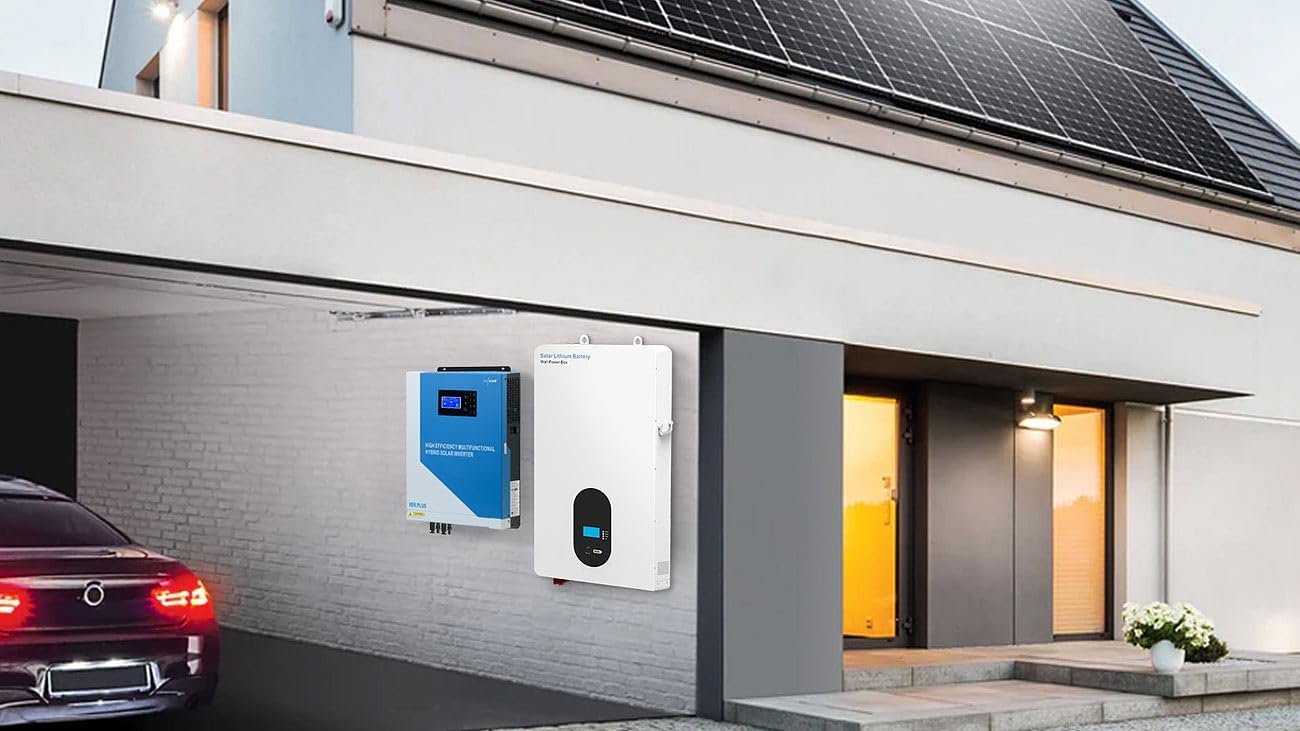
Gambar 3: Cthample installation of the revolt solar battery module and hybrid inverter.
6. Arahan Operasi
6.1. Menghidupkan/Mematikan
- Untuk Menghidupkan: Ensure all connections are secure. Switch on the battery module, then the inverter. The display will illuminate.
- Untuk Mematikan: Disconnect AC input (grid/generator) and solar input first. Then switch off the inverter, followed by the battery module.
6.2. Local Display and Menu Navigation
The inverter features a display and control buttons (MENU, ENTER, DOWN, ESC) for local configuration and monitoring. Refer to the detailed user manual for specific menu structures and parameter settings.

Figure 4: Battery module display.

Figure 5: Hybrid inverter display and controls.
6.3. Mobile App Control and Monitoring
Download the free mobile application to your smartphone or tablet. Connect the app to the inverter via the Wi-Fi module to:
- Monitor real-time system status, including power generation, consumption, and battery charge level.
- Adjust various parameters such as charging current, input/output voltage, output frequency, battery type, and timer settings.
- Set priority power sources (e.g., solar first, then battery, then grid).
- Terima makluman dan pemberitahuan.

Figure 6: System connection diagram showing power flow from various sources to household appliances.
7. Penyelenggaraan
The revolt solar battery module and hybrid inverter system is designed for minimal maintenance.
- Bateri LiFePO4: The integrated LiFePO4 battery is absolutely maintenance-free due to its advanced BMS technology.
- Pemeriksaan biasa: Periodically inspect all electrical connections for tightness and signs of wear. Ensure ventilation openings on both units are clear of dust and debris.
- Pembersihan: Clean the exterior of the units with a dry, soft cloth. Do not use liquid cleaners or solvents.
8. Penyelesaian masalah
If the system is not operating as expected, consider the following basic troubleshooting steps:
- Tiada Output Kuasa: Check all input power sources (solar, grid, battery) and ensure they are connected and active. Verify that the inverter is powered on.
- Kod Ralat pada Paparan: Refer to the detailed user manual for explanations of specific error codes displayed on the inverter.
- Isu Kesambungan Wi-Fi: Ensure the Wi-Fi module is correctly installed and its antenna is properly positioned. Check your mobile device's Wi-Fi settings and ensure it's connected to the inverter's network or has internet access if monitoring remotely.
- Perlindungan Lebihan: The inverter has overload protection. If an overload occurs, reduce the connected load and restart the inverter.
- Perlindungan Terlalu Panas: Ensure adequate ventilation. If the unit overheats, it will shut down automatically. Allow it to cool before restarting.
For persistent issues, contact a qualified electrician or customer support.
9. Spesifikasi
| Nombor Model | ZX3426-944 |
| Pengeluar | pemberontakan |
| Kuasa Penyongsang | 5,500 W |
| Jenis Bateri | LiFePO4 |
| Kapasiti Bateri | 4.8 kWh (100 Ah) |
| Keluaran Nominal Voltage | 48 V DC |
| MPPT Charge Controller Current | Sehingga 100 A |
| MPPT Jldtage Julat | 120-450VDC |
| Litar Terbuka Maks Voltage (VOC) | 500 V DC |
| Input AC Voltage | 90-280 V AC |
| Suhu Operasi | -10 hingga +50 °C |
| Suhu Penyimpanan | -15 hingga +60 °C |
| Kelembapan | 5 hingga 95% RH (tidak pemeluwapan) |
| Dimensi Penyongsang | 44 x 30 x 10 cm |
| Berat penyongsang | 9.7 kg |
| Total Item Weight (approx.) | 47 kg |
| Kecekapan | Sehingga 98% |
| Bentuk Gelombang Output | Gelombang Sinus Tulen |
10. Waranti dan Sokongan
For warranty information, please refer to the terms and conditions provided at the time of purchase or contact your retailer. For technical support, troubleshooting assistance beyond this manual, or spare parts inquiries, please contact the revolt customer service or your authorized dealer.