
1. Produk Lebihview
The Mcdodo USB C Cable CA-1100 is a 4ft (1.2m) Type-C to Type-C cable designed for fast charging and data transfer. It features a digital wattage meter to display real-time charging power and is constructed with a durable nylon braided cord.
Ciri-ciri Utama:
- 100W Power Delivery (PD) fast charging support.
- Integrated LED digital display for real-time wattage pemantauan.
- Durable nylon braided exterior.
- Up to 480Mbps data transfer speed.

Figure 1: Mcdodo USB C Cable CA-1100 with digital display.
2. Arahan Persediaan
Using the Mcdodo USB C Cable CA-1100 is straightforward. No complex setup is required.
- Sambungkan ke Sumber Kuasa: Insert one end of the USB-C cable into a compatible USB-C power adapter or port on a computer/power bank. Ensure the power source supports Power Delivery (PD) for optimal fast charging.
- Sambung ke Peranti: Insert the other end of the USB-C cable into the USB-C charging port of your compatible device (e.g., smartphone, tablet, laptop, gaming console).
- Sahkan Sambungan: Once connected, the digital display on the cable connector will illuminate, showing the real-time charging wattage.

Figure 2: Cable connected to a device and power source, displaying wattage.
3. Arahan Operasi
The Mcdodo USB C Cable CA-1100 is designed for both charging and data transfer.
3.1 Mengecas Peranti Anda
Connect the cable as described in the Setup section. The LED display will show the current charging wattage. This allows you to confirm if your device is fast charging (higher wattage) or trickle charging (lower wattagdan).

Figure 3: LED display indicating fast charging (left) and trickle charging (right).
The displayed wattage may vary depending on the connected device's battery level, charging protocol, and the power adapter's output capabilities. For example, a device with a low battery will typically draw higher wattage for fast charging, while a nearly full battery will draw lower wattage for trickle charging.

Gambar 4: Cthample of charging speed comparison.
3.2 Pemindahan Data
To transfer data, connect the cable between two compatible USB-C devices (e.g., a smartphone and a laptop). The cable supports data transfer speeds up to 480Mbps (USB 2.0 standard).

Figure 5: Data transfer between devices.
4. Penyelenggaraan
To ensure the longevity and optimal performance of your Mcdodo USB C Cable CA-1100, follow these maintenance guidelines:
- Storan: Store the cable in a cool, dry place away from direct sunlight and extreme temperatures. Avoid tightly coiling or bending the cable at sharp angles.
- Pembersihan: Gunakan kain lembut dan kering untuk mengelap kabel dan penyambung dengan lembut. Jangan gunakan pembersih cecair atau bahan kasar.
- Pengendalian: Always grasp the connector head when plugging or unplugging the cable. Avoid pulling directly on the cable itself, as this can damage the internal wires.
- Pemeriksaan: Periksa kabel secara berkala untuk sebarang tanda haus, koyak atau kerosakan pada penyambung. Hentikan penggunaan jika terdapat sebarang kerosakan.
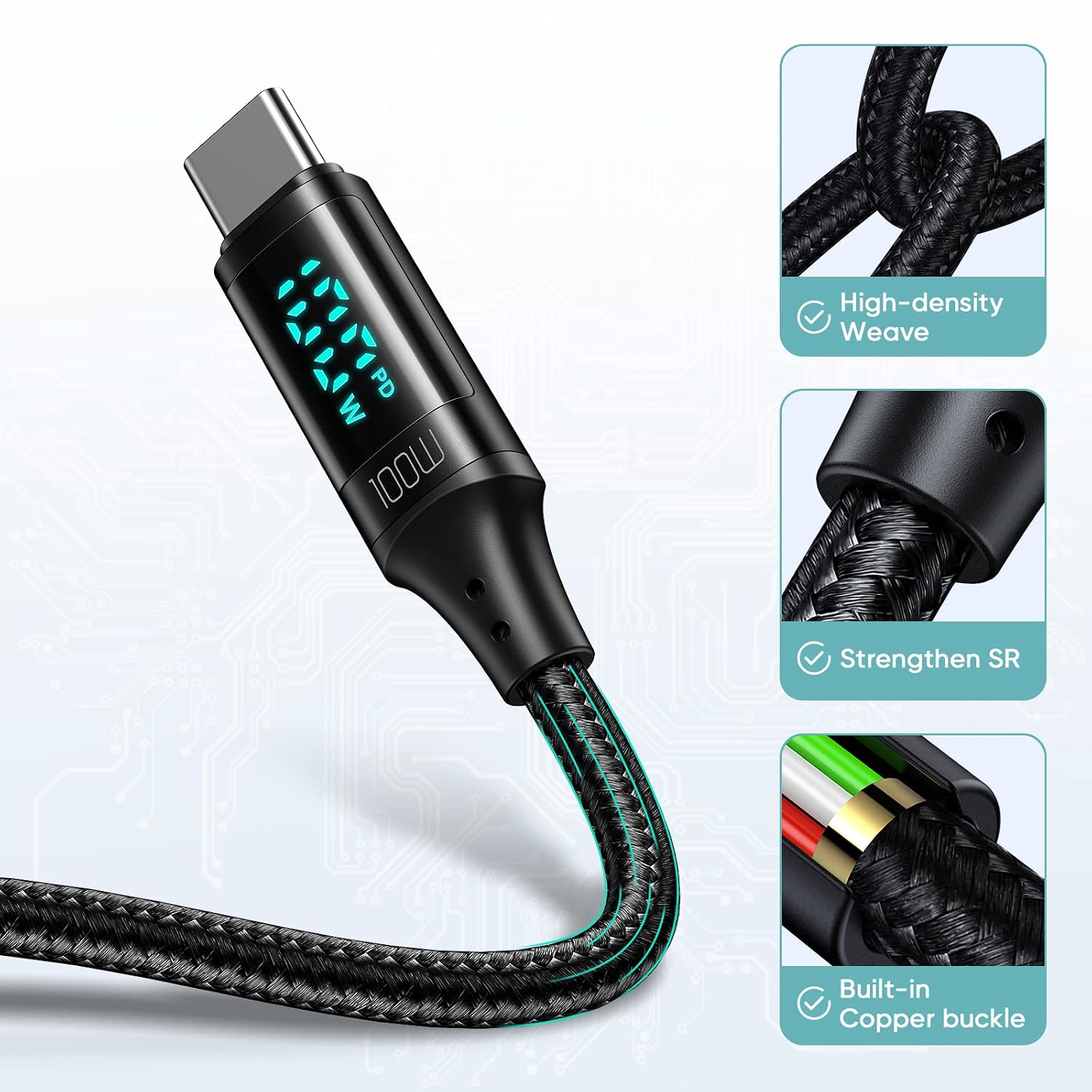
Figure 6: Cable construction for durability.
5. Penyelesaian masalah
If you encounter issues with your Mcdodo USB C Cable CA-1100, refer to the following common problems and solutions:
| Masalah | Kemungkinan Punca | Penyelesaian |
|---|---|---|
| Peranti tidak dicas. | Loose connection, incompatible power adapter, faulty device port. | Ensure both ends of the cable are securely connected. Try a different power adapter or device port. Verify the power adapter supports your device's charging requirements. |
| Kelajuan pengecasan perlahan. | Power adapter does not support fast charging, device not compatible with PD, high background app usage. | Use a power adapter that supports 100W Power Delivery. Close unnecessary background applications on your device. Ensure your device supports fast charging protocols. |
| Paparan digital tidak berfungsi. | Cable not connected, display malfunction. | Ensure the cable is properly connected to both a power source and a device. If the issue persists, the display may be faulty. |
| Pemindahan data tidak berfungsi. | Incorrect connection, device settings, incompatible ports. | Ensure both devices are properly connected and configured for data transfer. Check device settings for USB connection mode (e.g., File Transfer). |
6. Spesifikasi
Detailed specifications for the Mcdodo USB C Cable CA-1100:
- Jenama: mcdodo
- Nama Model: CA-1100
- Jenis Penyambung: USB Jenis C (Jantan-ke-Jantan)
- Jenis Kabel: USB
- Panjang: 4 kaki (kira-kira 1.2 meter)
- Wat Maksimumtage: 100W
- Arus Maksimum: 5 Amps
- Vol Maksimumtage: 20 Volt
- Kadar Pemindahan Data: 0.48 Gigabits Per Second (480 Mbps)
- Bahan Luar: Jalinan Nilon
- Ciri Khas: LED Digital Wattage Display, Fast Charging
- Peranti Serasi:
- telefon: iPhone 15/15Pro/15Plus/15ProMax, Samsung Galaxy S23/S22/S21/S20 Series, Note20/10/9, A90/A80/A72/A60/A51/A50/A12/A11, Google Pixel series, Motorola Moto Z/G series, LG G/V series.
- Tablet: iPad Pro 12.9" (2018/2020), iPad Pro 11" (2018/2020), iPad Air 10.9".
- Komputer riba: Apple MacBook (2015-2023), Huawei Matebook, Xiaomi Air/Pro, Lenovo Yoga/ThinkPad, Microsoft Surface Pro/Go, Dell XPS, HP Elitebook.
- Konsol Permainan: Nintendo Switch.

Figure 7: Wide compatibility with Type-C interface devices.
7. Video Produk
Watch the official product video for a visual guide on the Mcdodo USB C Cable's features and usage.
Video 1: PD 100W USB C to USB C Cable overview. This video demonstrates the cable's fast charging capabilities and digital display in action.
8. Waranti dan Sokongan
For warranty information or technical support, please refer to the product packaging or contact Mcdodo customer service directly. Contact details can typically be found on the manufacturer's official webtapak atau melalui peruncit anda.