
1. Produk Lebihview
The EAGLEND EH01 USB Headset with Microphone is designed for clear communication and comfortable use with PCs and laptops. It features an on-ear design, a noise-cancelling microphone, and versatile connectivity options.

Figure 1: EAGLEND EH01 USB Headset with Microphone
This headset is engineered for all-day comfort, featuring soft protein memory foam earpads made from high-level breathable materials. The adjustable headband ensures a secure fit for various head sizes. The unidirectional boom microphone rotates 270 degrees, allowing for placement on either the left or right ear, and is designed to pick up your voice while minimizing background noise.
Video 1: Selesaiview of the EAGLEND EH01 USB Headset with Microphone features and design.
2. Apa yang ada di dalam Kotak
Selepas membuka bungkusan, pastikan semua item berikut ada:
- EAGLEND EH01 USB Headset with Microphone
- USB Cable with In-line Control
- 3.5mm Audio Cable (detachable from in-line control)

Rajah 2: Kandungan Pakej
3. Persediaan dan Pemasangan
The EH01 headset offers dual connectivity for broad compatibility.
3.1. USB Connection (for PC/Mac/Laptop)
- Ensure the 3.5mm audio cable is connected to the in-line control unit.
- Plug the USB connector of the in-line control unit into an available USB port on your computer.
- Sistem pengendalian anda sepatutnya mengesan dan memasang pemacu yang diperlukan secara automatik.
- Verify the headset is selected as the default audio input and output device in your computer's sound settings.

Figure 3: Dual Connection Options
3.2. 3.5mm Jack Connection (for Tablets/Smartphones/Gaming Consoles)
- Detach the 3.5mm audio cable from the USB in-line control unit.
- Plug the 3.5mm jack directly into the audio port of your device (e.g., tablet, smartphone, PS5, PS4, Xbox One).
- Adjust volume and microphone settings directly on your device, as the in-line controls are active only with the USB connection.
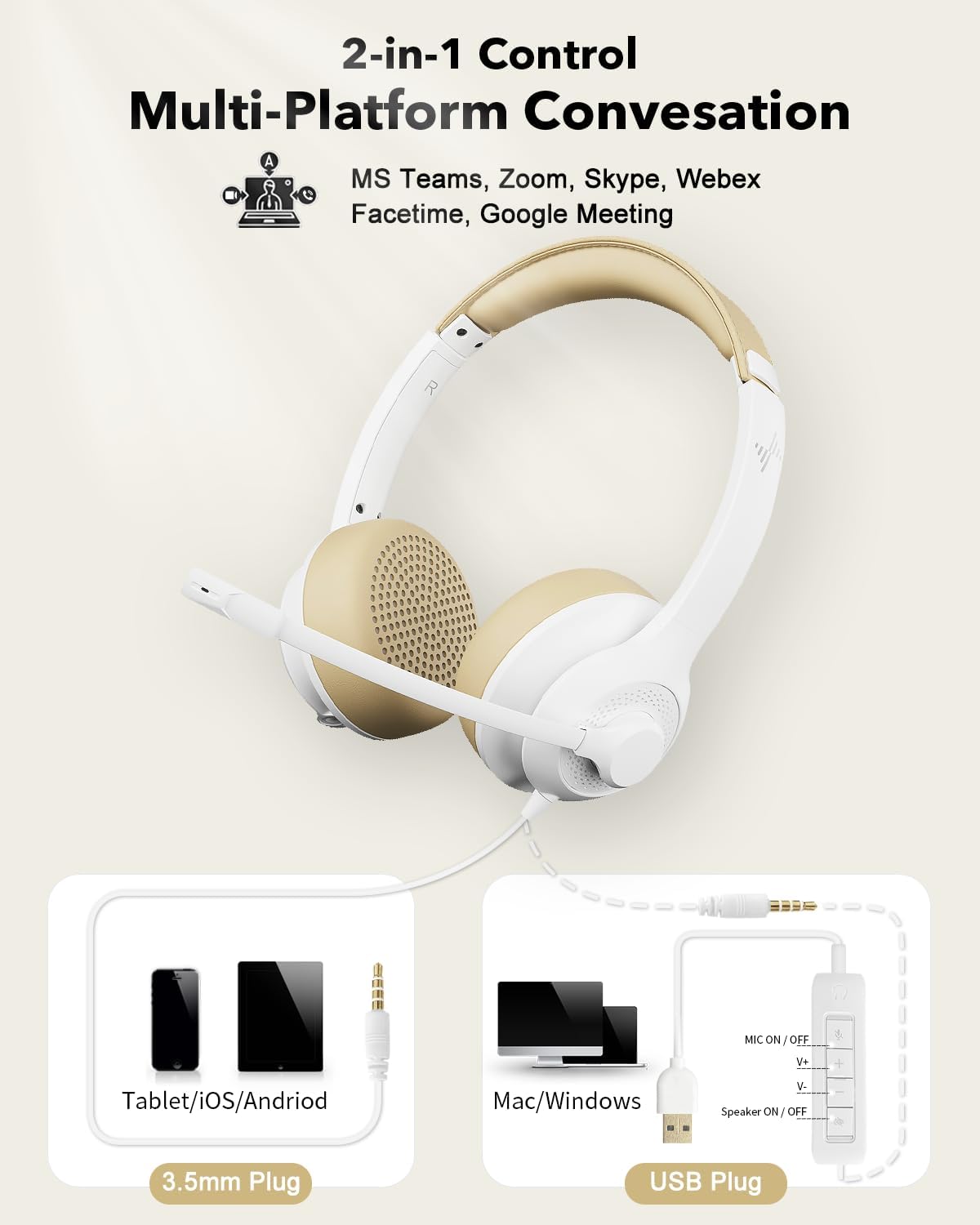
Figure 4: USB and 3.5mm Connection
4. Arahan Operasi
4.1. Penggunaan Mikrofon
- Melaraskan Mikrofon: The unidirectional boom microphone can be rotated 270° to position it on either your left or right ear. Adjust its position so it is close to your mouth for optimal voice pickup.
- Pembatalan Bunyi: The microphone features noise-cancelling technology to reduce ambient background sounds, ensuring your voice is heard clearly during calls.

Figure 5: Noise-Cancelling Microphone in action

Figure 6: Flexible Microphone Adjustment
4.2. In-line Control (USB Connection Only)
The in-line control unit provides convenient access to audio functions when connected via USB:
- Mic ON/OFF Button: Press to mute or unmute the microphone. An indicator light will show the microphone status.
- Volume Up (V+): Tekan untuk meningkatkan kelantangan pembesar suara.
- Volume Down (V-): Tekan untuk mengurangkan kelantangan pembesar suara.
- Speaker ON/OFF Button: Press to mute or unmute the headset speakers.
- Lampu Petunjuk Kuasa: Illuminates to indicate the headset is powered and connected.

Figure 7: In-line Control Unit
5. Penyelenggaraan
Penjagaan yang betul akan memanjangkan hayat dan prestasi set kepala anda.
- Pembersihan: Gunakan kain lembut dan kering untuk membersihkan set kepala. Jangan gunakan pembersih cecair atau aerosol.
- Pad telinga: The soft protein memory foam earpads are designed for breathability. Avoid exposing them to excessive moisture or harsh chemicals.
- Storan: When not in use, store the headset in a clean, dry place, away from extreme temperatures and direct sunlight.
- Penjagaan Kabel: Elakkan selekoh tajam atau tarikan kabel yang berlebihan untuk mengelakkan kerosakan.

Figure 8: Breathable Earpads for Comfort and Hygiene
6. Penyelesaian masalah
Jika anda menghadapi masalah dengan alat dengar anda, rujuk penyelesaian biasa berikut:
| Masalah | Kemungkinan Punca | Penyelesaian |
|---|---|---|
| Tiada bunyi dari set kepala |
|
|
| Mikrofon tidak berfungsi |
|
|
| Kualiti bunyi kurang baik |
|
|
7. Spesifikasi
| Ciri | Perincian |
|---|---|
| Nama Model | EH01 |
| Teknologi Ketersambungan | USB, AUX (3.5mm Jack) |
| Jack Fon Kepala | Jack 3.5 mm |
| Penempatan Telinga | Di Telinga |
| Faktor Bentuk | Di Telinga |
| Kawalan Bunyi | Pembatalan Bunyi Aktif (Mikrofon) |
| Jenis Kawalan | Volume Control, Inline Remote |
| Mikrofon | Unidirectional Boom, 270° Rotatable |
| Jenis Pemacu Audio | Pemandu Dinamik |
| Peranti Serasi | PC, Mac, Chromebook, Tablet, Smartphones, MP3 Players, PS5, PS4, Xbox One, Gaming Systems |
| bahan | plastik |
| warna | putih |
| Berat Barang | 9.6 auns |
| Dimensi Pakej | 7.44 x 6.18 x 2.13 inci |
8. Waranti dan Sokongan
The EAGLEND EH01 USB Headset comes with a Waranti 24 bulan provided by EAGLEND.
For technical support, warranty claims, or further assistance, please refer to the contact information provided on the product packaging or the official EAGLEND webtapak.