1. Pengenalan
Thank you for choosing the LIFETIME GD-BL 44-Inch Ergonomic Z-Shaped Gaming Desk. This manual provides essential information for the safe assembly, operation, and maintenance of your new desk. Please read it thoroughly before use and retain it for future reference.
2. Maklumat Keselamatan
- Had Berat: Do not exceed the maximum weight recommendation of 150 pounds (68 kg) on the desktop. Overloading can cause instability and damage.
- Perhimpunan: Follow assembly instructions carefully to ensure stability and safety. Ensure all screws and fasteners are tightened securely before use.
- penempatan: Place the desk on a flat, stable surface. Avoid placing it in areas with high humidity or direct sunlight to prevent material degradation.
- Kanak-kanak: Jauhkan bahagian kecil dan bahan pembungkus daripada kanak-kanak semasa pemasangan untuk mengelakkan bahaya tercekik.
- Kabel: Utilize the wire management features to prevent tripping hazards and protect cables from damage.
3. Kandungan Pakej
Sahkan bahawa semua komponen hadir sebelum memulakan pemasangan. Jika mana-mana bahagian yang hilang atau rosak, sila hubungi sokongan pelanggan.
- Desktop (Carbon Fiber Surface)
- Z-Shaped Leg Frames (Alloy Steel)
- Crossbars/Support Beams
- Kaki Meratakan Laras
- Pemegang Cawan
- Cangkuk Fon Kepala
- Dulang Pengurusan Kabel
- Perkakasan Pemasangan (skru, sepana Allen, dll.)
- Manual Arahan
4. Persediaan dan Pemasangan
The desk requires assembly and includes all necessary tools. Follow the provided instructions for a quick setup in approximately 30 minutes.
- Buka Pembungkusan Komponen: Tanggalkan semua bahagian dari pembungkusan dengan berhati-hati dan letakkannya di atas permukaan yang lembut dan bersih untuk mengelakkan calar.
- Pasang Bingkai Kaki: Secure the Z-shaped leg frames to the underside of the desktop using the provided screws and Allen wrench. Ensure the frames are oriented correctly.
- Pasang Palang Palang: Attach any reinforcing crossbars or support beams between the leg frames as indicated in the detailed assembly diagram.
- Laraskan Kaki Meratakan: Screw the adjustable leveling feet into the bottom of the leg frames. Adjust them to ensure the desk is stable and level on your floor.
- Lampirkan Aksesori: Install the cup holder, headphone hook, and cable management tray to the designated locations on the desk.
Video: Perhimpunan selesaiview for a similar gaming desk. This video demonstrates the general process of assembling a desk with a metal frame and desktop, including attaching legs and ensuring stability. Note that specific steps may vary slightly from your model.

Imej: Visual representation of the desk dimensions, highlighting the 44-inch width, 23.5-inch depth, and 29.5-inch height. This helps in planning your space for the desk.
5. Operasi dan Ciri
Your LIFETIME GD-BL gaming desk is designed for optimal functionality and comfort.
- Spacious Carbon Fiber Surface: The 44" x 23.5" desktop provides ample space for multiple monitors, keyboards, mice, and other gaming or work essentials. The carbon fiber texture is stylish and durable.
- Ergonomic Z-Shaped Design: The unique Z-shaped alloy steel legs offer superior stability and a modern aesthetic, minimizing wobble during intense use.
- Integrated Cup Holder: A convenient, expandable cup holder is attached to the side of the desk, keeping your beverages secure and preventing spills on the desktop.
- Cangkuk Fon Kepala: A dedicated hook allows you to hang your gaming headset or headphones, keeping them within reach and off the desktop.
- Pengurusan wayar: The integrated cable management tray helps organize and conceal power cords and peripheral cables, maintaining a clean and clutter-free workspace.
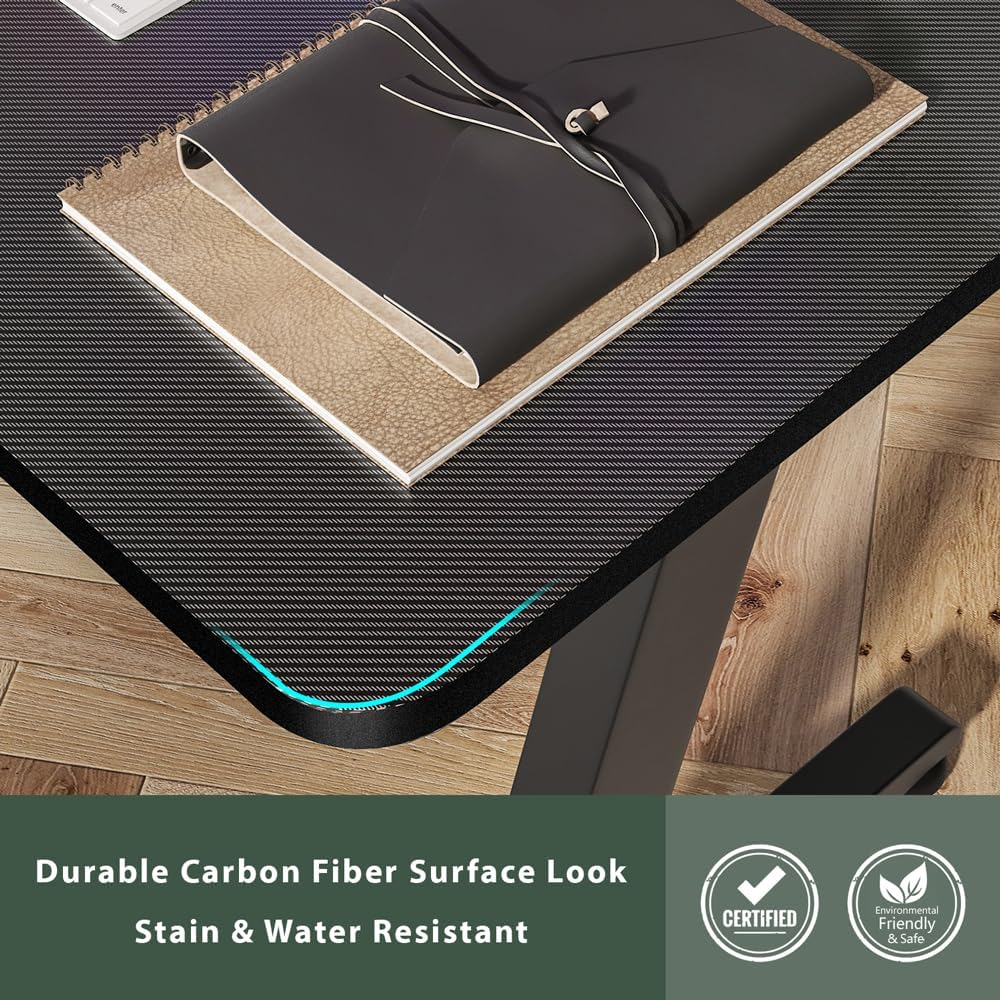
Imej: A terperinci view of the carbon fiber surface, showcasing its texture and finish. This surface is designed for durability and a modern aesthetic.

Imej: The desk set up in a room, demonstrating the practical use of the integrated cup holder and the overall spaciousness for a gaming setup.
6. Penyelenggaraan
To ensure the longevity and appearance of your desk, follow these maintenance guidelines:
- Pembersihan: Lap desktop dan bingkai dengan lembut, damp kain. Elakkan pembersih yang melelas atau bahan kimia keras yang boleh merosakkan kemasan.
- Tumpahan: Clean up spills immediately to prevent staining, especially on the carbon fiber surface.
- Pengikat: Periksa semua skru dan pengikat secara berkala untuk memastikan ia kekal ketat. Ketatkan semula jika perlu untuk mengekalkan kestabilan.
- Elakkan haba: Do not place hot items directly on the desktop without a protective coaster.
7. Penyelesaian masalah
Jika anda menghadapi sebarang masalah dengan meja anda, rujuk penyelesaian biasa berikut:
- Meja goyah:
- Pastikan semua skru pemasangan diketatkan dengan selamat.
- Adjust the leveling feet on the bottom of the legs to compensate for uneven floor surfaces.
- Bahagian yang hilang:
- Double-check all packaging materials. Small parts may be tucked away.
- Refer to the package contents list. If parts are genuinely missing, contact LIFETIME customer support.
- Calar Permukaan:
- While the carbon fiber surface is durable, deep scratches may occur from sharp objects. Use a desk mat to protect the surface.
8. Spesifikasi
| Jenama | SEUMUR HIDUP |
| Nombor Model | GD-BL |
| Dimensi Item (L x W x H) | 44 x 23.5 x 29.5 inci |
| Ketebalan Atas Meja | 1.2 Inci |
| Cadangan Berat Maksimum | 150 paun (68 kg) |
| Jenis Bahan Atas | Serat Karbon |
| Bahan Asas | Keluli Aloi |
| warna | Hitam |
| Masa Perhimpunan (Anggaran) | 30 minit |
| Termasuk Semua Alat Perhimpunan | ya |
9. Waranti dan Sokongan
LIFETIME is committed to providing high-quality products. For warranty information, product support, or to report missing/damaged parts, please visit the official LIFETIME webtapak atau hubungi perkhidmatan pelanggan mereka secara langsung. Simpan resit pembelian anda untuk tuntutan waranti.
For additional information and support, please visit the LIFETIME Store on Amazon.