
1. Maklumat Keselamatan
- This product is intended for children aged 3 to 12 years. Adult supervision is recommended during use.
- Do not disassemble or attempt to repair the camera. Contact support if issues arise.
- Keep the camera away from water and excessive moisture to prevent damage.
- Gunakan hanya kabel USB yang disediakan untuk mengecas.
- The thermal print paper is a consumable item. Ensure replacements are compatible.
2. Kandungan Pakej
Sahkan bahawa semua item terdapat dalam pakej anda:
- 1 x GREENKINDER X6 Kids Instant Print Camera
- 1 x Kad MicroSD 32GB
- 3 x Gulungan Kertas Cetakan Termal
- 1 x Lanyard
- 1 x Kabel Pengecasan USB-C
- 1 x Cartoon Sticker Set
- 5 x Color Pens
- 1 x Manual Pengguna
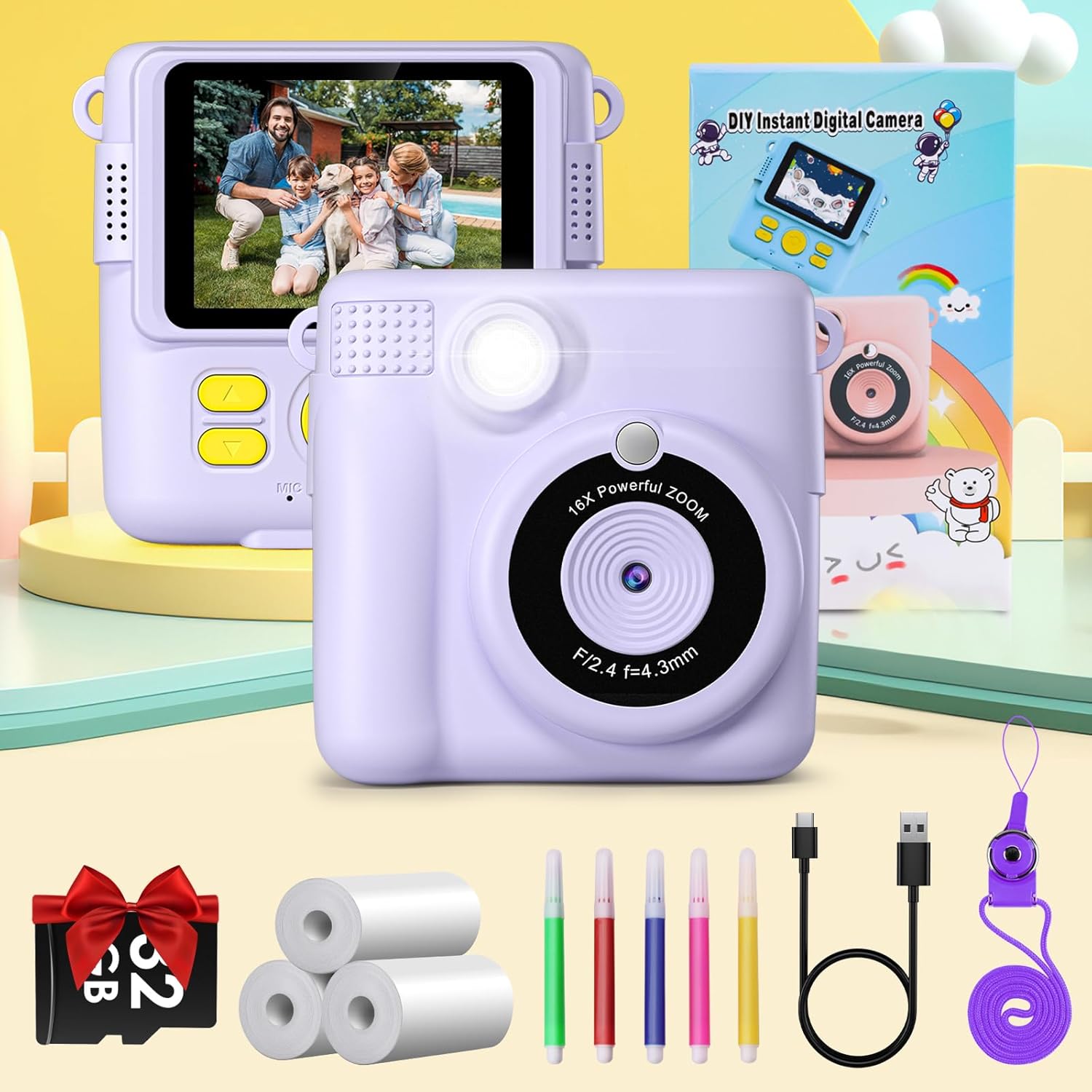
Figure 2.1: Complete package contents of the GREENKINDER X6 camera.
3. Produk Lebihview
Biasakan diri anda dengan komponen kamera:

Rajah 3.1: Depan dan belakang views of the GREENKINDER X6 camera with key features highlighted.
- Kanta: Main camera lens for capturing photos and videos.
- kilat: Menyediakan pencahayaan dalam keadaan cahaya malap.
- Skrin LCD 2.4 inci: Untuk viewfoto, video dan menu navigasi.
- Butang Kawalan: Power, Shutter, Navigation (Up/Down/Left/Right), OK/Menu.
- Slot Output Cetak: Where instant prints emerge.
- Slot Kad MicroSD: For memory expansion (32GB card included).
- Port USB-C: Untuk pengecasan dan pemindahan data.
4. Persediaan
4.1 Mengecas Bateri
The camera is equipped with a 1000mAh lithium-polymer battery. Before first use, fully charge the camera.
- Sambungkan kabel USB-C yang disediakan ke port USB-C kamera.
- Sambungkan hujung kabel yang satu lagi ke penyesuai kuasa USB (tidak disertakan) atau port USB komputer.
- Lampu penunjuk pengecasan akan menyala. Ia akan padam atau bertukar warna apabila pengecasan selesai.
4.2 Memasukkan Kad MicroSD
A 32GB MicroSD card is included for storing photos and videos.
- Cari slot kad MicroSD di sisi kamera.
- Masukkan kad MicroSD dengan sesentuh emas menghadap ke bawah sehingga ia klik pada tempatnya.
- Untuk mengalih keluar, tolak kad masuk perlahan-lahan sehingga ia mengklik, kemudian lepaskan dan ia akan keluar.
4.3 Memuatkan Kertas Cetak
The camera uses thermal print paper for instant black and white prints. Three rolls are included.
- Gently push the part of the camera with the lens upwards to open the paper compartment.
- Insert a roll of thermal print paper into the compartment, ensuring the paper feeds out from the top.
- Close the camera by pushing the two parts back together until they click securely.

Figure 4.1: Steps for loading thermal print paper.
5. Arahan Operasi
5.1 Hidupkan/Mati Kuasa
- Untuk menghidupkan kuasa, tekan dan tahan butang Kuasa selama beberapa saat.
- Untuk mematikan kuasa, tekan dan tahan butang Kuasa sekali lagi sehingga skrin dimatikan.
5.2 Basic Photography and Instant Printing
The camera allows for instant black and white prints using thermal technology.
- Hidupkan kamera.
- Bingkaikan gambar anda menggunakan skrin LCD 2.4 inci.
- Tekan butang Pengatup untuk mengambil foto.
- The camera will automatically print the photo in black and white from the output slot.
5.3 Rakaman Video
Record moments in 1080P resolution.
- Navigate to video mode using the menu buttons.
- Tekan butang Pengatup untuk mula merakam.
- Tekan butang Shutter sekali lagi untuk menghentikan rakaman.

Figure 5.1: Demonstrating 1080P video, time-lapse, and burst shooting features.
5.4 Ciri Istimewa
- Zum Digital 16x: Use the navigation buttons to zoom in or out before taking a photo.
- kilat: Activate or deactivate the flash for improved lighting in dark environments.
- Masa berlalu: Set the camera to take photos automatically at intervals of 3, 5, or 10 seconds.
- Menembak Menembak: Capture multiple photos in quick succession by holding down the shutter button.
- Permainan: The camera includes built-in puzzle games for entertainment. Access them via the menu.
- Filters and Frames: Apply various fun filters and decorative frames to your photos before printing or saving.

Figure 5.2: 16x Zoom and Flash functionality.

Gambar 5.3: Cthamples of different frames and filters.
5.5 DIY Coloring
After printing black and white photos, use the included color pens to personalize them.

Figure 5.4: DIY coloring of instant prints.
6. Penyelenggaraan
6.1 Membersihkan Kamera
- Gunakan kain lembut dan kering untuk membersihkan badan kamera.
- For the lens, use a specialized lens cleaning cloth.
- Jangan gunakan pembersih cecair atau bahan yang melelas.
6.2 Storing the Camera
- Simpan kamera di tempat yang sejuk dan kering, jauh daripada cahaya matahari langsung.
- Remove the MicroSD card if storing for extended periods.
6.3 Penjagaan Bateri
- Charge the battery regularly, even if the camera is not in frequent use, to maintain battery health.
- Elakkan menyahcas sepenuhnya bateri dengan kerap.
6.4 Replacing Print Paper
When the print paper runs out, you can purchase compatible thermal print paper. Cari untuk ASIN: B0C52Q298V untuk isi semula.
7. Penyelesaian masalah
| Masalah | Kemungkinan Punca | Penyelesaian |
|---|---|---|
| Kamera tidak dihidupkan. | Bateri lemah. | Charge the camera fully using the provided USB-C cable. |
| Tidak boleh mengambil gambar/video. | No MicroSD card inserted or card is full. | Insert a MicroSD card or delete old files untuk mengosongkan ruang. |
| Prints are blank or faded. | Print paper is incorrectly loaded or has run out. | Check paper orientation and ensure it is loaded correctly. Replace the paper roll if empty. |
| Kamera membeku atau tidak responsif. | Gangguan perisian. | Tekan dan tahan butang Kuasa selama 10 saat untuk memaksa mula semula. |
8. Spesifikasi
| Ciri | Perincian |
|---|---|
| Jenama | GREENKINDER |
| Model | X6 |
| Jenis Produk | Instant Print Camera (DSLR type) |
| warna | Lilac |
| Skrin | LCD 2.4 inci |
| Resolusi Video | 1080p |
| Resolusi Pegun Berkesan | 12 Megapiksel |
| Zum Digital | 16x |
| Teknologi Ketersambungan | USB-C |
| Ingatan | Supports MicroSD card (32GB included) |
| Komposisi Bateri | Polimer litium (1000mAh) |
| Ciri Khas | Time-lapse, Flash, Burst Shooting, Games, Filters, Frames |
| Berat Barang | 250 Gram |
| Tahun Model | 2023 |
9. Waranti dan Sokongan
For warranty information or technical support, please refer to the contact details provided with your purchase or visit the official GREENKINDER webtapak. Simpan resit pembelian anda sebagai bukti pembelian.