
1. Maklumat Keselamatan Penting
Please read these instructions carefully before installation. If you do not understand these instructions or have doubts about the safety of the installation, please contact a qualified installer. The manufacturer is not responsible for damage or injury caused by incorrect mounting or operation.
- Kapasiti Berat: This TV wall mount is designed for TVs weighing up to 110 paun (50 kg). Jangan melebihi had berat ini.
- Keserasian Saiz TV: Serasi dengan kebanyakan 40-82 inci flat or curved TVs.
- Keserasian VESA: Supports VESA mounting patterns from 200x100mm hingga 600x400mm. Verify your TV's VESA pattern before installation.
- Jenis Dinding: This mount is designed for installation on kancing kayu or solid concrete/brick walls. JANGAN pasang pada drywall sahaja.
- UL Disenaraikan: This product is UL Listed, indicating it meets specific safety standards.
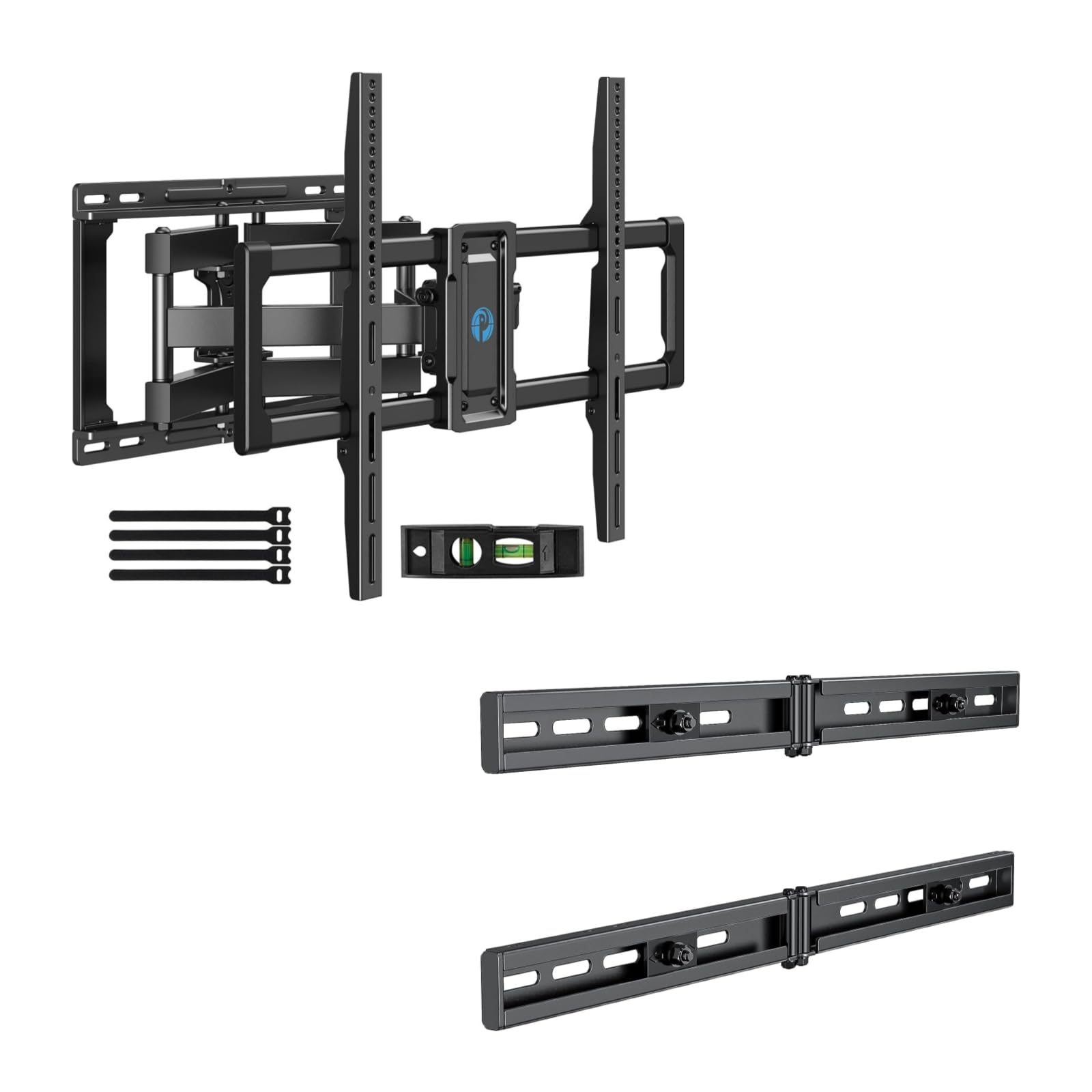
Image 1.1: Reinforced stability of the mount, highlighting heavy-duty steel arms and UL certification for safety and durability.
2. Kandungan Pakej
Please check to ensure all components are present and undamaged before beginning installation. If any parts are missing or defective, contact Pipishell customer service.
2.1 Alat Diperlukan (Tidak Termasuk)
- Pensel
- Pencari Belajar
- Drill with appropriate drill bits (e.g., 5/32" (4mm) for wood studs, 3/8" (10mm) for concrete)
- Tahap
- Pita Pengukur
- Sepana Soket atau Sepana Boleh Laras
- Pemutar Skru Kepala Phillips
2.2 Hardware and Components (Included)
- Pemasangan Plat Dinding
- Pendakap TV (2)
- Extension Brackets (2)
- Various TV Screws, Washers, and Spacers (M4, M6, M8)
- Lag Bolts and Concrete Anchors
- Gelembung Tingkat
- Pengikat Kabel
3. Persediaan dan Pemasangan
3.1 Pemeriksaan Pra-Pemasangan
- Verify your TV's weight, size, and VESA pattern are within the mount's specifications.
- Determine the desired viewketinggian untuk TV anda.
- Locate the wall studs using a stud finder. Mark the center of the studs.
3.2 Memasang Plat Dinding
The extension bracket feature allows for installation on wood studs with spacing between 16 and 24 inches.
- Position the wall plate assembly on the wall at your desired height, ensuring it is level. Mark the drill holes.
- For wood stud installation, drill pilot holes (e.g., 5/32" or 4mm) into the center of the studs. For concrete/brick, drill pilot holes (e.g., 3/8" or 10mm) and insert concrete anchors.
- Attach the wall plate to the wall using the provided lag bolts. Tighten securely.

Image 3.1: The extended wall plate design provides a flexible solution for mounting on walls with stud spacing between 16 and 24 inches.

Image 3.2: This feature helps center your TV for optimal viewing, even when wall studs are not perfectly centered.
3.3 Attaching TV Brackets to TV
- Letakkan TV anda dengan berhati-hati menghadap ke bawah di atas permukaan yang lembut dan bersih.
- Select the appropriate screws, washers, and spacers for your TV's VESA mounting holes.
- Attach the two TV brackets to the back of your TV. Ensure they are securely fastened and evenly spaced.
3.4 Memasang TV pada Plat Dinding
- Dengan bantuan, angkat TV dengan berhati-hati dan sambungkan pendakap TV pada plat dinding.
- Pastikan TV dipasang dengan kukuh pada plat dinding.
- Tighten the safety screws or locking mechanisms on the TV brackets to prevent accidental dislodgement.
4. Operating the TV Mount
This full motion mount allows for flexible adjustment to achieve the best viewsudut ing.
4.1 Pelarasan Pusing
The mount allows for a swivel range of +/-45°. Gently push or pull the TV to the desired left or right angle.

Image 4.1: The mount offers a smooth swivel motion of up to 45 degrees in either direction for flexible viewing.
4.2 Pelarasan Kecondongan
Adjust the tilt angle from +5° hingga -15° to reduce glare and optimize viewing. This adjustment is tool-free.

Image 4.2: Easily adjust the TV's vertical angle from +5° to -15° without tools to minimize glare and improve comfort.
4.3 Extension and Retraction
The mount allows the TV to extend from the wall by 2.89 inci hingga 16.3 inci. Gently pull the TV forward or push it back towards the wall to adjust the distance.

Image 4.3: Adjust the TV's distance from the wall, extending up to 16.3 inches or retracting to 2.89 inches for optimal viewdalam ruang.
5. Penyelenggaraan
- Pemeriksaan biasa: Periksa semua skru dan sambungan secara berkala untuk memastikan ia kekal ketat dan selamat.
- Pembersihan: Bersihkan pelekap dengan kain lembut dan kering. Elakkan pembersih atau pelarut yang melelas.
- Pelinciran: The moving parts are designed for smooth operation. No lubrication is typically required. If movement becomes stiff, check for debris or loose components.
6. Penyelesaian masalah
- TV tidak tahap: Check the level of the wall plate during installation. Most mounts have a post-installation leveling adjustment. Refer to the specific mechanism on your mount.
- Difficulty adjusting swivel/tilt/extension: Ensure no cables are snagged or obstructing movement. Check if any adjustment knobs or screws are overtightened. The mount features improved torque accuracy for smoother movement.
- Mount feels loose on the wall: Immediately remove the TV from the mount. Re-check all wall plate fasteners and ensure they are securely anchored into the studs or concrete. If issues persist, consult a professional installer.
- TV brackets do not fit TV: Verify your TV's VESA pattern matches the mount's compatibility (200x100mm to 600x400mm). Ensure you are using the correct screws and spacers for your TV model.
7. Spesifikasi
| Ciri | Spesifikasi |
|---|---|
| Jenis Pemasangan | Lekap di dinding |
| Jenis Pergerakan | Mengartikulasikan (Pergerakan Penuh) |
| Jenama | Pipishell |
| bahan | Keluli Aloi |
| Peranti Serasi | Televisyen |
| Minimum Supported Screen Size | 40 Inci |
| Maximum Supported Screen Size | 82 Inci |
| Kapasiti Berat Maksimum | 110 paun (50 kg) |
| Keserasian VESA | 200x100mm hingga 600x400mm |
| Julat Putar | +/-45 Darjah |
| Julat Kecondongan | +5 / -15 Degrees (Tool-Free) |
| Sambungan daripada Wall | 2.89 - 16.3 Inci |
8. Waranti dan Sokongan Pelanggan
Pipishell products are designed for durability and performance. For warranty information or technical assistance, please contact Pipishell customer support through their official webtapak atau peruncit tempat produk itu dibeli.
Sila sediakan model produk anda dan tarikh pembelian apabila menghubungi sokongan.