
GMKtec G2 PLUS
Manual Pengguna GMKtec Nucbox G2 Plus Mini PC
Model: G2 PLUS
1. Pengenalan
The GMKtec Nucbox G2 Plus is a compact and powerful mini PC designed for a variety of computing tasks, from routine office work and home entertainment to more demanding applications. Featuring the Intel N150 processor, 12GB DDR5 RAM, and a 512GB SSD, it offers efficient performance in an ultra-compact form factor. This manual provides essential information for setting up, operating, maintaining, and troubleshooting your device.

Figure 1.1: GMKtec Nucbox G2 Plus Mini PC
2. Produk Lebihview
The Nucbox G2 Plus is equipped with the latest Intel Twin Lake N150 CPU, offering improved performance for everyday computing. It supports 4K triple display output, high-speed wireless connectivity with WiFi 6 and Bluetooth 5.2, and dual Gigabit Ethernet ports for robust network connections. Its compact design makes it suitable for various environments, including home, office, and multimedia setups.

Figure 2.1: Key Features of Nucbox G2 Plus
3. Kandungan Pakej
Sila sahkan bahawa semua item terdapat dalam pakej:
- GMKtec Nucbox G2Plus Mini PC Intel N150 12GB RAM 512GB SSD
- 1 x Penyesuai Kuasa
- 1 x VESA Mount dengan Skru
- 1 x Blue Mini PC Cover Lid
- 1 x Kabel HDMI
- 1 x Manual Pengguna
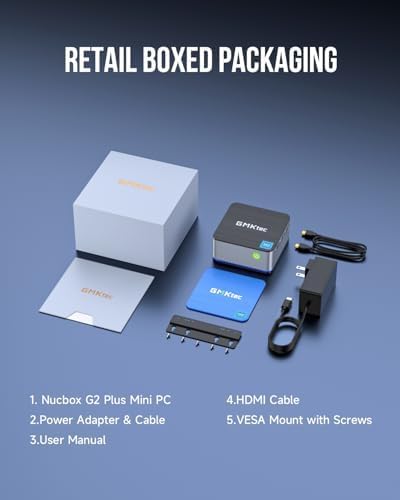
Figure 3.1: Contents of the Retail Box
4. Ciri Fizikal dan Pelabuhan
The Nucbox G2 Plus offers a comprehensive set of ports for versatile connectivity:
- Port USB 3.2 (x3): For connecting peripherals like keyboards, mice, and external storage devices.
- Port HDMI 2.0 (x2): Supports 4K@60Hz display output for connecting to monitors or TVs.
- DP V1.4 Port (x1): Supports 4K@60Hz display output, enabling triple display configurations.
- Bicu Audio 3.5mm: Untuk fon kepala atau pembesar suara.
- Gigabit Ethernet RJ45 Ports (x2): For stable wired network connections.
- Port USB-C: For power input (12V/3A) and data transfer.
- Slot Kunci Kensington: Untuk keselamatan fizikal.
- Butang Kuasa: Untuk menghidupkan/mematikan peranti.

Figure 4.1: Multi-functional Interface Layout
5. Panduan Persediaan
5.1 Sambungan Awal
- Connect your monitor(s) to the HDMI or DP ports using the provided HDMI cable or your own DP cable.
- Connect your keyboard and mouse to the USB 3.2 ports.
- For wired internet, connect an Ethernet cable to one of the RJ45 ports. For wireless, ensure your WiFi network is available.
- Connect the power adapter to the USB-C power input port on the mini PC, then plug the adapter into a power outlet.
5.2 Powering On and Operating System Setup
Press the power button on the front of the mini PC. The device comes pre-installed with Windows 11 Pro. Follow the on-screen instructions to complete the initial Windows setup, including language, region, network connection, and user account creation.
5.3 Persediaan Paparan Tiga Kali Ganda
The Nucbox G2 Plus supports up to three 4K@60Hz displays simultaneously. Connect two monitors via the HDMI 2.0 ports and a third via the DP V1.4 port. Once connected, Windows will automatically detect the displays. You can configure display settings (extend, duplicate, etc.) through the Windows Display Settings.

Figure 5.1: Triple Screen Display Configuration
5.4 Kesambungan Rangkaian
The mini PC supports both wired and wireless network connections:
- Berwayar (Ethernet): Connect an RJ45 Ethernet cable to either of the two Gigabit LAN ports for a stable and fast wired connection.
- Tanpa Wayar (WiFi 6): The device features 802.11ax (WiFi 6) for high-speed wireless internet. After booting, select your WiFi network from the taskbar and enter the password.
- Bluetooth 5.2: Connect wireless devices such as keyboards, mice, and headphones via Bluetooth. Enable Bluetooth in Windows settings and pair your devices.

Figure 5.2: Strong LAN & Wireless Network Support
6. Storage and Expansion
The Nucbox G2 Plus comes with a built-in 512GB M.2 2242 SATA SSD, providing fast boot times and quick file transfers. The storage is expandable up to 2TB, allowing for significant upgrades if more space is required. The design includes a cooling fan system with dual copper turbine cooling pipes to maintain optimal performance during extended use.

Figure 6.1: Internal Components and Expandable Storage
7. Pilihan Pemasangan
The Nucbox G2 Plus includes a VESA mount, allowing you to conveniently attach the mini PC to the back of a compatible monitor or to a wall. This helps to declutter your workspace and create a more streamlined setup.

Figure 7.1: VESA Mount Installation
8. Penyelenggaraan dan Penjagaan
- Keep the mini PC in a well-ventilated area to ensure proper airflow and prevent overheating.
- Elakkan daripada mendedahkan peranti kepada suhu yang melampau, kelembapan atau cahaya matahari langsung.
- Bersihkan bahagian luar dengan kain lembut dan kering. Jangan gunakan pembersih cecair atau aerosol.
- Kemas kini sistem pengendalian dan pemacu anda secara kerap untuk memastikan prestasi dan keselamatan yang optimum.
- Perform routine software maintenance, such as disk cleanup and antivirus scans.
9. Penyelesaian masalah
If you encounter issues with your GMKtec Nucbox G2 Plus, consider the following common troubleshooting steps:
- Tiada Kuasa: Pastikan penyesuai kuasa disambungkan dengan selamat ke kedua-dua PC mini dan soket kuasa yang berfungsi. Cuba soket lain jika perlu.
- Tiada Paparan: Check all HDMI/DP cable connections to the monitor and the mini PC. Ensure the monitor is powered on and set to the correct input source. Try a different cable or monitor if possible.
- Tiada sambungan internet: For wired connections, check the Ethernet cable and router status. For Wi-Fi, ensure Wi-Fi is enabled in Windows settings, and you are connected to the correct network with the correct password. Restart your router and the mini PC.
- Prestasi Perlahan: Close unnecessary applications. Check for background processes that might be consuming resources. Ensure sufficient free space on the SSD.
- Periferi Tidak Dikesan: Try connecting the peripheral to a different USB port. Ensure drivers are installed if required.
For persistent issues, refer to the Warranty and Support section for contact information.
10. Spesifikasi Teknikal
| Ciri | Spesifikasi |
|---|---|
| Pemproses | Intel N150 (4 Core, 4 Threads, up to 3.6GHz) |
| RAM | 12GB LPDDR5 4800 MHz |
| Penyimpanan | 512GB M.2 2242 SATA SSD (Expandable up to 2TB) |
| Grafik | Intel UHD Graphics 24EUs (max 1000MHz) |
| Paparan Output | 2 x HDMI 2.0 (4K@60Hz), 1 x DP V1.4 (4K@60Hz) |
| Port USB | 3 x USB 3.2, 1 x USB-C (Power/Data) |
| Rangkaian | WiFi 6 (802.11ax), Bluetooth 5.2, 2 x Gigabit Ethernet RJ45 |
| Sistem Operasi | Windows 11 Pro |
| Dimensi (LxWxH) | 3.42 x 3.42 x 1.55 inci |
| Berat badan | 1.65 paun |
| warna | Blue / Black Steel |
11. Waranti dan Sokongan
GMKtec offers a 1-year limited warranty for each mini PC, starting from the date of purchase. This warranty covers defects due to design and workmanship. For any support needs, please utilize the following channels:
- Sokongan Amazon: Log masuk ke akaun Amazon anda, navigasi ke 'Pesanan Anda' dan pilih 'Tanya Soalan Produk' untuk mendapatkan bantuan langsung.
- Sokongan Selepas Jualan: You can also send an email to the GMKtec After-Sales Team at support@gmktec.com untuk sokongan pelanggan 24/7.
GMKtec is committed to providing reliable products and professional after-sales service to ensure customer satisfaction.
Ask a question about this manual
Ask about setup, troubleshooting, compatibility, parts, safety, or missing instructions. Manuals+ will review the question and use this page’s manual context to help answer it.