
1. Pengenalan
The AOPUTTRIVER AP-189A is a high-precision digital manometer designed for measuring differential, positive, and negative pressure. It is widely used in various applications including flow measurement, air quality monitoring, level measurement, gas temperature measurement, and HVAC system control. This manual provides detailed instructions for the safe and effective use of your device.
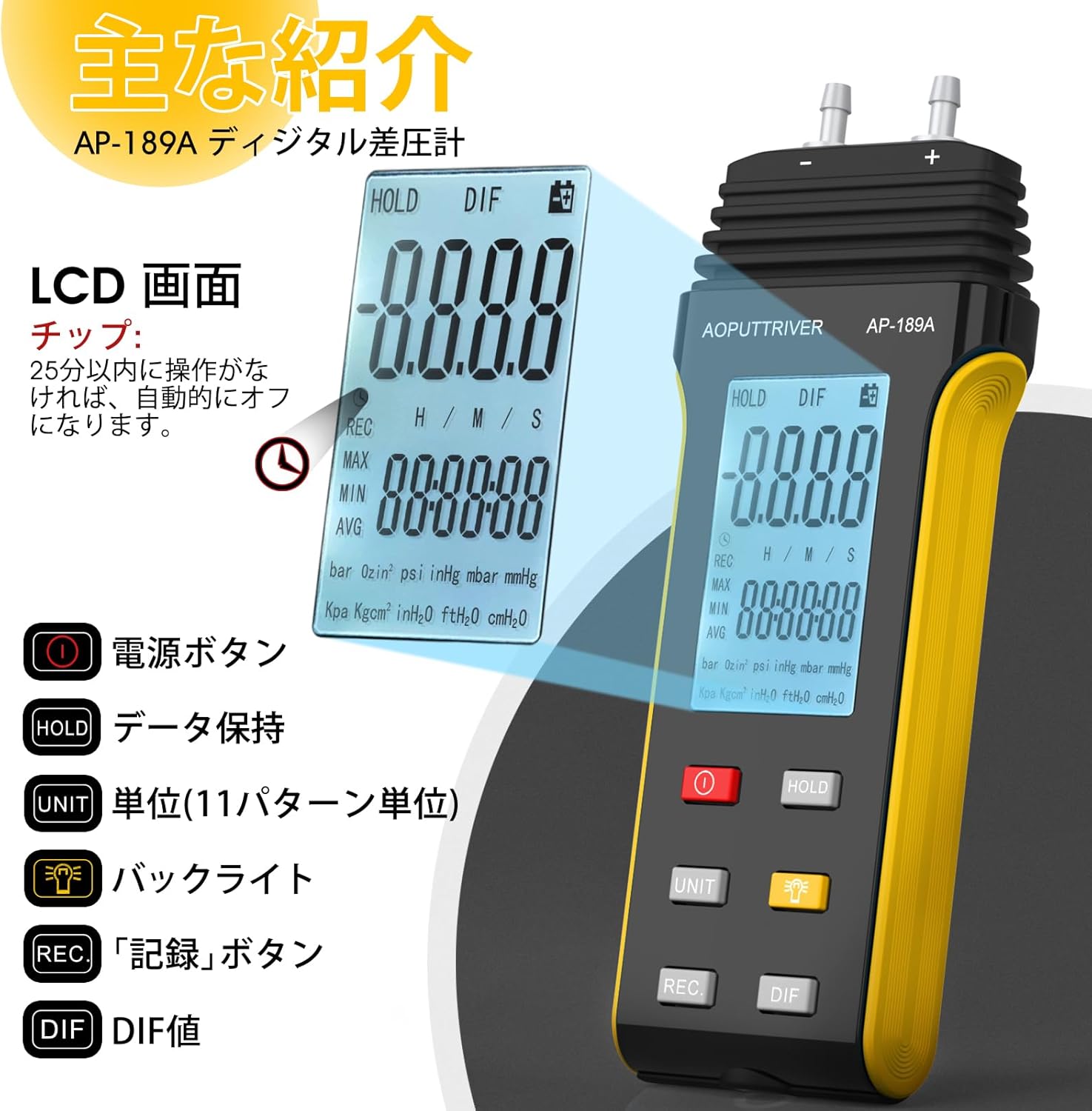
The device features a large LCD with backlight, data hold function, automatic power-off, and the ability to record maximum, minimum, and average values, as well as differential pressure (DIF). It supports 11 selectable pressure units for versatility in professional applications.
2. Ciri-ciri Produk
- Ketepatan Tinggi: Measurement range of ±2.000psi with an accuracy of ±0.3%FSO (at 25°C).
- Berbilang Unit: Easily switch between 11 pressure units: Psi, kPa, Kgfcm2, ozin2, Bar, mbar, inHg, mmHg, inH2O, ftH2O, cmH2O.
- Rakaman Data: Records MAX/MIN/AVG values for easy data analysis.
- Tetapan Sifar: Allows for precise zero calibration before measurements.
- Paparan Pelbagai fungsi: Large LCD with backlight for clear readings.
- Pengurusan tenaga: Low battery indicator and automatic power-off after 25 minutes of inactivity to conserve battery life.
- DIF Function: Measures differential pressure.

Imej: Selesaiview of the AP-189A Digital Manometer's key features and specifications, including accuracy, repeatability, maximum pressure, and various functions like data hold, auto-off, and unit selection.
3. Kandungan Pakej
Sahkan bahawa semua item ada dan dalam keadaan baik semasa membuka bungkusan:
- 1 x AP-189A Digital Manometer
- 1 x Beg Pelindung
- 1 x Pemutar Skru Kecil
- 2 x Bateri AAA 1.5V
- 1 x User Manual (Japanese)

Image: The complete package contents of the AP-189A Digital Manometer, showing the device, a protective carrying bag, a small screwdriver, two AAA batteries, and the user manual.
4. Persediaan
4.1 Pemasangan Bateri
- Cari penutup petak bateri di bahagian belakang peranti.
- Gunakan pemutar skru kecil yang disediakan untuk membuka petak bateri.
- Masukkan dua bateri AAA 1.5V, pastikan kekutuban (+/-) betul.
- Gantikan penutup petak bateri dan kencangkannya dengan skru.
4.2 Hos Penyambung
The AP-189A features dual ports for differential pressure measurement. Connect the hoses to the appropriate ports (+ and -) based on your measurement requirements. Ensure a secure connection to prevent leaks.

Imej: A terperinci view of the AP-189A Digital Manometer, highlighting its dimensions and the dual port connections at the top for pressure hoses.
5. Arahan Operasi
5.1 Hidupkan/Mati Kuasa
- Tekan ke Butang Kuasa (
 ) to turn the device ON.
 - Tekan dan tahan butang Butang Kuasa for a few seconds to turn the device OFF.
5.2 Penetapan Sifar
Before taking any measurements, it is crucial to perform a zero setting to ensure accuracy. Disconnect all pressure hoses from the device before performing this step.
- Ensure the device is powered on and no pressure is applied to the ports.
- Tekan dan tahan butang TAHAN butang selama lebih kurang 5 saat.
- The display will show "----" indicating that the zero setting is complete.

Image: Visual guide demonstrating how to perform a zero setting on the manometer by long-pressing the HOLD button until the display shows dashes.
5.3 Pemilihan Unit
Tekan ke UNIT button to cycle through the 11 available pressure units (Psi, kPa, Kgfcm2, ozin2, Bar, mbar, inHg, mmHg, inH2O, ftH2O, cmH2O) until your desired unit is displayed.
5.4 Fungsi Lampu Latar
Tekan ke Butang Lampu Latar () to turn the LCD backlight ON or OFF for improved visibility in low-light conditions.
5.5 Pegangan Data
Tekan ke TAHAN button briefly to freeze the current reading on the display. Press it again to release the hold function and resume live readings.
5.6 MAX/MIN/AVG/DIF Recording
Tekan ke REC button to enter recording mode. In this mode, the device will track the maximum, minimum, and average pressure values. Press REC repeatedly to cycle through MAX, MIN, AVG, and DIF displays. To exit recording mode, press and hold the REC butang.
5.7 Matikan Kuasa Automatik
The device will automatically power off after 25 minutes of inactivity to save battery life. This feature can typically be disabled or adjusted by pressing and holding specific buttons during power-on, as detailed in the full manual.
Image: A close-up of the AP-189A's LCD screen and control buttons, illustrating the functions of the Power, Hold, Unit, Backlight, Record, and DIF buttons.
6. Penyelenggaraan
- Pembersihan: Lap peranti dengan kain lembut dan kering. Jangan gunakan pembersih atau pelarut yang melelas.
- Storan: Store the manometer in its protective bag in a cool, dry place when not in use. Remove batteries if storing for extended periods to prevent leakage.
- Penentukuran: Regular calibration by a qualified technician is recommended to maintain measurement accuracy, especially for critical applications.
- Penggantian Bateri: Gantikan bateri dengan segera apabila penunjuk bateri rendah muncul untuk memastikan operasi berterusan dan mencegah kehilangan data.
7. Penyelesaian masalah
| Masalah | Kemungkinan Punca | Penyelesaian |
|---|---|---|
| Peranti tidak dihidupkan | Bateri mati atau tidak dipasang dengan betul | Periksa kekutuban bateri; menggantikan bateri. |
| Bacaan tidak tepat | No zero setting performed; sensor obstruction; device not calibrated | Perform zero setting; ensure ports are clear; consider professional calibration. |
| Display shows "OL" or "Err" | Overload (pressure exceeds maximum limit) | Remove pressure immediately. Ensure pressure does not exceed 6 Psi. |
| Lampu latar tidak berfungsi | Backlight function off; low battery | Press the backlight button; replace batteries. |
8. Spesifikasi
- Julat Pengukuran: ± 2.000psi
- Ketepatan: ±0.3%FSO (at 25°C)
- Kebolehulangan: ±0.25%FSO
- Linearity/Hysteresis: ±0.1%FSO
- Limited Maximum Pressure: 6 Psi
- Unit: Psi, kPa, Kgfcm2, ozin2, Bar, mbar, inHg, mmHg, inH2O, ftH2O, cmH2O
- Fungsi: Backlight, Data Hold, Auto Power Off (25 min), MAX/MIN/AVG/DIF, Zero Setting
- Bekalan Kuasa: 2 x Bateri AAA 1.5V
- Dimensi: Lebih kurang 166mm x 62mm x 31mm (6.29 inci x 2.44 inci x 1.22 inci)
- Berat: Kira-kira 250g
Image: A diagram illustrating the physical dimensions of the AP-189A Digital Manometer, including length, width, and thickness.
9. Waranti dan Sokongan
The AOPUTTRIVER AP-189A Digital Manometer comes with a 365-day warranty and lifetime technical support. If you encounter any quality issues with the product, please contact our customer support team. We are committed to resolving any problems as quickly as possible.
For support, please refer to the contact information provided in your product packaging or visit the official AOPUTTRIVER webtapak.