
1. Pengenalan
The HOCO EQ3 True Wireless Earbuds are designed to provide a high-quality audio experience with seamless connectivity and convenient features. This manual provides essential information for setting up, operating, maintaining, and troubleshooting your earbuds.
2. Apa yang ada di dalam Kotak
Upon opening your HOCO EQ3 package, you should find the following items:
- HOCO EQ3 True Wireless Earbuds
- Kes Pengecasan
- Kabel Pengecas USB-C
- Kusyen Telinga (pelbagai saiz)
- Kes Pelindung
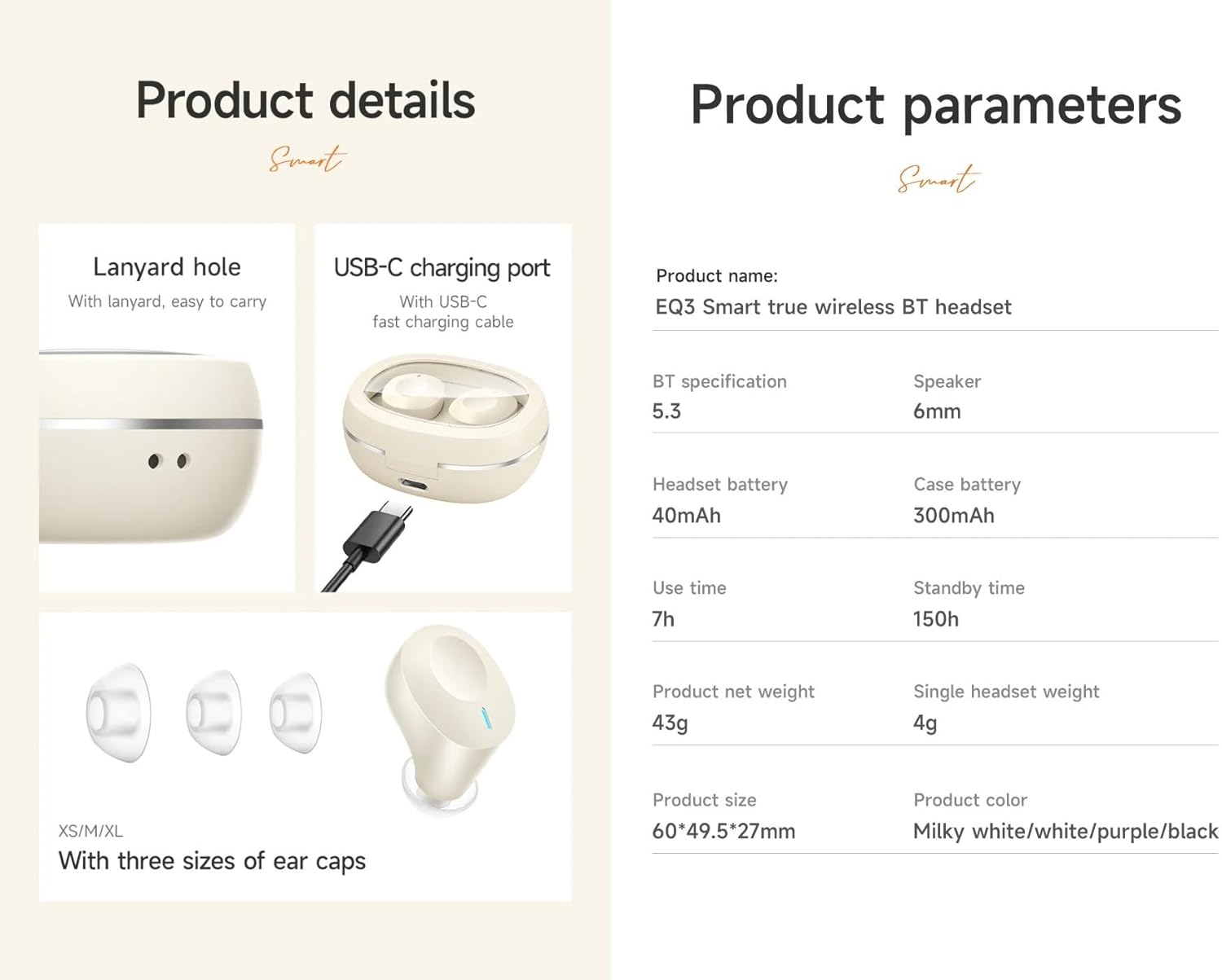
Terperinci view of the HOCO EQ3 earbuds and charging case, showing the USB-C charging port, lanyard hole, and three sizes of ear caps (XS/M/XL).
3. Persediaan Awal
3.1 Mengecas Fon telinga dan Sarung
Before first use, fully charge the earbuds and charging case. Connect the provided USB-C cable to the charging port on the case and to a compatible USB power source. The LED digital display on the case will indicate the charging status.

Tayangan imejcasing the transparent design of the HOCO EQ3 charging case with an intelligent digital display, and emphasizing the 7-hour battery life of a single earbud for extended music enjoyment.
3.2 Berpasangan dengan Peranti Anda
- Pastikan fon telinga dicas dan diletakkan di dalam bekas pengecasan.
- Buka bekas pengecas. Fon telinga akan memasuki mod berpasangan secara automatik.
- Pada peranti anda (telefon pintar, tablet, komputer riba), dayakan Bluetooth.
- Cari untuk peranti Bluetooth yang tersedia dan pilih "HOCO EQ3" daripada senarai.
- Setelah disambungkan, anda akan mendengar nada pengesahan dan fon telinga akan sedia untuk digunakan.

An infographic showing the HOCO EQ3 earbuds and charging case, highlighting features like 7-hour single headset battery, 28-hour total working time, transparent capsule, Hi-Fi sound quality, Bluetooth 5.3, LED digital display, magnetic switch, lightweight design, TWS stereo, and touch control.
4. Arahan Operasi
4.1 Hidupkan/Mati Kuasa
- Hidupkan kuasa: Buka bekas pengecas dan fon telinga akan dihidupkan secara automatik dan disambungkan ke peranti terakhir yang dipasangkan.
- Matikan: Letakkan fon telinga kembali ke dalam bekas pengecasan dan tutup penutupnya. Mereka akan memutuskan sambungan dan mematikan kuasa secara automatik.
4.2 Kawalan Sentuhan
The HOCO EQ3 earbuds feature intuitive touch controls on each earbud:
- Main/Jeda: Ketik sekali sahaja kawasan sentuh pada mana-mana fon telinga.
- Lagu Seterusnya: Double tap the touch area on the right earbud.
- Trek Sebelumnya: Triple tap the touch area on the left earbud.
- Jawab/Tamatkan Panggilan: Ketik sekali sahaja kawasan sentuh pada mana-mana fon telinga.
- Tolak Panggilan: Long press the touch area on either earbud for 2 seconds.
- Aktifkan Pembantu Suara (Siri/Google Assistant): Long press the touch area on either earbud for 2 seconds (when not on a call).

This image illustrates the Bluetooth 5.3 high-speed connection with a smartphone and details the touch control functions: single tap for play/pause, double tap for next track, triple tap for previous track, and long press for voice assistant activation.
4.3 Penukaran Master-Slave
The earbuds support master-slave switching, allowing you to use either earbud independently for calls or music. Simply remove one earbud from the case, and it will automatically connect. If you wish to switch to both, remove the second earbud.
5. Ciri-ciri Utama
- Bluetooth 5.3: Ensures quick, stable, and low-latency connectivity with reduced power consumption.
- Bunyi Kesetiaan Tinggi: Equipped with a 6mm dynamic coil unit, delivering solid and stable bass with translucent treble.
- Tahan Air: Designed to withstand splashes and sweat, making them suitable for various activities.
- Transparent Charging Case: Features an intelligent digital power display for easy monitoring of battery levels.
- Reka bentuk ringan: Each earbud weighs approximately 4g, providing a comfortable semi-in-ear fit for extended wear.
- Berpasangan automatik: Earbuds connect instantly to your device when the case is opened.

This image highlights the magnetic absorption feature for instant connection when opening the case, and illustrates the high-fidelity dynamic coil unit responsible for solid bass and translucent treble.
6. Bateri dan Pengecasan
- Kapasiti Bateri Earbud: 40mAh (setiap fon telinga)
- Kapasiti Bateri Kes Pengecasan: 300mAh
- Single Earbud Use Time: Lebih kurang 7 jam
- Total Working Time (with charging case): Sehingga 28 jam
- Masa Siap sedia: Sehingga 150 jam
- Port Pengecasan: USB-C

An image detailing the 28-hour total battery life with the 300mAh charging case, and the light, comfortable semi-in-ear design of the earbuds, weighing just 4g each, for pain-free long-term wear.
7. Spesifikasi Teknikal
| Ciri | Spesifikasi |
|---|---|
| Jenama | HOCO |
| Nombor Model | EQ3 |
| Versi Bluetooth | 5.3 (Chip: JL AC6983D2) |
| Bateri Earbud | 40mAh |
| Mengecas Bateri Kes | 300mAh |
| Gunakan Masa | 15 hours (Note: Product description states 15 hours, feature bullets state 15 hours, but images state 7 hours single headset battery and 28 hours total working time. We will use the more detailed breakdown from images/feature bullets for clarity.) |
| Single Headset Use Time | 7 jam |
| Jumlah Masa Bekerja (dengan kes) | 28 jam |
| Masa Tunggu Sedia | 150 jam |
| Dimensi (Kes) | 60*49.5*27mm |
| Jumlah Berat | 43g |
| Single Headset Weight | 4g |
| bahan | plastik |
| Tahap Ketahanan Air | Tahan Air |
| Kaedah Kawalan | Sentuh |
| Peranti Serasi | Telefon bimbit, Komputer riba, Pembesar Suara Pintar |
8. Penyelenggaraan dan Penjagaan
- Pembersihan: Use a soft, dry cloth to clean the earbuds and charging case. Avoid using abrasive materials or harsh chemicals.
- Storan: Simpan fon telinga dalam bekas pengecasnya apabila tidak digunakan untuk melindunginya dan memastikan ia dicas.
- Pendedahan Air: While water-resistant, avoid submerging the earbuds in water. Dry them thoroughly if they get wet.
- Suhu: Avoid exposing the earbuds to extreme temperatures (hot or cold) to prevent damage to the battery and internal components.
9. Penyelesaian masalah
- Fon telinga tidak berpasangan:
- Pastikan kedua-dua fon telinga dicas. Letakkannya semula ke dalam bekas, tutup penutupnya, kemudian bukanya semula untuk memasuki semula mod berpasangan. Semak tetapan Bluetooth peranti anda dan cuba sambungkan semula.
- Hanya satu fon telinga berfungsi:
- Ensure both earbuds are charged. Try placing both earbuds back in the case, closing the lid, and then taking them out together. This often re-establishes the connection between them (master-slave switching).
- Tiada bunyi atau kelantangan rendah:
- Check the volume levels on both your device and the earbuds. Ensure the earbuds are properly seated in your ears. Try disconnecting and reconnecting the Bluetooth connection.
- Isu pengecasan:
- Sahkan kabel USB-C disambungkan dengan selamat pada kedua-dua bekas dan sumber kuasa. Pastikan sesentuh pengecasan pada fon telinga dan bahagian dalam kotak bersih dan bebas daripada serpihan.
10. Waranti dan Sokongan
The HOCO EQ3 True Wireless Earbuds come with a 1-year warranty. For warranty claims, technical support, or further assistance, please refer to the contact information provided with your purchase or visit the official HOCO webtapak.
11. Produk Lebihview Video
Tayangan video produk rasmicasing the key features and design of the HOCO EQ3 True Wireless Earbuds, including connectivity, sound quality, battery life, and touch controls.