1. Pengenalan
This manual provides essential information for the proper use and maintenance of your DCU TECNOLOGIC Curved Glass Pro Smartwatch. Please read it carefully before using the device to ensure optimal performance and longevity.

Imej 1.1: Depan view of the DCU TECNOLOGIC Curved Glass Pro Smartwatch, showing its curved display and health tracking interface.
2. Produk Lebihview
The DCU TECNOLOGIC Curved Glass Pro Smartwatch features a 1.83-inch high-definition touch screen with a curved glass design for an immersive visual experience and improved ergonomics. It is designed to adapt comfortably to your wrist.
Ciri-ciri Utama:
- paparan: 1.83-inch High-Definition Touch Screen, customizable with various designs or personal photos.
- Ketersambungan: Bluetooth for calls and notifications.
- Pemantauan Kesihatan: Heart rate, blood oxygen, blood pressure, step counter, calorie tracking, sleep control, sedentary lifestyle alarm, water and medication reminders.
- Mod Sukan: 123 integrated sports modes, including walking, running, cycling, yoga, jumping rope, rowing, and spinning.
- Tahan Air: IP67 rating, submersible up to 1 meter for 30 minutes in fresh water.
- Fungsi Tambahan: App notifications, Bluetooth call function with 8 favorite contacts, voice assistant, remote photo control, music player control, weather information, alarm clock, timer, and do not disturb mode.
- Keserasian: iOS 9.0 or above and Android 5.0 or higher devices. Compatible with Google Fit and Apple Health.

Image 2.1: The smartwatch showcasing its 1.83-inch high-definition touch screen with a customizable watch face.
3. Persediaan
3.1 Mengecas Jam Pintar
Before initial use, fully charge your smartwatch. Connect the charging cable to the charging port on the back of the watch and to a standard USB power adapter (not included). A full charge typically provides 5-7 days of active use or 10-15 days in standby mode. Charging time is approximately 1 day.

Image 3.1: The smartwatch connected to a charger, illustrating the charging process.
3.2 Berpasangan dengan Telefon Pintar Anda
- Pastikan Bluetooth telefon pintar anda didayakan.
- Download the official companion app for the DCU TECNOLOGIC Curved Glass Pro Smartwatch from your device's app store (compatible with iOS 9.0+ and Android 5.0+).
- Open the app and follow the on-screen instructions to search for and connect to your smartwatch.
- Sahkan permintaan berpasangan pada telefon pintar anda dan jam tangan pintar.
Once paired, the smartwatch will synchronize data and allow access to features like notifications and call functions.

Image 3.2: The smartwatch displaying its compatibility with Google Fit and Apple Health applications.
4. Arahan Operasi
4.1 Navigasi Asas
The smartwatch features a full touch screen. Swipe left, right, up, or down to navigate through menus and access different functions. Tap to select an option or open an application.
4.2 Pemberitahuan dan Panggilan
- Pemberitahuan: Once paired, the smartwatch will display notifications from your connected smartphone apps.
- Fungsi Panggilan: Use the Bluetooth call function to make and receive calls directly from your watch. You can store up to 8 favorite contacts for quick dialing.
4.3 Pemantauan Kesihatan
Jam tangan pintar ini sentiasa memantau pelbagai metrik kesihatan:
- Heart Rate, Blood Oxygen, Blood Pressure: Access these measurements through the dedicated health apps on the watch.
- Step Counter & Calories: Tracks your daily activity and estimated calorie burn.
- Kawalan Tidur: Monitors your sleep patterns.
- Sedentary Alarm: Mengingatkan anda untuk bergerak selepas tempoh tidak aktif.
- Peringatan: Set reminders to drink water or take medication.
4.4 Mod Sukan
Select from 123 sports modes to track your workouts accurately. Common modes include walking, running, cycling, yoga, jumping rope, rowing, and spinning. The watch will record relevant data for your chosen activity.
4.5 Customization and Additional Functions
- Penyesuaian Wajah Jam: Personalize your watch face with multiple designs or upload personal photos from your gallery via the companion app.
- Pembantu Suara: Access your smartphone's voice assistant directly from the watch.
- Kawalan Jauh: Control your smartphone's camera for remote photo taking and manage music playback.
- Utiliti: Access weather information, set alarms, use the timer, and stopwatch.
- Mod Jangan Ganggu: Senyapkan pemberitahuan pada waktu tertentu.
- Permainan: The smartwatch includes 4 pre-installed games.
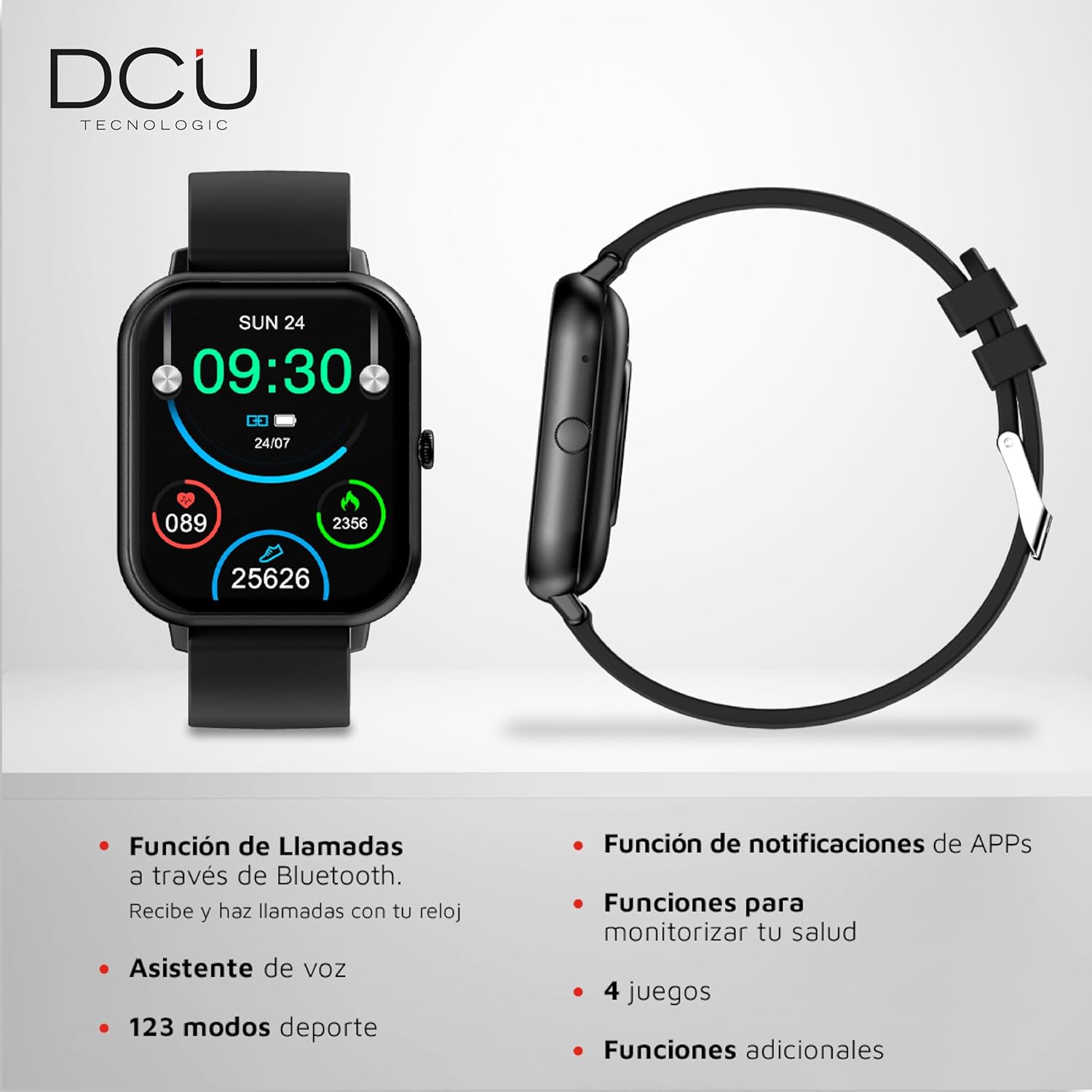
Image 4.1: The smartwatch interface showing icons for calls, notifications, health monitoring, and sports modes.
5. Penyelenggaraan
5.1 Pembersihan
Untuk membersihkan jam tangan pintar anda, lap skrin dan badan dengan lembut menggunakan kain lembut, kering dan bebas bulu. Untuk kotoran degil, lap sedikitampen the cloth with water. Avoid using harsh chemicals, abrasive materials, or strong cleaning agents.
5.2 Tahan Air
The smartwatch has an IP67 water resistance rating, meaning it is protected against dust and can withstand immersion in fresh water up to 1 meter for a maximum of 30 minutes. It is suitable for daily use and splashes, but it is not recommended for use in salt water, hot water, saunas, or during diving activities, as this may compromise its water resistance over time.

Imej 5.1: Belakang view of the smartwatch, highlighting the sensors and the anti-static silicone strap.
6. Penyelesaian masalah
Jika anda menghadapi masalah dengan jam tangan pintar anda, rujuk kepada penyelesaian biasa berikut:
- Peranti Tidak Dihidupkan: Ensure the smartwatch is fully charged. Connect it to the charger and wait a few minutes before attempting to power it on again.
- Tidak Boleh Dipasangkan dengan Telefon Pintar: Check that Bluetooth is enabled on your phone and the smartwatch is within range. Restart both devices and try pairing again. Ensure the companion app is updated to the latest version.
- Data Kesihatan Tidak Tepat: Pastikan jam tangan dipakai dengan kemas di pergelangan tangan anda, tidak terlalu ketat atau terlalu longgar. Bersihkan sensor di bahagian belakang jam tangan.
- Pemberitahuan Tidak Muncul: Verify that app notifications are enabled in your smartphone's settings and within the smartwatch's companion app. Ensure the smartwatch is properly connected via Bluetooth.
- Skrin Tidak Responsif: Try restarting the smartwatch. If the issue persists, ensure the screen is clean and dry.
For persistent issues, please refer to the support section.
7. Spesifikasi
| Jenama | DCU TECNOLOGIC |
| Nombor Model | 34157025 |
| Sistem Operasi | AsteroidOS |
| Saiz Skrin | 1.83 Inci |
| Jenis Paparan | Digital, Touchscreen |
| Ketersambungan | Bluetooth, WiFi |
| Jenis Bateri | Polimer Litium |
| Kapasiti Bateri | 1000 mAh |
| Hayat Bateri (Anggaran) | 5-7 hari (penggunaan), 10-15 hari (sedia sedia) |
| Tahan Air | IP67 (up to 1m for 30 mins in fresh water) |
| Peranti Serasi | Smartphone, Tablet (iOS 9.0+, Android 5.0+) |
| Ciri Khas | Curved Glass Screen, Customizable HD Touch Screen, Multi-Health Monitoring, 123 Sports Modes |
| Dimensi Pakej | 21.5 x 14.9 x 3.9 cm |
| Berat badan | 160 g |
8. Waranti
The DCU TECNOLOGIC Curved Glass Pro Smartwatch comes with a Waranti 3 tahun from the date of purchase. This warranty covers manufacturing defects under normal use. It does not cover damage caused by misuse, accidents, unauthorized modifications, or failure to follow the instructions in this manual. Please retain your proof of purchase for warranty claims.
9. Sokongan
For further assistance, technical support, or warranty inquiries, please contact DCU TECNOLOGIC customer service. Refer to the official DCU TECNOLOGIC webtapak atau dokumentasi pembelian anda untuk butiran hubungan.