
1. Pengenalan
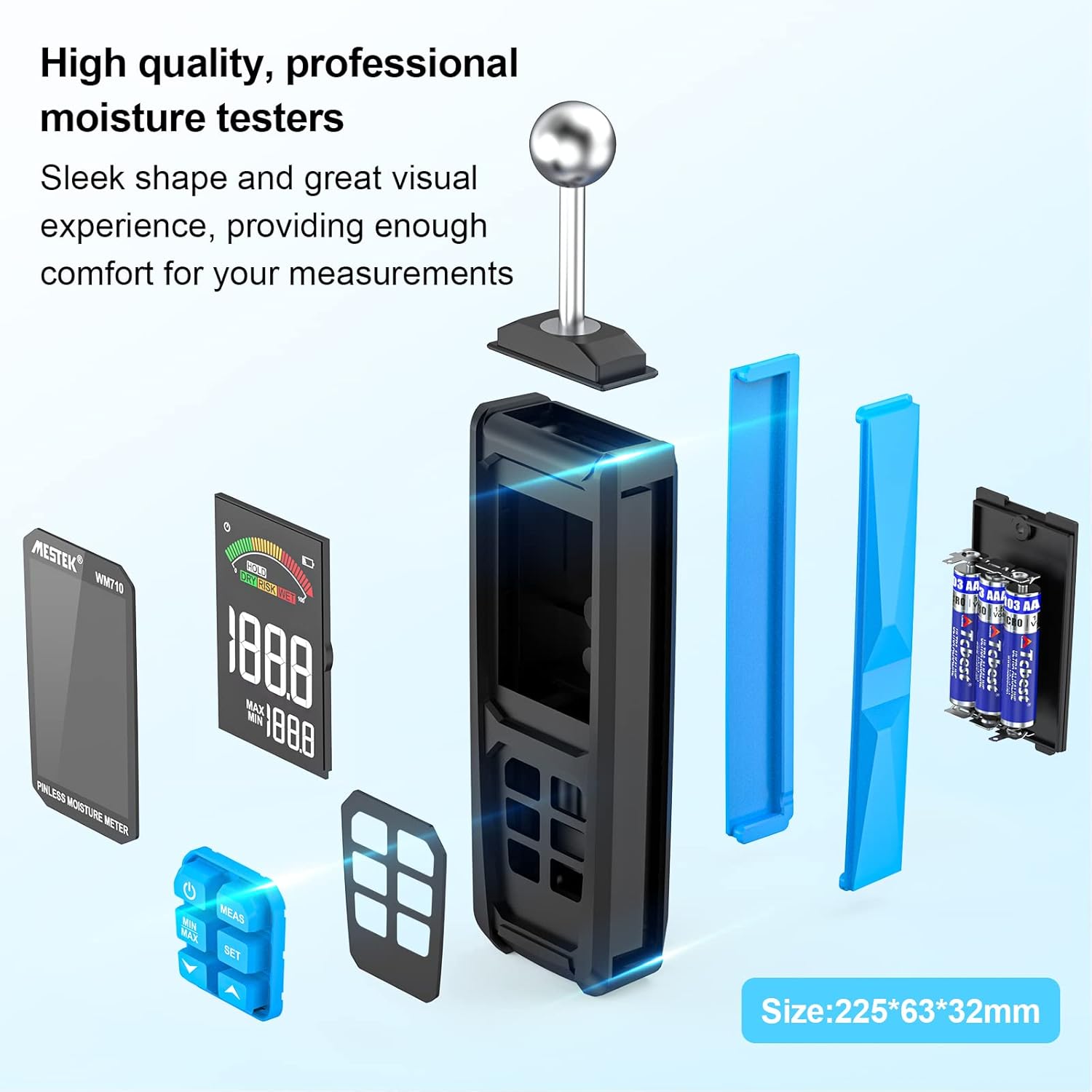
The MESTEK WM710A is a professional, non-destructive pinless moisture meter designed for detecting moisture content in various building materials. This device utilizes a spherical probe to send and receive high-frequency signals, allowing for damage-free moisture assessment. It is an essential tool for homeowners, builders, carpenters, and gardeners to identify leaks and moisture-related issues in wood, walls, concrete, and other construction materials.
This manual provides detailed instructions on how to set up, operate, and maintain your MESTEK WM710A moisture meter to ensure accurate and reliable measurements.
2. Ciri-ciri Produk
- Pengukuran Tidak Memusnahkan: Detects moisture without damaging the material. The spherical probe allows for easy measurement in corners and narrow areas.
- Julat Pengukuran Luas: Measures moisture from 0.0% to 100.0% with a resolution of 0.1%. Maximum measurement depth is 40mm.
- Penentukuran Automatik: Simple three-second press of the 'MEAS' button initiates automatic calibration for consistent accuracy.
- Large HD Color Display: Features a 3-inch high-definition color LCD screen with an analog bar for intuitive and clear readings.
- Audible Alarm Function: Provides audible alerts based on user-settable thresholds for 'Wet', 'Risk', and 'Dry' conditions.
- Data Retention & Max/Min Record: Allows for data hold and displays maximum/minimum measured values simultaneously.
- Penutupan Automatik: The device automatically powers off after 30 minutes of inactivity to conserve battery life.
- Reka bentuk tahan lasak: Robust construction with a soft rubber exterior for enhanced durability.
3. Kandungan Pakej
Selepas membuka pakej, sila sahkan bahawa semua item berikut disertakan:
- 1 x MESTEK WM710A Pinless Moisture Meter
- 3 x Bateri AAA
- 1 x Manual Pengguna
- 1 x Pemutar skru
- 1 x Beg Penyimpanan
4. Persediaan
4.1 Pemasangan Bateri
To power on your MESTEK WM710A, you need to install the included AAA batteries:
- Cari petak bateri di bahagian belakang peranti.
- Gunakan pemutar skru yang disediakan untuk membuka penutup petak bateri.
- Masukkan 3 bateri AAA, pastikan kekutuban (+/-) betul.
- Gantikan penutup petak bateri dan kencangkannya dengan skru.
Penerangan: This image shows the back of the MESTEK WM710A moisture meter with the battery compartment open. A hand is inserting AAA batteries into the compartment, and a small screwdriver is visible, indicating the tools needed for installation.
5. Arahan Operasi
5.1 Power On and Calibration
Follow these steps to power on the device and perform initial calibration:
- Tekan ke kuasa butang (
 ) to turn on the moisture meter.
 - Hold the spherical probe in the air, away from any materials, to ensure a dry environment for calibration.
- Tekan dan tahan butang MEAS button for approximately three seconds until 'CAL' appears on the screen, indicating automatic calibration is in progress.
- Once calibration is complete, the display will show '0.0' or a very low value, ready for measurement.
Penerangan: This image provides a visual four-step guide for operating the MESTEK WM710A. It shows pressing the power button, holding the probe in a dry area for calibration, pressing the MEAS button, and the display showing 'CAL' during calibration.
5.2 Mengambil Ukuran
Untuk mengukur kandungan lembapan:
- Place the spherical probe directly onto the surface of the material you wish to measure. Ensure full contact between the probe and the material.
- The device will instantly display the moisture reading on the LCD screen. The measurement depth is between 20-40mm.
- The color analog bar on the display will indicate the moisture level: hijau for Dry, kuning for Risk, and merah for Wet.

Penerangan: A close-up of the MESTEK WM710A's large backlit LCD display, showing the current measured value, maximum and minimum recorded values, and a color-coded analog bar indicating moisture levels (Dry, Risk, Wet).

Penerangan: This image shows the MESTEK WM710A moisture meter being used to measure moisture on a wall surface, demonstrating the non-destructive nature of the spherical probe.
5.3 Data Hold and Max/Min Record
- To hold the current measurement on the screen, press the TAHAN butang. Tekan sekali lagi untuk melepaskan.
- The device automatically records the maximum (MAX) and minimum (MIN) moisture values during a measurement session. These values are displayed below the current reading.
- Kepada view only the MAX or MIN value, press the MIN / MAX butang.

Penerangan: A close-up of the MESTEK WM710A display showing the 'HOLD' indicator, signifying that the current measurement is frozen on the screen.

Penerangan: The MESTEK WM710A held against a wall, demonstrating its ability to automatically detect and display the maximum and minimum moisture values within a test range to help locate wet and dry areas.
5.4 Setting Alarm Thresholds
The MESTEK WM710A allows you to set custom alarm thresholds for 'Risk' and 'Wet' conditions:
- Tekan ke SET butang untuk memasuki mod tetapan penggera.
- Gunakan Up (
 ) dan Bawah () arrow buttons to adjust the desired 'Risk' or 'Wet' value.
 - Tekan SET again to switch between 'Risk' and 'Wet' thresholds.
- Once the desired values are set, press the kuasa butang untuk keluar dari mod tetapan.

Penerangan: The moisture meter in use on a wooden surface, illustrating the 'Dry', 'Risk', and 'Wet' indicators on the display, which change based on the measured moisture content. An exclamation mark indicates an alarm condition.
5.5 Demonstrasi Video
Penerangan: An official product video demonstrating the features and usage of the MESTEK WM710A Pinless Moisture Meter, including battery installation, calibration, measurement on different materials, and alarm functions.
6. Aplikasi Pengukuran
The MESTEK WM710A is versatile and can be used on a wide range of materials:
- Wood Materials: Ideal for checking moisture levels in various types of wood before cutting or for assessing existing wooden structures.
- Dinding: Suitable for detecting moisture in plaster, stucco, and brick walls.
- Concrete & Cement: Effective for measuring moisture in concrete slabs and cement surfaces.
- Siling: Can be used to check for moisture in ceiling materials.
Note: This device is not designed for use on metallic materials.

Penerangan: Four images demonstrating the MESTEK WM710A being used to measure moisture in different materials: wood, a powder/brick wall, concrete, and a ceiling, showcasing serba bolehnya.
7. Spesifikasi
| Ciri | Spesifikasi |
|---|---|
| Nombor Model | WM710A |
| Jenama | MESTEK |
| Kedalaman Pengukuran | 20-40mm |
| Julat Pengukuran | 0.0 - 100.0 |
| Resolusi | 0.1% |
| Paparan | Large HD Color LCD (3 inches) |
| Sumber Kuasa | 3 x AAA Alkali Bateri |
| Dimensi Produk (W x H) | 32mm x 225mm |
| Berat Produk | 360 Gram |
| Suhu Operasi | Sehingga 50°C |
| Penutupan Automatik | Selepas 30 minit tidak aktif |
| Komponen yang Disertakan | WM710A Hygrometer, 3 AAA Batteries, User Manual, Screwdriver, Storage Bag |
8. Penyelenggaraan
- Pembersihan: Lap peranti dengan kain lembut dan kering. Jangan gunakan pembersih atau pelarut yang melelas.
- Storan: Store the moisture meter in a cool, dry place when not in use. If storing for an extended period, remove the batteries to prevent leakage.
- Penggantian Bateri: Replace batteries when the low power reminder appears on the display to ensure accurate readings.
- Penjagaan Probe: Keep the spherical probe clean and free from debris to maintain optimal performance.
9. Penyelesaian masalah
If you encounter issues with your MESTEK WM710A, please refer to the following common problems and solutions:
- Peranti tidak dihidupkan:
- Periksa sama ada bateri dipasang dengan betul dengan kekutuban yang betul.
- Gantikan dengan bateri AAA baharu.
- Bacaan tidak tepat:
- Ensure the device is calibrated in a dry environment before use.
- Make sure the spherical probe has full contact with the material surface.
- Avoid measuring near metallic objects, as this can interfere with readings.
- Penggera tidak berbunyi:
- Verify that the alarm thresholds are set correctly in the settings menu.
- Check if the measured moisture level exceeds the set threshold.
10. Waranti dan Sokongan
The MESTEK WM710A Pinless Moisture Meter comes with a Waranti 2 tahun from the date of purchase. This warranty covers manufacturing defects and ensures the product's quality and performance under normal use.
For any questions, technical support, or warranty claims, please contact MESTEK customer service. We aim to respond to all inquiries within 24 hours.
Maklumat Hubungan: Please refer to the contact details provided in your product packaging or visit the official MESTEK webtapak untuk sokongan.