
pengenalan
This manual provides essential information for the safe and effective operation, maintenance, and troubleshooting of your DEWALT DCD794 20V Cordless 1/2" Drill Driver. The DCD794 is a compact and lightweight tool designed for drilling and fastening applications, delivering up to 1,650 RPMs with a 1/2" ratcheting chuck and an integrated LED work light.

Imej: Depan view of the DEWALT DCD794 20V Cordless 1/2" Drill Driver.
Maklumat Keselamatan Am
Always observe basic safety precautions to reduce the risk of fire, electric shock, and personal injury. Keep your work area clean and well-lit. Do not operate power tools in explosive atmospheres, such as in the presence of flammable liquids, gases, or dust. Keep children and bystanders away while operating a power tool. Wear appropriate personal protective equipment, including eye protection, hearing protection, and gloves. Ensure the tool is switched off before making any adjustments, changing accessories, or storing it.
Produk Selesaiview
The DEWALT DCD794 Drill Driver is engineered for performance and durability. Key features include:
- 1/2" Ratcheting Chuck: Provides high bit retention for secure accessory gripping.
- Transmisi 2-Kelajuan: Allows for versatile drilling and fastening applications.
- 15 Clutch Settings: Offers precise control for various torque requirements.
- Lampu Kerja LED: Menerangi kawasan kerja untuk penglihatan yang lebih baik.
- Reka bentuk padat dan ringan: Enhances user comfort and maneuverability.
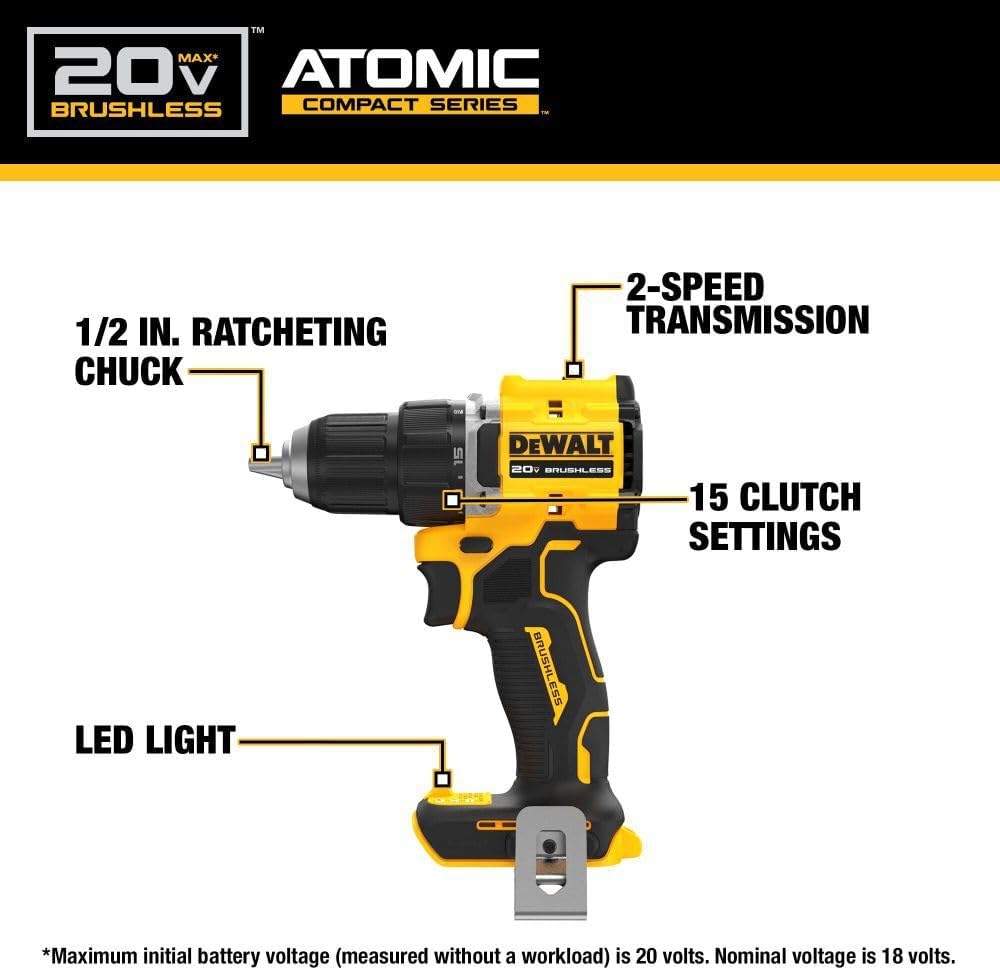
Image: Diagram highlighting the 1/2 inch ratcheting chuck, 2-speed transmission, 15 clutch settings, and LED light on the DEWALT DCD794 Drill Driver.
Persediaan
Pemasangan dan Pembuangan Bateri
- To install the battery, align the battery pack with the rails inside the tool's handle. Slide the pack firmly into the tool until it locks into place.
- To remove the battery, press the release button on the battery pack and pull the pack out of the handle.

Image: The DEWALT DCD794 Drill Driver with a 20V battery pack attached to the base.
Pemasangan dan Penyingkiran Bit
- To install a drill bit or driver accessory, grasp the rear half of the chuck and rotate the front half counter-clockwise until the chuck jaws open wide enough to accept the accessory.
- Insert the accessory fully into the chuck.
- Grasp the rear half of the chuck and rotate the front half clockwise until the accessory is firmly clamped.
- Untuk mengalih keluar, balikkan proses itu.
Arahan Operasi
Pemilihan Kelajuan
The drill driver features a 2-speed transmission for optimal performance across different applications. Use the speed selector switch located on top of the tool:
- Kedudukan 1 (Kelajuan Rendah): For high torque applications, such as driving screws or drilling large diameter holes.
- Kedudukan 2 (Kelajuan Tinggi): For faster drilling with smaller bits.

Image: The DEWALT DCD794 Drill Driver being used to drill into wood, illustrating its 2-speed transmission capability.
Tetapan Klac
The adjustable clutch ring allows you to select the appropriate torque setting for your task. Rotate the ring to align the desired number with the indicator mark. Lower numbers are for driving small screws or into soft materials, while higher numbers are for driving larger screws or into harder materials. The drill symbol setting provides maximum torque for drilling applications.
Trigger Switch and LED Light
The variable speed trigger switch controls the tool's speed. Press the trigger to start the tool and vary the pressure to adjust the speed. The integrated LED work light activates when the trigger is pressed, illuminating the work surface. The light remains on for a short period after the trigger is released.
Penyelenggaraan
Penyelenggaraan tetap memastikan prestasi optimum dan memanjangkan hayat alat anda.
- Pembersihan: Gunakan yang lembut, damp cloth to clean the exterior of the tool. Do not use harsh chemicals or abrasive cleaners. Keep the ventilation slots clear of dust and debris.
- Penyelenggaraan Chuck: Bersihkan rahang chuck secara berkala untuk memastikan cengkaman yang betul.
- Penjagaan Bateri: Simpan bateri di tempat yang sejuk dan kering, jauh daripada cahaya matahari langsung. Jangan simpan bateri dalam keadaan dinyahcas untuk tempoh yang lama.
- Pemeriksaan: Periksa alat secara berkala untuk sebarang bahagian yang rosak, skru longgar atau komponen yang haus. Pastikan sebarang bahagian yang rosak dibaiki oleh juruteknik servis yang berkelayakan.
Menyelesaikan masalah
| Masalah | Kemungkinan Punca | Penyelesaian |
|---|---|---|
| Alat tidak bermula | Bateri tidak dicas atau tidak dipasang dengan betul | Charge battery fully; ensure battery is securely inserted. |
| Kehilangan kuasa semasa operasi | Cas bateri rendah | Isi semula bateri. |
| Sedikit tergelincir dalam chuck | Chuck not tightened sufficiently or jaws are dirty | Tighten chuck firmly; clean chuck jaws. |
| Getaran yang berlebihan | Bent drill bit or accessory | Replace with a straight, undamaged accessory. |
Spesifikasi
| Ciri | Spesifikasi |
|---|---|
| Jenama | DEWALT |
| Nombor Model | DCD794B-NBX |
| Sumber Kuasa | Dikuasakan Bateri (20 Volt) |
| Kelajuan Putaran Maksimum | 1650 RPM |
| Saiz Chuck Maksimum | 0.5 Inci |
| Tork Maksimum | 1.5 Meter Newton |
| Kuasa Maksimum | 300 Watt |
| Jenis Bahan | plastik |
| Dimensi Item (L x W x H) | 6"L x 3"W x 8"H |
| Berat Barang | 2.54 paun |
Maklumat Waranti
DEWALT provides a limited warranty for its products. For specific details regarding the warranty period, coverage, and terms for your DCD794 Drill Driver, please refer to the warranty card included with your purchase or visit the official DEWALT webtapak. Simpan bukti pembelian anda untuk tuntutan waranti.
Sokongan
Untuk bantuan lanjut, sokongan teknikal atau untuk mencari pusat servis yang sah, sila lawati laman web rasmi DEWALT. webtapak atau hubungi perkhidmatan pelanggan mereka. Anda boleh mendapatkan lebih banyak maklumat dan sumber di Kedai DEWALT di Amazon atau korporat DEWALT utama webtapak.