
pengenalan
Thank you for choosing the Lecoo MCS30 Wireless Portable Speaker. This device is designed to provide high-quality audio and voice amplification with versatile connectivity options. Please read this manual carefully before using the product to ensure proper operation and to maximize its lifespan.
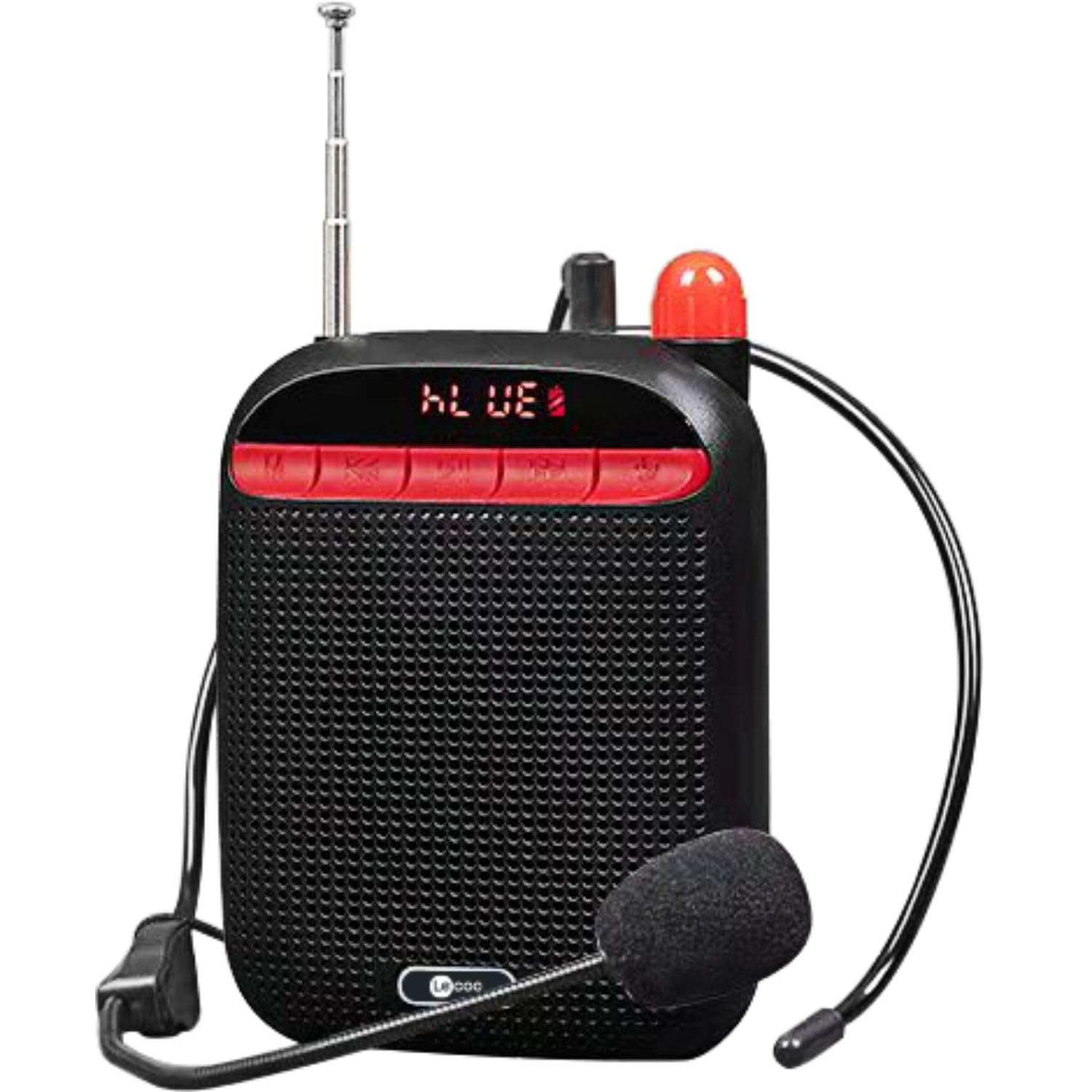
Image: Two Lecoo MCS30 portable speakers, one white and one black, shown with their respective wired headset microphones. Both speakers feature an extendable antenna and front-facing controls.
Produk Selesaiview
The Lecoo MCS30 is a compact and powerful portable speaker featuring multiple input options and dual microphone support for amplification and recording. Familiarize yourself with the device's components and controls.
Kawalan dan Paparan Panel Hadapan

Imej: Dekat hadapan view of the black Lecoo MCS30 speaker, highlighting the digital display and the red control buttons for mode selection, track navigation, and microphone functions.
- Skrin Paparan: Shows current mode, track information, and battery status.
- Butang Mod (M): Switches between Bluetooth, USB, AUX, and SD card modes.
- Butang Sebelumnya/Kelantangan Rendah: Tekan sebentar untuk trek sebelumnya, tekan lama untuk mengurangkan kelantangan.
- Butang Main/Jeda: Memainkan atau menjeda audio.
- Butang Seterusnya/Kelantangan Naik: Tekan sebentar untuk trek seterusnya, tekan lama untuk meningkatkan kelantangan.
- Butang Mikrofon: Activates/deactivates microphone functions.
Sambungan Sisi dan Belakang

Imej: Atas ke bawah view of the Lecoo MCS30 speaker, revealing the USB port, TF (SD card) slot, AUX input, and microphone input ports.
- Input MIC: For connecting external microphones (headset or lapel).
- Port USB: Untuk main balik pemacu kilat USB.
- Slot Kad TF: Untuk main balik kad SD.
- Input AUX: Untuk menyambungkan peranti audio luaran melalui kabel 3.5mm.
- Port Pengecasan DC 5V: Untuk mengecas peranti.
- Suis kuasa: Togol Hidup/Mati.
- Antena: Extendable antenna for improved signal reception (if applicable for radio functions).
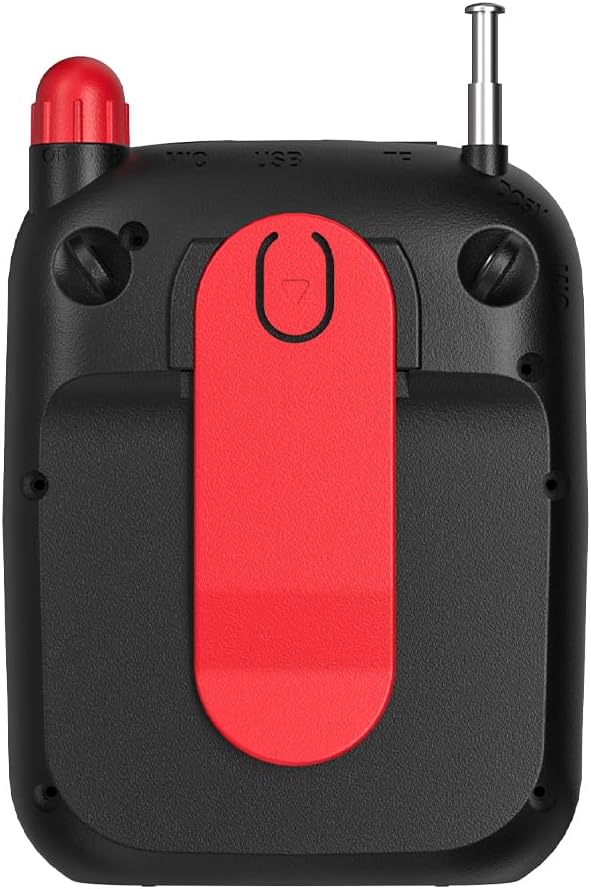
Imej: Belakang view of the Lecoo MCS30 speaker, clearly showing the integrated red belt clip for portable use.
- Klip tali pinggang: For attaching the speaker to clothing or a belt for hands-free use.
Persediaan
1. Mengisi Speaker
- Connect the charging cable to the DC 5V port on the speaker.
- Sambungkan hujung kabel yang satu lagi ke penyesuai kuasa USB (tidak disertakan) atau port USB komputer.
- Paparan akan menunjukkan status pengecasan. Cas penuh biasanya mengambil masa 3-4 jam.
- Putuskan sambungan pengecas setelah dicas sepenuhnya untuk menjimatkan hayat bateri.
2. Menghidupkan/Mematikan
- To power on, slide the power switch to the 'ON' position. The display will light up.
- Untuk mematikan kuasa, luncurkan suis kuasa ke kedudukan 'OFF'.
3. Pemasangan Bluetooth Awal
- Ensure the speaker is powered on and in Bluetooth mode (the display will show 'BLUE' or a Bluetooth icon). If not, press the 'M' (Mode) button to switch.
- Pada peranti mudah alih anda (telefon pintar, tablet, komputer riba), dayakan Bluetooth dan cari peranti yang tersedia.
- Select 'Lecoo MCS30' from the list of found devices.
- Once paired, the speaker will emit a confirmation sound, and the display will indicate a successful connection.
Arahan Operasi
1. Main semula Bluetooth
- After successful pairing, open your music player on your connected device and start playback.
- Use the speaker's 'Previous/Volume Down' and 'Next/Volume Up' buttons for track navigation (short press) and volume adjustment (long press).
- Use the 'Play/Pause' button to control playback.
2. Main semula USB/Kad SD
- Insert a USB flash drive into the USB port or an SD card into the TF card slot.
- The speaker will automatically switch to USB or SD card mode and begin playing MP3 files. If not, press the 'M' (Mode) button to select the correct mode.
- Use the speaker's control buttons for track navigation and volume adjustment.
3. AUX Input Playback
- Sambungkan satu hujung kabel audio 3.5mm (tidak disertakan) ke port input AUX pada pembesar suara.
- Sambungkan hujung yang lain ke bicu fon kepala peranti audio anda.
- Press the 'M' (Mode) button until the speaker enters AUX mode.
- Start playback from your audio device. Volume can be controlled via both the speaker and the connected device.
4. Microphone Usage and Voice Recording
- Connect the headset microphone or a lapel microphone to the MIC input port.
- Press the 'Microphone' button to activate the amplification function. Your voice will be ampdisampaikan melalui pembesar suara.
- To record your voice, ensure a USB flash drive or SD card is inserted. Press and hold the 'Microphone' button (or follow specific instructions if a dedicated record button exists, otherwise assume long press). The speaker will indicate recording has started.
- Press the 'Microphone' button again to stop recording. Recorded files are saved to the USB drive or SD card.
5. Kawalan Kelantangan
- Long press the 'Next/Volume Up' button to increase the volume.
- Long press the 'Previous/Volume Down' button to decrease the volume.
Penyelenggaraan
Pembersihan
- Lap permukaan pembesar suara dengan kain lembut dan kering.
- Jangan gunakan pembersih yang melelas, alkohol atau pelarut kimia, kerana ini boleh merosakkan kemasan.
- Avoid getting moisture into any ports or openings.
Penyimpanan
- Simpan pembesar suara di tempat yang sejuk dan kering jauh dari cahaya matahari langsung dan suhu yang melampau.
- Jika menyimpan untuk tempoh yang lama, cas bateri secara berkala (cth., setiap 3 bulan) untuk mengekalkan kesihatan bateri.
Menyelesaikan masalah
- Tiada Kuasa:
Ensure the speaker is fully charged. Check the power switch is in the 'ON' position. - Tiada Bunyi:
Check the volume level on both the speaker and the connected device. Ensure the correct input mode (Bluetooth, USB, AUX, SD) is selected. Verify cables are securely connected for AUX input. - Bluetooth Tidak Bersambung:
Ensure the speaker is in Bluetooth pairing mode. Turn off and on Bluetooth on your device. Move the speaker closer to your device. Clear previous Bluetooth connections on your device and try pairing again. - Mikrofon Tidak Berfungsi:
Ensure the microphone is securely plugged into the MIC input. Press the 'Microphone' button to activate it. Check the microphone's own power source if it has one. - Rakaman Tidak Berfungsi:
Ensure a compatible USB flash drive or SD card is inserted and has sufficient free space. Check if the recording function is properly activated (refer to 'Microphone Usage and Voice Recording' section).
Spesifikasi
| Ciri | Penerangan |
|---|---|
| Jenama | Lecoo |
| Model | MCS30 |
| Teknologi Ketersambungan | Bluetooth 5.3, USB, AUX, SD Card |
| Kuasa Keluaran | 5W |
| Julat Kekerapan | 100Hz-20KHz |
| Peranti Serasi | Smartphone, Laptop, Karaoke Machine, MP3 Player, Tablet |
| Sokongan Mikrofon | Dual Microphone (Headset/Lapel) with Amplification and Recording |
| Sokongan Format Audio | MP3 |
| warna | Hitam |
Waranti dan Sokongan
The Lecoo MCS30 Portable Speaker comes with a Lecoo Turkey Warranty. For warranty claims or technical support, please refer to the warranty card included with your product or visit the official Lecoo webtapak.
Anda boleh mendapatkan lebih banyak maklumat dan sokongan dengan melayari Lecoo Store on Amazon.