
1. Pengenalan
This manual provides detailed instructions for the installation, operation, and maintenance of your JOYING JY-UZS80N8 Single DIN Car Stereo. This advanced head unit features an 8-inch detachable touchscreen, integrated Apple CarPlay and Android Auto, a 48-band equalizer, AM/FM radio, and subwoofer output, designed to enhance your in-car audio and navigation experience.
Sila baca manual ini dengan teliti sebelum menggunakan peranti ini untuk memastikan fungsi dan keselamatan yang betul.

Image 1.1: The JOYING JY-UZS80N8 car stereo displaying the Apple CarPlay interface with navigation and media playback.
2. Komponen Produk dan Lebihview
2.1 Apa yang ada di dalam Kotak
Pakej termasuk item berikut:
- 8" Car Radio Unit x 1
- Universal ISO Harness x 1
- Antena 4G x 2
- Kabel USB x 2
- External Microphone x 1
- GPS Antenna x 1
- Manual Pengguna x 1
- Kit Pemasangan x 1

Image 2.1: All included accessories and the main unit of the JOYING JY-UZS80N8 car stereo.
2.2 Ciri-ciri Utama
- 8-inch Detachable Touchscreen: High-resolution 1280x800 display with a full-fit design for clear visuals and wide viewsudut-sudut.
- Apple CarPlay & Android Auto Tanpa Wayar: Seamless smartphone integration for navigation, calls, and media.
- Built-in 4G Module: Supports SIM card for internet access (data only, no calls/SMS).
- Pemprosesan Audio Lanjutan: 48-band EQ, built-in DSP, optical fiber and coaxial digital output for superior sound quality.
- But Cepat: Quick startup in approximately 2 seconds after the initial boot.
- Navigasi GPS: Precise positioning with included GPS antenna and offline map support.
- Output HDMI: Supports external display for passenger entertainment.
3. Persediaan dan Pemasangan
3.1 Nota Pra-Pemasangan
- Installation may require an additional installation frame kit, special ISO harness, amplifier adapter, or CANbus decoder depending on your vehicle model.
- The unit does not support factory car GPS antenna, backup camera, Bluetooth, USB, or microphone.
- Only JOYING accessories (DAB+ digital radio adapter, DVR, OBDII scanner, reverse camera, TPMS, steering wheel controller) are supported and must be ordered separately.
3.2 Sambungan Pendawaian
Refer to the wiring diagram for proper connection of power, speakers, antennas, and other peripherals. Ensure all connections are secure before powering on the unit.

Imej 3.1: Terperinci view of the rear panel connections for the JOYING JY-UZS80N8 head unit.
3.3 Detachable Screen Adjustment
The 8-inch screen is detachable and can be adjusted vertically by 2.5cm up or down from its middle position, in 0.7cm increments, to suit your installation requirements.

Image 3.2: Illustration of the detachable screen's vertical adjustment capability.
4. Arahan Operasi
4.1 Antara Muka Pengguna (UI)
The unit features a deep-optimized user interface tailored for in-car use. It allows for customization of widgets, display of current applications, and split-screen functionality.
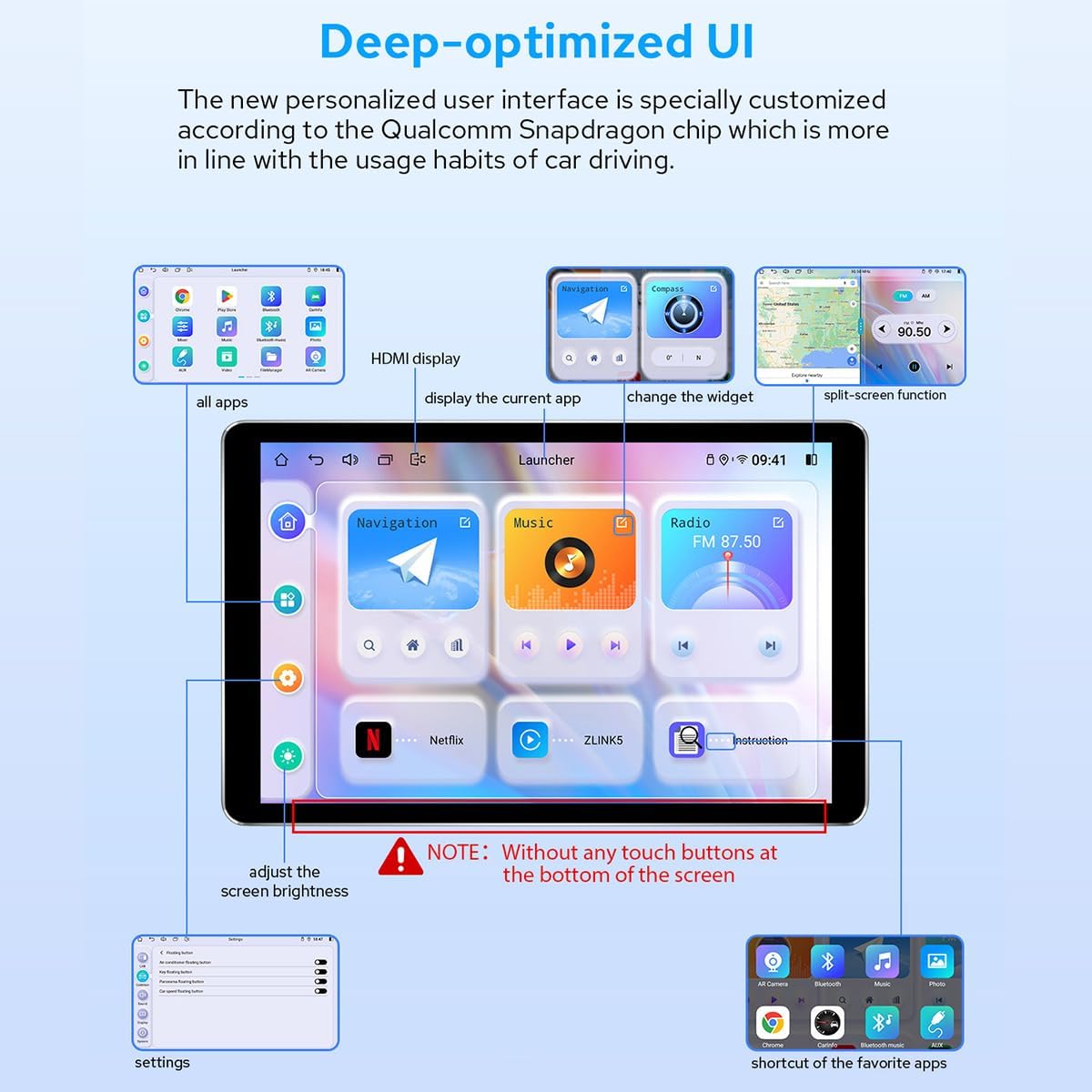
Imej 4.1: Selesaiview of the personalized user interface with key features highlighted.
4.2 Kawalan Gerak Isyarat
Control the screen using intuitive two-finger gestures:
- Gelongsor ke atas: Performs a specific action (configurable).
- Luncurkan ke Bawah: Performs a specific action (configurable).
- Slaid Kiri: Performs a specific action (configurable).
- Slide Right: Performs a specific action (configurable).
4.3 Floating Shortcut Key
Activate the floating shortcut key in the settings for easy access to frequently used functions while driving.

Image 4.2: Visual representation of Day & Night Mode, Gesture Control, and Floating Shortcut Key.
5. Ketersambungan
5.1 Tanpa Wayar Apple CarPlay & Android Auto
Connect your smartphone via USB cable or Bluetooth to access Apple CarPlay or Android Auto. This allows you to use navigation, make calls, send messages, and listen to music directly from your phone's apps on the car stereo's display.

Image 5.1: Illustration of smartphone connectivity with Wireless CarPlay and Android Auto.
5.2 Modul 4G
Insert a SIM card into the dedicated slot for direct internet access. The built-in 4G module supports FDD-LTE and TDD-LTE bands. Note that this feature is for internet data only and does not support phone calls or SMS messages.

Image 5.2: Instructions for inserting a 4G SIM card into the module.
5.3 Navigasi GPS
The unit includes precise GPS engines and an antenna for accurate positioning and faster real-time navigation. Offline maps can be downloaded and saved to the car stereo for use in areas without internet connectivity.
6. Tetapan Audio
6.1 Built-in DSP and EQ
The JY-UZS80N8 features a built-in Digital Signal Processor (DSP) and a 48-band equalizer with 20 preset sound effects. This allows for high-precision digital processing of audio signals, including reverberation, delay, distortion, and filtering, to achieve optimal sound quality.

Image 6.1: DSP and EQ interface for sound customization.
6.2 Subwoofer and DTS Scenes
The subwoofer output can be amplified and adjusted independently. The unit also supports DTS 5.1 panoramic surround sound effects and sound field correction for an immersive audio experience.

Image 6.2: EQ settings for subwoofer and DTS sound scene options.

Image 6.3: High-precision sound processing options.
7. Ciri Paparan
7.1 Ultra-thin Full-fit Screen
The 8-inch display features ultra-thin bezels and full-fit screen technology, which reduces reflection and enhances brightness and clarity. The screen offers a wide viewing angle, ensuring consistent color and image quality from various perspectives.

Image 7.1: The ultra-thin full-fit screen design.

Image 7.2: Screen appearance when off and demonstrating wide viewsudut-sudut.
7.2 Day & Night Mode
The display automatically adjusts between a bright daytime mode for clear visibility in sunlight and a softer night mode to reduce glare and eye strain during nighttime driving.
7.3 Output HDMI
The unit provides an HDMI output for connecting to external displays, such as headrest monitors, allowing passengers to watch videos while the main screen is used for navigation or other functions. Note that a straight-head HDMI cable is not supported due to space constraints; an L-shaped or angled HDMI cable is required.

Image 7.3: HDMI output displaying content.
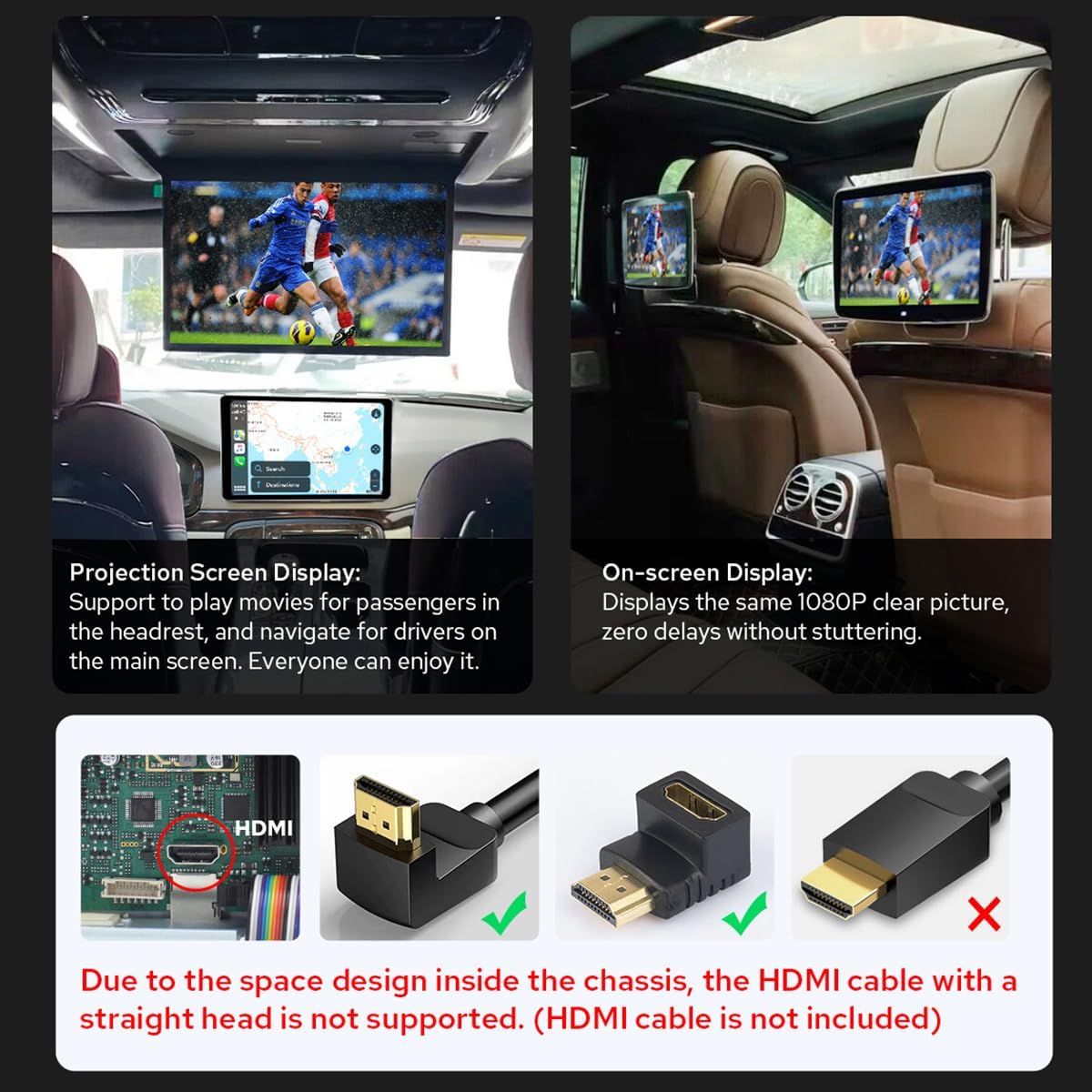
Image 7.4: HDMI output in use for passenger screens and compatible HDMI cable types.
8. Camera Integration
8.1 AR Camera Support
The unit supports Augmented Reality (AR) cameras, allowing you to switch between front and rear camera views while driving to observe your surroundings. For optimal performance, it is recommended to use JOYING's AR camera, which is optimized for compatibility and provides clearer, more stable images.

Image 8.1: Front and rear camera views from the AR camera.

Image 8.2: Recommended AR camera compatibility.
9. Spesifikasi
9.1 Parameter Umum
| Ciri | Perincian |
|---|---|
| Jenama | MERIAHKAN |
| Nombor Model | JY-UZS80N8 |
| Berat Barang | 4.29 paun |
| Dimensi Pakej | 9.25 x 6.5 x 5.12 inci |
| Tarikh Mula-mula Tersedia | 6 Julai 2023 |
9.2 Parameter Teknikal
| kategori | Parameter | Perincian |
|---|---|---|
| Pemproses | CPU | QCM6125 Okta Teras 64bit ARM (4x A73@2.0GHz, 4x A53@1.8GHz) |
| GPU | Adreno™ 610@950 MHz | |
| Teknologi Pembuatan | 11 nanometer | |
| Ingatan | Jenis Memori | LPDDR4X |
| RAM & ROM | 8GB + 128GB | |
| Paparan Multimedia | Resolusi Skrin | 1280x800P |
| Ketumpatan Skrin | 273 ppi | |
| Kadar Segar Semula | 60 Hz | |
| DPI | 160 dpi (hdpi) | |
| Network & Connection | Sistem Kedudukan | GPS / GLONASS / Beidou |
| Rangkaian | 4G/3G/Bluetooth OBD (5.0) | |
| Wi-Fi | Wi-Fi 5 (Up to 600 Mbps DL 802.11ac Wi-Fi X12 LTE modem) | |
| Output Audio | Mod Keluaran Audio | Stereo |
| Bunyi Sekeliling | 5.1 Konfigurasi Saluran | |
| Jenis Penyambung | Koaksial, Optik | |
| Ciri Khas | Built-In Bluetooth, Touchscreen | |
| Video | Pengekodan Video | Supports AVI, MKV, MP4, WMV, RMVB, MPG |
| Jumlah Port HDMI | 1 |

Image 9.1: Core technical parameters.

Image 9.2: Multimedia and network parameters.

Image 9.3: Internal motherboard structure.
10. Penyelesaian masalah
If you encounter issues with your JOYING JY-UZS80N8 car stereo, consider the following general troubleshooting steps:
- Tiada Kuasa: Periksa semua sambungan kuasa dan fius. Pastikan penyalaan kenderaan dihidupkan.
- Tiada Bunyi: Verify speaker connections, volume levels, and audio source selection. Check EQ and DSP settings.
- Skrin sentuh Tidak Responsif: Cuba mulakan semula unit. Pastikan skrin bersih dan bebas daripada serpihan.
- Isu Isyarat GPS: Pastikan antena GPS dipasang dengan betul dan mempunyai jelas view dari langit.
- Connectivity Problems (CarPlay/Android Auto/4G/WiFi): Check cable connections for wired CarPlay/Android Auto. For wireless connections, ensure Bluetooth/WiFi is enabled on both devices and the unit. Verify SIM card insertion and data plan for 4G.
- Lag/Pembekuan Sistem: Close unnecessary applications. Perform a system reset if the issue persists.
For more specific issues or persistent problems, please refer to the online support resources or contact JOYING customer service.
11. Penyelenggaraan
To ensure the longevity and optimal performance of your JOYING JY-UZS80N8 car stereo, follow these maintenance guidelines:
- Membersihkan Skrin: Gunakan kain lembut dan tidak berbulu untuk mengelap skrin sentuh dengan lembut. Untuk calitan degil, sedikit dampen kain dengan air atau pembersih selamat skrin. Elakkan bahan kimia yang keras atau bahan yang melelas.
- Pembersihan Am: Pastikan unit dan kawasan sekitar bebas daripada habuk dan serpihan. Gunakan berus lembut atau udara termampat untuk membersihkan bolong dan port.
- Kemas Kini Perisian: Periodically check for and install available software updates to ensure the unit has the latest features and bug fixes.
- Kawalan Suhu: Elakkan daripada mendedahkan unit kepada suhu yang melampau untuk tempoh yang lama.
12. Waranti dan Sokongan Pelanggan
For warranty information, technical assistance, or customer support, please refer to the warranty card included with your product or visit the official JOYING website. You can also contact JOYING customer service directly through their provided channels for any inquiries regarding your JY-UZS80N8 car stereo.
Please have your product model number (JY-UZS80N8) and purchase details ready when contacting support.