
1. Pengenalan
This manual provides detailed instructions for the Binken Wireless HDMI Transmitter and 2 Receivers, Model 810. This system allows for wireless transmission of HDMI audio and video signals, offering a convenient solution for extending your display without the need for long cables. Please read this manual thoroughly before use to ensure proper setup and operation.
2. Kandungan Pakej
Sahkan bahawa semua item terdapat dalam pakej anda:
- 1x Binken Wireless HDMI Transmitter (TX)
- 2x Binken Wireless HDMI Receiver (RX)
- 3x Kabel Kuasa USB
- 2x HDMI Adapters (e.g., Mini HDMI to HDMI, Micro HDMI to HDMI)
- 1x Manual Pengguna (dokumen ini)

Image: The Binken Wireless HDMI Transmitter and two Receivers, along with included USB power cables and HDMI adapters.
3. Produk Lebihview
The Binken Wireless HDMI system consists of a transmitter (TX) and two receivers (RX). The transmitter connects to your source device (e.g., laptop, game console), and the receivers connect to your display devices (e.g., TV, projector). The system supports 1080p@60Hz resolution and operates on 2.4G/5GHz frequencies for stable transmission up to 30 meters (98 feet).

Imej: Dari dekat view of one Binken Wireless HDMI unit, highlighting its compact design and connection ports (HDMI, USB power).
3.1 Ciri-ciri Utama
- Penghantaran HDMI Tanpa Wayar: Transmits audio and video signals wirelessly.
- Pasang dan Main: No software or Wi-Fi required for setup.
- Resolusi Tinggi: Supports up to 1080p@60Hz.
- Julat Lanjutan: Up to 30 meters (98 feet) transmission distance.
- Multi-Receiver Support: One transmitter can connect to up to four receivers (additional receivers sold separately).
- Keserasian Luas: Compatible with various HDMI source and display devices.
- Latensi Rendah: Approximately 0.1 seconds for near real-time experience.
4. Arahan Persediaan
Follow these steps to set up your Binken Wireless HDMI system:
- Sambungkan Pemancar (TX):
- Plug the HDMI connector of the Transmitter into the HDMI output port of your source device (e.g., laptop, PC, game console, DVD player).
- Connect a USB power cable to the Transmitter's power port and then to a USB power source (e.g., a USB wall adapter, TV USB port, or power bank). Ensure the Transmitter powers on (indicated by an LED light).
- Sambungkan Penerima (RX):
- Plug the HDMI connector of a Receiver into an available HDMI input port on your display device (e.g., TV, monitor, projector).
- Connect a USB power cable to the Receiver's power port and then to a USB power source. Ensure the Receiver powers on.
- Repeat for Additional Receivers: If using a second receiver, repeat step 2 for your second display device.
- Hidupkan Peranti: Ensure both your source device and display devices are powered on.
- Pilih Input yang Betul: On your display device, select the correct HDMI input source to which the Receiver is connected.
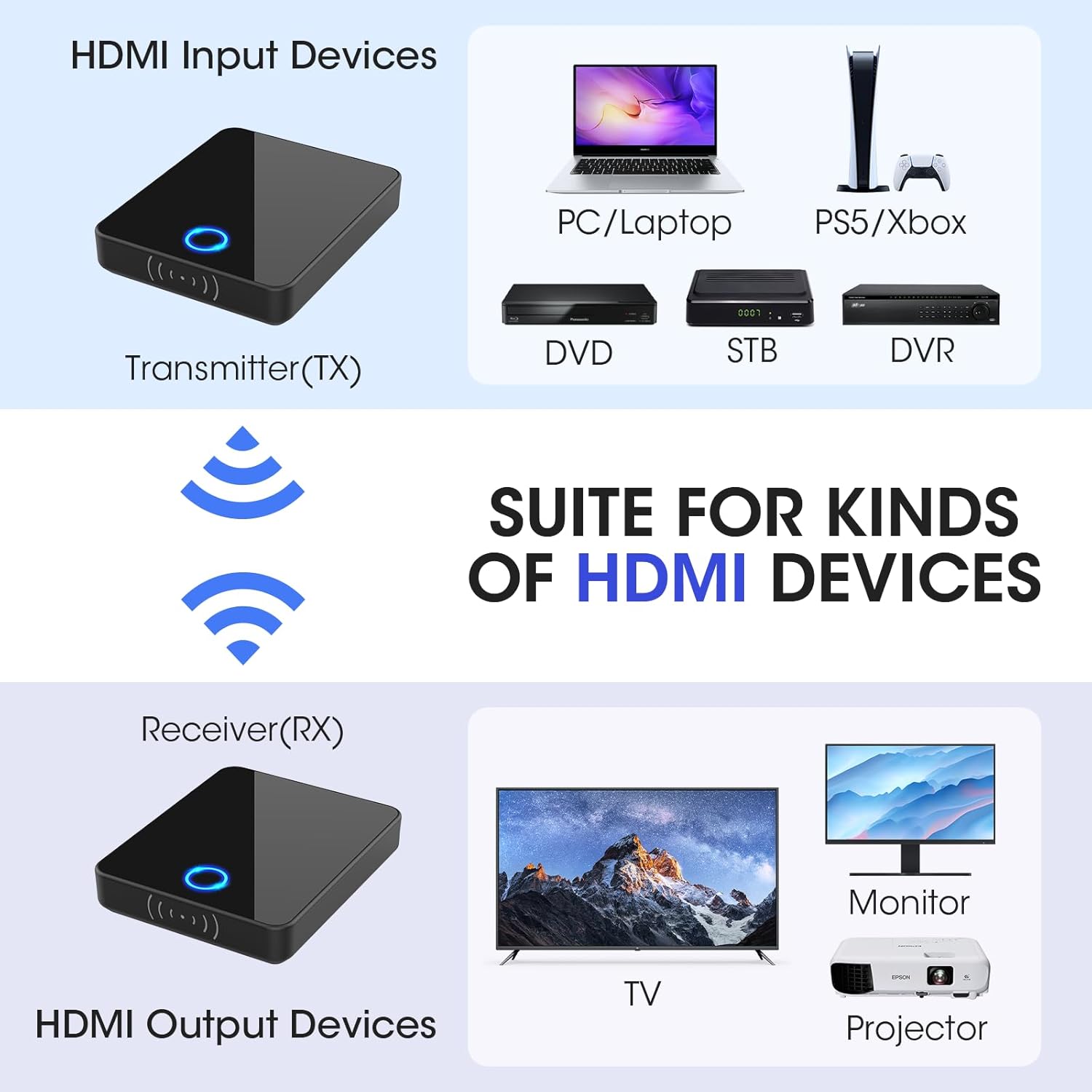
Image: A visual guide illustrating how to connect the Transmitter (TX) to HDMI input devices like laptops or game consoles, and the Receiver (RX) to HDMI output devices such as TVs, monitors, or projectors.
The system is designed for plug-and-play operation. Once all connections are made and devices are powered on, the transmitter and receiver(s) should automatically pair and begin transmitting the signal.
5. Operasi
5.1 Operasi Asas
After successful setup, the Binken Wireless HDMI system operates automatically. The video and audio from your source device will be mirrored to the connected display(s).
- Penunjuk LED: The LED light on both the Transmitter and Receiver indicates connection status. A solid light typically means a stable connection.
- Julat Isyarat: Maintain the transmitter and receiver within the specified range of 30 meters (98 feet) for optimal performance. Obstructions like walls and furniture can reduce this range.

Imej: Bekasample of the wireless HDMI system in use, showing a presentation being wirelessly projected in a meeting room, demonstrating its application for shared viewing.
5.2 Multi-Receiver Functionality
This system supports one transmitter broadcasting to up to four receivers simultaneously. To use multiple receivers:
- Connect each receiver to a separate display device as described in the Setup section.
- Ensure all receivers are powered on and within range of the transmitter.
- The transmitter will automatically broadcast the signal to all paired receivers.

Image: A floor plan diagram illustrating how one Binken Wireless HDMI Transmitter can send signals to multiple Receivers located in different rooms, enabling multi-room viewing.
6. Spesifikasi
| Ciri | Perincian |
|---|---|
| Nombor Model | 810 |
| Jenama | Binken |
| Teknologi Ketersambungan | HDMI wayarles |
| Jenis Penyambung | HDMI |
| Sokongan Resolusi | Hingga 1080p @ 60Hz |
| Kekerapan Penghantaran | 2.4GHz / 5GHz |
| Jarak Penghantaran | Up to 30 meters (98 feet) line of sight |
| Latensi | Lebih kurang 0.1 saat |
| Sokongan Berbilang Penerima | 1 Pemancar kepada sehingga 4 Penerima |
| Compatible Input Devices | Laptops, PCs, Blu-ray players, HD digital video cameras, DVDs, DSLRs, set-top boxes, cable/satellite boxes, PS4, PS5 |
| Compatible Output Devices | HDTVs, Projectors, Monitors |
7. Penyelesaian masalah
Jika anda menghadapi masalah, rujuk kepada masalah dan penyelesaian biasa berikut:
- Tiada Isyarat pada Paparan:
- Ensure both the Transmitter and Receiver are properly powered and their LED indicators are on.
- Sahkan bahawa kabel HDMI disambungkan dengan selamat ke kedua-dua peranti sumber dan paparan.
- Check that your display device is set to the correct HDMI input source.
- Try connecting the source device directly to the display with an HDMI cable to confirm the source and display are functioning correctly.
- Reduce the distance between the Transmitter and Receiver, and remove any major obstructions.
- Poor Video Quality or Flickering:
- Ensure the Transmitter and Receiver are within optimal range and have a clear line of sight.
- Minimumkan gangguan daripada peranti wayarles lain (cth, penghala Wi-Fi, telefon tanpa wayar).
- Check if the power supply to both units is stable.
- Tiada Audio:
- Verify that the audio output settings on your source device are correctly configured.
- Pastikan kelantangan peranti paparan tidak diredamkan atau ditetapkan terlalu rendah.
- Check all HDMI connections.
- Sambungan Terputus-putus:
- Relocate the Transmitter and Receiver to avoid physical obstructions or sources of interference.
- Ensure the power supply is consistent and adequate for both units.
8. Penyelenggaraan
To ensure the longevity and optimal performance of your Binken Wireless HDMI system, follow these maintenance guidelines:
- Pembersihan: Gunakan kain lembut dan kering untuk membersihkan peranti. Jangan gunakan pembersih cecair atau aerosol.
- Storan: Apabila tidak digunakan untuk tempoh yang lama, simpan peranti di tempat yang sejuk dan kering jauh dari cahaya matahari langsung dan suhu yang melampau.
- Pengendalian: Kendalikan peranti dengan berhati-hati. Elakkan daripada menjatuhkannya atau menyebabkannya terkena hentaman yang kuat.
- Kuasa: Always use the provided USB power cables and ensure a stable power source.
- Pengudaraan: Ensure the devices have adequate ventilation and are not covered during operation to prevent overheating.
9. Waranti dan Sokongan
Binken products are designed for reliability and performance. For warranty information and technical support, please refer to the official Binken webtapak atau hubungi perkhidmatan pelanggan mereka. Simpan resit pembelian anda sebagai bukti pembelian untuk tuntutan waranti.
Maklumat Hubungan:
- Webtapak: Visit the Binken Store on Amazon
- For further assistance, please consult the product listing page or contact Binken customer support directly.