
pengenalan
This manual provides detailed instructions for the operation and maintenance of your TEKMAGIC W64-NCA-BK Digital Sports Watch. Designed for durability and functionality, this watch features 10 ATM (100m) water resistance, a chronograph, stopwatch, timer, countdown, calendar, dual time zone display, and an alarm clock. Please read this manual thoroughly to ensure proper use and to maximize the lifespan of your watch.
Mengawasiview dan Fungsi Butang
Your TEKMAGIC W64-NCA-BK watch features four primary buttons for navigation and function control. Refer to the diagram below for button identification.
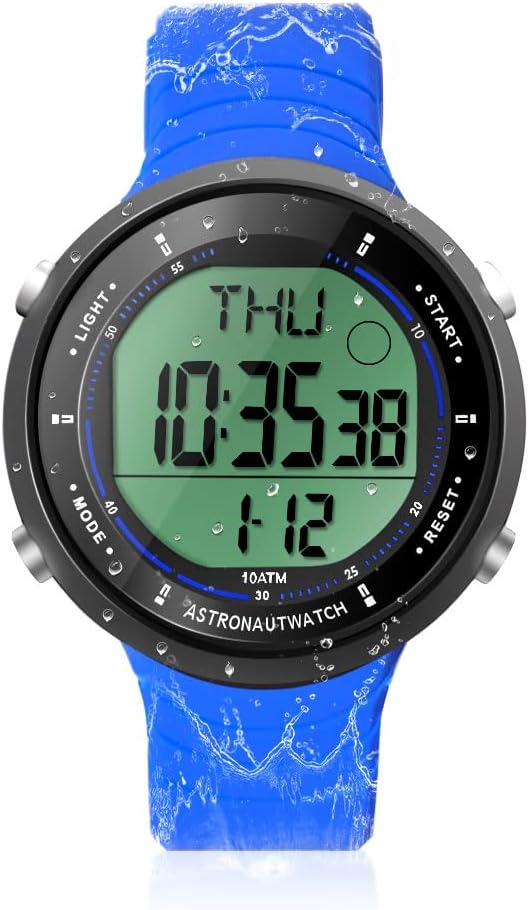
Penerangan Imej: A depan view of the TEKMAGIC W64-NCA-BK Digital Sports Watch. The watch has a blue silicone strap and a black case with a digital display showing "THU 10:35:38 1-12". Four buttons are visible on the sides, labeled "LIGHT", "MODE", "START", and "RESET".
- Butang LIGHT (Kiri Atas): Mengaktifkan lampu latar untuk keterlihatan dalam keadaan cahaya malap.
- Butang MOD (Kiri Bawah): Cycles through different modes: Time, Chronograph, Timer, Countdown, Alarm, Dual Time.
- Butang MULA (Kanan Atas): Starts/stops functions in Chronograph, Timer, and Countdown modes. Adjusts values in setting modes.
- Butang TETAP SEMULA (Bahagian Kanan Bawah): Resets functions in Chronograph, Timer, and Countdown modes. Cycles through digits in setting modes.
Persediaan dan Operasi Asas
1. Kuasa Awal Hidup
The watch typically comes pre-installed with a battery. If the display is blank, the battery may need replacement (refer to Maintenance section).
2. Menetapkan Masa dan Tarikh
- Dari mod Masa, tekan dan tahan butang MODE button until the seconds begin to flash. This indicates setting mode.
- Tekan ke TETAP SEMULA button to cycle through the setting options: Seconds → Hour → Minute → Year → Month → Day → 12/24 Hour Format.
- Gunakan MULAKAN butang untuk melaraskan nilai berkelip.
- Setelah semua tetapan selesai, tekan butang MODE butang untuk keluar dari mod tetapan.
3. 12/24 Hour Format Switch
During time setting, you can switch between 12-hour (with AM/PM indicator) and 24-hour formats using the MULAKAN button when the hour format option is flashing.
Fungsi Operasi
1. Chronograph (Jam randik)
The chronograph function allows for precise timing of events.

Penerangan Imej: A close-up of the TEKMAGIC W64-NCA-BK watch face showing the stopwatch function. The display reads "ST 0:00543" with "CHIME" indicated. The image also shows a person swimming with the watch.
- Tekan ke MODE button repeatedly until "ST" (Stopwatch) appears on the display.
- Tekan MULAKAN untuk memulakan masa.
- Tekan MULAKAN sekali lagi untuk menjeda masa.
- Tekan TETAP SEMULA untuk memadamkan jam randik kepada sifar.
- Untuk menyambung semula pemasaan selepas berhenti seketika, tekan MULAKAN.
2. Pemasa Undur
Set a specific time for the watch to count down from.
Penerangan Imej: A close-up of the TEKMAGIC W64-NCA-BK watch face showing the countdown timer function. The display reads "TR 0:0621". The image also shows a person surfing with the watch.
- Tekan ke MODE button repeatedly until "TR" (Timer) appears on the display.
- Tekan dan tahan butang TETAP SEMULA butang sehingga jam mula berkelip.
- Tekan MULAKAN to adjust the flashing hour value.
- Tekan TETAP SEMULA to move to minutes, then MULAKAN to adjust. Repeat for seconds.
- Setelah masa undur yang diingini ditetapkan, tekan MODE untuk keluar dari mod tetapan.
- Tekan MULAKAN untuk memulakan undur.
- Tekan MULAKAN again to pause the countdown. Press TETAP SEMULA to reset to the set time.
- Penggera akan berbunyi apabila kira detik mencapai sifar.
3. Jam Penggera
Tetapkan penggera harian untuk berbunyi pada masa tertentu.

Penerangan Imej: A composite image showing various watch functions. One quadrant specifically shows the watch face with "AL 12:00" indicating the alarm setting mode.
- Tekan ke MODE button repeatedly until "AL" (Alarm) appears on the display.
- Tekan dan tahan butang TETAP SEMULA butang sehingga digit jam mula berkelip.
- Tekan MULAKAN to adjust the flashing hour value.
- Tekan TETAP SEMULA to move to minutes, then MULAKAN untuk menyesuaikan diri.
- Tekan MODE untuk keluar dari mod tetapan penggera.
- Untuk menghidupkan/mematikan penggera, tekan MULAKAN while in Alarm mode (not setting mode). An alarm icon will appear/disappear.
4. Hourly Berpadu
hourly chime provides an audible alert at the top of every hour.
Penerangan Imej: A composite image showing various watch functions. One quadrant specifically shows the watch face with "CHIME" indicated, signifying the hourlLoceng y sedang aktif.
- While in Alarm mode ("AL"), press the TETAP SEMULA butang untuk menogol hourly chime ON/OFF. A chime icon will appear/disappear.
5. Zon Waktu Berganda
Display a second time zone for convenience when traveling or communicating across different regions.

Penerangan Imej: A composite image showing two TEKMAGIC W64-NCA-BK watches side-by-side, one displaying "THU 4:52:23" and the other "T2 16:52:23", illustrating the dual time zone feature. The image also shows people wearing the watch while hiking.
- Tekan ke MODE button repeatedly until "T2" (Dual Time) appears on the display.
- Tekan dan tahan butang TETAP SEMULA butang sehingga digit jam mula berkelip.
- Tekan MULAKAN to adjust the flashing hour value.
- Tekan TETAP SEMULA to move to minutes, then MULAKAN untuk menyesuaikan diri.
- Tekan MODE to exit dual time setting mode.
6. Lampu latar
To illuminate the display, press the CAHAYA button (top left). The backlight will remain on for a few seconds.
Penyelenggaraan
1. Water Resistance (10 ATM / 100m)
This watch is rated for 10 ATM (100 meters / 330 feet) water resistance, making it suitable for swimming, diving, snorkeling, and other water activities. Ensure all buttons are not pressed while underwater to maintain water resistance integrity.

Penerangan Imej: A composite image demonstrating the watch's 10 ATM waterproof capability. The top shows a diver underwater wearing the watch. The bottom left shows a person's arm with the watch in a swimming pool. The bottom right shows the watch submerged in water with splashes.
2. Penggantian Bateri
The watch uses a CR2025 battery. If the display becomes dim or the watch stops functioning, it's time to replace the battery. It is recommended to have battery replacement performed by a qualified watch technician to ensure proper sealing and maintain water resistance.
- Carefully remove the back cover of the watch using a suitable tool.
- Keluarkan bateri CR2025 lama.
- Masukkan bateri CR2025 baharu dengan bahagian positif (+) menghadap ke atas.
- Replace the back cover, ensuring it is securely fastened to maintain water resistance.
3. Pembersihan
Bersihkan jam tangan dengan kerap dengan kain lembut, damp cloth. For stubborn dirt, a mild soap solution can be used, followed by rinsing with fresh water and drying thoroughly. Avoid using harsh chemicals or abrasive materials.
Menyelesaikan masalah
| Masalah | Kemungkinan Punca | Penyelesaian |
|---|---|---|
| Paparan kosong atau malap. | Bateri lemah atau mati. | Gantikan bateri CR2025. |
| Watch loses time or functions incorrectly. | Bateri lemah; kerosakan dalaman. | Gantikan bateri. Jika masalah berterusan, hubungi khidmat pelanggan. |
| Air di dalam jam tangan. | Buttons pressed underwater; back cover not sealed properly after battery change. | Immediately take to a watch repair specialist. Avoid pressing buttons underwater. Ensure proper sealing after maintenance. |
| Alarm or chime not sounding. | Alarm/chime function is turned off. | Ensure alarm/chime is activated in the respective mode. |
Spesifikasi
| Ciri | Perincian |
|---|---|
| Nombor Model | W64-NCA-BK |
| Tahan Air | 10 ATM (100m / 330ft) |
| Jenis Pergerakan | Kuarza Jepun |
| Jenis Bateri | CR2025 |
| Hayat Bateri Beroperasi | 1.5 hingga 2 tahun |
| Ketepatan Masa | ±30 saat sebulan |
| Julat Undur | 23:59'59'' to 0:0'0'' |
| Bahan Kes | ABS |
| Bahan Tali | silikon |
| Diameter Kes | 45mm (1.8 inci) |
| Ketebalan Kes | 12mm (0.47 inci) |
| Lebar tali | 22mm (0.9 inci) |
| Max Wrist Circumference | 230mm (9.1 inci) |
| Min Wrist Circumference | 160mm (6.3 inci) |
| Berat Produk | 53g (0.12 paun) |

Penerangan Imej: A diagram illustrating the dimensions of the TEKMAGIC W64-NCA-BK Digital Sports Watch. It shows the watch with measurements for case diameter (45mm), case thickness (12mm), strap width (22mm), and minimum/maximum wrist circumference (160mm/230mm).
Sokongan Pelanggan
For further assistance or inquiries, please refer to the product's official support channels or contact your retailer. Keep your purchase receipt for warranty purposes.


