
1. Pengenalan
This manual provides essential information for the safe and efficient use of your INIU 65W USB C Charger (Model AI-625). Please read these instructions thoroughly before using the product and retain them for future reference. The INIU 65W charger is designed for fast and simultaneous charging of various portable electronic devices.
2. Produk Lebihview
Ciri-ciri Utama:
- Pengecasan Dwi Port: Equipped with one USB-C port and one USB-A port for simultaneous charging of two devices.
- Output Maks 65W: Delivers up to 65W of power, suitable for fast charging smartphones, tablets, and compatible laptops.
- Compact GaN Design: Utilizes GaN technology for a smaller, lighter form factor compared to traditional chargers.
- Palam boleh lipat: Features a foldable AC plug for enhanced portability and protection during travel.
- TempGuard 2.0 Protection: Incorporates advanced temperature control to prevent overheating and protect device battery health.
- Keserasian Luas: Supports a broad range of devices including Apple, Android, and other USB-powered gadgets.
Kandungan Pakej:
- INIU 65W USB-C & USB-A Dual Ports Charger (Model AI-625) x 1
- Manual Pengguna x 1
- 4ft USB-C to USB-C Cable (E-marked 100W) x 1

Image: The INIU 65W USB C Charger (Model AI-625) in black, featuring one USB-C port and one USB-A port, shown alongside its included 4ft USB-C to USB-C cable.

Image: The compact INIU 65W USB C Charger (AI-625) shown next to a larger, older generation 65W charger, highlighting its reduced size due to GaN technology.
3. Persediaan dan Operasi
Persediaan Awal:
- Buka serampang AC dari badan pengecas.
- Insert the charger into a standard wall outlet. Ensure the connection is secure.
Mengecas Peranti Anda:
- Pengecasan Peranti Tunggal:
- Connect one end of a compatible charging cable (e.g., the included USB-C to USB-C cable) to your device.
- Connect the other end of the cable to either the USB-C port or the USB-A port on the charger.
- Peranti harus mula mengecas secara automatik.
- Simultaneous Dual Device Charging:
- Connect your first device to the USB-C port using a compatible cable.
- Connect your second device to the USB-A port using a compatible cable.
- Both devices will charge simultaneously. The charger intelligently distributes power based on device requirements.
For optimal fast charging, ensure your cables and devices support the appropriate charging protocols (e.g., Power Delivery for USB-C).
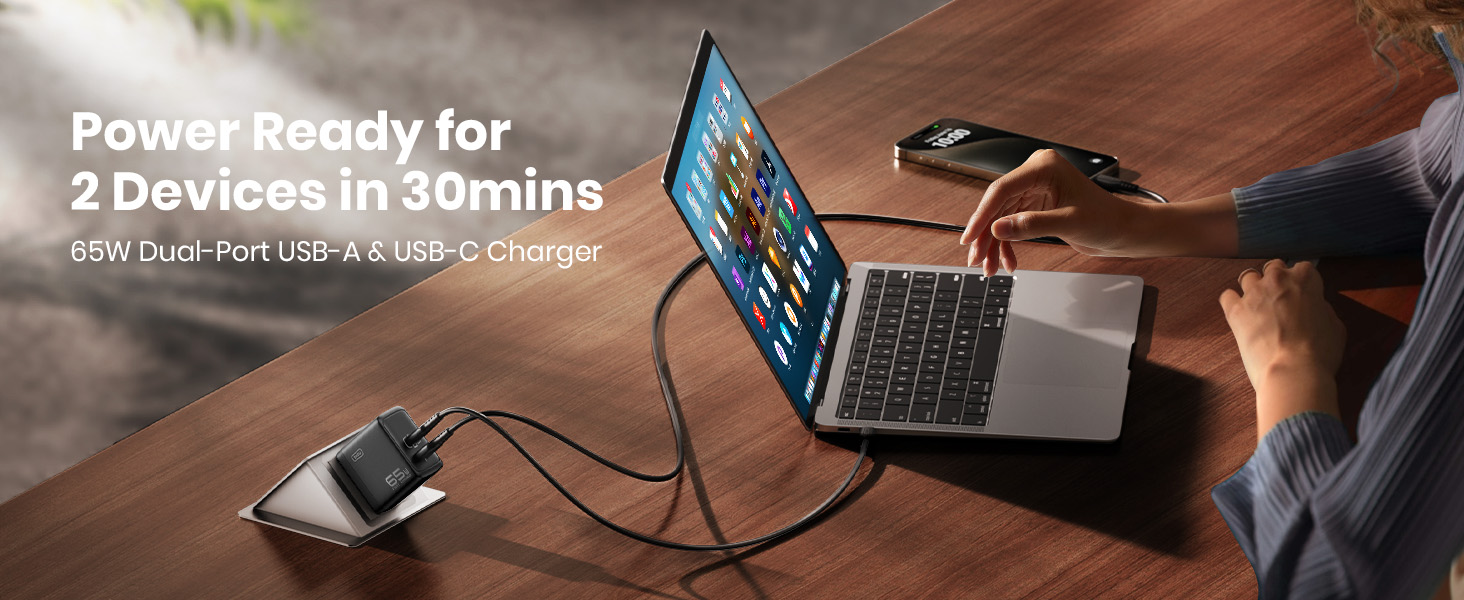
Image: The INIU 65W dual-port charger connected to a wall outlet, simultaneously charging a laptop via USB-C and a smartphone via USB-A, demonstrating its multi-device capability.
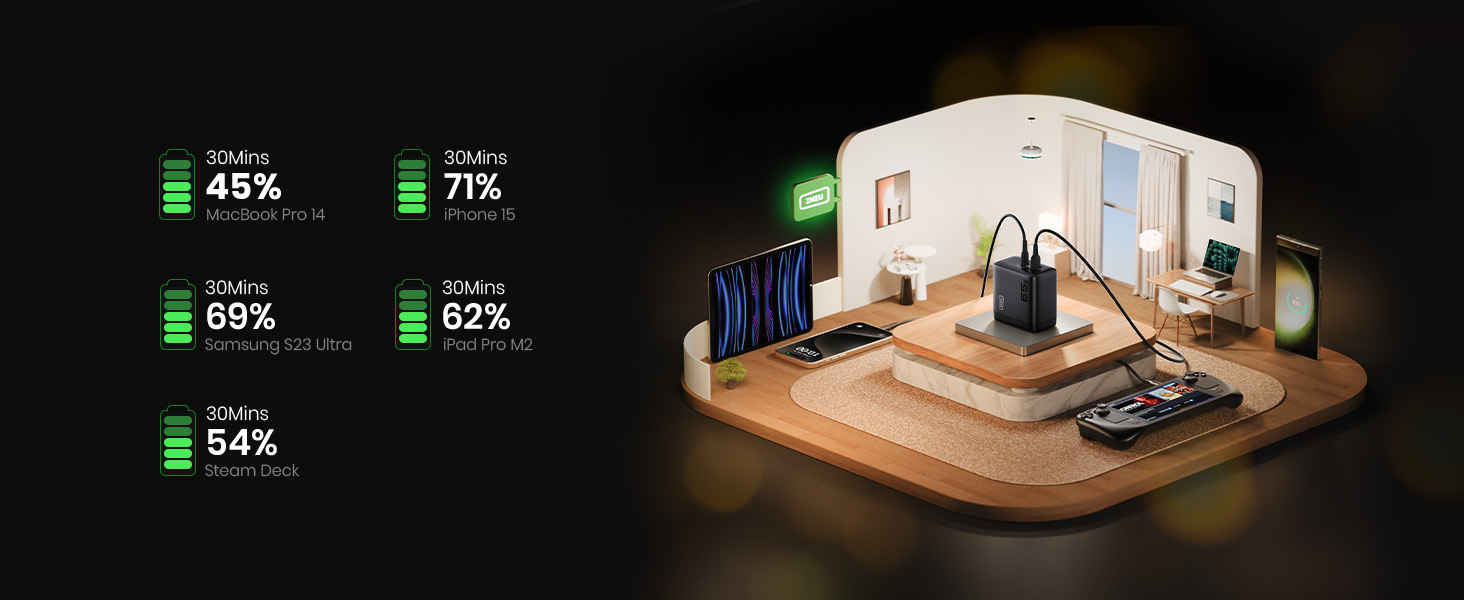
Image: A graphic illustrating approximate charging times for various devices (MacBook Pro 14, iPhone 15, Samsung S23 Ultra, iPad Pro M2, Steam Deck) reaching specific battery percentages within 30 minutes using the INIU 65W charger.
4. Keserasian
The INIU 65W USB C Charger is designed for broad compatibility with a wide range of electronic devices.
Keserasian Port USB-C:
- Komputer riba: MacBook Air M2, MacBook Pro 14" M1, Dell XPS 13, Surface Pro 8, Lenovo ThinkPad, etc.
- Konsol Permainan: Dek Stim, Nintendo Switch.
- Telefon pintar: iPhone 12-15 Series, Samsung Galaxy / Note series, Google Pixel, etc.
- Tablet: iPad Air / Pro / Mini, Galaxy Tab A.
- Peranti Lain: Oculus VR headsets, and other USB-C powered devices.
USB-A Port Compatibility:
- Telefon pintar: iPhone 8 and earlier, Samsung S8-S21, Google, Sony, LG, etc.
- Aksesori: Wireless Earbuds, Smart Watches, and other USB-A powered devices.

Image: A visual guide illustrating the wide range of devices compatible with the INIU 65W charger's USB-C and USB-A ports, including laptops, smartphones, tablets, and gaming consoles.
5. Maklumat Keselamatan
- Jangan dedahkan pengecas kepada cecair, suhu melampau atau cahaya matahari langsung.
- Elakkan daripada menjatuhkan atau meletakkan pengecas kepada hentaman kuat.
- Jangan cuba membuka, membaiki atau mengubah suai pengecas.
- Use only certified and compatible charging cables.
- Jauhkan daripada kanak-kanak.
- Cabut palam pengecas daripada alur keluar dinding apabila tidak digunakan atau semasa ribut elektrik.
- The charger is equipped with TempGuard 2.0 technology to manage heat. However, ensure adequate ventilation around the charger during operation.
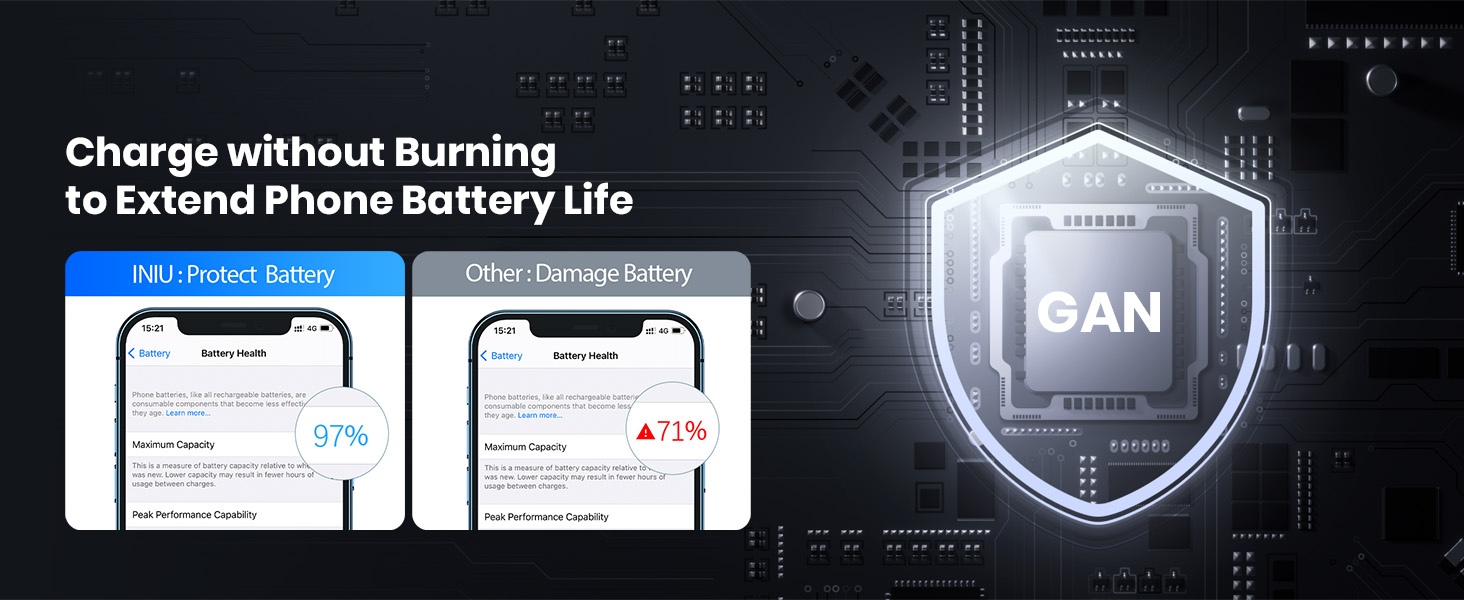
Image: A comparison graphic showing how the INIU charger, with its GaN technology, helps maintain phone battery health (97% maximum capacity) over time, contrasting with other chargers that may lead to battery degradation (71% maximum capacity).
6. Penyelenggaraan
- Bersihkan pengecas dengan kain lembut dan kering. Jangan gunakan pembersih cecair atau aerosol.
- Ensure the ports are free from dust and debris to maintain optimal connection.
- Simpan pengecas di tempat yang sejuk dan kering apabila tidak digunakan.
7. Penyelesaian masalah
- Peranti tidak dicas:
- Pastikan pengecas dipasang dengan selamat pada salur keluar dinding yang berfungsi.
- Sahkan bahawa kabel pengecasan disambungkan dengan betul kepada kedua-dua pengecas dan peranti anda.
- Try a different charging cable or device to isolate the issue.
- Periksa sama ada port pengecasan peranti bersih dan bebas daripada serpihan.
- Pengecasan perlahan:
- Ensure your device and cable support fast charging protocols (e.g., Power Delivery for USB-C).
- Some devices, especially certain laptops, may require specific charging profiles. While this charger provides 65W, some devices might indicate "slow charging" if they expect a higher wattage or a specific proprietary protocol.
- If charging two devices simultaneously, the total 65W output is shared, which may result in slower charging for individual devices compared to single-device charging.
- Close background applications on your device that consume significant power.
- Pengecas terasa hangat:
- It is normal for chargers to generate some heat during operation, especially during fast charging. The INIU AI-625 features TempGuard 2.0 for thermal management.
- If the charger becomes excessively hot to touch, unplug it immediately and contact customer support.
8. Spesifikasi
| Ciri | Perincian |
|---|---|
| Jenama | INIU |
| Nombor Model | AI-625 |
| Wattage | 65 Watt (Maksimum) |
| Bilangan Pelabuhan | 2 (1x USB-C, 1x USB-A) |
| Input Voltage | AC 100-240V |
| Amppemadam | Output varies based on device and port usage |
| Ciri Khas | Fast Charging, Lightweight Design, Retractable Plug, Travel-Friendly |
| Jenis Bahan | plastik |
| warna | Hitam |
| Dimensi | 12.29 x 10.59 x 3.61 cm |
| Berat badan | 168 g |
9. Waranti dan Sokongan
INIU provides an industry-leading Waranti 3 tahun for this product, along with lifetime technical support.
For warranty claims, technical assistance, or any product-related inquiries, please contact INIU customer support through their official webtapak atau peruncit tempat produk itu dibeli.

Image: The INIU 65W charger displayed next to a shield icon indicating "3 Year Product Care," emphasizing the extended warranty.