
Hoppstar Hoppstar Expert Yale
Hoppstar Expert Digital Camera User Manual
Model: Hoppstar Expert Yale | Brand: Hoppstar
1. Pengenalan
Welcome to the user manual for your Hoppstar Expert Digital Camera. This manual provides essential information on how to set up, operate, and maintain your camera, ensuring a fun and creative experience for young photographers. Please read this manual carefully before using the camera and keep it for future reference.
The Hoppstar Expert is designed specifically for children, offering a user-friendly interface, durable construction with interchangeable silicone covers, and a range of exciting features including a selfie camera, video recording, picture frames, photo filters, and face detection.
2. Maklumat Keselamatan
- This product is intended for children aged 3 years and older. Adult supervision is recommended during use.
- Jangan dedahkan kamera kepada air atau kelembapan berlebihan.
- Avoid dropping the camera or subjecting it to strong impacts, even with the protective silicone cover.
- Keep small parts, such as memory cards, out of reach of very young children to prevent choking hazards.
- Use only the charging cable provided or a compatible USB charger.
- Jangan cuba membuka atau membaiki kamera sendiri. Hubungi khidmat pelanggan jika timbul masalah.
3. Kandungan Pakej
Sila tandai kotak untuk item berikut:
- Hoppstar Expert Digital Camera
- Manual Arahan
- Kabel Pengecas USB
- Lanyard/Tali
- Penyesuai USB-C ke USB-A
- USB-C to Micro-USB Adapter
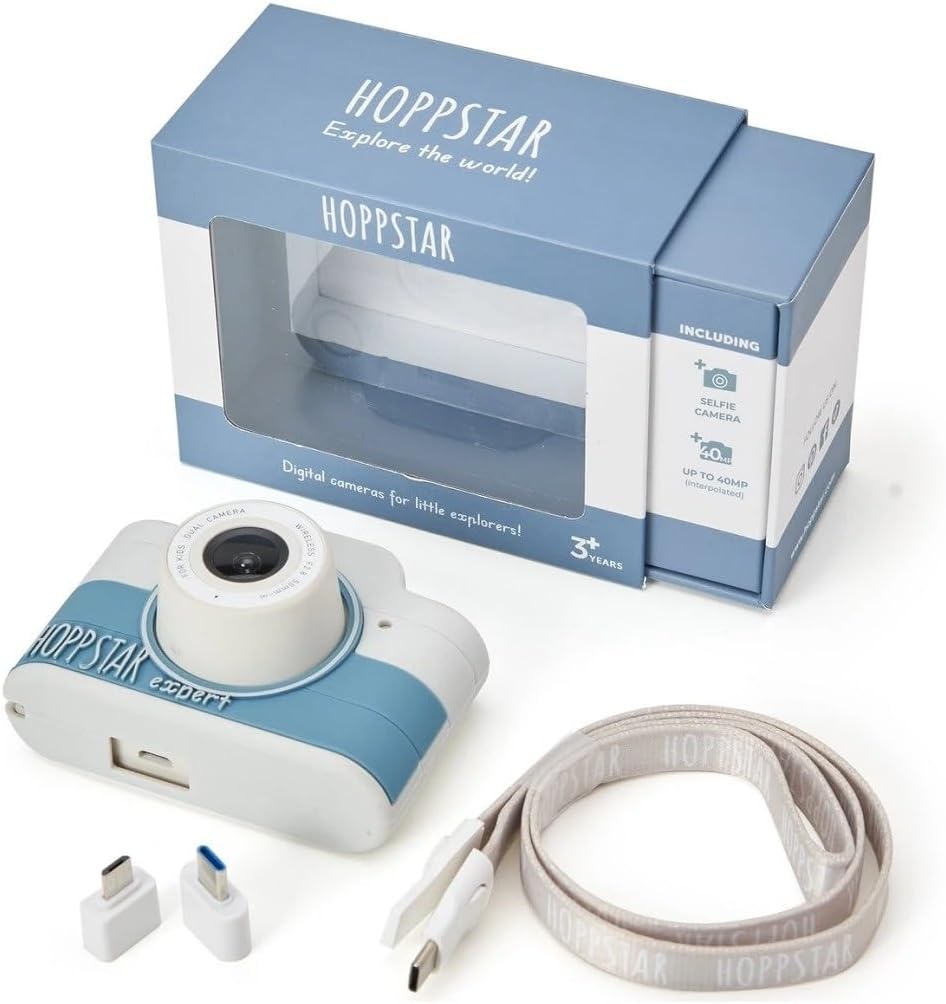
Image: Hoppstar Expert camera shown with its retail packaging, USB charging cable, lanyard, and two USB adapters.
4. Produk Lebihview
Depan View

Image: The front of the Hoppstar Expert camera, featuring the main lens, flash, and the 'Hoppstar Expert' branding on the blue and white body.
- Kanta Utama: For taking standard photos and videos.
- Flash/Light: Menyediakan pencahayaan dalam keadaan cahaya malap.
- mikrofon: Menangkap audio semasa rakaman video.
belakang View

Image: The back of the Hoppstar Expert camera, displaying the LCD screen and the control buttons on either side.
- Skrin LCD: Displays menus, live view, and playback.
- Kamera Selfie: Located above the screen for self-portraits.
- Butang Kawalan: Navigation, OK, Menu, and other function buttons.
5. Persediaan
5.1 Mengecas Kamera
Before first use, fully charge the camera's internal battery. Connect the provided USB charging cable to the camera's USB port and to a USB power source (e.g., computer, wall adapter). The charging indicator light will show the charging status and turn off when fully charged.
5.2 Memasukkan Kad Memori
The Hoppstar Expert comes with 16 GB of internal storage. If you wish to expand storage, locate the memory card slot (usually on the side or bottom) and insert a compatible microSD card (not included) until it clicks into place. Ensure the camera is powered off before inserting or removing the card.
5.3 Menghidupkan/Mematikan
Press and hold the Power button (usually located on the top or side) for a few seconds to turn the camera on or off.
6. Arahan Operasi
6.1 Kawalan Asas
- Butang OK: Mengesahkan pilihan dalam menu, mengambil foto atau memulakan/menghentikan rakaman video.
- Butang Navigasi: Used to move through menu options (Up, Down, Left, Right).
- Butang Menu: Accesses the camera's settings and feature options.
- Butang Mod: Bertukar antara mod foto, video dan main balik.
6.2 Mengambil Foto
In photo mode, frame your shot using the LCD screen. Press the OK button to capture a photo. The camera supports both front and selfie cameras. To switch between cameras, navigate to the camera settings in the menu or use a dedicated button if available.
6.3 Merakam Video
Switch to video mode. Press the OK button once to start recording and press it again to stop. Videos are saved to the internal memory or inserted memory card.
6.4 Using Creative Features
The Hoppstar Expert includes several creative features:
- Picture Frames: Apply fun borders to your photos. Access this feature through the camera's menu.
- Photo Filters: Change the look and feel of your photos with various color and effect filters.
- Pengesanan Muka: The camera can automatically detect faces in the frame, assisting with focus.
Explore these options within the camera's menu settings to enhance your photos and videos.
7. Penyelenggaraan
- Pembersihan: Use a soft, dry cloth to clean the camera body and screen. For the lens, use a specialized lens cleaning cloth. Do not use liquid cleaners.
- Penutup silikon: The interchangeable silicone cover can be removed and cleaned with mild soap and water if necessary. Ensure it is completely dry before reattaching.
- Penjagaan Bateri: Untuk memanjangkan hayat bateri, elakkan daripada menyahcas sepenuhnya bateri dengan kerap. Cas kamera dengan kerap, walaupun tidak digunakan untuk tempoh yang lama.
- Storan: Simpan kamera di tempat yang sejuk dan kering jauh dari cahaya matahari langsung dan suhu yang melampau.
8. Penyelesaian masalah
Kamera Tidak Dihidupkan
- Pastikan bateri telah dicas. Sambungkan kamera ke sumber kuasa dan cuba lagi.
- Tekan dan tahan butang Kuasa untuk tempoh yang lebih lama (5-10 saat).
Kualiti Imej/Video yang Buruk
- Pastikan kanta bersih dan bebas daripada kotoran atau habuk.
- Check lighting conditions. Optimal results are achieved in well-lit environments.
- Ensure the camera is held steady during capture.
Camera Freezes/Unresponsive
- Try resetting the camera by pressing the reset button (if available, often a small pinhole) or by holding the Power button until it turns off and then restarting.
Tidak Boleh Menyimpan Foto/Video
- Check if the internal memory or inserted memory card is full. Delete unnecessary files or insert a new card.
- Ensure the memory card is properly inserted and not corrupted.
If you encounter issues not listed here or if troubleshooting steps do not resolve the problem, please contact Hoppstar customer support.
9. Spesifikasi
| Ciri | Spesifikasi |
|---|---|
| Nama Jenama | Hoppstar |
| Nama Model | Hoppstar Expert Yale |
| Nombor Model | 76893 |
| warna | Yale |
| Dimensi Pakej | 14.3 x 8.7 x 5.1 cm |
| Kelajuan Tangkapan Berterusan | 30 fps |
| Komponen Terbina dalam | Camera + Instruction Manual |
| Tahun Model | 2023 |
| Warna Filem | warna |
| Jenis Kawalan Pendedahan | Automatik |
| Jenis Pengatup | elektronik |
10. Waranti dan Sokongan
The Hoppstar Expert Digital Camera comes with a standard manufacturer's warranty. Please refer to the warranty information provided with your purchase or visit the official Hoppstar weblaman web untuk butiran lanjut mengenai terma dan syarat jaminan.
For technical support, product inquiries, or warranty claims, please contact Hoppstar customer service through their official webtapak atau maklumat hubungan yang diberikan dalam dokumentasi pembelian anda.
Ask a question about this manual
Ask about setup, troubleshooting, compatibility, parts, safety, or missing instructions. Manuals+ will review the question and use this page’s manual context to help answer it.