
FERMAX 90b61eff-c290-484c-aba5-73e26c52e3da
Manual Pengguna Monitor FERMAX Duox Plus Veo 4.3"
Model: 90b61eff-c290-484c-aba5-73e26c52e3da
pengenalan
Welcome to the user manual for your new FERMAX Duox Plus Veo 4.3" Monitor. This manual provides essential information for the proper installation, operation, and maintenance of your device. Please read this manual thoroughly before using the product to ensure safe and efficient operation.
Maklumat Keselamatan Penting
- Keselamatan Elektrik: Ensure all electrical connections are made by a qualified professional and comply with local electrical codes. Disconnect power before installation or maintenance.
- Keadaan Persekitaran: Do not expose the monitor to extreme temperatures, humidity, or direct sunlight. Install in a dry, well-ventilated area.
- Pengendalian: Handle the monitor with care to avoid damage to the screen or internal components.
- Pembersihan: Gunakan kain lembut dan kering untuk pembersihan. Jangan gunakan pembersih atau pelarut yang melelas.
- Pelupusan: Dispose of the product and its components according to local electronic waste regulations.
Kandungan Pakej
Sila sahkan bahawa semua item yang disenaraikan di bawah disertakan dalam pakej anda:
- FERMAX Duox Plus Veo 4.3" Monitor Unit
- Pendakap Pemasangan
- Connection Cables (if applicable)
- Skru dan Palam Dinding
- Manual Pengguna (dokumen ini)
Ciri-ciri Produk
The FERMAX Duox Plus Veo 4.3" Monitor offers advanced features for your intercom system:
- 4.3-inch color display for clear video communication.
- Hands-free audio communication.
- Intuitive button interface for call answer, door release, and additional functions.
- Sleek, compact design suitable for modern interiors.
- Compatible with Duox Plus digital systems.
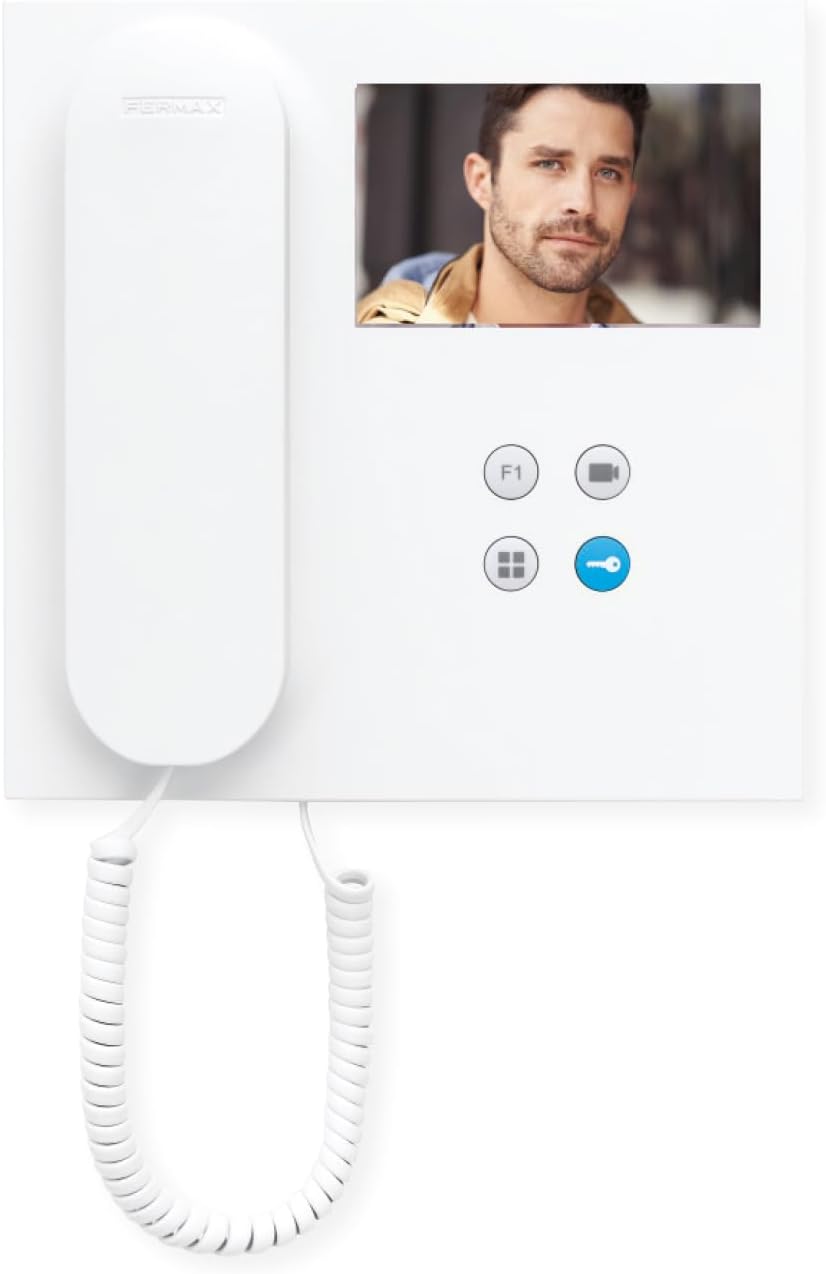
Imej: Depan view of the FERMAX Duox Plus Veo 4.3" Monitor, showing the display, handset, and control buttons.
Persediaan dan Pemasangan
1. Memasang Monitor
- Pilih Lokasi: Select a suitable indoor location, away from direct heat sources or moisture.
- Tandakan Titik Penggerudian: Gunakan pendakap pelekap sebagai templat untuk menandakan titik penggerudian pada dinding.
- Lubang gerudi: Drill holes at the marked points and insert wall plugs.
- Kurungan Selamat: Pasangkan pendakap pelekap pada dinding menggunakan skru yang disediakan.
2. Sambungan Pendawaian
Amaran: Ensure power is disconnected before making any electrical connections. Refer to your system's wiring diagram for specific connections.
- Connect the Duox Plus bus wires (data and power) to the designated terminals on the monitor.
- Connect any additional wires for auxiliary functions (e.g., second door release, panic button) as per your system's requirements.
- Pastikan semua sambungan selamat dan terlindung dengan betul.
3. Memasang Monitor
- Carefully align the monitor with the mounting bracket.
- Slide the monitor onto the bracket until it clicks securely into place.
- Pulihkan kuasa kepada sistem.
Arahan Operasi
Menerima Panggilan
- When a visitor calls from the outdoor panel, the monitor will ring and display the visitor's image.
- Untuk menjawab panggilan, tekan butang Butang Jawab (typically indicated by a phone icon).
- Untuk menamatkan panggilan, tekan butang Butang Tamatkan Panggilan (often the same button or a distinct hang-up icon).
Membuka Pintu
- During a call, or when monitoring the outdoor panel, press the Butang Pelepas Pintu (typically indicated by a key icon) to open the main entrance door.
Monitoring the Outdoor Panel
- Kepada view the outdoor panel camera without an incoming call, press the Butang Monitor (often indicated by a camera icon). The display will show the live feed.
Melaraskan Tetapan
- Kelantangan: Use the volume controls (if present, or via menu) to adjust the ringtone and conversation volume.
- Kecerahan/Kontras: Access the monitor's menu (refer to specific button layout) to adjust display settings.
Penyelenggaraan
- Pembersihan: Gunakan kain lembut dan tidak berbulu untuk mengelap skrin dengan lembut danasing. Do not use liquid cleaners, aerosols, or abrasive materials.
- Pemeriksaan: Periksa semua kabel dan sambungan secara berkala untuk sebarang tanda haus atau kerosakan.
- Kemas Kini Perisian: If applicable, check the manufacturer's website for any firmware updates for your Duox Plus system.
Menyelesaikan masalah
| Masalah | Kemungkinan Punca | Penyelesaian |
|---|---|---|
| Tiada imej pada skrin. | No power; loose connection; camera issue. | Check power supply. Ensure all cables are securely connected. Verify outdoor panel camera is functioning. |
| No audio during call. | Volume too low; faulty connection; microphone/speaker issue. | Increase volume. Check audio cable connections. Contact support if issue persists. |
| Pelepasan pintu tidak berfungsi. | Incorrect wiring; faulty lock mechanism; system error. | Verify wiring to the door strike. Test the lock mechanism independently. Consult system installer. |
| Monitor not ringing. | Ringtone volume off; system not registered; faulty outdoor panel button. | Check ringtone volume. Ensure monitor is properly registered to the system. Test outdoor panel button. |
If the problem persists after attempting these solutions, please contact FERMAX technical support or your installer.
Spesifikasi Teknikal
| Ciri | Perincian |
|---|---|
| Model | 90b61eff-c290-484c-aba5-73e26c52e3da |
| Saiz Skrin | 4.3 Inci |
| Resolusi | 800 x 600 |
| Nisbah Aspek | 4:3 |
| Nisbah Kontras Imej | 2000:1 |
| Permukaan Skrin | Berkilat |
| Pengeluar | FERMAX |
| Dimensi Pakej | 8.74 x 8.15 x 2.01 inci |
Waranti dan Sokongan
FERMAX products are designed for durability and reliability. For information regarding warranty terms and conditions, please refer to the warranty card included with your product or visit the official FERMAX webtapak.
For technical support, installation assistance, or service inquiries, please contact your local FERMAX distributor or visit the support section of the FERMAX webtapak:

Image: FERMAX brand logo with the slogan "Connectivity for All".
Ask a question about this manual
Ask about setup, troubleshooting, compatibility, parts, safety, or missing instructions. Manuals+ will review the question and use this page’s manual context to help answer it.