
1. Pengenalan
Thank you for choosing the GameSir T4 Cyclone Wireless Controller. This manual provides detailed instructions for setting up, operating, maintaining, and troubleshooting your controller. The GameSir T4 Cyclone is designed for a versatile gaming experience across multiple platforms.

Imej: Depan view of the GameSir T4 Cyclone Wireless Controller.
2. Kandungan Pakej
- GameSir T4 Cyclone Wireless Controller
- Kabel USB-C
- Manual Pengguna
- Note: The 2.4G wireless receiver is sold separately.
3. Persediaan
3.1 Mengecas Pengawal
Before first use, fully charge the controller. Connect the supplied USB-C cable to the controller's charging port and the other end to a USB power source (e.g., computer, wall adapter). The controller features an 860mAh battery, providing approximately 25 hours of playtime on a full charge.

Image: Illustration showing 860mAh battery capacity and 25 hours playing time.
3.2 Keserasian
The GameSir T4 Cyclone Wireless Controller is compatible with the following platforms:
- Nintendo Switch (including Switch, Switch Lite, and Switch OLED)
- PC Windows 10/11
- Android devices (Android 6.0 and above)
- iOS devices (iOS 13.0 and above)
- Dek Stim
Note: Xbox consoles are NOT supported.

Image: Controller shown with icons for Switch, PC, iOS, and Android, indicating multi-platform compatibility.
3.3 Pilihan Kesambungan
The controller offers three ways to connect to your devices:
- Sambungan Bluetooth:
- Pastikan pengawal dicas.
- Hidupkan alat kawalan.
- On your device (Switch, Android, iOS, PC), go to Bluetooth settings and search for available devices.
- Select "GameSir T4 Cyclone" to pair.
- 2.4G Wireless Connection (Receiver Sold Separately):
- Plug the 2.4G wireless receiver into an available USB port on your device (PC, Steam Deck).
- Hidupkan pengawal. Ia sepatutnya bersambung secara automatik kepada penerima.
- Sambungan Berwayar USB-C:
- Connect the controller to your device using the supplied USB-C cable.
- The controller will function as a wired controller and charge simultaneously.

Image: Visual representation of Bluetooth, USB-C, and 2.4G wireless connectivity options.
4. Arahan Operasi
4.1 Hall Effect Sensing Joysticks
The GameSir T4 Cyclone features Hall Effect joysticks, which use magnetic sensors to detect movement. This technology provides:
- Zon Mati Sifar: Memastikan tindak balas segera walaupun kepada input yang paling kecil.
- Anti-Drift Performance: Eliminates common stick drift issues found in traditional joysticks, ensuring long-term precision.
- Ketahanan: Designed for up to 5 million cycles.

Image: Diagram illustrating the internal components of GameSir Hall Effect Sticks, highlighting anti-drift and longevity.
4.2 Hall Effect Analog Triggers
The analog triggers also utilize Hall Effect technology, offering precise and consistent input. You can switch between two trigger modes:
- Regular Trigger Mode: Provides a full range of motion for nuanced control in racing or driving games.
- Fast Trigger Mode (Hair Trigger): Reduces travel distance for quicker, mouse-click-like responses, ideal for FPS or RPG games.

Image: Diagram showing the internal mechanism of Hall Effect Analog Triggers with 0.1mm accuracy.
4.3 Programmable Macro Back Buttons
The controller features two programmable back buttons (L4 and R4) that can be customized for enhanced gameplay. These buttons allow you to:
- Pemetaan Butang: Assign a single button function to L4 or R4.
- Fungsi Turbo: Set a button to rapidly repeat its input.
- Combo Function: Program a sequence of button presses to execute complex actions with a single press.
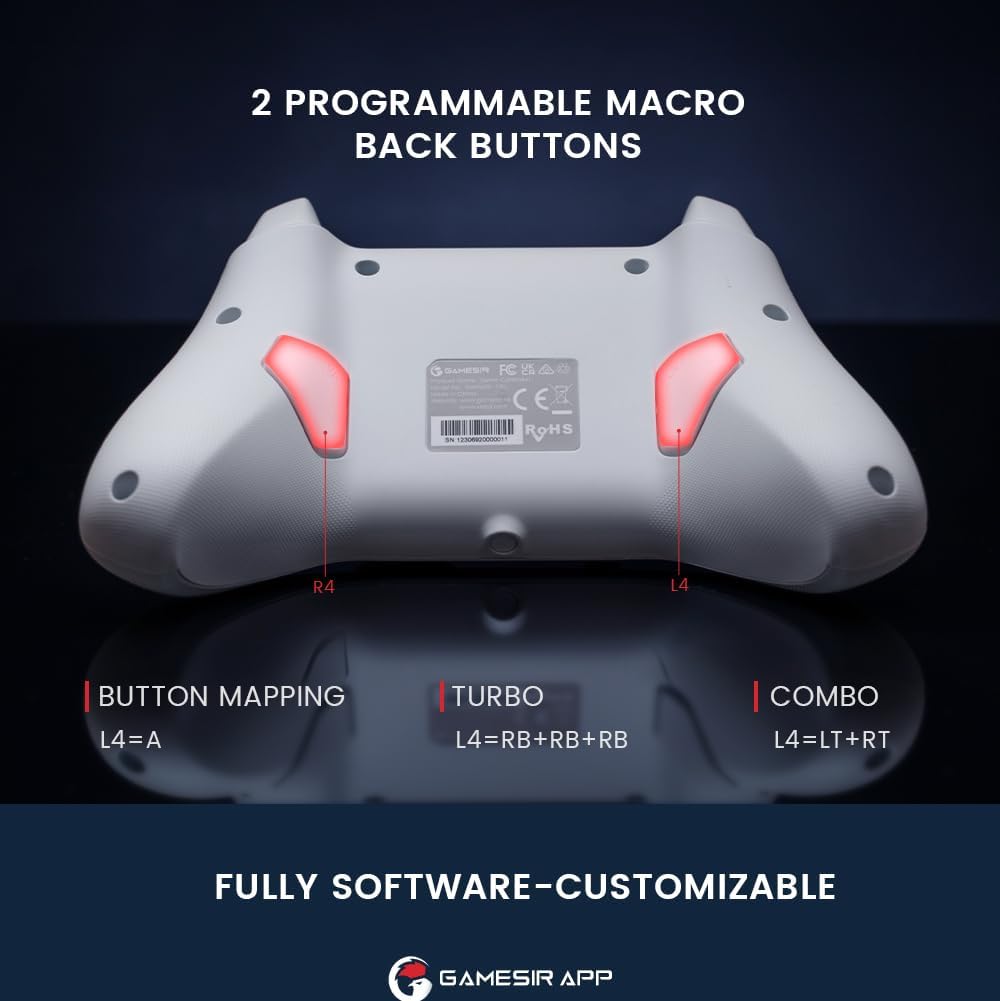
Imej: Belakang view of the controller highlighting the L4 and R4 programmable macro back buttons.
4.4 Multi-function M Button
The 'M' button provides quick access to various settings without needing the app:
- M + LT/RT: Switch between Hair Trigger (fast) and Linear Trigger (regular) modes.
- M + LS/RS: Adjust stick deadzone settings.
- M + D-pad Up/Down: Laraskan keamatan getaran.
- M + A: Change ABXY button layout (e.g., Switch layout vs. Xbox layout).

Image: Diagram showing the multi-function M button and its combinations for various settings.
4.5 Kawalan Pergerakan
The controller supports motion controls, allowing for interactive gameplay in compatible Nintendo Switch titles. Tilt, shake, or rotate the controller to interact with your games.

Image: Controller shown with dynamic lines indicating motion control in action during gameplay.
4.6 GameSir App Customization
For advanced customization, download the GameSir App. The app allows you to:
- Sesuaikan pemetaan butang.
- Adjust stick deadzone.
- Set trigger travel distance.
- Tala halus keamatan getaran.
- Kemas kini perisian tegar pengawal.

Image: Screenshots of the GameSir App interface showing options for button mapping, stick, triggers, and vibration settings.
5. Penyelenggaraan
- Pembersihan: Gunakan kain lembut dan kering untuk membersihkan pengawal. Elakkan menggunakan bahan kimia yang keras atau bahan yang melelas.
- Storan: Simpan pengawal di tempat yang sejuk dan kering jauh dari cahaya matahari langsung dan suhu yang melampau.
- Penjagaan Bateri: Do not attempt to replace the internal battery. If the controller will not be used for an extended period, charge it periodically to maintain battery health.
6. Penyelesaian masalah
- Pengawal Tidak Bersambung:
- Pastikan pengawal dicas sepenuhnya.
- Sahkan Bluetooth diaktifkan pada peranti anda dan pengawal berada dalam mod berpasangan.
- If using 2.4G wireless, ensure the receiver is properly inserted and the controller is in 2.4G mode.
- Cuba mulakan semula kedua-dua pengawal dan peranti anda.
- Input Lag or Unresponsive Controls:
- Ensure there are no obstructions or excessive distance between the controller and your device.
- Kurangkan gangguan daripada peranti wayarles lain.
- For critical gaming, consider using the USB-C wired connection for the lowest latency.
- Stick Drift or Inaccurate Movement:
- The Hall Effect joysticks are designed to prevent drift. If you experience issues, ensure the controller firmware is up to date via the GameSir App.
- Check the stick deadzone settings in the GameSir App and ensure it is set to 0 for optimal responsiveness.
- Rumble Motor Noise:
- Some users may notice a high-pitched squeal from the rumble motors. If this is distracting, the vibration intensity can be adjusted or disabled via the multi-function M button or the GameSir App.
- LED Indicator Too Bright:
- The LED brightness can be adjusted through the GameSir App.
- GameSir App Not Recognizing Controller:
- Ensure Bluetooth is enabled and the controller is paired with your mobile device.
- Check for app updates and controller firmware updates.
- Verify that the app has necessary permissions on your mobile device.
7. Spesifikasi
| Ciri | Perincian |
|---|---|
| Jenama | PermainanTuan |
| Nama Model | GameSir T4 Cyclone |
| Peranti Serasi | Android, iOS, Nintendo Switch, PC, Steam Deck |
| Jenis Pengawal | Kayu bedik |
| Teknologi Ketersambungan | Bluetooth, 2.4G Wireless (receiver sold separately), USB C |
| Ciri-ciri Tambahan | Wireless, Hall Effect Joysticks, Hall Effect Triggers, Programmable Back Buttons, Motion Control |
| Kuantiti Butang | 16 |
| Platform Perkakasan | Desktop, Gaming Console, Laptop, Smartphone, Tablet |
| Sumber Kuasa | Wireless (Rechargeable Battery) |
| Kapasiti Bateri | 860 mAh |
| Masa Bermain | lebih kurang 25 jam |
| Berat Barang | 400 g |
| Dimensi Item (L x W x H) | 6.14 x 4.21 x 2.48 inci |
8. Video Produk Rasmi
Video: Seorang pegawai tamatview of the GameSir T4 Cyclone and Pro Wireless Controllers, demonstrating features and compatibility.
9. Waranti dan Sokongan
GameSir products come with a limited warranty. For detailed warranty information, please refer to the warranty card included with your product or visit the official GameSir website. For technical support, troubleshooting assistance, or to download the GameSir App and firmware updates, please visit the GameSir support page or contact customer service.
GameSir App: The GameSir App is essential for unlocking the full customization potential of your controller and for keeping its firmware updated. It is available for download on Google Play and the Apple App Store.