1. Pengenalan
This manual provides detailed instructions for the installation, operation, and maintenance of your Turing TP-MMD4MV2 Smart Series TwilightVision 4MP IR Zoom Dome IP Camera. This advanced surveillance camera features a 2.7-13.5mm motorized varifocal lens, Smart IR illumination up to 40m (131ft), and TwilightVision technology for optimal image clarity in low-light conditions. It supports up to a 256GB MicroSD card for edge storage and is designed for outdoor use with IP67 weather resistance and IK10 vandal resistance. Please read this manual thoroughly before using the product to ensure proper setup and functionality.
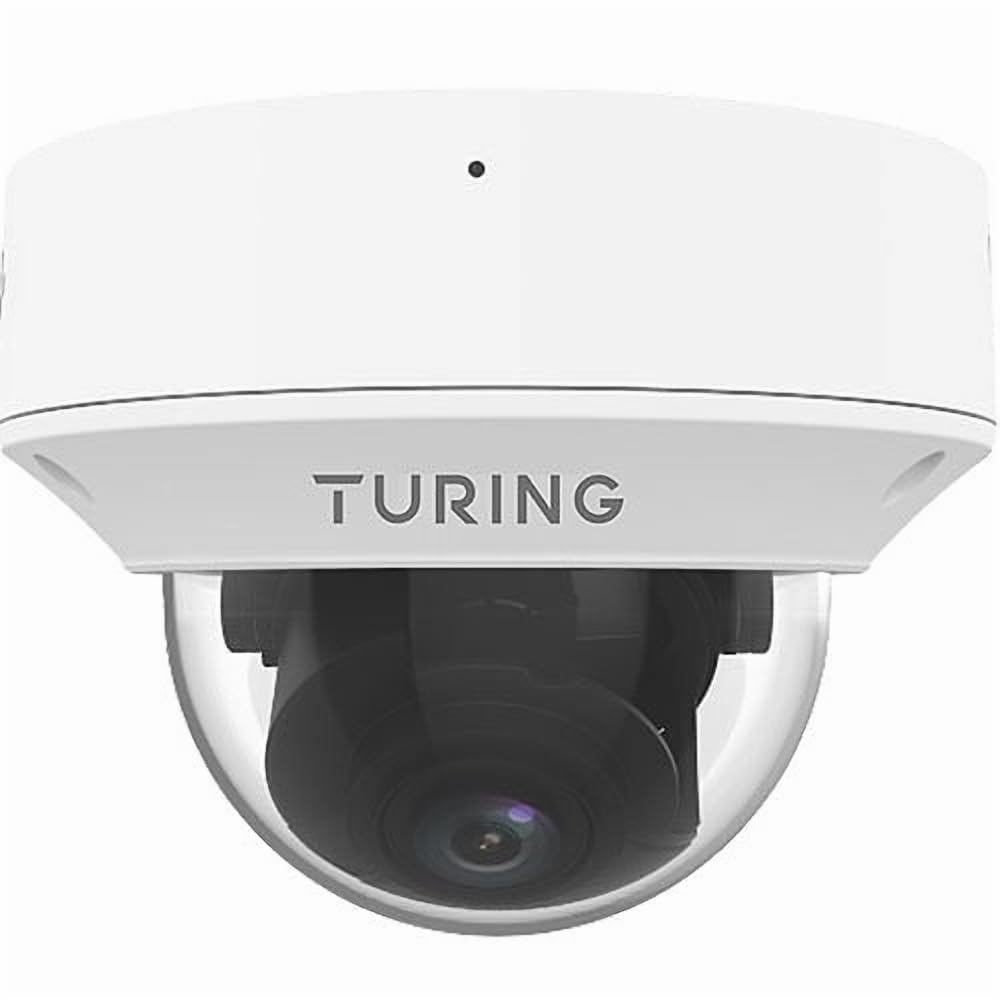
Figure 1: Turing TP-MMD4MV2 Smart Series TwilightVision 4MP IR Zoom Dome IP Camera. This image shows the white dome camera with its protective casing.
2. Maklumat Keselamatan
Sila patuhi langkah keselamatan berikut untuk mengelakkan kecederaan atau kerosakan pada produk:
- Keselamatan Elektrik: Ensure power supply meets the camera's requirements (DC 12V+/-25% or PoE IEEE 802.3af). Do not overload power outlets.
- Pemasangan: Installation should be performed by qualified personnel. Mount the camera securely to prevent it from falling.
- Persekitaran: Do not expose the camera to extreme temperatures, humidity, or corrosive environments beyond its specified operating conditions.
- Pembersihan: Gunakan kain lembut dan kering untuk membersihkan. Jangan gunakan detergen yang kuat atau bahan yang melelas.
- Pembongkaran: Jangan cuba membuka atau mengubah suai kamera. Ini akan membatalkan jaminan dan boleh menyebabkan kerosakan.
3. Kandungan Pakej
Sahkan bahawa semua item terdapat dalam pakej anda:
- Turing TP-MMD4MV2 IP Dome Camera
- Mounting Screw Kit (screws, wall anchors)
- Penyambung Kalis Air untuk Kabel Ethernet
- Templat Bor
- Panduan Mula Pantas / Manual Pengguna (dokumen ini)
Note: A MicroSD card and DC 12V power adapter are not included and must be purchased separately if not using Power over Ethernet (PoE).
4. Produk Lebihview
The TP-MMD4MV2 camera is designed for robust outdoor surveillance, offering high-resolution imaging and intelligent features.
4.1 Ciri-ciri Utama
- Resolusi 4 Megapiksel: Captures video at 2688x1520 pixels at 30/25fps.
- Kanta Varifokal Bermotor: 2.7-13.5mm lens with auto-focus for flexible viewsudut-sudut.
- TwilightVision Technology: Enhances image clarity in extremely low-light conditions (down to 0.002 Lux).
- IR Pintar: Infrared illumination up to 40 meters (131 feet) for clear night vision.
- People and Vehicle Search: Advanced analytics when used with Turing SMART series NVRs and Turing Vision Cloud.
- Mikrofon terbina dalam: Untuk pemantauan audio.
- Edge Storage: Supports up to 256GB MicroSD card (not included).
- Reka bentuk tahan lasak: IP67 weather-rated and IK10 vandal-resistant.
- Pilihan Kuasa: Supports Power over Ethernet (PoE) and DC 12V.
4.2 Komponen Kamera
The camera consists of the main dome unit, a mounting base, and various ports. While a specific diagram is not provided, typical components include:
- Penutup Kubah: Protective, vandal-resistant casing.
- Modul Kamera: Contains the lens, image sensor, and IR LEDs.
- Port Ethernet (RJ45): Untuk sambungan rangkaian dan PoE.
- Input Kuasa DC: For optional 12V DC power supply.
- Butang Tetapkan Semula: Untuk memulihkan tetapan lalai kilang.
- Slot Kad MicroSD: Located internally, accessible by removing the dome cover.
Figure 2: Illustrative diagram of camera components (image not available). This diagram would typically show the external parts of the dome camera, including the lens, IR LEDs, and the location of the cable connections and reset button.
5. Persediaan dan Pemasangan
Ikuti langkah ini untuk pemasangan kamera anda dengan betul.
5.1 Memasang Kamera
- Pilih Lokasi: Select a suitable outdoor location for wall mounting, ensuring a clear field of view and within range of your network cable. The camera is IP67 and IK10 rated for outdoor use.
- Sediakan Permukaan: Use the provided drill template to mark the screw holes on the mounting surface. Drill pilot holes as indicated.
- Selamatkan Pangkalan: Attach the camera's mounting base to the surface using the supplied screws and wall anchors.
- Pengurusan Kabel: Route the Ethernet cable through the mounting base or side cable entry point. Use the waterproof connector for outdoor installations to protect the RJ45 connection.
Figure 3: Illustrative diagram of camera mounting (image not available). This diagram would show the steps for securing the camera base to a wall or ceiling, including drilling and cable routing.
5.2 Menguasakan Kamera
Kamera boleh dikuasakan dalam dua cara:
- Kuasa Ethernet (PoE): Connect an Ethernet cable from a PoE-enabled switch or NVR to the camera's RJ45 port. This provides both power and data.
- DC 12V Power Adapter: If PoE is not available, connect a 12V DC power adapter (not included) to the camera's DC power input. Then, connect an Ethernet cable for data transmission.
5.3 Sambungan Rangkaian
Connect the camera to your network via an Ethernet cable. The camera supports Ethernet connectivity. While 'Wireless Communication Technology: Wi-Fi' is listed in some specifications, the primary and most robust connection method for this model is wired Ethernet, especially for PoE. For initial setup, a wired connection is recommended.
5.4 Pemasangan Kad MicroSD
To install a MicroSD card for local storage (up to 256GB):
- Matikan: Disconnect power from the camera before proceeding.
- Remove Dome Cover: Carefully twist and remove the outer dome cover to access the internal components.
- Masukkan Kad MicroSD: Locate the MicroSD card slot and gently insert the card until it clicks into place.
- Replace Dome Cover: Reattach the dome cover, ensuring it is securely sealed to maintain weather resistance.
Figure 4: Illustrative diagram of MicroSD card slot location (image not available). This diagram would show the internal view of the camera with the dome cover removed, highlighting the MicroSD card slot.
6. Mengendalikan Kamera
Once installed and powered, the camera can be accessed and configured.
6.1 Akses dan Konfigurasi Awal
The camera is designed to integrate with Turing SMART NVRs (TR-MR(P) models) and the Turing Vision Cloud for full functionality, including People and Vehicle Search. Refer to your NVR's manual or Turing Vision Cloud documentation for specific integration steps.
- Penemuan Rangkaian: Use Turing's network discovery tool to find the camera's IP address on your network.
- Web Antara muka: Akses kamera web antara muka melalui a web browser using its IP address. Log in with default credentials (refer to the Quick Start Guide for defaults).
- Tukar Kata Laluan: For security, immediately change the default password upon first login.
- Tetapan Rangkaian: Configure IP address, subnet mask, and gateway if necessary.
6.2 Adjusting the Motorized Lens
The 2.7-13.5mm motorized varifocal lens allows you to remotely adjust the zoom and focus:
- Akses siaran langsung kamera view through the NVR interface or web pelayar.
- Locate the zoom and focus controls.
- Adjust the zoom to achieve the desired field of view. The camera will automatically adjust focus (AF).
6.3 Smart IR and TwilightVision
The camera automatically switches between day and night modes. Smart IR adjusts the intensity of the infrared LEDs to prevent overexposure of close-up objects, ensuring balanced illumination up to 40m (131ft). TwilightVision technology provides enhanced color images in extremely low-light conditions before switching to IR mode.
6.4 Rakaman dan Penyimpanan
- NVR Recording: Configure recording schedules and motion detection settings on your Turing SMART NVR.
- Rakaman Kad MicroSD: If a MicroSD card is installed, configure event-triggered or continuous recording via the camera's web antara muka.
- Pengekodan Video: The camera supports Ultra 265, H.265, H.264, and MJPEG video encoding formats.
6.5 Pemantauan Audio
The built-in microphone captures audio. Ensure audio recording is enabled in the camera's settings if desired. Audio compression uses G.711.
7. Penyelenggaraan
Penyelenggaraan tetap memastikan prestasi optimum dan jangka hayat kamera anda.
- Pembersihan: Periodically clean the dome cover with a soft, damp cloth to remove dust, dirt, or water spots that may affect image quality. Do not use harsh chemicals.
- Kemas kini Firmware: Check the Turing website for the latest firmware updates. Regularly updating firmware can improve performance, add features, and enhance security. Follow the provided instructions carefully during updates.
- Pemeriksaan Kabel: Periodically inspect all cables and connections for wear, damage, or corrosion, especially for outdoor installations.
- Pemeriksaan Alam Sekitar: Ensure the camera's environment remains within its operating temperature and humidity ranges.
8. Penyelesaian masalah
Rujuk jadual berikut untuk isu biasa dan penyelesaiannya.
| Masalah | Kemungkinan Punca | Penyelesaian |
|---|---|---|
| Tiada kuasa untuk kamera | Incorrect power supply; PoE not active; loose connection | Verify 12V DC power or PoE source. Check all cable connections. |
| Tiada suapan video | Network issue; incorrect IP address; camera not configured | Check network cable. Ensure camera is powered. Verify IP address and network settings. Restart camera. |
| Kualiti imej yang lemah | Dirty lens/dome; improper focus; low light conditions | Clean the dome cover. Adjust focus via the motorized lens controls. Ensure sufficient lighting or proper IR operation. |
| Tidak dapat mengakses kamera melalui rangkaian | IP address conflict; firewall blocking; incorrect network settings | Use network discovery tool. Check network configuration. Temporarily disable firewall for testing. Reset camera to factory defaults if necessary. |
| Kad MicroSD tidak merakam | Card full; card not formatted; recording schedule not set | Check card status in settings. Format card if needed. Configure recording schedule. Ensure card is properly inserted. |
9. Spesifikasi
Detailed technical specifications for the Turing TP-MMD4MV2 camera:
| Ciri | Spesifikasi |
|---|---|
| Nombor Model | TP-MMD4MV2 |
| Penderia Imej | 1/3-inch, 4.0 megapixel, progressive scan, CMOS |
| Maks. Resolusi | 4MP (2688x1520) at 30/25fps |
| Lensa | 2.7-13.5mm motorized varifocal, AF automatic focusing |
| Sudut dari View | H: 98.26 - 31.35 degrees; V: 54.76 - 18.55 degrees; D: 127.74 - 36.99 degrees |
| Pencahayaan Minimum | Color: 0.002 Lux (F1.2, AGC on); 0 Lux with IR on |
| Julat IR | Smart IR up to 40m (131ft) |
| Pemampatan Video | Ultra 265, H.265, H.264, MJPEG |
| Pemampatan Audio | G.711 |
| Pengurangan Bunyi Digital | 2D and 3D DNR |
| Penyimpanan Edge | Kad MicroSD, sehingga 256 GB (tidak termasuk) |
| Bekalan Kuasa | DC 12V+/-25%, PoE (IEEE 802.3af) |
| Penggunaan Kuasa | Maksimum 7.0W |
| Perlindungan Ingress | IP67 |
| Rintangan Vandal | IK10 |
| Dimensi (D x H) | 5.88 x 4.4 inci (149.35 x 111.76 mm) |
| Berat badan | 2.03 paun (0.92 kg) |
| Suhu Operasi | Refer to manufacturer's official specifications for exact range |
| Protokol Ketersambungan | Ethernet |
| Supported NVR | Turing SMART NVR: model TR-MR(P). |
10. Maklumat Waranti
Turing products are covered by a limited warranty. For specific warranty terms, conditions, and duration, please refer to the official Turing webtapak atau kad jaminan yang disertakan dengan produk anda. Simpan bukti pembelian anda untuk tuntutan waranti.
11. Sokongan Pelanggan
If you encounter any issues or have questions not covered in this manual, please contact Turing customer support:
- Webtapak: Visit the official Turing webtapak untuk Soalan Lazim, sumber sokongan dan maklumat hubungan.
- Sokongan Teknikal: Contact details for technical assistance can typically be found on the manufacturer's webtapak atau dalam pembungkusan produk anda.
12. Video Produk
Tiada video produk rasmi daripada penjual disediakan dalam data produk untuk disematkan dalam manual ini.