
1. Pengenalan
The Raddy SH-905 is a versatile emergency radio designed for outdoor enthusiasts and emergency preparedness. This device integrates multiple functions into a compact and robust design, ensuring ease of use and reliable power in various situations. It features AM/FM/SW/NOAA reception, multiple charging options, and essential emergency tools.
2. Produk Lebihview
The Raddy SH-905 emergency radio is equipped with a 10,000mAh battery, offering extended operation and the ability to charge external devices. Key features include:
- Penerimaan Berbilang Jalur: FM/AM/SW/NOAA with automatic weather alerts.
- Digital Display & Tuning: LCD screen and large buttons for precise tuning and quick station saving.
- Kaedah Pengecasan Pelbagai: Solar panel, hand crank, USB-C, and optional AAA batteries.
- Bank Kuasa Berkapasiti Tinggi: 10,000mAh internal battery for charging smartphones and other USB devices.
- Pencahayaan Kecemasan: Integrated flashlight and reading lamp dengan pelbagai mod.
- Penggera SOS: Audible alarm and flashing red light for emergency signaling.

Image 2.1: The Raddy SH-905 Emergency Radio, demonstrating its capability to charge a smartphone with its 10,000mAh power bank.
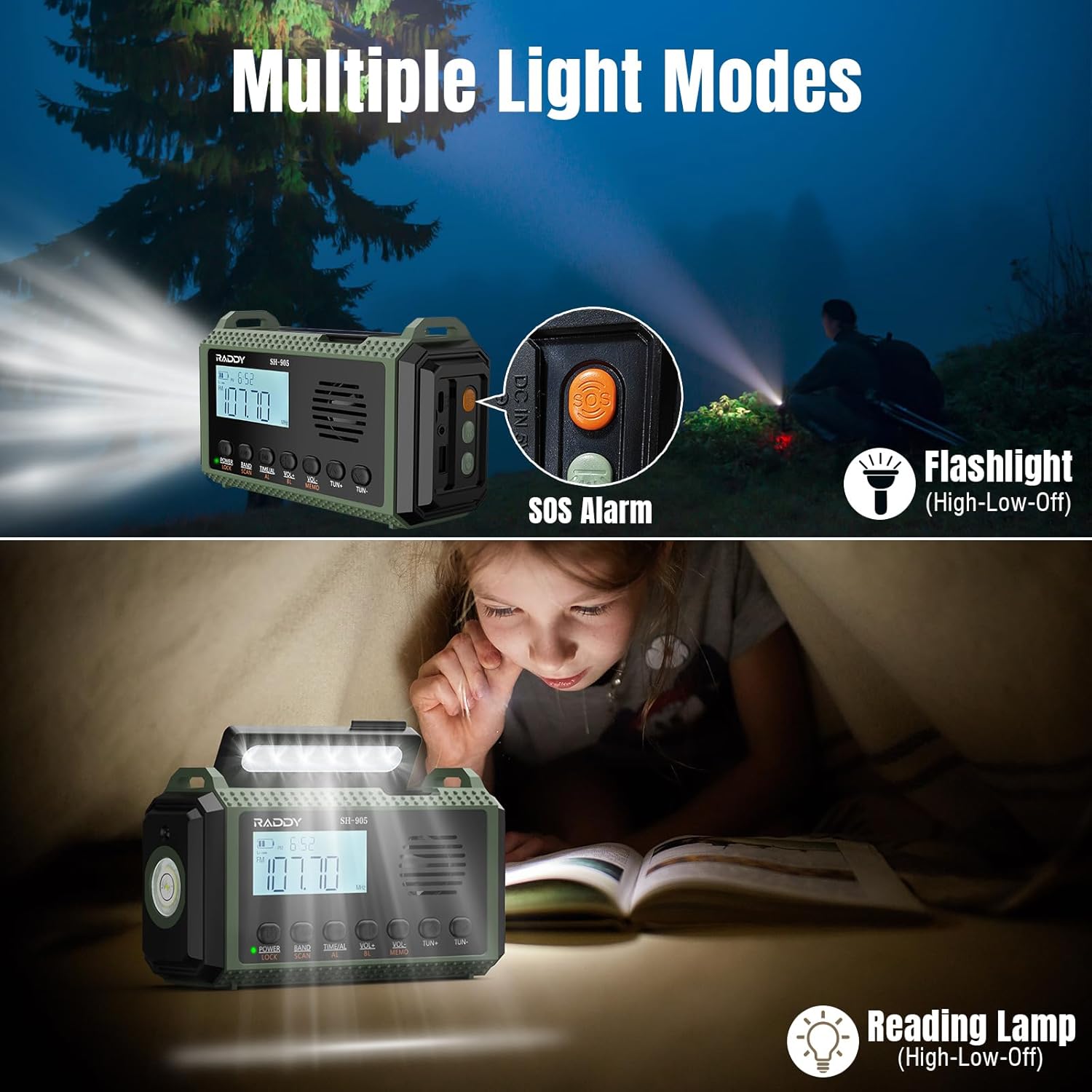
Image 2.2: The Raddy SH-905 featuring its flashlight, reading lamp, and SOS alarm button for various lighting and emergency signaling needs.
3. Persediaan
3.1 Pengecasan Awal
Before first use, fully charge the internal 10,000mAh lithium-polymer battery using the USB-C input port. Connect the radio to a standard USB power adapter (not included) or a computer USB port using the provided USB-C cable.
3.2 Optional AAA Battery Installation
For extended power or as an alternative power source, you can install 3 AAA batteries (not included) into the designated compartment. This can add approximately 1000mAh to the total capacity.

Image 3.1: Illustration of the four available charging methods for the Raddy SH-905: solar, hand crank, AAA batteries, and USB-C.
4. Arahan Operasi
4.1 Hidupkan/Mati Kuasa
Tekan dan tahan butang KUASA button to turn the radio on or off. The LCD screen will illuminate.
4.2 Radio Reception (AM/FM/SW/NOAA)
- Pemilihan Band: Tekan ke BAND button to cycle through FM, AM, and SW bands.
- tuning: Gunakan TUN + dan TUN- buttons for manual tuning. For precise tuning, the digital display provides clear frequency information.
- Scanning & Saving: Tekan ke IMBAS button to automatically scan for available stations. Press and hold MEMO to save a station to memory.
- Amaran Cuaca NOAA: The radio automatically monitors NOAA weather alerts. In case of severe weather, an alert will sound.

Image 4.1: The Raddy SH-905's digital display for precise tuning and quick scan/save functionality, highlighting its user-friendly interface.
4.3 Pengecasan Peranti Luaran (Power Bank)
Connect your smartphone or other USB-powered device to the USB output port using your device's charging cable. The radio's 10,000mAh battery will begin charging your device.

Image 4.2: The Raddy SH-905 functioning as a 10,000mAh power bank, illustrating its Type-C input, USB output, and 3.5mm earphone jack.
4.4 Fungsi Pencahayaan
- Lampu suluh: Press the flashlight button on the side to activate. Cycle through high, low, and off modes.
- Membaca Lamp: Angkat panel solar untuk mendedahkan bacaan lamp. Press the reading lamp button to cycle through high, low, and off modes.
4.5 Penggera SOS
Tekan ke SOS button to activate a loud siren and a flashing red light for emergency signaling. Press it again to deactivate.
5. Penyelenggaraan
- Keep the radio dry and clean. Avoid exposure to extreme temperatures or direct sunlight for prolonged periods.
- Bersihkan bahagian luar dengan lembut, damp kain. Jangan gunakan bahan kimia yang keras atau pembersih yang kasar.
- If using AAA batteries, remove them if the radio will not be used for an extended period to prevent leakage.
6. Penyelesaian masalah
| Masalah | Kemungkinan Punca | Penyelesaian |
|---|---|---|
| Radio tidak dihidupkan. | Bateri lemah. | Charge the internal battery using USB-C, solar, or hand crank. Check AAA batteries if installed. |
| Penerimaan radio yang lemah. | Antena tidak dilanjutkan, isyarat lemah, atau gangguan. | Fully extend the telescopic antenna. Reposition the radio for better signal. Try scanning again. |
| Cannot charge external device. | Radio battery is low, or cable is faulty. | Ensure the radio's internal battery is sufficiently charged. Try a different USB cable. |
| Pengecasan solar adalah perlahan. | Cahaya matahari tidak mencukupi. | Place the solar panel in direct, strong sunlight. Solar charging is primarily for maintaining charge or slow charging. |
7. Spesifikasi
| Ciri | Perincian |
|---|---|
| Jenama | Raddy |
| Nombor Model | SH905 |
| warna | hijau |
| Teknologi Ketersambungan | USB |
| Ciri Khas | Mudah alih, Boleh dicas semula |
| Peranti Serasi | Headphones, MP3 Player, Smartphone, Tablet |
| Komposisi Bateri | Litium-polimer |
| Bateri boleh dicas semula | Yes (10,000mAh included) |
| Dimensi Produk | 9L x 7W x 16H centimeters (approx. 3.5L x 2.8W x 6.3H inches) |
| Teknologi Penalaan | AM, FM, SW |
| Sumber Kuasa | Battery, Solar, Hand Crank |
| Kumpulan Radio yang Disokong | AM, FM, SW, NOAA |
| Komponen Termasuk | User Manual, USB-C Charging Cable, Wrist Strap |

Image 7.1: Physical dimensions of the Raddy SH-905 Emergency Radio.
8. Waranti dan Sokongan
8.1 Waranti Pengilang
The Raddy SH-905 Emergency Radio comes with an Waranti pengilang 18 bulan. Sila simpan bukti pembelian anda untuk tuntutan waranti.
8.2 Sokongan Pelanggan
For technical assistance, troubleshooting beyond this manual, or warranty inquiries, please contact Raddy customer support through their official website or the retailer where the product was purchased. Refer to the packaging or product documentation for specific contact details.