
1. Pengenalan
Terima kasih kerana membeliasing the Sofirn SC18 Rechargeable Flashlight. This compact and powerful EDC (Everyday Carry) flashlight is designed for various applications, offering high brightness, convenient USB-C charging, and durable construction. Please read this manual carefully before use to ensure proper operation and maintenance.
2. Maklumat Keselamatan
- Keselamatan Mata: Do not shine the flashlight directly into eyes or at other people. The high lumen output can cause temporary vision impairment.
- Kanak-kanak: Keep out of reach of children to prevent accidental activation or misuse.
- haba: The flashlight head may become hot during prolonged use at high brightness levels. Exercise caution to avoid burns.
- Keselamatan Bateri: Use only the recommended rechargeable battery. Do not disassemble, crush, or expose the battery to extreme temperatures or fire.
- Pembongkaran: Do not disassemble the flashlight head as this may damage the light and void the warranty.
3. Kandungan Pakej
Sahkan bahawa semua item terdapat dalam pakej anda:
- Sofirn SC18 Flashlight
- Bateri Boleh Dicas semula (dipasang atau berasingan)
- Kabel Pengecas USB-C
- Lanyard
- Manual Pengguna

Image: The Sofirn SC18 flashlight shown with its included accessories, typically a USB-C cable, lanyard, and battery.
4. Persediaan
4.1 Pemasangan Bateri
The Sofirn SC18 typically comes with the battery pre-installed. If not, unscrew the tail cap, insert the 18650 rechargeable battery with the positive (+) end facing towards the head of the flashlight, and then screw the tail cap back on tightly.
4.2 Pengecasan Awal
Before first use, fully charge the flashlight. The SC18 features a built-in USB-C charging port.
- Locate the rubber cover on the side of the flashlight head.
- Gently pull open the rubber cover to expose the USB-C port.
- Connect the provided USB-C cable to the flashlight and plug the other end into a USB power source (e.g., phone charger, power bank, computer USB port).
- The indicator light on the side switch will show charging status:
- merah: Mengecas
- hijau: Dicas sepenuhnya
- Once charging is complete, disconnect the cable and firmly close the rubber cover to maintain water resistance.

Image: The Sofirn SC18 flashlight with its USB-C port exposed and connected to a charging cable, illustrating the charging process and battery indicator.
5. Arahan Operasi
The Sofirn SC18 uses a single side switch for all operations.
5.1 Operasi Asas
- Hidupkan/Matikan: Klik satu kali pada suis sisi untuk menghidupkan atau mematikan lampu.
- Tukar Mod Kecerahan: While the light is on, press and hold the side switch to cycle through Moon, Low, Medium, and High modes. Release the switch to select the desired mode. The flashlight has a Smart Memory function and will turn on at the last used brightness level (except Turbo and Strobe).

Image: A person holding the Sofirn SC18 flashlight, illuminating a dark path with its powerful 1800 lumen beam, demonstrating its effective beam distance.
5.2 Mod Khas
- Mod Cahaya Bulan: From OFF, press and hold the side switch for 1 second to activate Moonlight mode.
- Mod Turbo: Double-click the side switch from any state (ON or OFF) to activate Turbo mode. Double-click again to return to the previously used mode.
- Mod Strob: Triple-click the side switch from any state (ON or OFF) to activate Strobe mode. Single click to turn off or double-click to return to the previously used mode.
5.3 Fungsi Lockout
The lockout function prevents accidental activation, which is useful when carrying the flashlight in a pocket or bag.
- Aktifkan Penguncian: From OFF, quadruple-click the side switch. The main LED will flash twice to indicate lockout is active.
- Nyahaktifkan Penguncian: Quadruple-click the side switch again. The main LED will flash twice, and the flashlight will turn on in Moonlight mode, indicating lockout is deactivated.

Image: An illustration of the Sofirn SC18 flashlight with a protective shield graphic, demonstrating the safety lock mode feature to prevent accidental activation.
6. Penyelenggaraan
6.1 Pembersihan
Bersihkan badan lampu suluh dengan lembut, damp cloth. Do not use abrasive cleaners or solvents. Keep the threads and O-rings clean and lubricated with silicone grease to ensure smooth operation and water resistance.
6.2 Tahan Air
The Sofirn SC18 is rated IP68 waterproof, meaning it is protected against dust ingress and can withstand immersion in water up to 2 meters for 30 minutes. Ensure the USB-C port cover is fully sealed before exposing the flashlight to water.

Image: The Sofirn SC18 flashlight shown in two scenarios: one being splashed with water and another on wet rocks, highlighting its IP68 waterproof and drop-resistant design.
6.3 Penjagaan Bateri
To prolong battery life, charge the battery regularly and avoid fully discharging it. If the flashlight will not be used for an extended period, remove the battery or activate the lockout function to prevent parasitic drain.
7. Penyelesaian masalah
| Masalah | Kemungkinan Punca | Penyelesaian |
|---|---|---|
| Lampu suluh tidak menyala. | Bateri mati atau salah dimasukkan. Lampu suluh berada dalam mod kunci keluar. | Charge the battery or reinsert it with the correct polarity. Deactivate lockout mode (quadruple-click). |
| Lampu berkelip-kelip atau padam tanpa diduga. | Bateri lemah. Loose tail cap or head. Kenalan kotor. | Cas semula bateri. Tighten the tail cap and head. Bersihkan kenalan dan ulir bateri. |
| Cannot charge the flashlight. | USB-C cable or power source issue. Halangan port pengecasan. | Cuba kabel USB-C atau penyesuai kuasa yang lain. Periksa port pengecasan untuk mengesan serpihan. |
8. Spesifikasi
| Ciri | Perincian |
|---|---|
| Model | SC18 |
| Sumber Cahaya | LED |
| Output Maks | 1800 Lumen |
| Jarak Pancaran Maks | 217 meter (712 kaki) |
| Sumber Kuasa | 1x 18650 Lithium-Ion Battery (included) |
| Mengecas | USB-C Boleh dicas semula |
| Tahan Air | IP68 (up to 2 meters submersible) |
| Rintangan Jatuh | 1 meter |
| bahan | Aloi Aluminium |
| Dimensi (L x D) | Approx. 10.14 cm x 2.46 cm (3.99" x 0.97") |
| Berat badan | Approx. 55g (1.94oz) without battery |
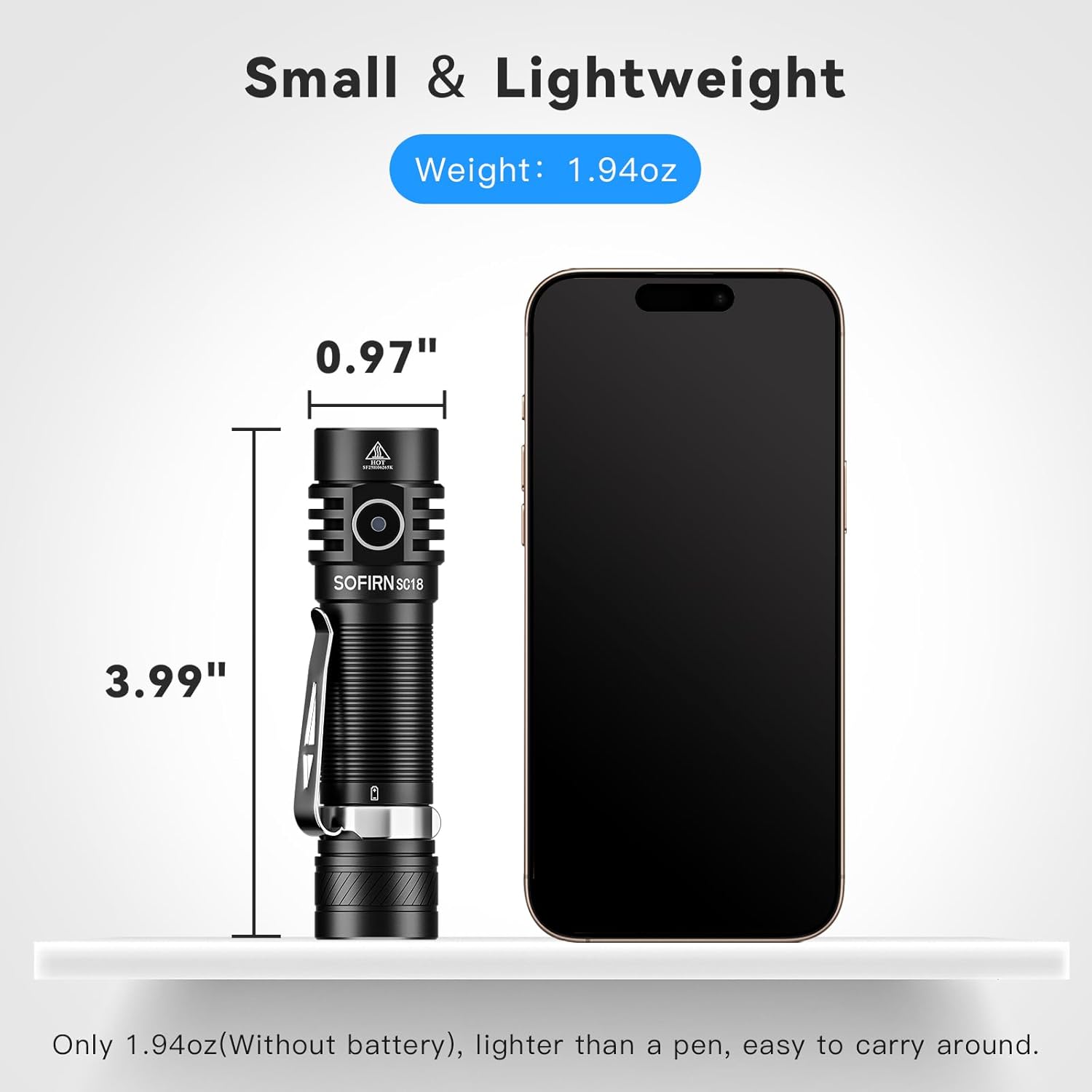
Image: The Sofirn SC18 flashlight displayed next to a smartphone, illustrating its compact size and dimensions (3.99 inches long, 0.97 inches diameter).
Brightness and Runtime Table
| Mod | Output (Lumens) | Masa jalan | Jarak Pancaran |
|---|---|---|---|
| Cahaya bulan | 3lm | 230j | 11m |
| rendah | 100lm | 23j | 51m |
| Sederhana | 350lm | 6.3j | 97m |
| tinggi | 800lm | 2.6j | 150m |
| Turbo | 1800lm | 2.3j | 217m |
| Strob | 1800lm | 5h | - |
Note: Runtimes are approximate and may vary based on environmental conditions and battery age.
9. Waranti dan Sokongan
The Sofirn SC18 Rechargeable Flashlight comes with a Waranti pengilang selama 1 tahun from the date of purchase, covering defects in materials and workmanship. This warranty does not cover damage caused by misuse, unauthorized modifications, or normal wear and tear.
For warranty claims, technical support, or any questions regarding your product, please contact Sofirn customer service through the retailer where you purchased the product or visit the official Sofirn webtapak untuk maklumat hubungan.
Sumber Dalam Talian:
10. Video Produk
Sofirn SC18 Product Overview
Video: An official product video from Sofirn showcasing the features and functionality of the SC18 flashlight, including its design, charging, and various light modes.