
Della 048-OPAC-6H
Della 10000 BTU Portable Air Conditioner User Manual
Model: 048-OPAC-6H | Brand: Della
1. Maklumat Keselamatan Penting
Please read this manual carefully before operating your portable air conditioner. Keep this manual for future reference. Always follow basic safety precautions to reduce the risk of fire, electric shock, or injury.
- Pastikan unit diletakkan di atas permukaan yang rata dan stabil untuk mengelakkan terbalik.
- Jangan kendalikan unit dengan kord atau palam yang rosak.
- Jangan masukkan jari atau objek ke dalam saluran masuk atau keluar udara.
- Jauhkan unit daripada bahan mudah terbakar dan api terbuka.
- Sentiasa cabut plag unit sebelum membersihkan atau melakukan sebarang penyelenggaraan.
- Perkakas ini tidak dimaksudkan untuk digunakan oleh orang (termasuk kanak-kanak) yang kurang keupayaan fizikal, deria atau mental, atau kurang pengalaman dan pengetahuan, melainkan mereka telah diberi pengawasan atau arahan mengenai penggunaan perkakas oleh orang yang bertanggungjawab untuk keselamatan mereka.
2. Produk Lebihview
The Della 10000 BTU Portable Air Conditioner is a versatile unit designed to provide cooling, heating, dehumidification, and fan functions for spaces up to 450 sq. ft. It features smart WiFi connectivity for convenient control via a mobile app, a remote control, and an intuitive soft-touch control panel.

Image: Della Portable Air Conditioner unit, remote control, and smartphone displaying the control app.
Key components include the main unit with integrated handle, exhaust hose, window installation kit, and remote control.

Image: Diagram showing the dimensions of the portable air conditioner: 12.2 inches (width) x 12.2 inches (depth) x 27.6 inches (height).
3. Persediaan
3.1 Membongkar
Carefully remove the unit and all accessories from the packaging. Retain the original packaging for future storage or transport. Allow the unit to stand upright for at least 24 hours before initial use to allow the refrigerant to settle.
3.2 Penempatan
Place the air conditioner on a firm, level surface in a location that allows for proper air circulation. Ensure there is at least 20 inches (50 cm) of space from walls or other objects to allow for adequate airflow around the unit.
3.3 Pemasangan Kit Tingkap
The included window kit is designed for easy installation in both horizontal and vertical sliding windows. No drilling is required.

Image: Diagrams illustrating the installation of the window kit in both horizontal and vertical sliding windows, showing compatibility with window openings from 25.5 to 64.1 inches.
- Assemble the window slider kit by sliding the adjustable panels together to fit your window opening. The kit is compatible with window sizes from 25.5 to 64.1 inches.
- Secure the panels with the provided screws.
- Open the window and place the assembled window kit into the window frame. Extend the panels to fit snugly and close the window against the kit to secure it.
- Ensure the window kit is sealed properly to prevent air leakage. Use foam seals if necessary.
3.4 Sambungan Hos Ekzos
- Attach the exhaust hose connector to one end of the exhaust hose.
- Attach the window kit adapter to the other end of the exhaust hose.
- Insert the exhaust hose connector into the exhaust outlet on the back of the air conditioner unit.
- Insert the window kit adapter into the opening on the window slider kit.
- Ensure all connections are secure to prevent hot air from re-entering the room.
3.5 Sambungan Kuasa
Plug the power cord into a grounded 115V/60Hz electrical outlet. Do not use extension cords or power strips.
4. Arahan Operasi
4.1 Panel Kawalan
The unit features an intuitive soft-touch control panel on the top of the unit.
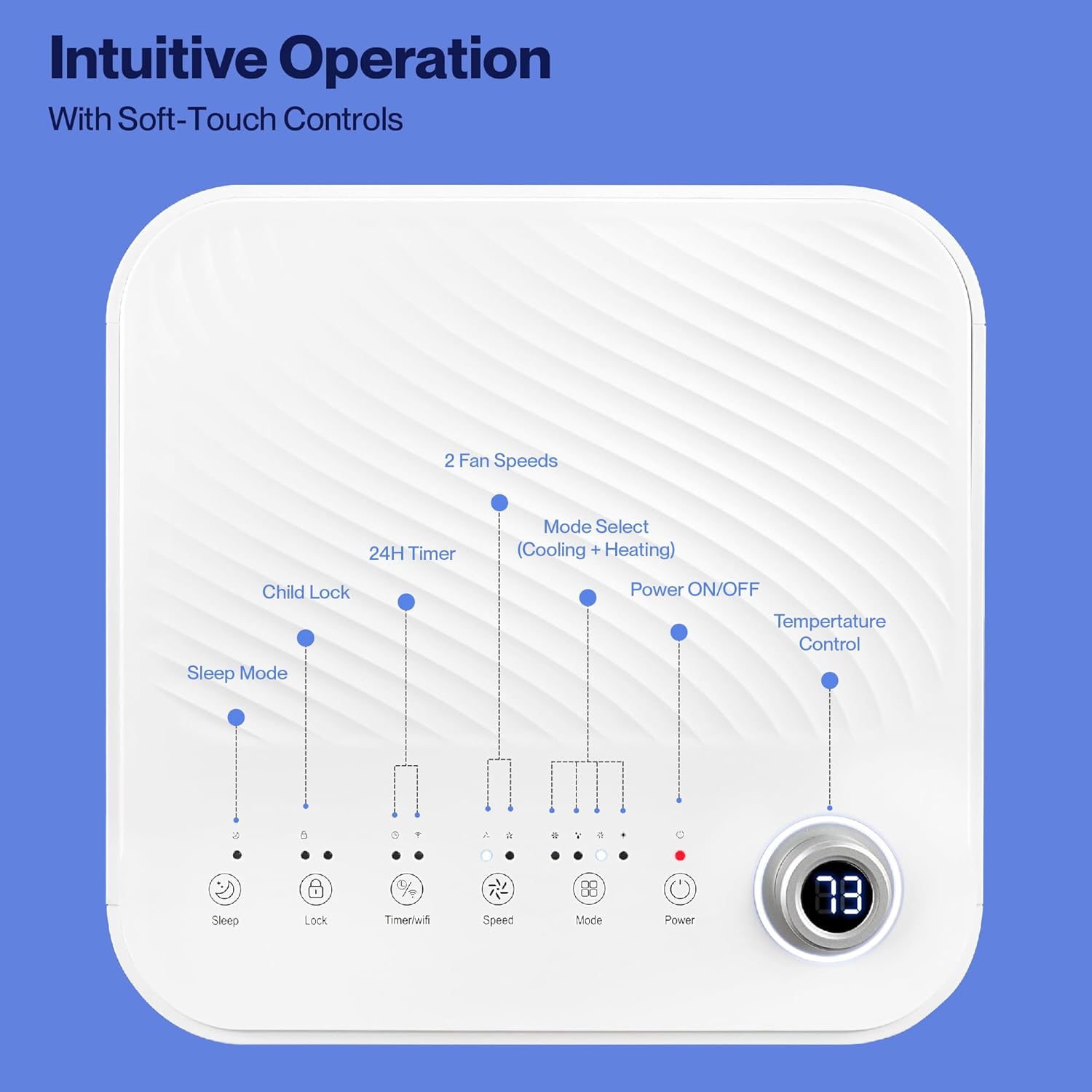
Image: Detailed diagram of the control panel with labels for each button: Sleep, Child Lock, Timer/WiFi, Fan Speed, Mode Select (Cooling + Heating), Power ON/OFF, and Temperature Control with digital display.
- HIDUP/MATI Kuasa: Tekan untuk menghidupkan atau mematikan unit.
- Pilih Mod: Cycle through Cooling, Heating, Dehumidification, Ventilation (Fan), and Sleep modes.
- Kawalan Suhu: Gunakan anak panah atas/bawah untuk melaraskan suhu yang dikehendaki.
- Kelajuan Kipas: Select between 2 fan speeds (Low, High).
- Pemasa: Tetapkan pemasa 24 jam untuk operasi hidup/mati automatik.
- Kunci Kanak-kanak: Mengaktifkan atau menyahaktifkan fungsi kunci kanak-kanak.
- Mod tidur: Aktifkan mod tidur untuk operasi yang lebih senyap dan pelarasan suhu secara beransur-ansur.
4.2 Alat Kawalan Jauh
The unit comes with a remote control for convenient operation from a distance. All functions available on the control panel can be accessed via the remote.
4.3 WiFi/Smart App Control
Control your Della Portable Air Conditioner from anywhere using the free DELLA+ app on your smartphone. The unit is compatible with Google Assistant and Amazon Alexa for voice control.

Image: A person relaxing on a couch, using a smartphone to control the air conditioner, with text indicating compatibility with Google Assistant and Amazon Alexa.
- Download the DELLA+ app from your smartphone's app store.
- Follow the in-app instructions to connect your air conditioner to your home WiFi network.
- Once connected, you can control modes, temperature, fan speed, and set schedules remotely.
The app also supports Smart Geo Location, allowing the unit to automatically turn on or off based on your proximity to home.

Image: A smartphone screen showing a map with a car icon and a notification indicating the AC unit automatically turned on due to Smart Geo Location.
5. Penyelenggaraan
Regular maintenance ensures optimal performance and extends the lifespan of your unit. Always unplug the unit before cleaning.
5.1 Membersihkan Penapis Udara
Penapis udara hendaklah dibersihkan setiap dua minggu atau lebih kerap bergantung pada penggunaan dan kualiti udara.
- Cari panel penapis udara (biasanya di bahagian belakang atau sisi unit).
- Keluarkan penapis.
- Basuh penapis dengan air suam dan sabun. Bilas dengan teliti dan biarkan ia kering sepenuhnya sebelum dimasukkan semula.
5.2 Menyalirkan Air
The unit has a self-evaporating system, but in high humidity conditions, water may accumulate. The "Water-full indicator" will illuminate when the water tank needs draining.
- Place a shallow pan or tray under the drain port (located at the bottom rear of the unit).
- Tanggalkan palam longkang.
- Allow all accumulated water to drain out.
- Gantikan palam longkang dengan selamat.
5.3 Penyimpanan
Jika menyimpan unit untuk tempoh yang lama:
- Toskan semua air yang terkumpul.
- Bersihkan penapis udara.
- Run the unit in fan-only mode for a few hours to dry the interior.
- Cabut palam kord kuasa dan gulungkannya dengan kemas.
- Simpan unit di tempat yang sejuk dan kering, sebaik-baiknya dalam pembungkusan asalnya.
6. Penyelesaian masalah
Rujuk bahagian ini untuk isu biasa dan penyelesaiannya.
| Masalah | Kemungkinan Punca | Penyelesaian |
|---|---|---|
| Unit tidak dihidupkan | No power; Power cord unplugged; Circuit breaker tripped; Water tank full | Check power outlet; Plug in power cord; Reset circuit breaker; Drain water tank |
| Unit tidak menyejukkan dengan berkesan | Air filter dirty; Exhaust hose not properly installed; Room too large; Doors/windows open; Temperature setting too high | Clean air filter; Ensure exhaust hose is sealed; Close doors/windows; Lower temperature setting |
| Unit bising | Unit not on level surface; Air filter dirty; Obstruction in fan | Place unit on level surface; Clean air filter; Check for obstructions |
| Kebocoran air | Palam longkang longgar atau hilang; Unit condong | Pastikan palam saliran kukuh; Pastikan unit rata |
| Isu sambungan WiFi | Incorrect WiFi password; Unit too far from router; Router issues | Verify password; Move unit closer to router; Restart router |
Jika masalah berterusan selepas mencuba penyelesaian ini, sila hubungi sokongan pelanggan.
7. Spesifikasi
| Ciri | Spesifikasi |
|---|---|
| Nombor Model | 048-OPAC-6H |
| Kapasiti Penyejukan | 10000 BTU |
| Kawasan Liputan | Sehingga 450 Sq. Ft. |
| Fungsi | Cooling, Heating, Dehumidifier, Fan, Sleep Mode |
| Voltage | 115 Volt |
| Tahap Kebisingan | 54 dB |
| Bahan penyejuk | R 410A |
| Dimensi (L x W x H) | 12.2 x 12.2 x 27.6 inci |
| bahan | Plastik ABS |
| Ciri Khas | Portable, Dehumidifier, WiFi Enabled, Remote Control, Built-in Handle, 24-hour timer, Child Lock |
8. Waranti dan Sokongan Pelanggan
For warranty information or technical assistance, please refer to the warranty card included with your product or visit the official Della website. You may also contact Della customer support directly for further assistance with troubleshooting or parts replacement.
Ask a question about this manual
Ask about setup, troubleshooting, compatibility, parts, safety, or missing instructions. Manuals+ will review the question and use this page’s manual context to help answer it.