
PeakDo B0C854HLRM
PeakDo 4K HDMI to USB-C Adapter User Manual
Model: B0C854HLRM
1. Pengenalan
The PeakDo 4K HDMI to USB-C Female to Female Adapter is designed to seamlessly connect your HDMI source devices to USB-C display devices. This adapter is ideal for expanding your entertainment and productivity by enabling high-quality video and audio transmission from devices like gaming consoles, PCs, laptops, and TV boxes to AR smart glasses or portable USB-C monitors.
It supports resolutions up to 4K at 60Hz, ensuring a clear and immersive viewing experience with zero latency. Its compact and lightweight design makes it highly portable for use on the go.
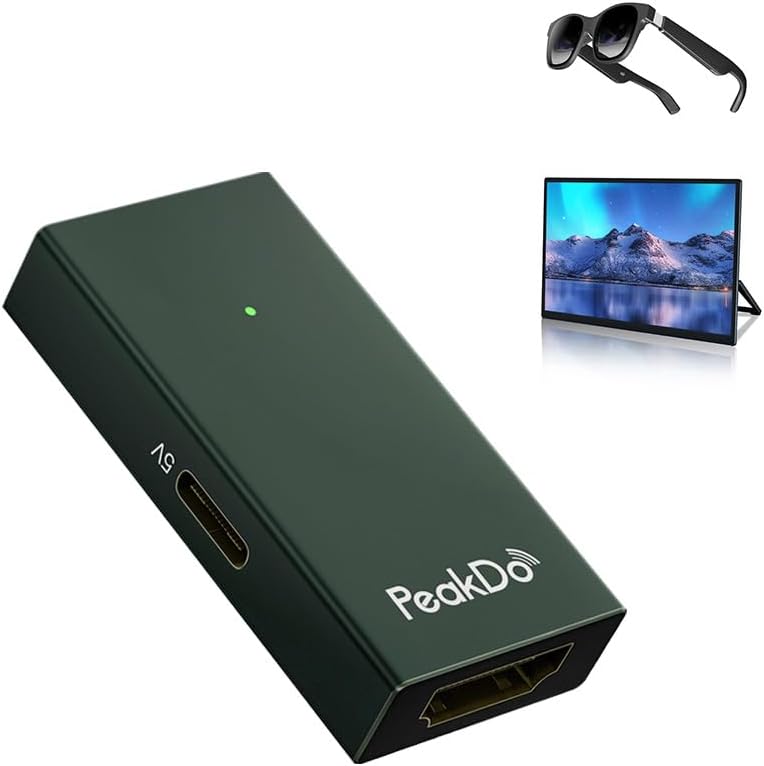
Image: The PeakDo 4K HDMI to USB-C Adapter, a compact dark green device with a USB-C power input, an HDMI input, and a USB-C output. Shown alongside AR glasses and a portable monitor, illustrating its primary use.
2. Panduan Persediaan
The PeakDo HDMI to USB-C Adapter is designed for plug-and-play functionality, requiring no complex setup or software installation. Follow these steps to connect your devices:
- Power the Adapter: Connect the provided USB power cable to the 5V USB-C port on the adapter and plug the other end into a power source (e.g., a USB wall adapter, computer USB port).
- Sambungkan Sumber HDMI: Use an HDMI cable to connect your signal source device (such as a PC, laptop, TV box, or gaming console like PS5/4, Xbox, or Switch) to the HDMI input port on the adapter.
- Connect USB-C Display: Use a USB-C cable to connect the USB-C output port on the adapter to your AR smart glasses or portable USB-C monitor.
Once all connections are made, your display device should automatically detect the signal from the HDMI source.

Image: A detailed connection diagram showing various HDMI source devices (Nintendo Switch, PS5, PS4, Xbox Series X/S, Desktop, Laptop, Apple TV, Google TV) connecting via an HDMI cable to the PeakDo adapter. The adapter is powered by a 5V USB-C cable and connects via a USB-C cable to display devices like AR glasses or a portable monitor.
3. Arahan Operasi
The PeakDo adapter facilitates high-quality video and audio transmission for various applications:
- Permainan Imersif: Connect your gaming consoles (PS5, PS4, Xbox, Nintendo Switch) to AR glasses or portable monitors for an enhanced gaming experience with zero latency.
- Pengalaman Teater Rumah: Transform your AR glasses or portable monitor into a personal home theater by connecting media players, TV boxes, or streaming sticks.
- Extended Workspace: Use the adapter to connect your laptop or PC to a portable USB-C monitor, creating an extended display for improved productivity.
The adapter supports universal compatibility with various USB-C display devices, including XREAL One/Pro/Air 2 Pro/Air 2/Air, Viture Pro/One, Rokid Air/Max, and RayNeo Air 2S AR glasses, as well as general USB-C portable monitors.

Image: A man wearing AR glasses and holding Nintendo Switch Joy-Cons, playing a racing game. The PeakDo adapter is visible, connected to the Switch and the AR glasses, illustrating a low-latency gaming setup.

Image: A man sitting on the floor, wearing AR glasses and holding an Xbox controller, playing a robot combat game. An Xbox console is next to him, connected to the PeakDo adapter, demonstrating immersive gaming.

Image: A person wearing AR glasses, watching a basketball game projected as a large virtual screen in a living room setting, demonstrating the "Create Your Home Theatre" capability with the adapter.

Image: A laptop connected to a power strip, which also powers the PeakDo adapter. The adapter then connects to a portable USB-C monitor, illustrating how to "Convert Your HDMI Device to a USB-C Device" for an extended display.
4. Penyelenggaraan
To ensure the longevity and optimal performance of your PeakDo HDMI to USB-C Adapter, please follow these simple maintenance guidelines:
- Jaga kebersihan: Lap penyesuai dengan kerap dengan kain lembut dan kering untuk mengeluarkan habuk dan serpihan. Elakkan menggunakan pembersih cecair atau bahan yang melelas.
- Simpan dengan Betul: Apabila tidak digunakan, simpan penyesuai di tempat yang sejuk dan kering jauh dari cahaya matahari langsung dan suhu yang melampau.
- Tangani dengan Berhati-hati: The adapter is made from premium aluminum for durability and heat dissipation. Avoid dropping or subjecting it to strong impacts.
- Lindungi Pelabuhan: Ensure that the HDMI and USB-C ports are free from dust and foreign objects.
5. Penyelesaian masalah
If you encounter issues while using your PeakDo HDMI to USB-C Adapter, please refer to the following common solutions:
- Tiada Paparan/Isyarat:
- Ensure the adapter is properly powered via the 5V USB-C port.
- Verify that both the HDMI cable and USB-C cable are securely connected to their respective ports on the adapter and devices.
- Check if your HDMI source device is outputting a signal and if your USB-C display device is set to the correct input.
- No Sound (XREAL Air Glasses):
- First, ensure your XREAL Air glasses firmware is updated to the latest version.
- After updating, press and hold the brightness + button on your XREAL Air glasses until you hear two beeps, then release. This action can help resolve sound issues.
- Adapter Not Powering USB-C Device:
- This adapter is primarily for video output and cannot power USB-C devices requiring more than 5W.
- For devices with higher power requirements, please use an external power supply for your USB-C device.
- Isu Keserasian:
- Note that this adapter is not compatible with the Meta series of devices.
- The adapter supports HDMI source to USB-C display only (non-bidirectional).
6. Spesifikasi
| Jenama | PeakDo |
| Nombor Model | B0C854HLRM |
| warna | Hijau Gelap |
| Peranti Serasi | Gaming Consoles (PS5/4, Xbox, Switch), PC, Laptop, Monitor, TV Box, AR Smart Glasses (XREAL, Viture, Rokid, RayNeo), USB-C Portable Monitors |
| Jenis Penyambung | HDMI (Female) to USB-C (Female) |
| Input Voltage | 5 Volt |
| Bilangan Pelabuhan | 1 (HDMI Input), 1 (USB-C Output), 1 (USB-C Power Input) |
| Resolusi Maks Disokong | 4K @ 60Hz |
| bahan | Aluminium Premium |
| Kandungan Pakej | 1x HDMI to USB-C Adapter, 1x USB Power Cable, 1x User Manual |
7. Waranti dan Sokongan
For detailed warranty information and customer support, please refer to the documentation included with your product or visit the official PeakDo website. You can typically find contact information for technical assistance, FAQs, and warranty claims there.
Sila simpan bukti pembelian anda untuk sebarang pertanyaan berkaitan waranti.
Ask a question about this manual
Ask about setup, troubleshooting, compatibility, parts, safety, or missing instructions. Manuals+ will review the question and use this page’s manual context to help answer it.