
1. Pengenalan
This manual provides detailed instructions for the installation, operation, and maintenance of your Rebluum Solar Outdoor Security Camera. Please read this manual thoroughly before using the product to ensure proper function and safety. Keep this manual for future reference.
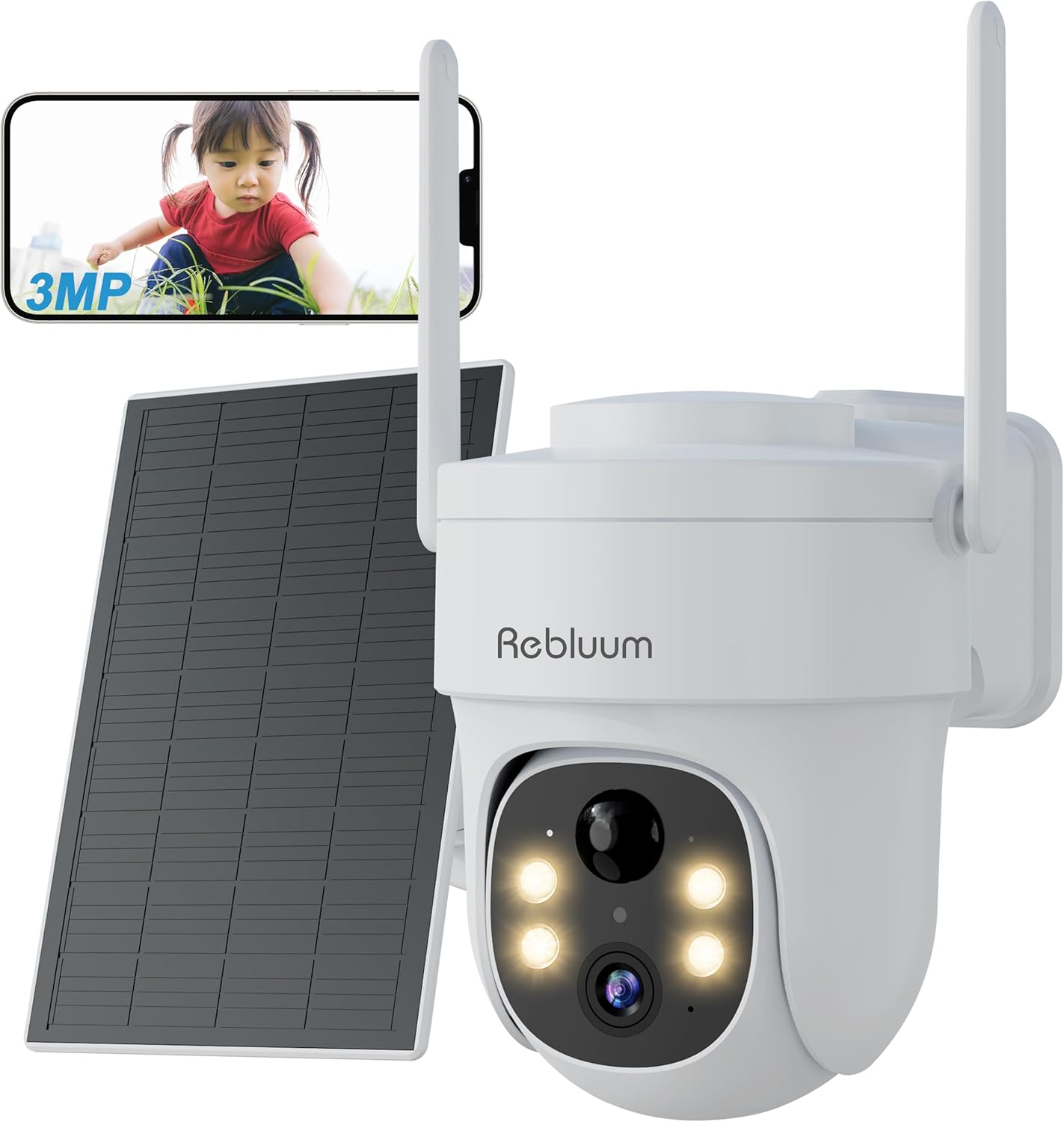
Figure 1: Rebluum Solar Outdoor Security Camera
2. Ciri-ciri Produk
- Video Resolusi Tinggi: Capture clear images with 3MP (2304x1296) resolution. Features WDR (Wide Dynamic Range) for optimal image quality in varying light conditions, such as strong backlight at building entrances.
- Penglihatan Malam Lanjutan: Equipped with LED and infrared functions, offering three night vision modes:
- Penglihatan Malam Inframerah: Black and white video in low light.
- Penglihatan Malam Warna: Full-color video at night when motion is detected and white lights activate.
- Penglihatan Malam Pintar: Infrared mode by default, switches to color when motion is detected.

Rajah 2: Mod Penglihatan Malam
- Rintangan Cuaca: IP65 rated for dust and water resistance, suitable for outdoor installation in various weather conditions.
- 360° Pan/Tilt/Zoom (PTZ): Remotely control the camera's horizontal (360°) and vertical (90°) movement, and zoom in/out via the smartphone app for comprehensive area monitoring.
- Kesambungan Tanpa Wayar: Supports 2.4GHz Wi-Fi for stable communication. Solar panel power eliminates the need for power cables, simplifying installation.
- Pengesanan Pintar: Features PIR thermal detection and AI recognition (human, pet, vehicle, package detection). Customizable detection sensitivity (1-10 levels) and activity zones to minimize false alarms.
- Audio Dua hala: Built-in microphone and speaker allow for real-time communication with visitors or to deter intruders.
- Pilihan Storan: Supports local storage via MicroSD card (8GB-128GB, sold separately) and cloud storage services. Older data is automatically overwritten when storage is full.
- Integrasi Rumah Pintar: Compatible with Amazon Alexa for voice control and live viewing on compatible Echo devices.
- Kawalan Apl: Manage and monitor your camera from anywhere using the dedicated CloudEdge app (compatible with Android 4.2+ and iOS 8.0+).
Video 1: Produk Tamatview - This video demonstrates the key features of the Rebluum Solar Outdoor Security Camera, including its high-resolution video, night vision capabilities, and smart detection functions.
3. Kandungan Pakej
Sila pastikan semua barang ada dan dalam keadaan baik semasa membuka bungkusan.
- Rebluum Solar Outdoor Security Camera
- Panel Suria
- Pendakap Pemasangan
- Kabel Pengecasan USB Jenis-C
- Skru Pemasangan dan Penambat Dinding
- Installation Template Sticker
- Manual Pengguna (dokumen ini)
- Solar Charger Manual
- Security Camera Warning Sticker
Video 2: Unboxing and Package Contents - This video shows the unboxing process and all items included in the Rebluum Solar Outdoor Security Camera package.
4. Panduan Persediaan
4.1 Pengecasan Awal
- Connect the solar panel to the camera using the USB Type-C cable.
- Ensure the solar panel is placed in an area with direct sunlight for 6-8 hours for initial charging.
Nota: Always perform initial charging before first use.
4.2 Penyisipan Kad MicroSD
If you plan to record video locally, insert a MicroSD card (8GB-128GB, not included) into the designated slot on the camera.
4.3 Muat Turun Apl dan Pendaftaran
- Download the "CloudEdge" app from your smartphone's app store (Android 4.2+ or iOS 8.0+).
- Register a new user account following the in-app instructions.
4.4 Konfigurasi Kamera
- Follow the in-app instructions to add your camera and connect it to your 2.4GHz Wi-Fi network.
- Ensure your smartphone and camera are close to your Wi-Fi router during the initial setup.
4.5 Memasang Kamera
Choose a suitable location for your camera and solar panel, ensuring the solar panel receives adequate sunlight.
- Pemasangan Dinding: Use the provided mounting bracket and screws. The bracket has specific holes for wall installation. Use the template sticker to mark drill points.
- Pemasangan siling: The bracket also has holes suitable for ceiling installation.
Penting: Drill holes as needed for the chosen mounting method. Secure the bracket firmly, then slide the camera onto the bracket until it clicks into place.

Rajah 3: Pilihan Pemasangan
5. Arahan Operasi
5.1 Viewdalam Suapan Langsung
Open the CloudEdge app on your smartphone to view the live video feed from your camera. You can remotely control the camera's pan, tilt, and zoom functions from the app interface.
5.2 Mod Penglihatan Malam
You can select from three night vision modes within the app settings:
- Mod Inframerah: Provides clear black and white video in complete darkness.
- Mod Warna: Keeps white lights on for full-color night vision.
- Mod Pintar: Automatically switches from infrared to color night vision when motion is detected.
5.3 Tetapan Pengesanan Pergerakan
Customize detection to suit your needs:
- Sensitiviti Pengesanan: Adjust the motion detection sensitivity from level 1 to 10. Higher sensitivity detects smaller movements.
- Pengesanan Humanoid: Enable this feature to detect only human shapes, reducing false alarms from animals or moving objects. Set to level 1 for human-only detection.
- Custom Detection Zones: Tentukan kawasan tertentu dalam kamera view where you want motion detection to be active, avoiding unnecessary alerts from public areas.
Nota: If both motion detection and humanoid detection are enabled, humanoid detection takes precedence. To detect all moving objects (people, animals, packages, vehicles), set motion detection to level 10 and turn off humanoid detection.

Figure 4: Customizable Detection Settings
5.4 Komunikasi Dua Hala
Use the two-way audio feature in the app to speak through the camera's speaker and listen through its microphone. This is useful for interacting with visitors or deterring unwanted guests.
5.5 Rakaman dan Main semula
The camera supports both MicroSD card and cloud storage. When motion is detected, the camera will automatically record. You can view dirakam footage via the CloudEdge app.
- Rakaman Kad SD: Records in 10, 20, or 30-second clips.
- Rakaman Awan: Records in 6-second clips.
5.6 Perkongsian Keluarga
Share camera access with family members through the CloudEdge app. You can set specific permissions for each shared user, allowing multiple people to view suapan kamera secara serentak.
5.7 Integrasi Alexa
Connect your Rebluum camera to Amazon Alexa. Once linked, you can use voice commands like "Alexa, show me the garden" to view the live feed on compatible Echo devices with a display.

Figure 5: Smart Features Overview
6. Penyelenggaraan
- Pembersihan: Bersihkan kanta kamera dan panel solar dengan kerap dengan lembut, damp cloth to ensure optimal performance. Avoid abrasive cleaners.
- Peletakan Panel Suria: Ensure the solar panel remains free from obstructions (e.g., leaves, dirt) and is positioned to receive maximum direct sunlight for efficient charging.
- Kemas kini Firmware: Check the CloudEdge app periodically for firmware updates to ensure your camera has the latest features and security enhancements.
7. Penyelesaian masalah
- Kamera Tidak Menyambung ke Wi-Fi: Ensure your Wi-Fi is 2.4GHz. Check Wi-Fi signal strength at the camera's location. Restart your router and camera.
- Penglihatan Malam yang lemah: Verify the camera lens is clean. Ensure there are no obstructions blocking the infrared or white lights. Check if the selected night vision mode is appropriate for the environment.
- Penggera Palsu yang Kerap: Adjust motion detection sensitivity in the app. Enable humanoid detection or set custom detection zones to exclude irrelevant areas.
- Bateri Habis Cepat: Ensure the solar panel is receiving sufficient direct sunlight. Reduce the frequency of motion detection events or live viewing if possible.
- Tiada Rakaman: Check if a MicroSD card is properly inserted and formatted, or if your cloud storage subscription is active. Ensure motion detection is enabled.
8. Spesifikasi
| Ciri | Spesifikasi |
|---|---|
| Jenama | Rebluum |
| Resolusi | 3MP (2304x1296) |
| Lensa | 4mm |
| Jarak Penglihatan Malam | Sehingga 15m |
| Penilaian Kalis Air | IP65 |
| Sudut Pan / Tilt | Mendatar 360°, Menegak 90° |
| Kesambungan Wayarles | Wi-Fi 2.4GHz sahaja |
| Penyimpanan | MicroSD Card (8GB-128GB), Cloud Storage |
| Sumber Kuasa | Solar Panel, Built-in Battery |
| Keserasian | Android 4.2+, iOS 8.0+, Amazon Alexa |
| Dimensi | 20.7 x 19 x 16 cm |
| Berat badan | 1.11 kg |
9. Waranti dan Sokongan
Rebluum is committed to providing quality products and services. If you encounter any issues, malfunctions, or have questions regarding your product, please do not hesitate to contact our customer support team. We will provide solutions to the best of our ability.
During the warranty period, repair or exchange requests may be possible.
e-mel: Support@szrebluum.com
YouTube: Rebluum Security