
F3030
AULA F3030 Gaming Keyboard User Manual
Model: F3030 | Brand: Generic
1. Pengenalan
Welcome to the user manual for your AULA F3030 Gaming Keyboard. This mechanical wired keyboard is designed for an enhanced gaming and typing experience, featuring a durable metal panel, responsive Blue mechanical switches, and vibrant green backlighting. This manual will guide you through the setup, operation, and maintenance of your new keyboard.
2. Ciri-ciri Utama
- Tombol Multimedia: Easily adjust volume or mute audio with a simple turn or press.
- Panel Logam Tahan Lama: Provides a robust and stable base for intense gaming sessions.
- Suis Mekanikal Biru: Offer tactile feedback and an audible click for precise keystrokes.
- Lampu Latar Hijau: Illuminates keys for visibility in low-light conditions and adds aesthetic appeal.
- EN 104 Key Layout: Susun atur papan kekunci bersaiz penuh standard untuk fungsi yang komprehensif.
- Full N-Key Rollover & Anti-Ghosting: Ensures every keystroke is registered accurately, even during rapid, simultaneous presses.

Imej: Selesaiview of key features including the metal panel, blue light, and mechanical switches.
3. Kandungan Pakej
Sila semak kandungan pakej untuk memastikan semua item ada:
- AULA F3030 Gaming Keyboard
- Manual Pengguna (dokumen ini)
4. Panduan Persediaan
Setting up your AULA F3030 Gaming Keyboard is straightforward:
- Tanggalkan papan kekunci daripada pembungkusannya.
- Cari port USB yang tersedia pada komputer anda.
- Plug the USB cable of the keyboard into the USB port.
- Your operating system should automatically detect and install the necessary drivers. No additional driver installation is typically required for basic functionality.

Image: The AULA F3030 Gaming Keyboard ready for connection.
5. Arahan Operasi
5.1 Tombol dan Butang Multimedia
The AULA F3030 keyboard features a versatile multimedia knob and dedicated multimedia buttons for quick control over your audio and media playback:
- Tombol Multimedia: Rotate the knob clockwise to increase volume, counter-clockwise to decrease volume. Press the knob to mute or unmute audio.
- M1 Button: Typically functions as 'Previous Track'.
- M2 Button: Typically functions as 'Play/Pause'.
- M3 Button: Typically functions as 'Next Track'.
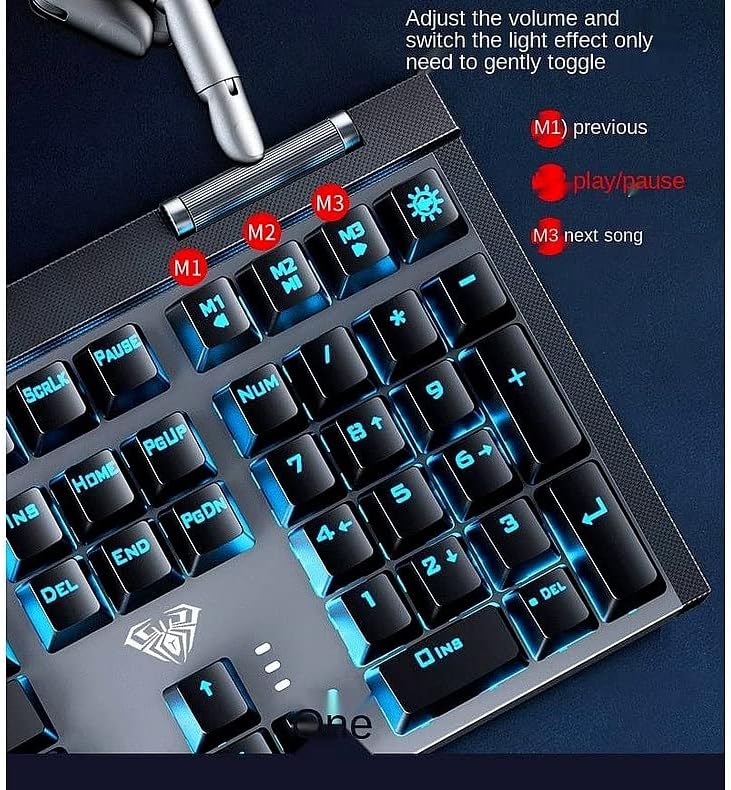
Imej: Terperinci view of the multimedia knob and dedicated media control buttons.
5.2 Kawalan Lampu Latar
The keyboard features a green backlight. Specific controls for changing backlight modes or brightness may be available through function key combinations (e.g., Fn + specific keys). Refer to the keyboard's keycap legends or try common combinations like Fn + directional arrows or Fn + Ins/Home/PgUp/Del/End/PgDn for backlight adjustments.

Image: The AULA F3030 keyboard showcasing its green backlight.
5.3 Suis Mekanikal
The AULA F3030 uses Blue mechanical switches, known for their distinct tactile bump and audible click. This provides clear feedback with each keystroke, which is preferred by many typists and gamers for its responsiveness and accuracy.

Image: A close-up of the Blue mechanical switch, highlighting its design.
6. Penyelenggaraan dan Penjagaan
To ensure the longevity and optimal performance of your AULA F3030 Gaming Keyboard, follow these maintenance tips:
- Pembersihan: Use a soft, dry cloth to wipe down the keyboard surface. For dust and debris between keys, use compressed air. For stubborn grime, a slightly damp cloth (not wet) can be used, ensuring no liquid enters the keyboard.
- Elakkan Cecair: Keep liquids away from the keyboard to prevent damage to the internal components.
- Storan: When not in use, store the keyboard in a clean, dry environment away from direct sunlight or extreme temperatures.
7. Penyelesaian masalah
If you encounter any issues with your AULA F3030 Gaming Keyboard, please refer to the following common solutions:
- Papan Kekunci Tidak Membalas:
- Pastikan kabel USB dipasang dengan kukuh pada papan kekunci dan komputer.
- Cuba palamkan papan kekunci ke port USB lain pada komputer anda.
- Mulakan semula komputer anda.
- Lampu latar tidak berfungsi:
- Check if the backlight has been turned off via a function key combination (e.g., Fn + light icon key).
- Pastikan papan kekunci disambungkan dengan betul dan menerima kuasa.
- Kunci Tidak Mendaftar:
- Bersihkan di sekeliling kunci yang terjejas untuk memastikan tiada serpihan yang menghalang suis.
- If only specific keys are affected, it might indicate a hardware issue.
Jika masalah berterusan selepas mencuba langkah ini, sila hubungi sokongan pelanggan.
8. Spesifikasi Produk
| Spesifikasi | Perincian |
|---|---|
| Dimensi Produk | 27 x 22 x 5 cm |
| Berat badan | 1.55 kg |
| Pengeluar | Aula |
| Teknologi Ketersambungan | Berwayar USB |
| Penerangan Papan Kekunci | Multimedia |
| Ciri Khas | Backlit, Anti-Ghosting, N-Key Rollover |
| Bilangan Kunci | 104 |
| Gaya | moden |
| bahan | logam |
| Tema | Permainan |
| Peranti Serasi | Laptop (and other devices with USB port) |
9. Waranti dan Sokongan
For information regarding warranty coverage and technical support for your AULA F3030 Gaming Keyboard, please refer to the warranty card included with your purchase or contact the retailer/manufacturer directly. Keep your proof of purchase for warranty claims.
Ask a question about this manual
Ask about setup, troubleshooting, compatibility, parts, safety, or missing instructions. Manuals+ will review the question and use this page’s manual context to help answer it.