
Elgin M1.4
Elgin Ruckus Wireless Bluetooth Earplug Headphones
Model M1.4 - User Manual
pengenalan
Thank you for choosing the Elgin Ruckus Wireless Bluetooth Earplug Headphones. These headphones are designed to provide both high-quality audio and certified hearing protection in noisy environments. Featuring a 25 dB Noise Reduction Rating (NRR), Bluetooth 5.3 connectivity, and a durable IP65 sweatproof design, they are ideal for professionals and individuals requiring reliable hearing safety with integrated audio.
Maklumat Keselamatan
Your safety is paramount. These earplug headphones are OSHA-compliant and ANSI-certified with a 25 dB NRR to protect your hearing. Always ensure proper fit to achieve the stated noise reduction. Avoid using at excessively high volumes for prolonged periods to prevent hearing damage. Be aware of your surroundings, especially in situations requiring attention to environmental sounds.

This image highlights key features including 12+ hour battery life, IP65 dust and sweatproof rating, and 25 NRR for hearing protection.
Apa yang Termasuk
Sila semak kandungan pakej untuk memastikan semua item ada:
- Elgin Ruckus Wireless Bluetooth Earplug Headphones
- Kabel Pengecas USB-C
- One Pair of Clips
- Rugged Elgin Carrying Case
- Manual Pengguna

The image displays the Elgin Ruckus Wireless Headphones, USB-C charging cable, a pair of clips, and the rugged carrying case.
Video: Video ini memberikan gambaran keseluruhanview of the items included in the Elgin Ruckus Wireless Bluetooth Earbuds package.
Produk Selesaiview
The Elgin Ruckus Wireless Earplug Headphones combine robust construction with advanced audio technology. They feature medical-grade silicone ear tips for comfort and effective noise isolation, a durable Kevlar-reinforced cable, and a compact control module.
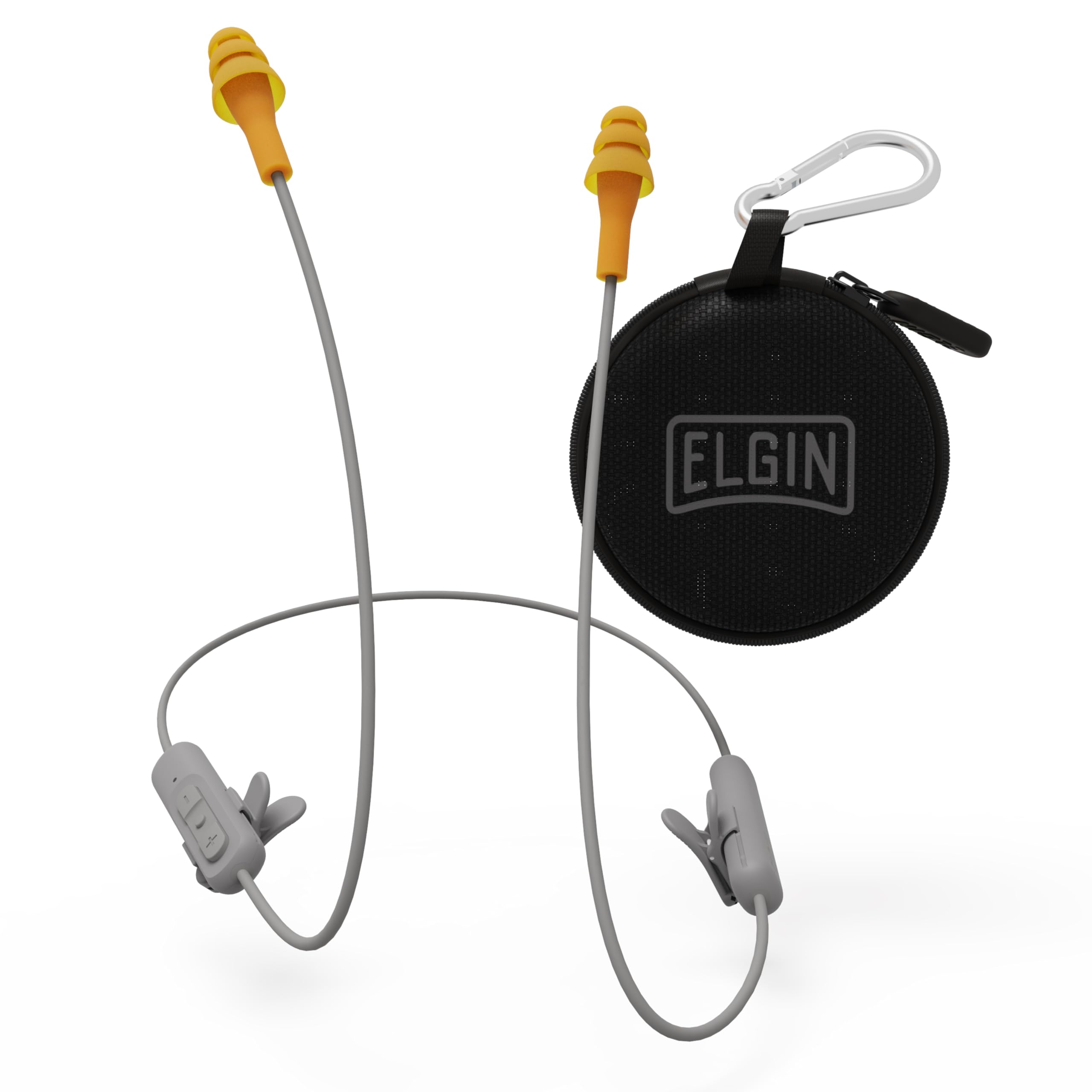
Satu jarak dekat view of the Elgin Ruckus Wireless Bluetooth Earplug Headphones, highlighting the orange earplugs and the gray control module.
Ciri-ciri Utama:
- OSHA-Compliant Noise Protection: 25 dB NRR for effective hearing safety.
- Bluetooth 5.3: Superior connectivity up to 50 feet.
- Mikrofon Pembatalan Bunyi: For clear calls in loud environments.
- 12+ Hour Battery Life: Penggunaan lanjutan dengan sekali cas.
- IP65 Durability: Dust and sweatproof design.
- Reka bentuk ergonomik: Comfortable and secure fit with medical-grade silicone ear tips.

This image illustrates the Bluetooth 5.3 technology, custom-tuned drivers, and noise-isolating microphone for superior connectivity.
Persediaan
1. Mengecas Fon Kepala
- Cari port pengecasan USB-C pada modul kawalan.
- Sambungkan kabel pengecas USB-C yang disediakan ke port.
- Plug the other end of the cable into a compatible USB power source (e.g., wall adapter, computer USB port).
- The LED indicator on the control module will illuminate during charging and change color or turn off when fully charged. A full charge takes approximately 2.5 hours.
2. Berpasangan Bluetooth
- Pastikan fon kepala dimatikan.
- Press and hold the multi-function button (center button on the control module) for approximately 5-7 seconds until the LED indicator flashes red and blue, indicating pairing mode.
- Pada peranti anda (telefon pintar, tablet, dll.), dayakan Bluetooth dan cari peranti yang tersedia.
- Select "Elgin Ruckus" from the list of available devices.
- Setelah disambungkan, penunjuk LED akan berkelip biru perlahan.
3. Memakai Fon Kepala
For optimal noise reduction and comfort, insert the earplugs firmly into your ear canals. The flexible cable is designed to be worn around the back of your neck. Use the included clips to secure the cable to your clothing, preventing accidental dislodgement during activity.
Arahan Operasi
Fungsi Modul Kawalan:
- Hidupkan/Mati Kuasa: Tekan dan tahan butang berbilang fungsi.
- Main/Jeda: Tekan sebentar butang berbilang fungsi.
- Kelantangan: Tekan sebentar butang '+'.
- Perlahankan suara: Tekan sebentar butang '-'.
- Lagu Seterusnya: Tekan lama butang '+'.
- Trek Sebelumnya: Tekan lama butang '-'.
- Jawab/Tamatkan Panggilan: Tekan sebentar butang berbilang fungsi semasa panggilan masuk.
- Tolak Panggilan: Tekan lama butang berbilang fungsi semasa panggilan masuk.
- Aktifkan Pembantu Suara: Tekan dua kali butang berbilang fungsi.
The integrated noise-canceling microphone ensures clear communication even in noisy environments, making these headphones suitable for hands-free calls while maintaining hearing protection.
Penyelenggaraan
To ensure the longevity and performance of your Elgin Ruckus headphones, follow these maintenance guidelines:
- Pembersihan: Bersihkan hujung telinga silikon secara berkala dengan kain lembutamp cloth. Ensure they are completely dry before reinserting them into your ears.
- Storan: When not in use, store the headphones in the provided rugged carrying case to protect them from dust, dirt, and physical damage.
- Elakkan Keadaan Melampau: Do not expose the headphones to extreme temperatures, direct sunlight for extended periods, or corrosive liquids.
- Tahan Air: While IP65 rated (dust and sweatproof), avoid submerging the headphones in water.
Menyelesaikan masalah
| Masalah | Penyelesaian |
|---|---|
| Fon kepala tidak dapat dihidupkan | Pastikan bateri dicas. Sambungkan kepada sumber kuasa menggunakan kabel USB-C. |
| Tidak boleh berpasangan dengan peranti | Make sure the headphones are in pairing mode (flashing red and blue LED). Ensure Bluetooth is enabled on your device and it's within 50 feet. Forget previous pairings on your device and try again. |
| Tiada suara atau kelantangan rendah | Check volume levels on both the headphones and your connected device. Ensure earplugs are properly seated in your ear canals. |
| Kualiti panggilan yang lemah | Ensure the microphone is not obstructed. Move closer to your connected device. |
Spesifikasi
| Ciri | Perincian |
|---|---|
| Nama Model | Ruckus Wireless |
| Penilaian Pengurangan Bunyi (NRR) | 25 dB |
| Versi Bluetooth | 5.3 |
| Julat Bluetooth | Sehingga 50 Kaki |
| Hayat Bateri | 12+ Jam |
| Masa Mengecas | Lebih kurang 2.5 Jam |
| Tahap Ketahanan Air | IP65 (Dust and Sweatproof) |
| Mikrofon | Bunyi-Membatalkan |
| Penempatan Telinga | Di Telinga |
| bahan | Plastik, Silikon |
| Berat Barang | 1 auns |
Waranti dan Sokongan
The Elgin Ruckus Wireless Bluetooth Earplug Headphones come with a Waranti Terhad 1 Tahun from the date of purchase. This warranty covers manufacturing defects. For warranty claims, technical support, or any product-related inquiries, please visit the official Elgin USA webtapak atau hubungi perkhidmatan pelanggan mereka secara langsung.
Sokongan dalam talian: Visit the Elgin Store on Amazon