
pengenalan
This manual provides detailed instructions for the safe and effective use of your Dylanto Kids Instant Print Camera, Model BLL2. Please read this manual thoroughly before operating the device and retain it for future reference.
Produk Selesaiview
The Dylanto Kids Instant Print Camera is designed for children aged 3-12, offering both digital photography and instant black-and-white printing capabilities. It features a 2.4-inch screen, 1080P video recording, 16x digital zoom, and various creative functions.

Figure 1: Dylanto Kids Instant Print Camera and included accessories.
Kandungan Pakej:
- Dylanto Kids Instant Print Camera (Model BLL2)
- 3 Gulungan Kertas Percetakan Termal
- Kad Memori 32GB
- Lanyard
- Kabel Jenis-C USB
- Manual Pengguna (dokumen ini)
Maklumat Keselamatan
- Ensure the camera is fully charged before first use and after each use to prolong battery life.
- The thermal printing paper is BPA-free.
- Do not expose the camera to extreme temperatures or moisture.
- Supervise young children during use to prevent accidental damage or misuse.
- Keep small parts, such as the memory card, out of reach of very young children to prevent choking hazards.
Persediaan
1. Mengecas Kamera
Before initial use, fully charge the camera. Connect the provided USB Type-C cable to the camera's charging port and the other end to a compatible USB power adapter (not included) or computer USB port. The charging indicator will show the charging status.
The camera has a 2000 mAh battery capacity, providing approximately 3-4 hours of continuous use after a full charge.
2. Memasang Kad Memori
Locate the memory card slot on the camera. Insert the provided 32GB memory card into the slot until it clicks into place. Ensure the card is inserted in the correct orientation.
3. Loading Printing Paper
The camera uses thermal printing paper. Follow these steps to load a new roll:
- Gently push up the part with the lens to open the paper slot.
- Insert a roll of thermal printing paper into the slot. Ensure the paper feeds from the bottom of the roll and the end of the paper is facing upwards, ready to be pulled out.
- Close the two parts of the camera until they click securely.
- To avoid blank prints, pull the paper out by approximately 1 inch before the first print.

Figure 2: Steps for loading thermal printing paper.

Figure 3: Detailed instructions for paper installation, including a tip for blank prints.
Arahan Operasi
Hidupkan/Mati Kuasa
Press and hold the power button to turn the camera on or off.
Navigasi dan Menu
Use the directional buttons and the OK/Shutter button to navigate through the camera's menu and select options on the 2.4-inch IPS screen.

Figure 4: Camera interface showing main functions.
Mengambil Foto
In photo mode, frame your shot using the screen. Press the shutter button to capture a photo. The camera supports 16x digital zoom.
The camera can capture color photos digitally and simultaneously print black-and-white thermal photos.
Mod Percetakan:
The camera offers three printing modes for thermal prints: Low, Middle, and High, which likely refer to print density or quality.

Figure 5: Available printing modes.
Merakam Video
Switch to video mode. Press the shutter button to start recording 1080P video. Press it again to stop recording.

Figure 6: Video recording capabilities and storage.
Video 1: Demonstration of the camera's instant print and video recording features. This video highlights the camera's ability to capture moments and print them instantly.
Ciri Khas
- Fotografi Selang Masa: Set intervals for automatic photo capture (e.g., 2s, 5s, 10s).
- Penggambaran berterusan: Tangkap berbilang foto secara berturut-turut.
- Permainan: The camera includes built-in puzzle games for entertainment.
- Filter Frames & Stickers: Apply various frames and stickers to photos before printing or saving.
- Pemain mp3: The camera supports MP3 playback.
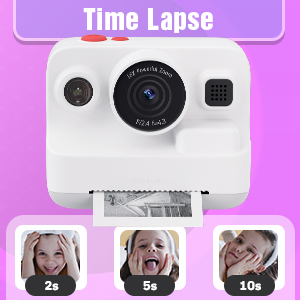
Figure 7: Time-lapse settings.

Figure 8: Built-in games and DIY photo features.

Figure 9: Creative frame and sticker options.
Penyelenggaraan
- Pembersihan: Gunakan kain lembut dan kering untuk membersihkan badan dan skrin kamera. Jangan gunakan pembersih cecair atau bahan kasar.
- Storan: Simpan kamera di tempat yang sejuk dan kering, jauh daripada cahaya matahari langsung apabila tidak digunakan.
- Penjagaan Bateri: Fully charge the camera regularly, even if not in frequent use, to maintain battery health.
- Penyimpanan Kertas: Store thermal paper rolls in a cool, dark place to prevent premature fading or damage.
Menyelesaikan masalah
| Masalah | Kemungkinan Punca | Penyelesaian |
|---|---|---|
| Kamera tidak dihidupkan. | Bateri lemah. | Charge the camera fully using the provided USB Type-C cable. |
| Printed photos are blank. | Thermal paper installed incorrectly (wrong side up). | Open the paper slot, rotate the paper roll 180 degrees, and re-install it correctly. Ensure the paper feeds from the bottom of the roll and the end is facing upwards. |
| Kualiti cetakan buruk. | Low battery; paper quality; print mode setting. | Ensure camera is fully charged. Use recommended thermal paper. Check print mode settings (Low, Middle, High) and adjust to High for better quality. |
| Tidak boleh menyimpan foto/video. | Kad memori penuh atau tidak dimasukkan dengan betul. | Periksa sama ada kad memori 32GB dimasukkan dengan betul. Padam yang tidak perlu files to free up space or replace the card if full. |
| Kamera membeku atau tidak responsif. | Gangguan perisian. | Press and hold the power button for 10-15 seconds to force a restart. If the issue persists, contact customer support. |
Spesifikasi
| Ciri | Perincian |
|---|---|
| Nama Model | BLL2 |
| Skrin Paparan | Skrin Warna IPS 2.4 inci |
| Resolusi Foto | Up to 12 MP Effective Still Resolution |
| Resolusi Video | 1080P (AVI format) |
| Zum Optik | Zum Digital 16x |
| Penstabilan Imej | digital |
| Teknologi Penderia Foto | CMOS (1/4-inch sensor size) |
| Disokong File Format | JPEG (photos) |
| Kapasiti Bateri | 2000 mAh Litium Ion |
| Hayat Bateri | Approx. 3-4 hours continuous use |
| Antara Muka Pengecasan | USB Jenis-C |
| Simpanan Memori | 32GB (included) |
| Ketersambungan | USB, Wi-Fi |
| kilat | Built-In, Automatic |
| Penggambaran Berterusan | 30 fps |
| Julat Umur | Kid (3-12 years old recommended) |
| Dimensi (lebih kurang) | 3.9 inci (lebar) x 3.1 inci (tinggi) |

Figure 10: Camera dimensions and included accessories.
Maklumat Waranti
The Dylanto Kids Instant Print Camera comes with a Waranti 6 bulan dari tarikh pembelian. Waranti ini meliputi kecacatan pembuatan dan kerosakan dalam penggunaan biasa. Ia tidak melindungi kerosakan yang disebabkan oleh penyalahgunaan, kemalangan, pembaikan tanpa kebenaran atau haus dan lusuh biasa.
Sila simpan bukti pembelian anda untuk tuntutan waranti.
Sokongan Pelanggan
For any questions, technical assistance, or warranty claims, please contact Dylanto customer support through the retailer where you purchased the product or visit the official Dylanto brand store on Amazon: