
pengenalan
Welcome to the user manual for your new Dragon Touch Notepad 102 Android Tablet. This guide provides detailed instructions on setting up, operating, maintaining, and troubleshooting your device to ensure you get the most out of its powerful features. The Notepad 102 is designed for versatile use, offering a seamless experience for entertainment, productivity, and communication.
Key features include a large 128GB storage capacity, 8GB RAM, an Octa-Core 2.0GHz processor, a vibrant 10-inch IPS HD display, and a 13MP camera, all running on the latest Android 12 operating system.
Apa yang ada dalam Kotak
Sila semak kandungan pakej untuk memastikan semua item ada:
- 1 x Dragon Touch Notepad 102 Tablet
- 1 x Pengecas
- 1 x Kabel USB
Produk Selesaiview
Ciri-ciri Utama
- 128GB Large Storage Capacity: Expandable up to 256GB via microSD card slot for all your media and files.
- 2.0 Ghz Octa-Core Processor and 8GB RAM: Ensures powerful and fast performance for streaming and multitasking.
- Versatile Use As Tablet Or Laptop: Easily connect to a docking keyboard (not included) for a laptop-like experience.
- Hayat Bateri yang Panjang: Powered by a 6000mAh battery, offering up to 6 hours of video playback.
- 8MP Front + 13MP Rear Camera: For video calls, selfies, and capturing moments.
- Native and Latest Android OS: GMS certified Android 12 for a smooth, fast, and customizable user experience with full Google Play access.
- Ultra-fast 2.4GHz and 5GHz WiFi: Provides top-of-the-line connectivity.
- GPS terbina dalam: Supports offline GPS navigation.
Komponen
Familiarize yourself with the physical components of your tablet:

Rajah 1: Depan dan belakang view of the Dragon Touch Notepad 102 tablet.

Rajah 2: Depan view of the Dragon Touch Notepad 102 tablet, showcasing its 10-inch IPS HD display.

Rajah 3: Sisi view of the Dragon Touch Notepad 102 tablet, highlighting its slim profile dan lokasi pelabuhan.

Rajah 4: Belakang view of the Dragon Touch Notepad 102 tablet, showing the camera and Dragon Touch branding.
Persediaan
1. Pengecasan Awal
Before first use, fully charge your tablet. Connect the included USB cable to the tablet's USB Type-C port and the other end to the charger. Plug the charger into a power outlet. The battery indicator on the screen will show charging progress.
2. Menghidupkan/Mematikan
- Untuk Menghidupkan: Press and hold the Power button located on the side of the tablet until the Dragon Touch logo appears.
- Untuk Mematikan: Tekan dan tahan butang Kuasa sehingga menu pilihan kuasa muncul. Pilih "Matikan kuasa" dan sahkan.
- Untuk Mulakan Semula: Daripada menu pilihan kuasa, pilih "Mulakan Semula" dan sahkan.
3. Persediaan Android Awal
Upon first power-on, the tablet will guide you through the initial Android 12 setup process. This includes selecting your language, connecting to a Wi-Fi network, setting up your Google account, and configuring basic settings.
4. Menyambung ke Wi-Fi
- Pergi ke tetapan > Rangkaian & internet > Wi-Fi.
- Togol Wi-Fi On.
- Pilih rangkaian Wi-Fi yang anda inginkan daripada senarai.
- Masukkan kata laluan rangkaian jika digesa, kemudian ketik Sambung.
5. Optional Docking Keyboard Connection
The Notepad 102 is compatible with a docking keyboard (sold separately) for enhanced productivity. The tablet features smart absorption technology for a strong and comfortable connection.
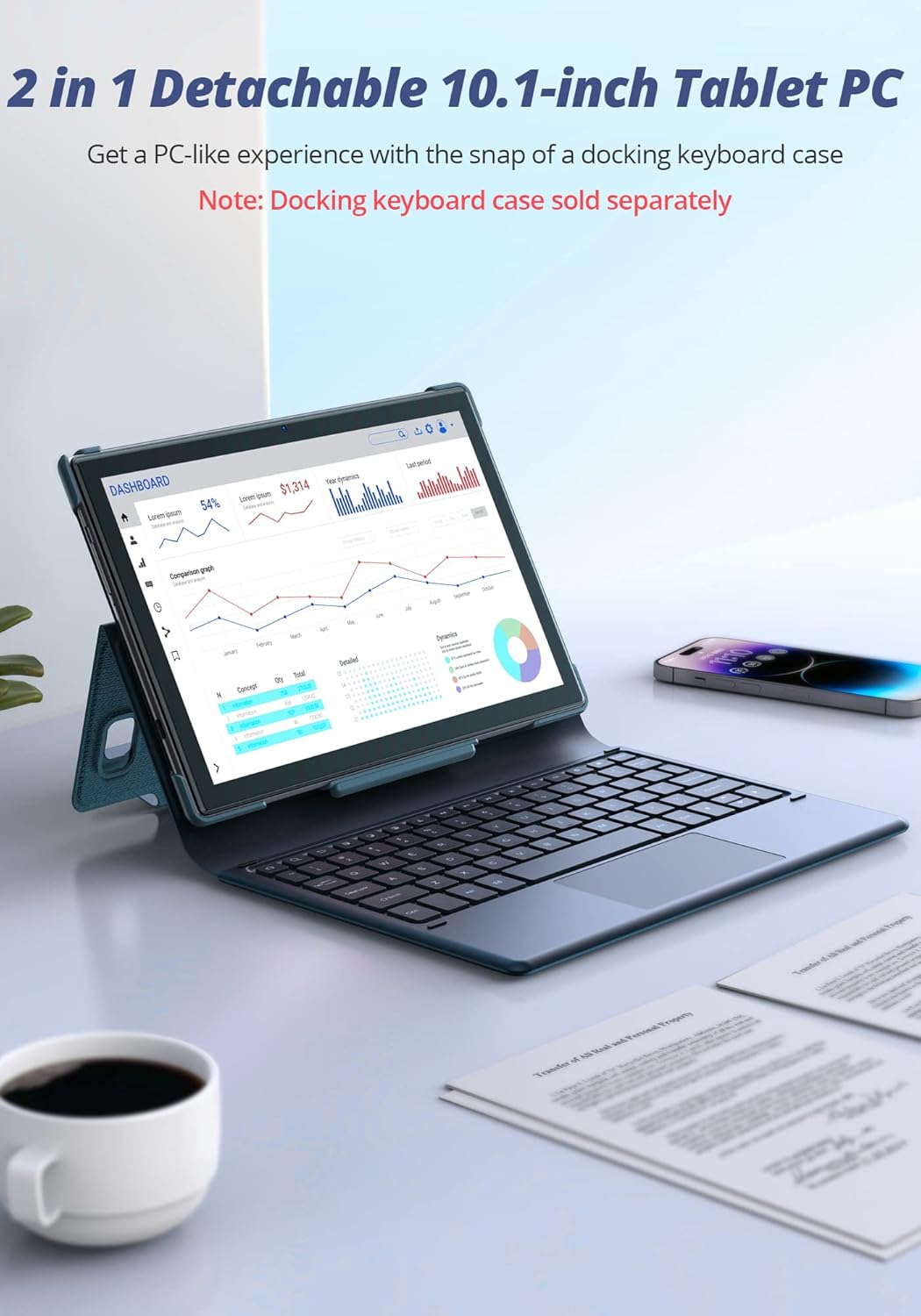
Figure 5: The Dragon Touch Notepad 102 tablet connected to an optional docking keyboard, transforming it into a laptop-like device.
Mengendalikan Tablet Anda
Navigasi dan Gerak Isyarat
- Ketik: Pilih item atau buka apl.
- Leret: Scroll through screens, web pages, or lists.
- Cubit-untuk-Zum: Zum masuk atau keluar pada foto dan web muka surat.
- Tekan lama: Akses menu kontekstual atau alihkan ikon aplikasi.
Pengurusan Apl
The tablet runs on Android 12, providing full access to the Google Play Store. You can download and install a wide variety of applications.
- Pasang Apl: Open the Google Play Store app, search for your desired app, and tap "Install".
- Nyahpasang Apl: Long-press the app icon on the home screen or app drawer, then drag it to "Uninstall" or select "App info" and then "Uninstall".
Penggunaan Kamera
The tablet features an 8MP front camera and a 13MP rear camera for photos and video calls.

Figure 6: A user taking a photo with the Dragon Touch Notepad 102 tablet's rear camera.

Figure 7: A video call in progress on the Dragon Touch Notepad 102 tablet, demonstrating its front camera capabilities.
Pengurusan Storan
Your tablet comes with 128GB of internal storage, which can be expanded up to 256GB using a microSD card (not included). To manage your storage:
- Pergi ke tetapan > Penyimpanan kepada view penggunaan storan dan mengosongkan ruang.
- Insert a microSD card into the designated slot to expand storage for photos, videos, and other files.

Figure 8: The tablet offers 128GB of internal storage, expandable up to 512GB with a microSD card.
Hayat Bateri
The 6000mAh battery provides extended usage times. For optimal battery performance:
- Charge the tablet fully before first use.
- Elakkan suhu yang melampau.
- Tutup apl yang tidak digunakan yang berjalan di latar belakang.
- Laraskan kecerahan skrin pada tahap yang selesa.

Figure 9: The 6000mAh battery provides up to 6 hours of video playback, 10 hours of daily use, and 15 hours of music playback.
Prestasi dan Paparan
The Octa-Core 2.0GHz processor and 8GB RAM ensure smooth performance for all your tasks. The 10-inch IPS HD display offers clear and vibrant visuals.

Figure 10: The tablet's powerful Octa-Core processor and 8GB RAM deliver an ultimate entertainment experience.

Figure 11: The 10.1-inch IPS HD display features 2.5D curved glass and eye protection for comfortable viewing.
Penyelenggaraan
Membersihkan Tablet Anda
Untuk memastikan tablet anda dalam keadaan optimum:
- Gunakan kain lembut dan tidak berbulu untuk membersihkan skrin dan badan.
- Elakkan menggunakan bahan kimia yang keras atau bahan yang melelas.
- Do not spray cleaners directly onto the screen.
Kemas Kini Perisian
Regularly check for and install system updates to ensure your tablet has the latest features, security patches, and performance improvements.
- Pergi ke tetapan > Sistem > Kemas kini sistem.
- Ikut arahan pada skrin untuk memuat turun dan memasang sebarang kemas kini yang tersedia.
Penjagaan Bateri
Untuk memanjangkan hayat bateri:
- Elakkan menyahcas sepenuhnya bateri dengan kerap.
- Do not leave the tablet plugged in for extended periods after it's fully charged.
- Store the tablet in a cool, dry place when not in use for long periods.
Menyelesaikan masalah
This section addresses common issues you might encounter with your Dragon Touch Notepad 102 tablet.
Tablet Tidak Dihidupkan
- Periksa Bateri: Ensure the tablet is charged. Connect the charger and wait a few minutes before attempting to power on.
- Tetapan Semula Keras: Tekan dan tahan butang Kuasa selama 10-15 saat untuk memaksa mula semula.
Isu Ketersambungan Wi-Fi
- Mulakan semula Penghala: Power cycle your Wi-Fi router.
- Forget Network: Go to Wi-Fi settings, forget the network, and reconnect.
- Semak Isyarat: Pastikan anda berada dalam julat penghala Wi-Fi anda.
Apl Ranap atau Membeku
- Close App: Force close the app from recent apps or through Settings > Apps.
- Kosongkan Cache: Go to Settings > Apps > [App Name] > Storage & cache > Clear cache.
- Kemas kini Apl: Pastikan apl dikemas kini kepada versi terkini daripada Gedung Google Play.
- Mulakan Semula Tablet: A simple restart can often resolve temporary software glitches.
Prestasi Perlahan
- Tutup Aplikasi Latar Belakang: Too many apps running can slow down the tablet.
- Kosongkan Storan: Padam yang tidak perlu files atau apl untuk mengosongkan ruang.
- Tetapan semula kilang: As a last resort, if issues persist, you may perform a factory reset (Settings > System > Reset options > Erase all data). Warning: This will erase all data on your tablet. Back up important information first.
Spesifikasi Teknikal
| Ciri | Spesifikasi |
|---|---|
| Jenama | Sentuhan Naga |
| Nama Model | Notepad 102 |
| Sistem Operasi | Android 12 |
| Saiz Skrin | 10 Inci |
| Resolusi Skrin | 1280 x 800 piksel |
| Pemproses | 2 GHz Octa-Core (MediaTek) |
| RAM | 8 GB |
| Storan Dalaman | 128 GB |
| Storan Boleh Dikembangkan | Sehingga 256 GB melalui kad mikroSD |
| Kamera Belakang | 13 MP |
| Kamera Depan | 8 MP |
| Jenis Wayarles | 802.11g (2.4GHz & 5GHz WiFi) |
| Purata Hayat Bateri | 6 Hours (video playback) |
| Berat Barang | 2.01 paun |
| Dimensi Produk | 9.5 x 6.37 x 0.31 inci |
| warna | Perak |
Waranti dan Sokongan
Your Dragon Touch Notepad 102 tablet comes with a standard manufacturer's warranty. Please refer to the warranty card included in your product packaging for specific terms and conditions.
For technical support, warranty claims, or further assistance, please visit the official Dragon Touch website or contact their customer service department. Contact details are typically available on the brand's official support page or in the product packaging.
Anda juga boleh melawat Dragon Touch Store on Amazon untuk maklumat lanjut dan sumber.