
1. Pengenalan
Thank you for choosing the CAMKORY DC403 Digital Camera. This compact and easy-to-use camera is designed for capturing high-quality photos and videos, making it suitable for beginners and children. This manual provides essential information on setting up, operating, and maintaining your camera to ensure optimal performance and longevity.

Image 1.1: The CAMKORY DC403 camera is designed to be pocket-sized and easy to use, making it ideal for children and beginners. It has passed drop tests for durability.
2. Produk Lebihview
2.1 Ciri-ciri Utama
- Resolusi Tinggi: 44 Megapixel photos and 1080p Full HD video recording.
- Zum Digital: Zum digital 16x untuk menangkap subjek yang jauh.
- Penstabilan Imej: Optical image stabilization to reduce blur.
- paparan: 2.5-inch LCD screen for clear viewing.
- Mod Serbaguna: Includes self-timer, fill light, fun filters, smile capture, burst shooting, and webfungsi cam.
- mudah alih: Compact and lightweight design (9.5 x 5.5 x 2 cm, 120g) for easy carrying.
- Kuasa: Comes with two 3.7V 700mAh rechargeable lithium-polymer batteries.
- Ketersambungan: USB Type-C for charging and data transfer to PC.
2.2 Komponen Kamera
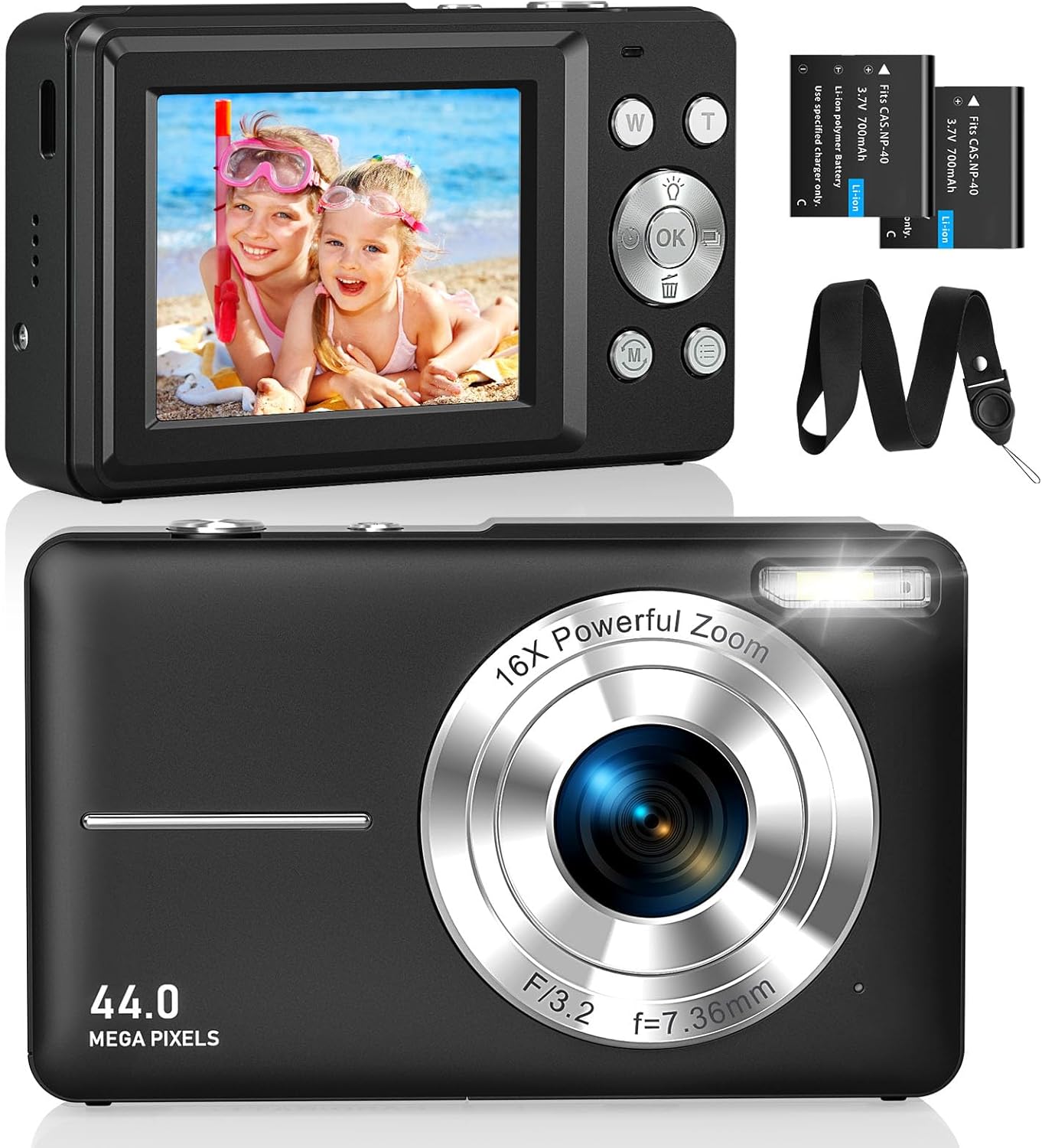
Imej 2.1: Depan dan belakang views of the CAMKORY DC403 Digital Camera, illustrating the lens, flash, LCD display, and various control buttons. Two rechargeable batteries are also shown.
The camera features an intuitive layout with ergonomically placed buttons suitable for small hands. Key controls include the power button, shutter button, zoom (W/T) buttons, mode button, and an OK button for menu navigation.

Imej 2.2: Terperinci view of the camera's side controls, including the ON/OFF button, Shutter, W/T (Zoom), Fill Light, and Mode button.
3. Persediaan
3.1 Pemasangan dan Pengecasan Bateri
- Buka penutup petak bateri di bahagian bawah kamera.
- Insert the two provided 3.7V 700mAh rechargeable lithium-polymer batteries, ensuring correct polarity.
- Tutup penutup petak bateri dengan selamat.
- Connect the camera to a power source using the supplied USB Type-C cable for charging. The charging indicator will show the charging status.
3.2 Pemasangan Kad Memori
The camera supports Micro SD memory cards from 4GB to 32GB. A memory card is required to save photos and videos.
- Cari slot kad Micro SD, biasanya berhampiran petak bateri.
- Masukkan kad Micro SD dengan sesentuh logam menghadap bahagian hadapan kamera sehingga ia terkunci pada tempatnya.
- Before first use, it is recommended to format the memory card directly within the camera's settings menu. This ensures compatibility and optimal performance.
3.3 Kuasa Awal Hidup
Press and hold the power button (usually located on the top or side of the camera) to turn on the device. The LCD screen will illuminate, and the camera will be ready for use.
4. Arahan Operasi
4.1 Mengambil Foto
- Hidupkan kamera.
- Bingkaikan gambar anda menggunakan skrin LCD 2.5 inci.
- Use the W/T buttons to adjust the 16x digital zoom.
- Press the shutter button halfway down to focus, then press it fully to capture the 44MP image.

Image 4.1: The camera captures 44MP images, allowing for detailed and clear photographs.
4.2 Merakam Video
- Switch to video mode using the Mode button.
- Press the shutter button to start recording 1080p FHD video.
- Press the shutter button again to pause or stop recording.

Image 4.2: The camera supports 1080p Full HD video recording, allowing users to capture moments with clarity.
4.3 Ciri Istimewa
- Zum Digital: Use the W/T buttons to zoom in and out. The camera features 16x digital zoom.
- Penstabilan Imej: The optical image stabilization feature helps reduce blur from camera shake.
- Isi Cahaya: Activate the fill light for better illumination in low-light conditions.
- Pemasa Kendiri: Set a delay (e.g., 2s, 5s, 10s) before taking a photo, useful for group shots or selfies.
- Penggambaran berterusan: Rakam urutan foto yang pantas dengan menekan butang pengatup.
- Penapis: Experiment with 20 different built-in filters to add creative effects to your photos.
- Pengesanan Senyuman: The camera can automatically detect and capture a photo when a smile is detected.
- WebMod cam: Connect the camera to a computer via USB to use it as a webkamera untuk penstriman langsung atau panggilan video.

Image 4.3: Demonstrations of 16x digital zoom and image stabilization. The zoom feature allows for closer shots, while stabilization helps maintain clarity during movement.

Imej 4.4: Cthamples of self-timer, continuous shooting, and fill light functions. These features enhance photographic flexibility and quality in various scenarios.

Image 4.5: The camera can be used as a webcam when connected to a computer, suitable for streaming or video calls.
5. Penyelenggaraan
5.1 Membersihkan Kamera
- Gunakan kain lembut dan tidak berbulu untuk membersihkan badan kamera.
- Untuk kanta dan skrin LCD, gunakan kain dan larutan pembersih kanta khusus. Elakkan bahan kimia yang keras.
- Pastikan kamera dimatikan sebelum membersihkannya.
5.2 Penyimpanan
- Simpan kamera di tempat yang sejuk dan kering jauh dari cahaya matahari langsung dan suhu yang melampau.
- Jika menyimpan untuk tempoh yang lama, keluarkan bateri untuk mengelakkan kebocoran.
- Use the provided long strap and pouch to protect the camera from drops and scratches during transport.
6. Penyelesaian masalah
If you encounter issues with your CAMKORY DC403 camera, please refer to the following common solutions:
| Masalah | Penyelesaian yang Mungkin |
|---|---|
| Kamera tidak dihidupkan | Ensure batteries are correctly inserted and fully charged. Try using the second battery if available. |
| Cannot take photos/videos | Check if a Micro SD card is inserted and has sufficient free space. Ensure the card is formatted in the camera. |
| Imej adalah kabur | Ensure the lens is clean. Hold the camera steady or use the image stabilization feature. Check lighting conditions. |
| Camera not recognized by PC | Ensure the USB Type-C cable is securely connected to both the camera and the PC. Try a different USB port or cable. |
| Bateri cepat habis | Reduce screen brightness. Turn off features like flash or continuous shooting when not needed. Ensure batteries are fully charged before use. |
7. Spesifikasi
| Ciri | Perincian |
|---|---|
| Jenama | CAMKORY |
| Nama Model | DC403 |
| warna | Hitam |
| Jenis Produk | Kamera Digital Kompak |
| Resolusi Pegun Berkesan | 44 Megapiksel |
| Resolusi Video | 1080p HD Penuh |
| Zum Digital | 16x |
| Zum Optik | 16x (Note: This appears to be a mislabeling in the source data, likely referring to digital zoom) |
| Penstabilan Imej | Optik |
| Saiz Skrin | LCD 2.5 inci |
| Teknologi Ketersambungan | USB (Jenis-C) |
| Kad Memori yang Disokong | Micro SD (4-32GB) |
| Jenis Bateri | Lithium-polymer (2 x 3.7V 700mAh included) |
| Dimensi (L x W x H) | 9.5 x 2 x 5.5 cm |
| Berat Barang | 120 Gram |
| Burst Mode Speed | 30 bingkai sesaat |
| Julat ISO | ISO 100 to ISO 1600 |
| Apertur | F3.5-F5.6 |
| Jenis Fokus | Auto Fokus |
| Tahap Ketahanan Air | Bukan kalis air |
8. Waranti dan Sokongan
For any questions, technical support, or warranty inquiries regarding your CAMKORY DC403 Digital Camera, please contact CAMKORY customer service through the retailer's platform or the official CAMKORY webtapak. Sila simpan bukti pembelian anda untuk tuntutan waranti.