
BuTure VC70
Manual Pengguna Pembersih Vakum Tanpa Wayar BuTure VC70
Model: VC70
1. Pengenalan
Thank you for choosing the BuTure VC70 Cordless Vacuum Cleaner. This manual provides important information on the safe operation, maintenance, and troubleshooting of your new appliance. Please read this manual thoroughly before first use and keep it for future reference.
2. Arahan Keselamatan
Sentiasa ikuti langkah berjaga-jaga keselamatan asas apabila menggunakan peralatan elektrik untuk mengurangkan risiko kebakaran, renjatan elektrik atau kecederaan.
- Jangan gunakan di luar atau di permukaan basah.
- Jangan biarkan digunakan sebagai mainan. Perhatian yang rapi diperlukan apabila digunakan oleh atau berhampiran kanak-kanak.
- Gunakan hanya seperti yang diterangkan dalam manual ini. Gunakan hanya lampiran yang disyorkan pengilang.
- Jangan gunakan dengan kord atau palam yang rosak. Jika perkakas tidak berfungsi sebagaimana mestinya, telah terjatuh, rosak, ditinggalkan di luar rumah, atau terjatuh ke dalam air, kembalikannya ke pusat servis.
- Jangan tarik atau bawa dengan kord, gunakan kord sebagai pemegang, tutup pintu pada kord, atau tarik kord di sekeliling tepi atau sudut yang tajam. Jangan jalankan perkakas di atas kord. Jauhkan kord dari permukaan yang dipanaskan.
- Jangan cabut plag dengan menarik kord. Untuk mencabut palam, pegang palam, bukan kordnya.
- Jangan pegang palam atau perkakas dengan tangan yang basah.
- Jangan letakkan sebarang objek ke dalam bukaan. Jangan gunakan dengan mana-mana bukaan yang disekat; jauhkan daripada habuk, serabut, rambut dan apa sahaja yang boleh mengurangkan aliran udara.
- Jauhkan rambut, pakaian longgar, jari dan semua bahagian badan daripada bukaan dan bahagian yang bergerak.
- Jangan ambil apa-apa yang terbakar atau berasap, seperti rokok, mancis, atau abu panas.
- Jangan gunakan untuk mengambil cecair mudah terbakar atau mudah terbakar, seperti petrol, atau gunakan di kawasan yang mungkin terdapat.
- Jangan ambil bahan toksik, seperti peluntur klorin, ammonia atau pembersih longkang.
- Jangan gunakan tanpa beg habuk dan/atau penapis di tempatnya.
- Matikan semua kawalan sebelum mencabut plag.
- Gunakan lebih berhati-hati semasa membersihkan di tangga.
- Jangan gunakan untuk mengutip objek keras atau tajam seperti kaca, paku, skru, syiling, dll.
3. Kandungan Pakej
Carefully unpack your BuTure VC70 and check that all items are present and in good condition. If any items are missing or damaged, please contact customer support.

Rajah 3.1: All components of the BuTure VC70 cordless vacuum cleaner, including the main unit, extension wand, floor brush, crevice tool, 2-in-1 brush, wall mount, charger, and spare filter.
- Main Vacuum Body (with dustbin and motor)
- Tongkat Sambungan
- Berus Lantai Bermotor
- Alat Celah
- Alat Berus 2-dalam-1
- Pendakap Pelekap Dinding
- Penyesuai Kuasa/Pengecas
- Penapis Ganti
- Manual Pengguna (dokumen ini)
4. Produk Lebihview
Familiarize yourself with the main parts of your BuTure VC70 vacuum cleaner.

Rajah 4.1: The BuTure VC70 cordless vacuum cleaner shown as a stick vacuum, and in handheld configurations with different attachments, along with the wall mount and filters.
- Unit Utama: Mengandungi motor, tong sampah dan panel kawalan.
- Tongkat Sambungan: Connects the main unit to the floor brush for upright cleaning.
- Berus Lantai Bermotor: Features an integrated brush with soft and hard bristles for effective cleaning on various floor types.
- Tong sampah: Bekas lutsinar untuk mengumpul habuk dan serpihan.
- Sistem Penapisan: Multi-layer system designed to capture fine dust and allergens.
- Skrin Sentuh LED: Displays battery level, current mode, and maintenance reminders.
5. Persediaan dan Pemasangan
Follow these steps to assemble your vacuum cleaner for first use.
5.1 Pengecasan Awal
Sebelum penggunaan pertama, cas sepenuhnya bateri. Bateri boleh ditanggalkan untuk memudahkan pengecasan.
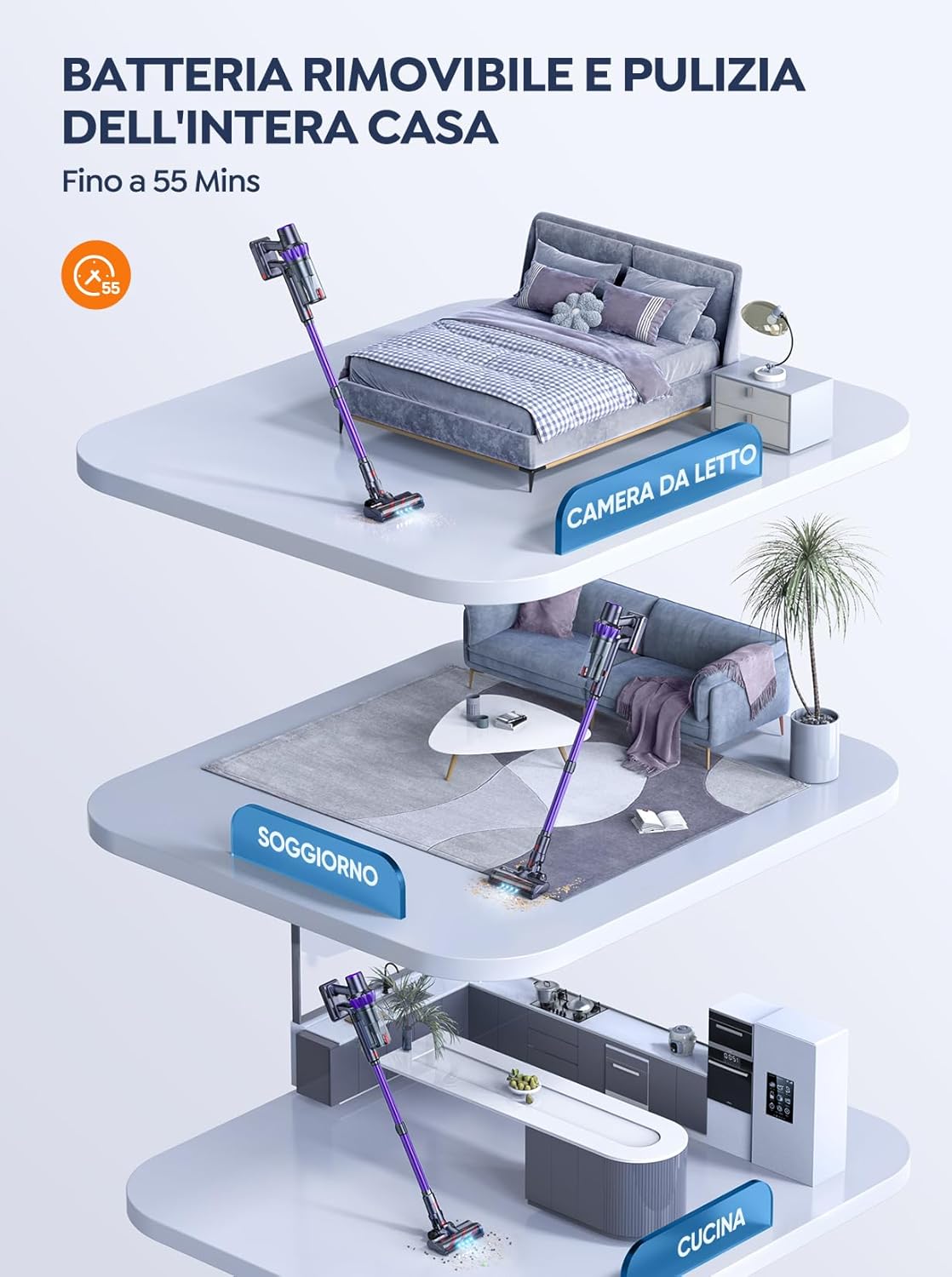
Rajah 5.1: The removable battery allows for flexible charging options and extended cleaning time across multiple rooms.
- Connect the power adapter to the charging port on the main unit or directly to the battery if removed.
- Pasangkan penyesuai ke soket dinding.
- The LED screen will indicate charging status. A full charge typically takes 4-5 hours.
5.2 Memasang Vakum
- Pasang Tongkat Sambungan: Insert the top end of the extension wand into the main vacuum body until it clicks into place.
- Pasang Berus Lantai: Insert the bottom end of the extension wand into the motorized floor brush until it clicks into place.
- Attach Accessories (for handheld use): For handheld cleaning, you can directly attach the crevice tool or 2-in-1 brush tool to the main vacuum body.
6. Mengendalikan Pembersih Vakum
Learn how to effectively use your BuTure VC70 for various cleaning tasks.
6.1 Kuasa Hidup/Mati dan Pemilihan Mod

Rajah 6.1: The intelligent LED touch screen provides real-time information on battery status and selected cleaning mode.
- Untuk Menghidupkan: Press the power button on the main unit. The vacuum will start in the default mode.
- Untuk Menukar Mod: Use the mode selection button on the LED touch screen to cycle through available suction modes (e.g., Eco, Standard, Max, Auto).
- Untuk Mematikan: Tekan butang kuasa sekali lagi.
6.2 Intelligent Automatic Suction Mode
The BuTure VC70 features an intelligent automatic suction mode that adjusts power based on floor type.
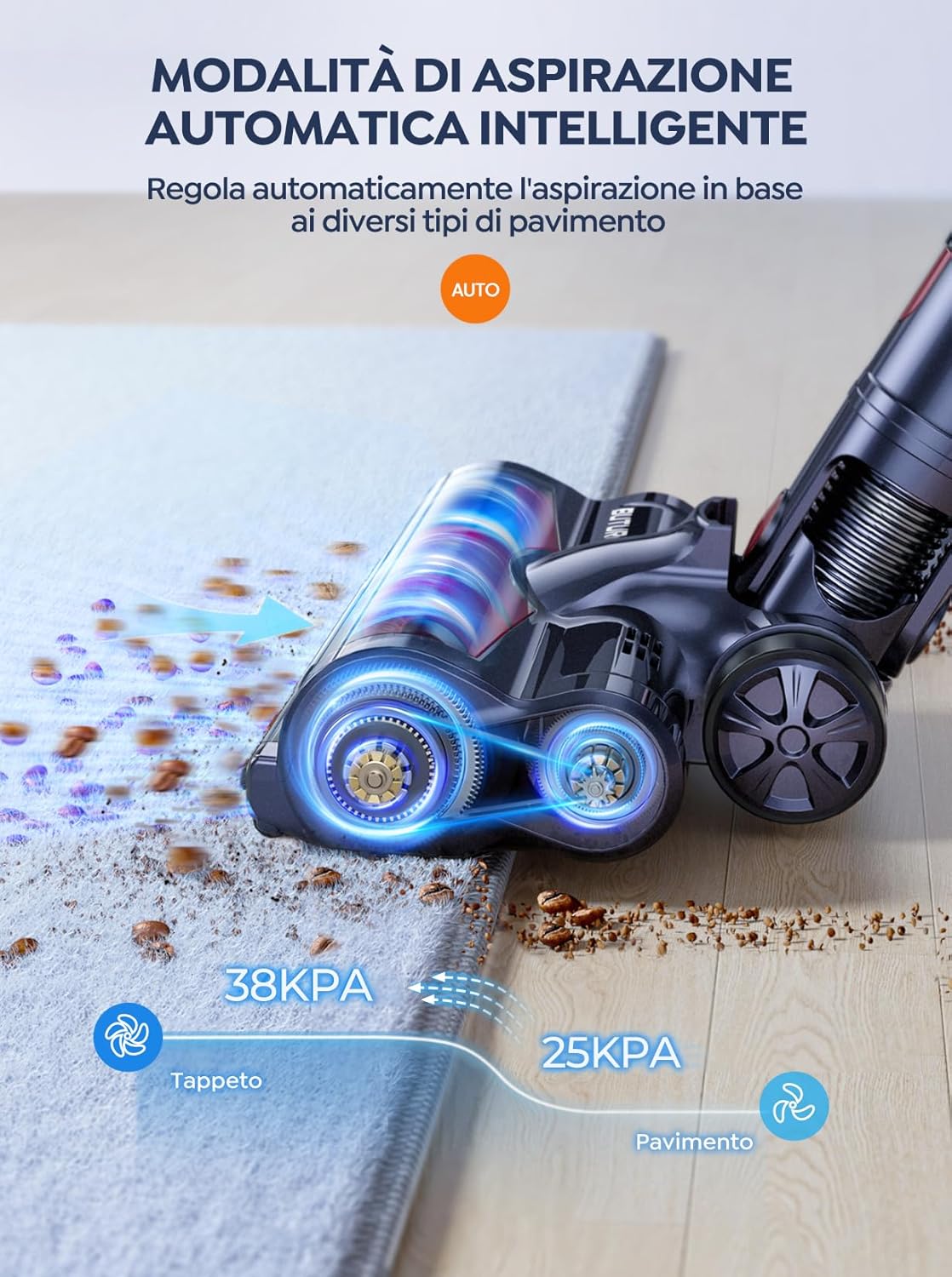
Rajah 6.2: The vacuum automatically adjusts suction power, providing 38KPA for carpets and 25KPA for hard floors in Auto mode.
In Auto mode, the vacuum detects the floor type and automatically increases suction for carpets (up to 38KPA) and reduces it for hard floors (25KPA), optimizing cleaning efficiency and battery life.
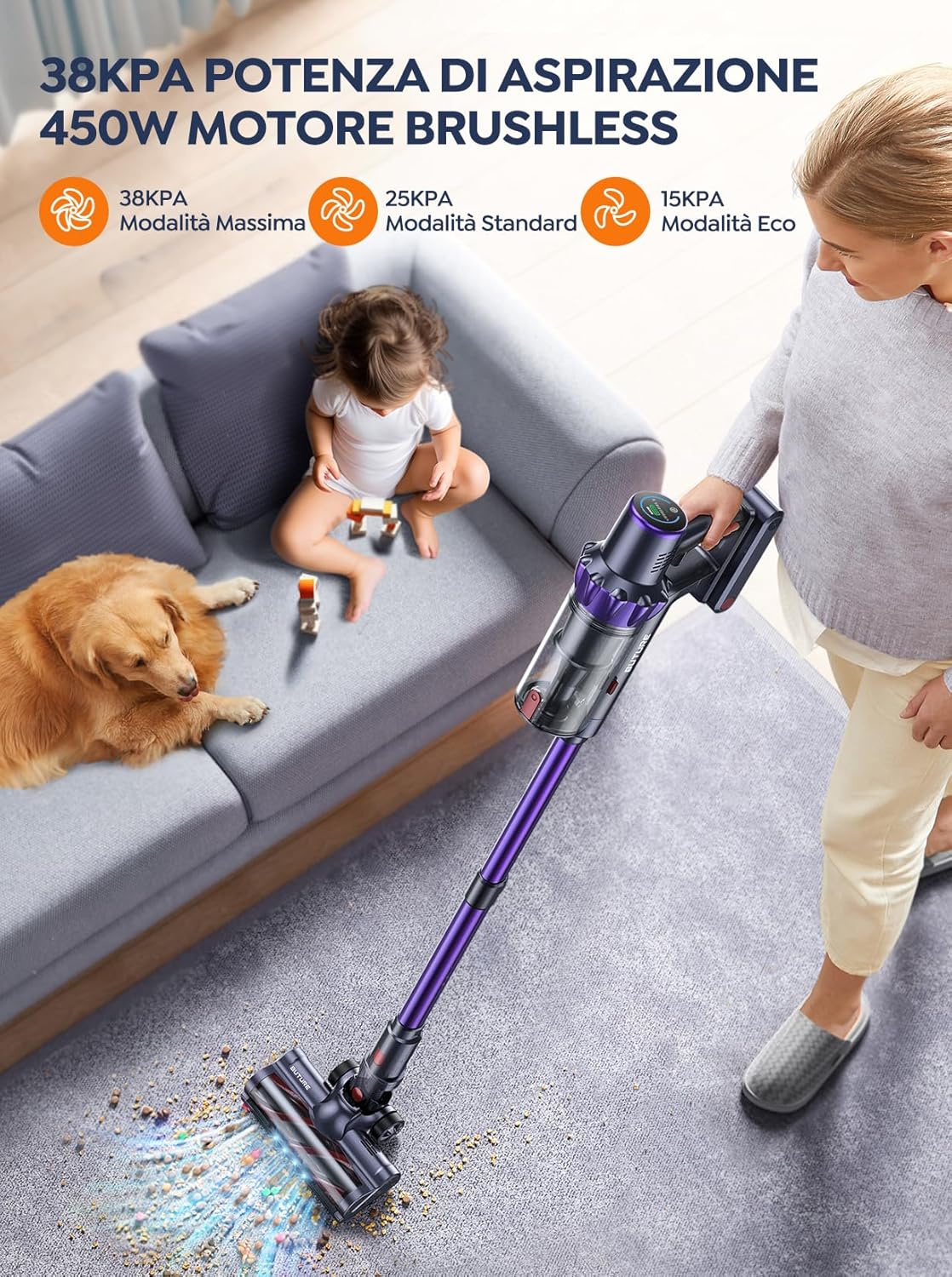
Rajah 6.3: The 450W brushless motor delivers powerful suction, with modes including 38KPA Max, 25KPA Standard, and 15KPA Eco.
6.3 Menggunakan Lampiran
- Alat Celah: Ideal untuk celah sempit, sudut dan tepi.
- Alat Berus 2-dalam-1: Use the brush for delicate surfaces like upholstery or curtains, and the nozzle for general dusting.
- Berus Lantai Bermotor: Designed for efficient cleaning of both hard floors and carpets. Its integrated bristles effectively pick up various debris.

Rajah 6.4: The motorized floor brush features a combination of soft and hard bristles to effectively clean different types of debris from various floor surfaces.
7. Penyelenggaraan
Penyelenggaraan tetap memastikan prestasi optimum dan memanjangkan jangka hayat pembersih vakum anda.
7.1 Mengosongkan Tong Sampah
Empty the dustbin after each use or when the MAX fill line is reached.
- Tekan butang pelepas tong habuk untuk menanggalkannya daripada unit utama.
- Open the dustbin lid and empty contents into a trash can.
- Close the lid and reattach the dustbin to the main unit.
7.2 Membersihkan Penapis
The BuTure VC70 features an advanced multi-layer filtration system. Clean filters regularly to maintain suction power.

Rajah 7.1: The advanced multi-layer filtration system captures 99.99% of dust and dirt, ensuring cleaner exhaust air.
- Remove the dustbin and locate the filters inside.
- Gently tap the filters to remove loose dust.
- Rinse the filters under cold running water. Ensure they are completely dry before reinserting (allow 24-48 hours for air drying).
- Replace filters every 3-6 months depending on usage.
7.3 Membersihkan Gulungan Berus
Periksa gulungan berus secara berkala untuk mengesan rambut kusut atau serpihan.
- Turn off the vacuum and detach the motorized floor brush.
- Locate the brush roll access latch/button and open it.
- Remove the brush roll. Use scissors or a cleaning tool to cut and remove any tangled hair or fibers.
- Reinsert the brush roll and secure the access latch.
8. Penyelesaian masalah
Jika anda menghadapi masalah dengan pembersih vakum anda, rujuk jadual berikut untuk masalah dan penyelesaian biasa.
| Masalah | Kemungkinan Punca | Penyelesaian |
|---|---|---|
| Vakum tidak dihidupkan | Bateri tidak dicas Bateri tidak dipasang dengan betul | Cas bateri sepenuhnya Pastikan bateri diklik dengan selamat pada tempatnya |
| Kuasa sedutan rendah | Tong sampah penuh Penapis tersumbat Brush roll is tangled Hose/nozzle is blocked | Kosongkan tong sampah Bersihkan atau ganti penapis Bersihkan gulungan berus Check for and remove blockages |
| Gulung berus tidak berputar | Brush roll is tangled Brush roll motor issue | Bersihkan gulungan berus Hubungi sokongan pelanggan jika isu berterusan |
| Vacuum stops suddenly | Perlindungan terlalu panas diaktifkan Bateri lemah | Turn off and allow to cool for 30 minutes Cas bateri |
9. Spesifikasi
Technical specifications for the BuTure VC70 Cordless Vacuum Cleaner.
| Ciri | Spesifikasi |
|---|---|
| Nombor Model | VC70 |
| Jenama | BuTure |
| Kuasa Dinilai | 450 Watt |
| Voltage | 100-240 Volt |
| Kapasiti tong sampah | 1.5 Liter |
| Tahap Kebisingan | 68 dB |
| Berat Barang | 1.81 Kilogram (lebih kurang 4 paun) |
| Jenis Bateri | Litium-ion |
| warna | Violet |
10. Waranti dan Sokongan
BuTure products are manufactured to the highest quality standards. For warranty information or technical support, please refer to the warranty card included with your purchase or visit the official BuTure website. Please have your model number (VC70) and purchase details ready when contacting support.
Ask a question about this manual
Ask about setup, troubleshooting, compatibility, parts, safety, or missing instructions. Manuals+ will review the question and use this page’s manual context to help answer it.