
amazon basics B0C58TDFPR
Manual Pengguna Penstabil Gimbal Genggam Amazon Basics
Model: B0C58TDFPR
pengenalan
The Amazon Basics Handheld Gimbal Stabiliser is designed to provide smooth and steady footage for your smartphone photography and videography. This manual provides essential information for setting up, operating, maintaining, and troubleshooting your device.

Image: The Amazon Basics Handheld Gimbal Stabiliser with a smartphone attached, ready for use.
Kandungan Pakej
Sebelum anda mula, sila sahkan bahawa semua barang ada di dalam bungkusan:
- 1N Handheld Gimbal with attached holder
- 1N Charging cable
- Manual Pengguna 1N (dokumen ini)
- 1 Tripod
- 1N Hanging belt
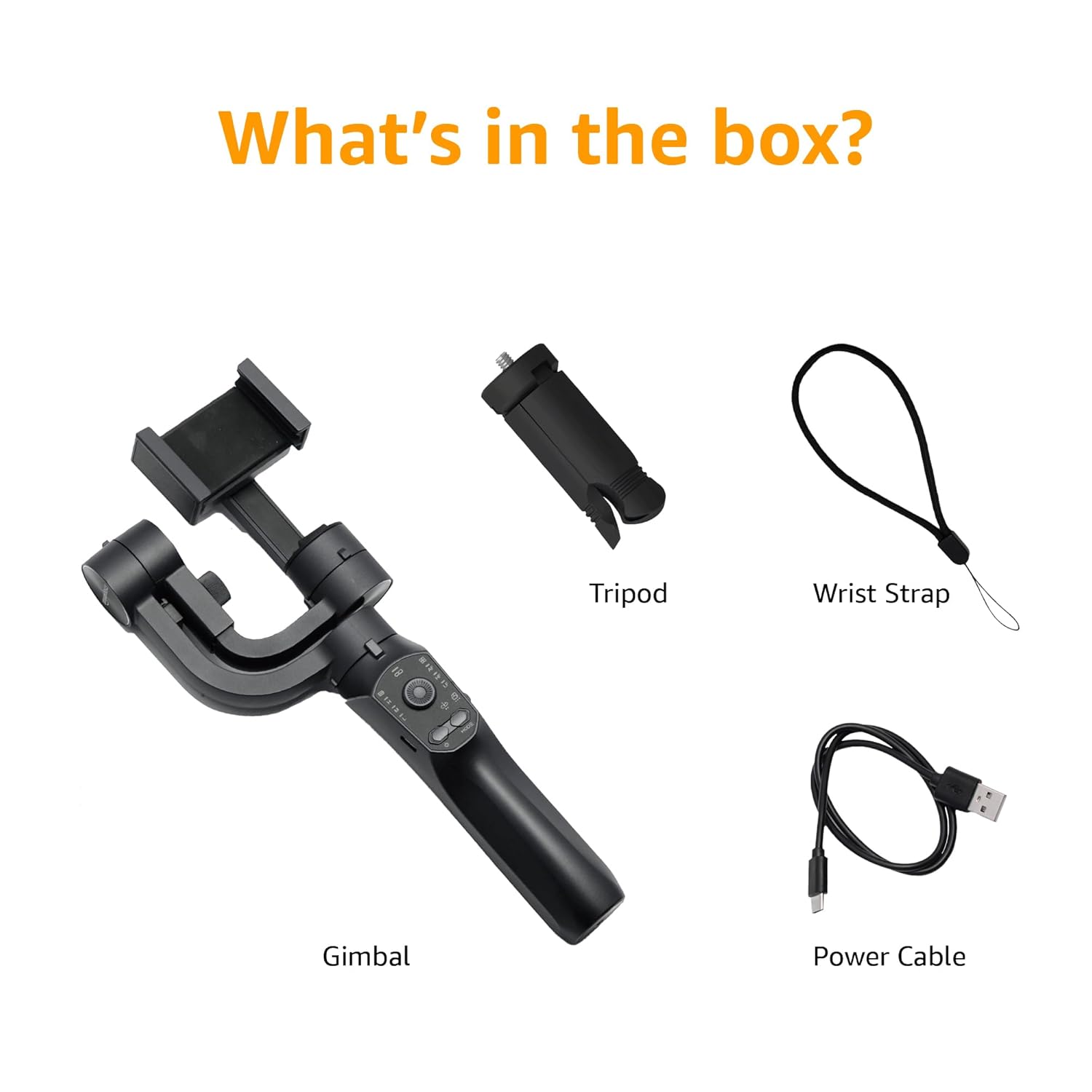
Image: A visual representation of the package contents, including the gimbal, tripod, power cable, and wrist strap.
Komponen Produk
Familiarize yourself with the different parts of your gimbal stabiliser:
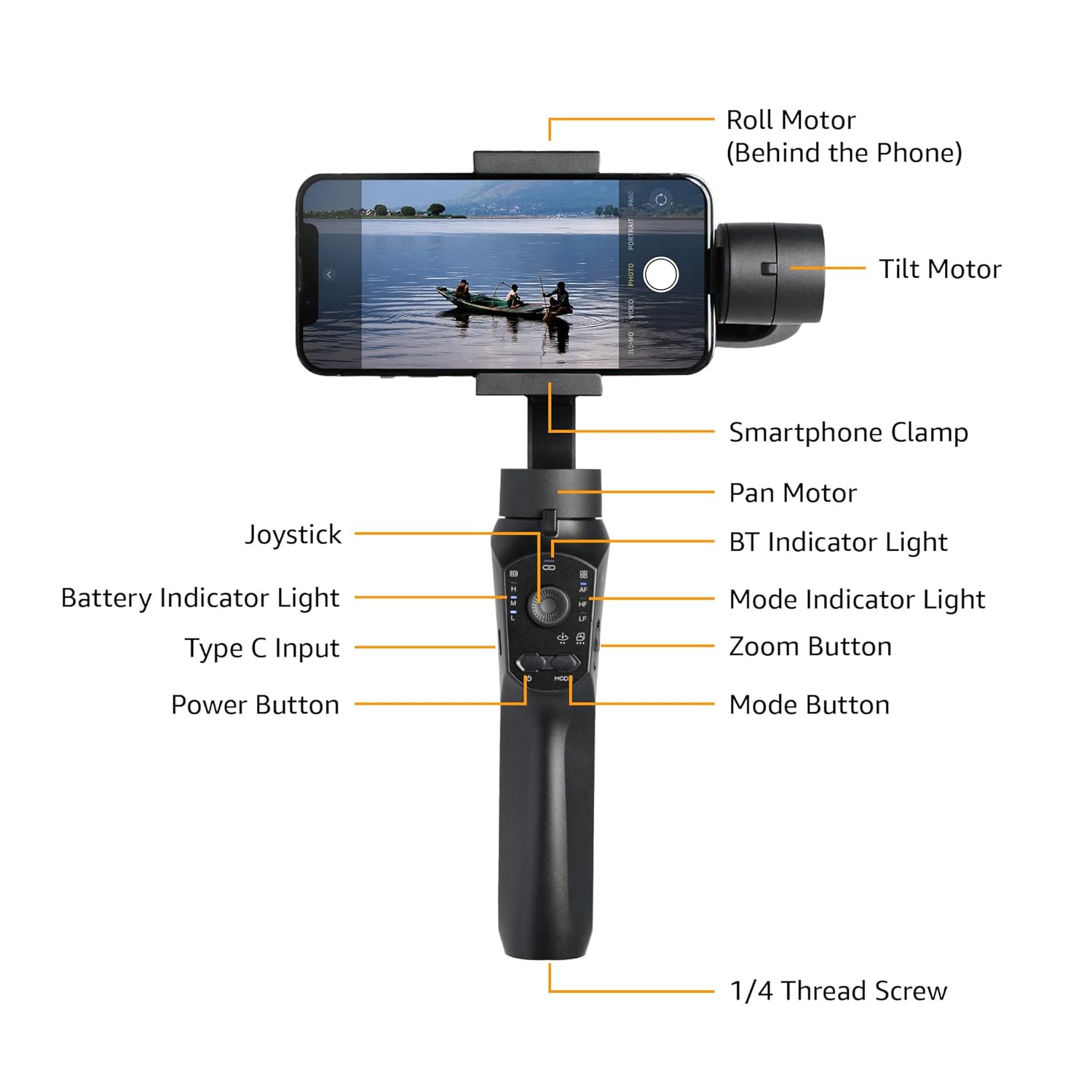
Image: Labeled diagram showing the various components of the gimbal, including the Roll Motor, Tilt Motor, Smartphone Clamp, Pan Motor, BT Indicator Light, Mode Indicator Light, Zoom Button, Mode Button, Power Button, Type C Input, Battery Indicator Light, Joystick, and 1/4 Thread Screw.
- Motor Gulung: Controls the roll axis (rotation along the lens axis).
- Motor condong: Controls the tilt axis (up and down movement).
- Telefon Pintar Clamp: Securely holds your smartphone.
- Motor Pan: Controls the pan axis (left and right rotation).
- joystick: For manual control of gimbal movement.
- Lampu Petunjuk BT: Menunjukkan status sambungan Bluetooth.
- Lampu Petunjuk Bateri: Menunjukkan tahap bateri semasa.
- Input Jenis C: Charging port for the gimbal.
- Butang Kuasa: Turns the gimbal on/off.
- Lampu Penunjuk Mod: Memaparkan mod pengendalian semasa.
- Butang Zum: Controls digital zoom (via app).
- Butang Mod: Switches between different operating modes.
- 1/4 Thread Screw: For attaching accessories like the included tripod.
Persediaan
- Charge the Gimbal: Before first use, fully charge the gimbal using the provided Type-C charging cable. The battery indicator light will show charging status.
- Install the Smartphone:
- Extend the smartphone clamp and carefully place your smartphone in the center.
- Ensure the phone is balanced as centrally as possible within the clamp to reduce motor strain.
- Manual Balancing (Crucial):
Important: Do not switch on this Gimbal without manual balancing. Doing so may lead to motor damage and fast battery draining.
- With the smartphone mounted, adjust the position of the phone within the clamp until it remains level when you release it. This minimizes the work the motors need to do.
- Adjust the horizontal arm if necessary to achieve perfect balance.
- Hidupkan kuasa: Press and hold the Power Button until the gimbal powers on and stabilizes.
- Muat turun Apl: Download the "Gimbal Pro" app from your smartphone's app store (available for Android and iOS). This app unlocks advanced features and controls.
- Sambung melalui Bluetooth: Open the Gimbal Pro app and follow the on-screen instructions to connect your gimbal via Bluetooth. The BT Indicator Light will confirm a successful connection.

Image: An illustration demonstrating the three axes of stabilization: Tilt Axis, Roll Axis, and Pan Axis, which work together to keep footage mantap.
Arahan Operasi
Operasi Asas
- Hidupkan/Mati Kuasa: Tekan dan tahan Butang Kuasa.
- Kawalan Joystick: Use the joystick to manually control the pan and tilt movements of the gimbal.
- Butang Mod: Press the Mode Button to cycle through different operating modes (e.g., Pan Follow, Lock Mode, FPV). The Mode Indicator Light will change accordingly.
- Butang Zum: Use the Zoom Button to zoom in or out within the Gimbal Pro app.
- Multifunction Push Key: This key allows you to focus or zoom, providing a more professional photography experience.
Advanced Features (via Gimbal Pro App)
The Gimbal Pro app unlocks a variety of advanced shooting modes and features:
- Facial Tracking: Automatically tracks a subject's face to keep them in frame.
- Selang Masa: Capture stunning time-lapse videos.
- Pergerakan Perlahan: Record high-frame-rate videos for slow-motion effects.
- Intelligent Zoom: Provides precise zoom control.
- Hitchcock Mode: Creates a "Dolly Zoom" effect.
- Mad Dog Mode: A dynamic, fast-response mode.
- Mod Permulaan: Rotates the camera 360 degrees along the roll axis.
- Mod FPV: Follows the gimbal's orientation for an immersive first-person view.

Imej: Visual examples of features available through the mobile app, including Facial Tracking, Time Lapse Shooting, Slow Motion, and Intelligent Zoom.

Image: Icons illustrating various shooting modes such as Mad Dog Mode, Hitchcock Mode, Inception Mode, and FPV Mode, available on the gimbal.
Portrait-to-Landscape Rotation
The gimbal supports effortless rotation between portrait and landscape orientations for versatile shooting.

Image: A three-panel image demonstrating the gimbal's ability to effortlessly rotate a smartphone from portrait to landscape orientation.
Bateri dan Pengecasan
The gimbal is equipped with a 3600mAh Lithium Ion battery, providing up to 10 hours of operational time.
- mengecas: Connect the provided Type-C cable to the gimbal's charging port and a suitable USB power source.
- Fungsi Bank Kuasa: The gimbal can also function as a power bank to charge your smartphone during extended shoots. Connect your smartphone to the gimbal's Type-C port using a compatible cable.
- Penunjuk Bateri: Monitor the battery level using the Battery Indicator Lights on the control panel.
Penyelenggaraan
- Pembersihan: Use a soft, dry cloth to clean the gimbal. Avoid using harsh chemicals or abrasive materials.
- Storan: Store the gimbal in a cool, dry place away from direct sunlight and extreme temperatures.
- Penjagaan Bateri: For long-term storage, charge the battery to approximately 50-60% to prolong its lifespan. Recharge every 3 months if not in use.
- Elakkan beban berlebihan: Do not mount smartphones heavier than the recommended payload capacity (approx. 180 grams, as per user experience). Overloading can damage the motors.
Menyelesaikan masalah
| Masalah | Kemungkinan Punca | Penyelesaian |
|---|---|---|
| Gimbal tidak dapat dihidupkan. | Bateri lemah. | Cas gimbal sepenuhnya. |
| Gimbal motors vibrate or do not stabilize properly. | Improper manual balancing. | Ensure the smartphone is perfectly balanced before powering on. Refer to the "Manual Balancing" section under Setup. |
| Gimbal disconnects from phone or app features not working. | Bluetooth connection issue; App malfunction. |
|
| Footage is still shaky. | Improper balancing; Exceeding gimbal's stabilization limits. |
|
Spesifikasi
| Ciri | Perincian |
|---|---|
| Nombor Model | B0C58TDFPR |
| Penstabilan | 3-Axis (Pan, Tilt, Roll) |
| Jenis Bateri | Litium Ion |
| Kapasiti Bateri | 3600mAh |
| Masa Operasi | Sehingga 10 jam |
| Port Pengecasan | Jenis-C |
| Peranti Serasi | Telefon pintar |
| Dimensi Produk (LxWxH) | 10 x 7 x 28.9 cm |
| Berat Barang | 460 g |
| warna | Hitam |
| Pengeluar | SHENZHEN JX ROBOT TECHNOLOGY CO. LTD |

Image: A diagram illustrating the dimensions of the gimbal in both folded and extended states.
Waranti dan Sokongan
This Amazon Basics Handheld Gimbal Stabiliser comes with a Waranti terhad 1 tahun dari tarikh pembelian.
For warranty claims, technical support, or any product-related inquiries, please contact Amazon Basics customer service or refer to the official Amazon support channels.
Ask a question about this manual
Ask about setup, troubleshooting, compatibility, parts, safety, or missing instructions. Manuals+ will review the question and use this page’s manual context to help answer it.