
pengenalan
The TAXNELE THC30A is a digital programmable timer switch designed for automatic control of various electrical equipment. It features daily and weekly programming capabilities with up to 20 ON/OFF settings, a manual override function, and a built-in lithium battery for power-off memory. This manual provides detailed instructions for installation, operation, and maintenance to ensure safe and efficient use of your timer switch.
Maklumat Keselamatan
- Pastikan bekalan kuasa diputuskan sebelum pemasangan atau penyelenggaraan.
- Pemasangan hendaklah dilakukan oleh juruelektrik yang berkelayakan atau individu yang berpengetahuan.
- Jangan melebihi kapasiti beban maksimum 30A / 5000W.
- Jauhkan peranti daripada air dan suhu yang melampau.
- Verify correct wiring connections to prevent damage to the device or connected appliances.
Ciri-ciri Produk
- Kawalan Boleh Diprogram: Sehingga 20 tetapan HIDUP/MATI setiap hari atau minggu.
- Memori Matikan: Built-in 3V lithium battery maintains timing, display, and data storage for up to 3 years during power interruptions.
- Ketepatan Tinggi: Industrial-grade chip for accurate timing.
- Pembatalan Manual: Allows temporary or permanent manual control.
- Paparan LCD: Clear digital display for easy programming and monitoring.
- Din Rail Mount: Designed for easy installation on a standard DIN rail.
- Aplikasi luas: Suitable for street lights, neon lamps, advertising signs, production equipment, and home appliances.

Figure 1: The THC30A timer switch highlighting its power-off memory function, which retains data for up to 3 years using a built-in CR2032 lithium battery.

Figure 2: The THC30A timer switch featuring a 30A big load relay for stable and safe operation with various electrical loads.
Product Components and Display
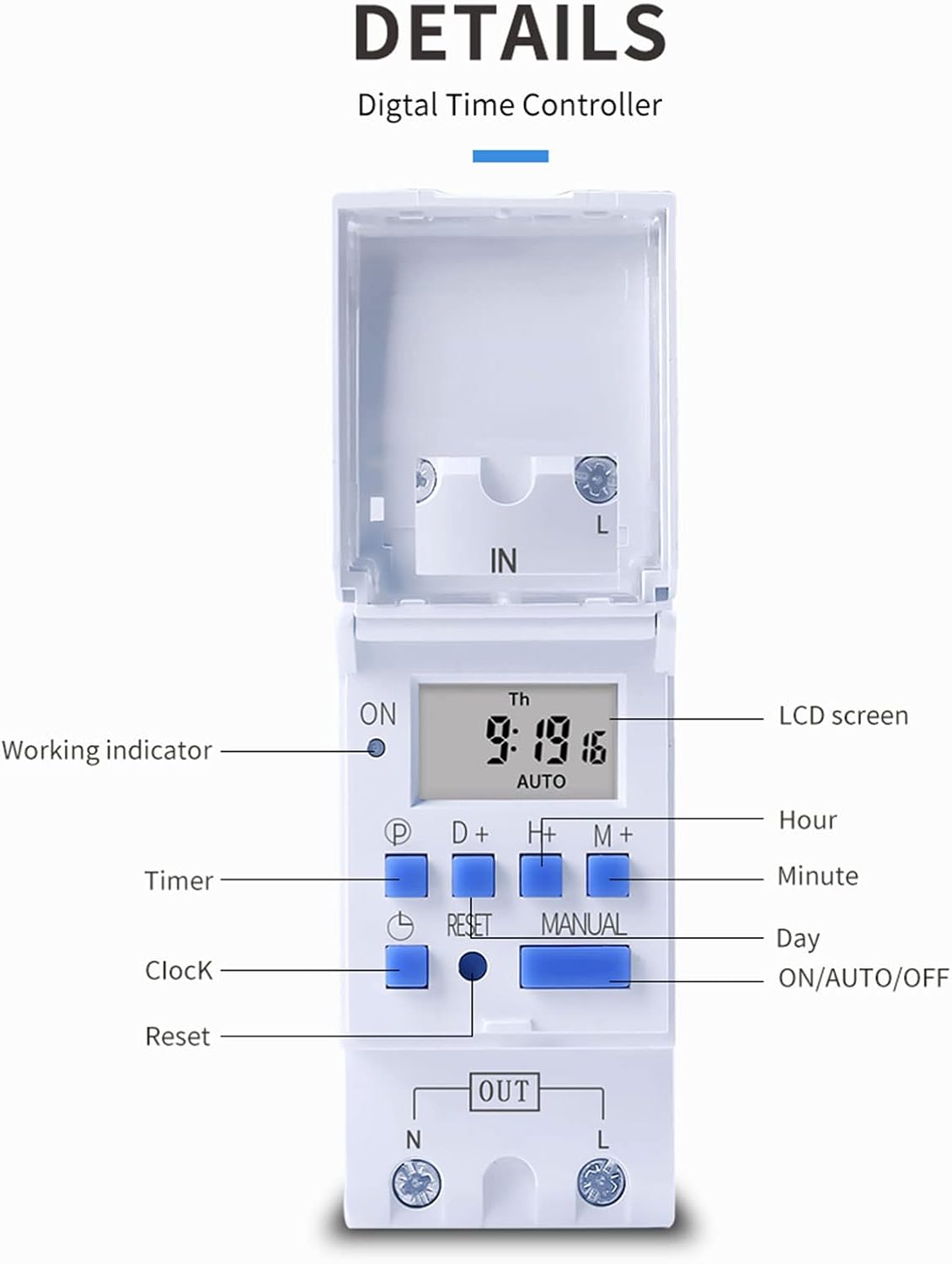
Rajah 3: Terperinci view of the THC30A timer switch's LCD screen and control buttons. Labels include Working indicator, Timer, Clock, Reset, P (Program), D+ (Day), H+ (Hour), M+ (Minute), Manual, and ON/AUTO/OFF status.
- Skrin LCD: Displays current time, day, and ON/OFF status.
- Penunjuk Kerja: LED light indicating operation status.
- Butang P: Memasuki mod pengaturcaraan.
- Butang D+: Adjusts day in clock setting or program.
- Butang H+: Adjusts hour in clock setting or program.
- Butang M+: Adjusts minute in clock setting or program.
- Butang Jam: Returns to clock display or exits programming mode.
- Butang Tetapkan Semula: Clears all settings and resets the timer.
- Butang Manual: Bertukar antara mod HIDUP, AUTO dan MATI.
Spesifikasi
| Parameter | Nilai |
|---|---|
| Model | THC30A |
| Penilaian Semasa | 30A |
| Penarafan Kuasa | 5000W |
| Voltage Pilihan | 12V DC AC, 24V DC AC, 48V DC AC, 110V AC, 220V AC |
| Ralat Masa | ≤2 seconds/day |
| Paparan | LCD |
| Julat Masa | 1 minit hingga 168 jam (7 hari) |
| Tetapan HIDUP/MATI | 20 kumpulan |
| Suhu Operasi | -20 ℃ hingga 50 ℃ |
| Dimensi | 86 x 36 x 65mm (3.38 x 1.41 x 2.56 inci) |
| Rizab Kuasa | 3V Lithium battery (CR2032 type) for 3 years data retention |

Figure 4: Dimensions of the THC30A timer switch, showing measurements for height, width, and depth for proper installation planning.
Persediaan dan Pemasangan
1. Pemasangan
The THC30A timer switch is designed for DIN rail mounting. Securely attach the device to a standard 35mm DIN rail in an appropriate electrical enclosure.
2. Pendawaian
AMARAN: Ensure all power is disconnected before performing any wiring.
Connect the input power supply to the "IN" terminals (N for Neutral, L for Live). Connect the load (e.g., light, appliance) to the "OUT" terminals (N for Neutral, L for Live). The timer acts as a switch for the live wire. Refer to the wiring diagram below for correct connections.

Figure 5: Simplified wiring diagram for the THC30A timer switch. The new version offers direct power output, simplifying connections compared to older models.
- Input (IN): Connect your main power supply (e.g., AC 12V, 24V, 48V, 110V, 220V) to these terminals.
- Keluaran (KELUAR): Connect your electrical load (e.g., light, motor) to these terminals. The timer controls the power flow to this output.
Arahan Operasi
1. Persediaan / Tetapan Semula Awal
Selepas penggunaan pertama atau selepas penggunaan kuasa yang berpanjangantage, paparan mungkin kosong. Tekan butang Tetapkan semula button (located in a small hole, use a pointed object) to clear all settings and initialize the timer. The LCD will display "0:00" and "AUTO".
2. Menetapkan Waktu dan Hari Semasa
- Tekan dan tahan butang jam butang.
- Sambil pegang jam, tekan D+ to set the current day (Monday to Sunday).
- Sambil pegang jam, tekan H+ untuk menetapkan jam semasa (0-23).
- Sambil pegang jam, tekan M+ untuk menetapkan minit semasa (0-59).
- Lepaskan jam butang. Masa kini telah ditetapkan.
3. Pengaturcaraan Kitaran HIDUP/MATI
Pemasa ini menyokong sehingga 20 program ON/OFF. Setiap program terdiri daripada masa ON dan masa OFF.
- Tekan ke P button once. The display will show "1 ON". This is for the first ON setting.
- Tekan D+ to select the day(s) for this ON event. You can choose a single day, specific days, or blocks of days (e.g., Mon-Fri, Sat-Sun, Mon-Sun).
- Tekan H+ untuk menetapkan jam bagi acara ON yang pertama.
- Tekan M+ untuk menetapkan minit bagi acara ON yang pertama.
- Tekan ke P button again. The display will show "1 OFF". This is for the first OFF setting.
- Ulang langkah 2-4 untuk menetapkan hari, jam dan minit bagi peristiwa OFF yang pertama.
- Teruskan menekan P to cycle through "2 ON", "2 OFF", up to "20 ON", "20 OFF" and set additional programs as needed.
- Selepas menetapkan semua program yang dikehendaki, tekan butang jam butang untuk keluar dari mod pengaturcaraan dan kembali ke paparan masa semasa.
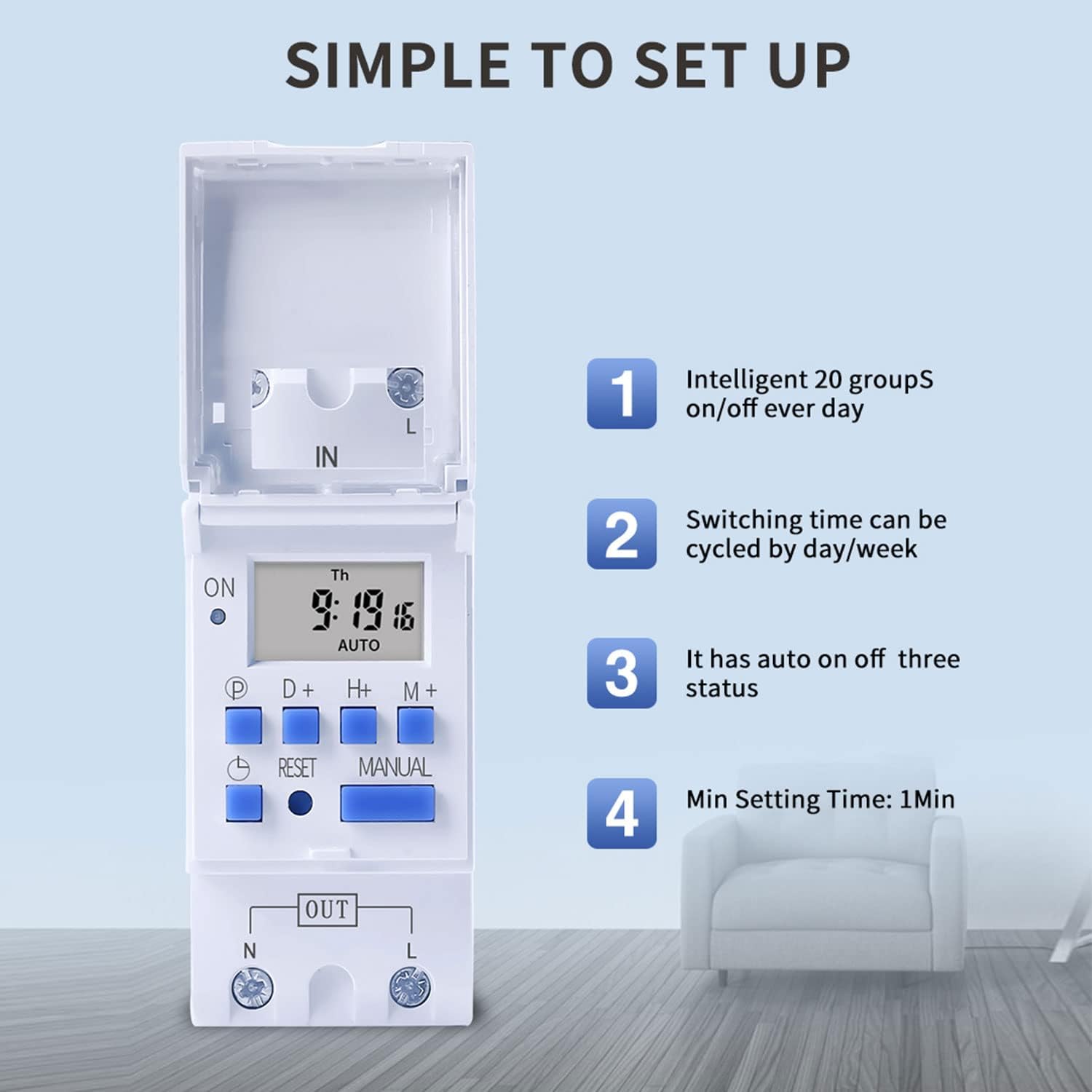
Figure 6: Visual guide to the simple setup of the THC30A timer, highlighting its 20 ON/OFF groups, daily/weekly cycling, auto ON/OFF status, and minimum 1-minute setting time.
4. Penggantian Manual
Tekan ke Manual button to cycle through the output modes:
- ON: Output sentiasa HIDUP, mengatasi semua program.
- AUTO: The output operates according to the programmed ON/OFF cycles. This is the standard operating mode.
- MATI: Output sentiasa MATI, mengatasi semua program.
Pastikan pemasa berada dalam keadaan AUTO mod untuk operasi yang diprogramkan berfungsi.
Penyelenggaraan
- Keep the timer clean and free from dust. Use a dry, soft cloth for cleaning.
- Jangan gunakan pembersih atau pelarut yang melelas.
- The internal lithium battery (CR2032) has a long lifespan (up to 3 years). If the display consistently goes blank after power outages, the battery may need replacement. This should be done by a qualified technician.
Menyelesaikan masalah
| Masalah | Kemungkinan Punca | Penyelesaian |
|---|---|---|
| Paparan kosong. | Tiada bekalan kuasa; bateri dalaman kehabisan kuasa. | Check power connections. Press the Reset button. If problem persists, internal battery may need replacement. |
| Timer does not switch ON/OFF as programmed. | Timer is not in AUTO mode; incorrect program settings; current time/day is wrong. | Tekan Manual until "AUTO" is displayed. Verify program settings (ON/OFF times, days). Check and correct current time and day. |
| Output sentiasa HIDUP atau sentiasa MATI. | Pemasa berada dalam mod HIDUP atau MATI manual. | Tekan Manual sehingga "AUTO" dipaparkan. |
| Program hilang selepas kuasa dimatikantage. | Internal backup battery is depleted. | The internal CR2032 battery may need replacement. Contact support if necessary. |
Aplikasi
The TAXNELE THC30A timer switch is versatile and can be used in various applications to automate electrical devices:

Gambar 7: Cthamples of common applications for the THC30A timer switch, including street light control, home appliance control, battery charging control, and advertising light control.
- Street Light Control: Automate the turning ON/OFF of street lights based on time.
- Home Appliance Control: Schedule operation of water heaters, fans, or other household devices.
- Battery Charging Control: Manage charging cycles for batteries to prevent overcharging.
- Advertising Light Control: Program display times for neon signs and advertising boards.
- Production Equipment: Control machinery operation in industrial settings.
Waranti dan Sokongan
For warranty information or technical support, please refer to the contact details provided with your purchase or visit the official TAXNELE webtapak. Simpan resit pembelian anda sebagai bukti pembelian.