pengenalan
Thank you for choosing the TRIUMPHKEY Height Adjustable Desk. This manual provides essential information for the safe assembly, operation, and maintenance of your new desk. Please read it thoroughly before use and retain it for future reference.
This electric height-adjustable desk is designed to enhance your workspace ergonomics, allowing you to switch between sitting and standing positions effortlessly. It features a robust frame, a spacious desktop, and convenient functions like memory presets and a USB charging port.

Image: Product details showing overall dimensions (180cm length, 80cm width, 72-118cm height range) and the four-part desktop construction.
Maklumat Keselamatan Penting
- Pastikan semua komponen diikat dengan selamat sebelum digunakan.
- Jauhkan kanak-kanak dan haiwan peliharaan dari meja semasa operasi untuk mengelakkan kecederaan.
- Do not overload the desk. The maximum weight capacity is 70 kg.
- Elakkan meletakkan cecair terus pada panel kawalan atau berhampiran komponen elektrik.
- Do not attempt to disassemble or repair the motor or control system yourself. Contact customer support for assistance.
- Ensure there are no obstructions in the desk's path when adjusting height. The anti-collision system is designed to prevent damage, but caution is always advised.

Image: Illustration of the anti-collision technology, showing the desk automatically stopping and reversing when an obstruction is detected during height adjustment.
Kandungan Pakej
Please check the package carefully to ensure all parts are present and undamaged. If any parts are missing or damaged, please contact customer support.
- Bahagian desktop (4 bahagian)
- Desk legs (2)
- Alas kaki (2)
- Control panel with USB port
- Motor and power adapter
- Dulang pengurusan kabel
- Cangkuk fon kepala
- Assembly hardware (screws, tools)
- Manual arahan

Image: A visual representation of all parts included in the product package, such as desktop panels, frame components, control panel, and accessories.
Persediaan dan Perhimpunan
Follow these steps to assemble your TRIUMPHKEY Height Adjustable Desk. It is recommended to have two people for assembly.
- Buka Pembungkusan Komponen: Lay out all parts on a clean, soft surface to prevent scratches. Refer to the package contents list to ensure everything is present.
- Pasang Desktop: Connect the four desktop sections using the provided dowels and metal plates. Ensure they are aligned perfectly and secured with screws from underneath.
- Pasangkan Kaki ke Bingkai: Secure the desk legs to the main frame using the designated screws.
- Mount Feet: Attach the foot pads to the bottom of the desk legs.
- Pasang Panel Kawalan: Mount the control panel to the underside of the desktop in the desired location.
- Sambungan Pendawaian: Connect the motor, control panel, and power adapter according to the wiring diagram in the included manual. Ensure all connections are secure.
- Install Cable Management: Attach the cable management tray and headphone hook to the underside of the desk.
- Kuasa Permulaan: Plug the power adapter into a wall outlet. The desk should be ready for initial calibration or use.

Imej: Jarak dekat view of the cable management tray and headphone hook, illustrating how they help keep the workspace tidy.
Arahan Operasi
Fungsi Panel Kawalan

Imej: Terperinci view of the multifunction control panel, highlighting the memory buttons, up/down controls, and integrated USB charging port.
- Butang Atas/Bawah (▲ / ▼): Tekan dan tahan untuk melaraskan ketinggian meja secara berterusan. Lepaskan untuk berhenti pada ketinggian yang diingini.
- Pratetap Memori (1, 2, 3):
Untuk Menjimatkan Ketinggian: Adjust the desk to your desired height. Press the 'M' button, then press one of the number buttons (1, 2, or 3) within 3 seconds. The display will show 'S-' followed by the number, indicating the height is saved.
Untuk Mengingat Ketinggian: Press the corresponding number button (1, 2, or 3). The desk will automatically move to the saved height. - Port Pengecasan USB: Located on the side of the control panel. Use it to charge your mobile devices.
- Peringatan Sedentari: This function can be activated to remind you to change positions after a set period. Refer to the detailed manual for programming instructions.
Sistem Anti-Perlanggaran
The desk is equipped with an anti-collision system. If the desktop encounters an obstruction while moving up or down, it will automatically stop and reverse slightly to prevent damage or injury. Always ensure the path is clear, especially when children or pets are nearby.
Penyelenggaraan
- Pembersihan: Lap desktop dan bingkai dengan lembut, damp kain. Elakkan bahan kimia yang keras atau pembersih yang kasar.
- Pemeriksaan: Periksa semua skru dan sambungan secara berkala untuk memastikan ia ketat. Ketatkan semula jika perlu.
- Pengurusan Kabel: Keep cables organized in the cable management tray to prevent tangles and damage.
- Penjagaan Motor: The motor is designed for long-term use and requires no special maintenance. Avoid exposing it to excessive moisture or extreme temperatures.
Menyelesaikan masalah
| Masalah | Kemungkinan Punca | Penyelesaian |
|---|---|---|
| Meja tidak bergerak. | Kabel kuasa terputus; Kabel motor terputus; Lebihan beban. | Check all power and motor connections. Reduce weight on the desk. |
| Meja bergerak tidak sekata atau mengeluarkan bunyi yang luar biasa. | Sambungan longgar; Halangan; Pengagihan berat tidak sekata. | Check all connections. Clear any obstructions. Redistribute weight evenly. |
| Sistem anti-perlanggaran terlalu kerap mencetuskan. | Sensitivity setting too high; Minor vibrations. | Refer to the detailed manual for adjusting anti-collision sensitivity. Ensure stable environment. |
| Pratetap memori tidak berfungsi. | Height not saved correctly. | Re-save the desired height following the instructions in the 'Operating Instructions' section. |
Spesifikasi
- Jenama: TRIUMPHKEY
- Nombor Model: scrivania regolabile in altezza (0287)
- Desktop Dimensions (L x W): 180 x 80 cm
- Julat Ketinggian: 72 - 118 cm
- Kapasiti Berat: 70 kg
- Bahan: Alloy Steel (frame), Engineered Wood (desktop)
- Tahap Bunyi Motor: < 50 dB
- ciri-ciri: 3 Memory Presets, USB Charging Port, Anti-Collision System, Sedentary Reminder, Cable Management, Headphone Hook
- Berat produk: 15.5 kg
- warna: Beige + Black
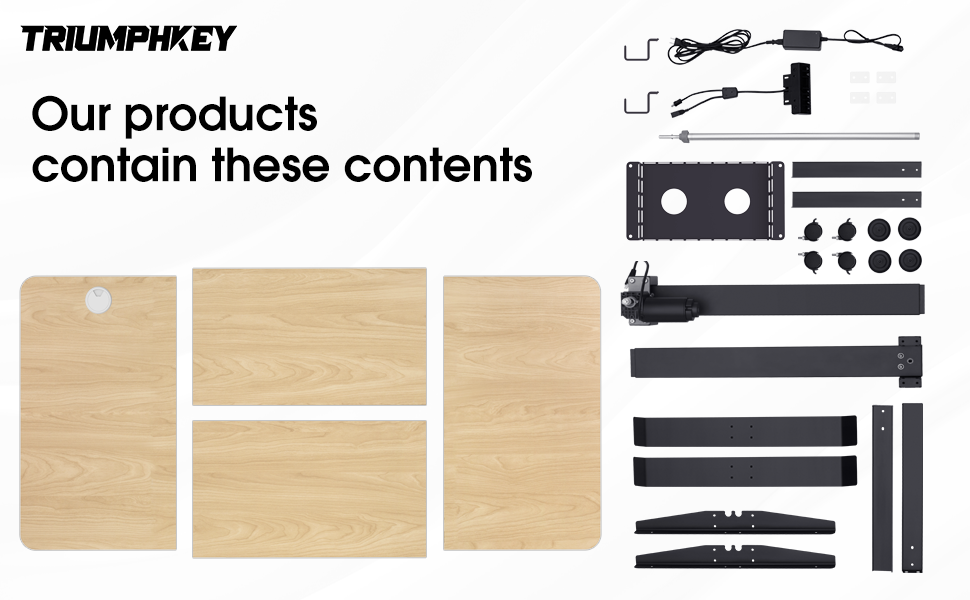
Image: Visual representation of the desk's robust construction, capable of supporting up to 70 kg of weight.

Image: The desk shown at its minimum (72cm) and maximum (118cm) height, illustrating its adjustable range.
Waranti dan Sokongan
Maklumat Waranti: This TRIUMPHKEY product comes with a standard manufacturer's warranty. Please refer to the warranty card included in your package for specific terms and conditions, including coverage duration and claim procedures. Keep your proof of purchase for warranty claims.
Sokongan Pelanggan: For any questions, technical assistance, or warranty claims, please contact TRIUMPHKEY customer support. You can typically find contact information on the brand's official webtapak atau melalui platform pembelian anda.
Sumber Dalam Talian: Lawati TRIUMPHKEY Store on Amazon untuk maklumat dan sokongan produk tambahan.